
You are using an out of date browser. It may not display this or other websites correctly.
You should upgrade or use an alternative browser.
You should upgrade or use an alternative browser.
Live in Your World, HAX in Ours!

Live in Your World, HAX in Ours!
Hello World! I've been reporting on Sony PlayStation hacking news since 2000 and started PSXHAX in 2014 to cover PlayStation (PSX), PlayStation 2 (PS2), PlayStation 3 (PS3), PlayStation 4 (PS4), PlayStation Portable (PSP), PlayStation Vita (PS Vita), PlayStation TV (PS TV) and next-gen PlayStation 5 (PS5) platforms along with anything else of interest.
Click on my UserName author link above and you'll be able to view a curated list of all the articles I've contributed thus far to PSXHAX.COM!
Click on my UserName author link above and you'll be able to view a curated list of all the articles I've contributed thus far to PSXHAX.COM!
PS4 Media Player v2.50 Update Adds 360-Degree Video & FLAC Audio!
Just in time for the release of PlayStation VR, today Sony updated the PS4 Media Player to v2.50 adding 360-degree video and photos, high-resolution FLAC (Free Lossless Audio Codec) with upscaled audio / music support! 
To quote from SCEE's Gillen McAllister on the updates for audiophiles:
"If you’ve a PlayStation VR connected to your PlayStation 4, simply activate ‘VR mode’ from Media Player’s Options menu, then select your 360° video or photo from your media server or USB device. You’ll now be able to view your chosen media in full 360° thanks to the power of PlayStation VR.
(Note, to enjoy 360-degree media on PlayStation VR, any supported video – MKV, AVI, MP4, MPEG2 PS , MPEG2 TS, AVCHD – or photo – JPEG, BMP, PNG – files must be captured in equirectangular format by a 360-degree omnidirectional camera.)
v2.50 also introduces improvements to your audio experience. Once updated, the PS4 Media Player will not only support High-Res (FLAC) audio files, but will also upscale your non-FLAC music to near high-resolution audio quality.
The latter is thanks to Sony’s DSEE HX technology. What this means is any MP3s or AACs – files whose space-saving compression strips out some of a song’s subtleties – played through your PlayStation 4 will be automatically upscaled. It means your compressed music will now sound much richer as a result. You can get a more in-depth breakdown on how the technology works here."
To quote from SCEE's Gillen McAllister on the updates for audiophiles:
"If you’ve a PlayStation VR connected to your PlayStation 4, simply activate ‘VR mode’ from Media Player’s Options menu, then select your 360° video or photo from your media server or USB device. You’ll now be able to view your chosen media in full 360° thanks to the power of PlayStation VR.
(Note, to enjoy 360-degree media on PlayStation VR, any supported video – MKV, AVI, MP4, MPEG2 PS , MPEG2 TS, AVCHD – or photo – JPEG, BMP, PNG – files must be captured in equirectangular format by a 360-degree omnidirectional camera.)
v2.50 also introduces improvements to your audio experience. Once updated, the PS4 Media Player will not only support High-Res (FLAC) audio files, but will also upscale your non-FLAC music to near high-resolution audio quality.
The latter is thanks to Sony’s DSEE HX technology. What this means is any MP3s or AACs – files whose space-saving compression strips out some of a song’s subtleties – played through your PlayStation 4 will be automatically upscaled. It means your compressed music will now sound much richer as a result. You can get a more in-depth breakdown on how the technology works here."
PS4Dev: E3Mode Update by ZiL0G80 for PS4 Developers
Previously ZiL0G80 hinted briefly on the PS4 IDU Mode / E3Mode, and today he shared a bit more of his findings with other PlayStation 4 developers on the PS4 E3Mode via Pastebin.com. 
Here are a few related Tweets, and below is the code as he warns the Pastebin will expire in 24 hours:
Here are a few related Tweets, and below is the code as he warns the Pastebin will expire in 24 hours:
Code:
using System;
using System.Collections.Generic;
using System.Runtime.CompilerServices;
using Sce.PlayStation.HighLevel.UI2;
using Sce.Vsh.Accessor;
using Sce.Vsh.Accessor.Db;
using Sce.Vsh.Lx;
using Sce.Vsh.ShellUI.AppSystem;
using Sce.Vsh.ShellUI.Lnc;

namespace Sce.Vsh.ShellUI.AppMain
{
    // Token: 0x0200000D RID: 13
    [Aot]
    public class E3Mode
    {
        // Token: 0x060000B2 RID: 178 RVA: 0x00004C6A File Offset: 0x00002E6A
        public static void Start()
        {
            if (ShowMode.Enable)
            {
                E3Mode.s_enableAutoBoot = true;
                E3Mode.CreateDimmerScreen();
                E3Mode.StartMonitorPsImpose();
            }
        }

        // Token: 0x060000B3 RID: 179 RVA: 0x00004C83 File Offset: 0x00002E83
        public static void StartFarsightUI()
        {
            if (ShowMode.Enable && E3Mode.s_enableAutoBoot)
            {
                E3Mode.StartAutoBoot();
            }
        }

        // Token: 0x060000B4 RID: 180 RVA: 0x00004C98 File Offset: 0x00002E98
        public static bool IsEnableAutoBoot()
        {
            return ShowMode.Enable && E3Mode.s_enableAutoBoot;
        }

        // Token: 0x060000B5 RID: 181 RVA: 0x00004CA8 File Offset: 0x00002EA8
        private static void Stop()
        {
            E3Mode.s_enableAutoBoot = false;
            E3Mode.DestroyDimmerScreen();
            E3Mode.StopMonitorPsImpose();
        }

        // Token: 0x060000B6 RID: 182 RVA: 0x00004CBC File Offset: 0x00002EBC
        private static void CreateDimmerScreen()
        {
            if (E3Mode.s_dimmerScreen == null)
            {
                E3Mode.s_dimmerScreen = new Scene
                {
                    Focusable = false
                };
                E3Mode.s_dimmerScreen.RootWidget.AppendChild(new Panel
                {
                    BackgroundColor = new UIColor(0f, 0f, 0f, 1f)...
PS4 Pro to Offer SATA 3.0 Interface Hard Disk Drive Support
Sony's upcoming PS4 Pro video gaming console will indeed offer SATA 3.0 interface hard disk drive support according to Japanese site 4Gamer.net.
Below is a rough translation courtesy of DualShockers.com, to quote:
"Today they published a correction that they received from Sony Interactive Entertainment, clarifying that the PS4 Pro will actually use the SATA 3.0 interface.
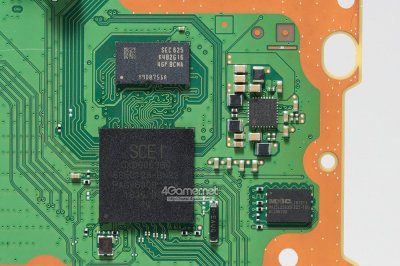 This increases the data transfer rate with the hard disk drive from 3.0 Gbit/s to 6.0 Gbit/s, improving quite significantly the storage and data transfer performance of the console."
Below is a rough translation courtesy of DualShockers.com, to quote:
"Today they published a correction that they received from Sony Interactive Entertainment, clarifying that the PS4 Pro will actually use the SATA 3.0 interface.
This increases the data transfer rate with the hard disk drive from 3.0 Gbit/s to 6.0 Gbit/s, improving quite significantly the storage and data transfer performance of the console."
PlayStation VR / PS VR Set Up Installation Video Guides
For those who are waiting in line to get your PlayStation Virtual Reality set today, here's some PS VR video guides on how to set up your shiny new PlayStation VR courtesy of Sony!
There are 3 parts to their PlayStation VR / PS VR Set Up Tutorial:
PlayStation VR Set Up Tutorial - Part 2 Video | PS VR
PlayStation VR Set Up Tutorial - Part 3 Video | PS VR
There are 3 parts to their PlayStation VR / PS VR Set Up Tutorial:
- Watch Part 1 of this 3 part video series that will take you all the way from PS VR set up, to play.
- Watch Part 2 of this 3 part video series that will show you how to hook up your PS VR headset.
- Watch Part 3 of this 3 part video series that will show you how to finalize your PS VR setup and play!
PlayStation VR Set Up Tutorial - Part 2 Video | PS VR
PlayStation VR Set Up Tutorial - Part 3 Video | PS VR
PlayStation VR (PSVR) Headset Teardown Video by Sony Engineer
As PS VR Titles join PlayStation Store this week with the release of PlayStation VR tomorrow, Sony President Shuhei Yoshida shared a PlayStation VR headset teardown video today performed by engineer Takamasa Araki!
To quote from Wired.com: "In this video, we see Sony Interactive Entertainment mechanical design director Takamasa Araki disassemble the VR headset screw by screw, laying its innards bare.
There’s not much detail about the system’s specs—the 5.7-inch OLED display, say, or the Sixaxis motion sensors embedded in the headset that help a Playstation Camera track it in space—or the external processor unit that helps mirror your VR experience on the TV (or allows non-VR players to play alongside the PSVR wearer)."
To quote from Wired.com: "In this video, we see Sony Interactive Entertainment mechanical design director Takamasa Araki disassemble the VR headset screw by screw, laying its innards bare.
There’s not much detail about the system’s specs—the 5.7-inch OLED display, say, or the Sixaxis motion sensors embedded in the headset that help a Playstation Camera track it in space—or the external processor unit that helps mirror your VR experience on the TV (or allows non-VR players to play alongside the PSVR wearer)."
- PS4 Fake PKG (FPKG) Sharing Guide
- 6.XX Webkit / 6.72 PS4 Jailbreak
- 7.00-7.02 Webkit Exploit
- 7.02 Webkit / 7.02 Kernel / PS4JB
- 7.50 Kernel Exploit / PS4JB 7.55
- 7.55 / 8.00 Payloads / PS4JB2 7.55
- 9.00 PS4 Webkit Exploit
- 9.00 PS4 Payloads / GoldHEN (Latest)
- 9.00 PS4 Jailbreak Kernel Exploit
- 11.00 PS4 Jailbreak Kernel Exploit
- 13.00 PS4 Kernel Exploit / 13.02 BD-J Bug
- 4.03 PS5 Webkit Exploit
- PS5 Kernel Exploit (ExFAT Bug)
- PS5 Root Keys Obtained
- 4.03 PS5 Kernel Build String
- 4.03 PS5 Webkit Execution
- 4.03 PS5 Kernel Vulnerability
- 4.03 PS5 Filesystem Dumps
- 4.51 PS5 BD-JB Sandbox Escape
- PS5 BD-JB Exploit Hack Source Code
- Mast1c0re PS5 Userland Exploit
- PS5 Kernel Access via PS4 Exploit
- PS5 exFAT Vulnerability Disclosed
- 4.03 PS5 Kernel Exploit Webkit ROP
- 4.50 PS5 Kernel Exploit Webkit ROP
- 4.51 PS5 Kernel Exploit Webkit ROP
- 4.xx PS5 Kernel Exploit v1.01
- 4.xx PS5 Kernel Exploit v1.02 / v1.03
- PS5 1.00-6.50 Firmware Webkit
- Native PS5 ROP Chain Execution
- Mast1c0re PS5 Compiler Attack
- PS5 FreeBSD Kernel Bug & WebKit
- PS5 UMTX 2 Exploit & PS5 Jailbreak
- Byepervisor PS5 Hypervisor Exploit
- Lua Lapse PS5 Kxploit & Laps3c0re / Y2JB
- 12.00 / 12.70 PS5 Kernel Exploit