
Interested in investing time and money into PSXHAX.COM? Read More and Contact Us for details!
Category PS4 Guides and Tutorials       Thread starter Thread starter PSXHAX       Date / timeStart date Mar 12, 2018 at 7:48 AM       Replies 534      
Status
Not open for further replies.
Today @Codsworth let us know about an ESP Host project he's been working on, and shared a guide on a simple way to serve PS4 payloads using the ESP8266 Wifi Module board with at least 4 MB flash. :winkxf2:

Download: esphost.bin / esphostmulti.bin / esphostmulti405.bin / GIT

Here's all the details from the README.md: ESP Host

Today I show you a simple way to serve payload using the ESP8266.

Benefits of using the ESP8266:
  • Extremely low cost hardware, available worldwide
  • Ability to run 24/7 via USB, self-hosted payload, no external apps or programs required
  • Completely block all updates
  • No need for custom DNS server or settings, features automatic redirect
  • Easy to program and update via USB
  • Very low power consumption
Requirements:
Payloads included in esphost.bin
  • VORTEX HEN 1.4
Payloads included in esphostmulti.bin
  • HEN
  • HEN+VR
  • FTP
  • DUMPER
  • BACKUP
https://github.com/pearlxcore/ps4-playground-455

Instructions:

Flash esphost.bin using the following command:
Code:
sudo esptool.py --port /dev/ttyUSB0 write_flash 0x00000 0x400000 ./esphost.bin
  • After flashing completes, connect to "PS4-WIFI" using "easy setting" then go to [Settings] > [User Guide]
NOTE: Windows users must use the appropriate com port when flashing with esptool.py

NOTE2: Users can optionally flash using the GUI version of ESPTool

Compatible boards:

These are the most popular ESP8266 boards, but any esp8266 with 4M flash or larger will work.
Updates (via Codsworth)
  • More stable payloads , no memory errors or reloading pages
  • Updated esp-host to include payloads from ps4-playground
  • Added file compression - save space and serve payloads quickly.
  • Upgraded payload index to a better design thanks to pearlxcore
To-Do
  • Add ability to upload files/payloads
Notice and credits

Credit should be given to original authors of payloads - you know who you are.

How to run PS4 exploit offline using ESP-12E (ESP8266)
PS4 with ESP8266 7 seconds for the hen + playground
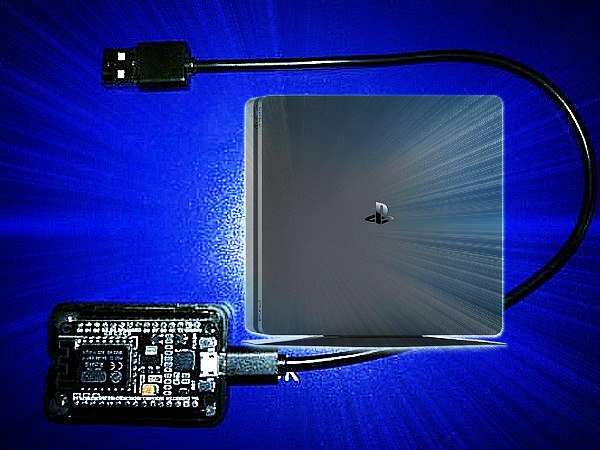
ESP Host Serve PS4 Payloads Using the ESP8266 Guide by Codsworth.jpg
 

Comments

@nzie yeah i have the data folder and nothing i do will make that error go away can you check this out see if my set up is like yours? The only thing there i forgot to change for the pic was flash mode which i always have as DIO ... and I tried the method you described above... didn't work, same error. thanks for all the patients and help by the way!!

vlcsnap-2018-04-01-15h09m22s426.png

 
Yes i had to create the tool folder to then put ESP8266 folder to then put that esp8266.js file or whatever its called in there. I've actually tried that board and many others... no dice. so i don't want to take up more of your time today but let me just run down the process... see if im missing something...

i hold down the flash button as i plug in the 8266 to put it in flash mode, then set all the info, com port.. etc, then i do Sketch Data Upload get the error. Then i unplug the card, hold down flash button again as i plug it in, this time i upload the .ino and it goes to 100% everything is fine, I press reset, try Sketch Data Upload, again doesn't work.

I've tried various combinations of the flash and reset button nothing works. Whats strange is that if i use that Pyflasher 3.0 with a bin, everything works! I can see the stuff in the user guide on the ps4. And that's ultimately what im trying to do, set up the 8266 how i want so i can keep it plugged in and then point my browser on the ps3 to it and don't have to worry about pc, or a phone or whatever being connected... i will always have the 8266. But i want to be able to put in new files as they are available... but this is turning out to be worse than the Rpi 3 ;)
 
@nzie Anyway the above pic is just a BASE that was posted. now im REALLY gonna work on my stuff..

You won't believe what i had to do and how i figured it out all by trial and error...

1. In the board managers, the 8266 community package installer deal needs to be on v2.4.1
2. Load the sketch, now i get the 100% before i wasn't actually seeing it, it would just say done uploading
3. remove the ESP8266, plug it back in while holding flash
4. Go back to board managers, remove v2.4.1, install v2.2.0
5. Make sure everything in tools, settings is all good, then do the Sketch Data Upload

Now it all %&*^!@ good! :mad: jeesh, this has been frustrating! But now that i got it...:bananaman:

So i'll get you a beer (seriously maybe even two) if you tell me how you dumped the bin from it? I figure i gotta go through python but if you could post the steps... then you got yourself a cold one or two , just send me your PP email. thanks

@Codsworth who's gonna pay that?? i just did the exchange and that comes out to about $123 usd!! I mean something like $10 or $15 to pay for the 8266 plus a convenience charge for saving you time and trouble but $120+ usd thats insane
 
@nzie yes TLOU pkg works good even with all the psarc errors. Though dragon quest 2 still eludes me. Probably never at it, just the fact that now I feel I must finish it lol.

In the last 24hrs I have had one panic attack(shut off at payload sent) and 2 panics while starting game after sending payload. I must say bravo, bravo

You saw a board for sale how much? That seems ridiculous. Got one for 50 lol just kidding. Thank you all again.
 
Status
Not open for further replies.
Back
Top
