
You are using an out of date browser. It may not display this or other websites correctly.
You should upgrade or use an alternative browser.
You should upgrade or use an alternative browser.
Live in Your World, HAX in Ours!

Live in Your World, HAX in Ours!
Hello World! I've been reporting on Sony PlayStation hacking news since 2000 and started PSXHAX in 2014 to cover PlayStation (PSX), PlayStation 2 (PS2), PlayStation 3 (PS3), PlayStation 4 (PS4), PlayStation Portable (PSP), PlayStation Vita (PS Vita), PlayStation TV (PS TV) and next-gen PlayStation 5 (PS5) platforms along with anything else of interest.
Click on my UserName author link above and you'll be able to view a curated list of all the articles I've contributed thus far to PSXHAX.COM!
Click on my UserName author link above and you'll be able to view a curated list of all the articles I've contributed thus far to PSXHAX.COM!
Mirror's Edge Catalyst Hits PSN This Week, New Sales Detailed
If you're wondering what's new on PlayStation Store this week look no further, Grace Chen has confirmed today that Fenix Furia, Mirror's Edge Catalyst, Odin Sphere Leifthrasir and more are heading to PSN this week!
PS4 Games
ANIMA: GATE OF MEMORIES
$29.99
ATELIER SOPHIE ~THE ALCHEMIST OF THE MYSTERIOUS BOOK~
$59.99
BROKEN BOTS
$6.99
FENIX FURIA
$14.99
GUILTY GEAR XRD -REVELATOR-
$59.99
MIRROR’S EDGE CATALYST
$59.99
ODIN SPHERE LEIFTHRASIR
$59.99
PSYCHONAUTS (PS2)
$9.99
SOUL AXIOM
$19.99
STEAMWORLD HEIST & CROSS BUY
$19.99
PS3 Games
GUILTY GEAR XRD -REVELATOR-
$49.99
ODIN SPHERE LEIFTHRASIR
$49.99
PS Vita Games
ATELIER SOPHIE ~THE ALCHEMIST OF THE MYSTERIOUS BOOK~
$39.99
ODIN SPHERE LEIFTHRASIR
$39.99
STEAMWORLD HEIST & CROSS BUY
$19.99
Sales
PS4 Games
ANIMA: GATE OF MEMORIES
$29.99
ATELIER SOPHIE ~THE ALCHEMIST OF THE MYSTERIOUS BOOK~
$59.99
BROKEN BOTS
$6.99
FENIX FURIA
$14.99
GUILTY GEAR XRD -REVELATOR-
$59.99
MIRROR’S EDGE CATALYST
$59.99
ODIN SPHERE LEIFTHRASIR
$59.99
PSYCHONAUTS (PS2)
$9.99
SOUL AXIOM
$19.99
STEAMWORLD HEIST & CROSS BUY
$19.99
PS3 Games
GUILTY GEAR XRD -REVELATOR-
$49.99
ODIN SPHERE LEIFTHRASIR
$49.99
PS Vita Games
ATELIER SOPHIE ~THE ALCHEMIST OF THE MYSTERIOUS BOOK~
$39.99
ODIN SPHERE LEIFTHRASIR
$39.99
STEAMWORLD HEIST & CROSS BUY
$19.99
Sales
| Platform | Title | Sale Price | Original Price |
| PS4 | 7 DAYS TO DIE | $26.99 | $29.99 |
| PS4 | ABASHED VENUS | $1.97 | $2.99 |
| PS4 | ABATTOIR AMERICAN GOTHIC | $1.97 | $2.99 |
| PS4 | ABE | $1.97 | $2.99 |
| PS4 | ADAM BY MICHAELANGELO | $1.97 | $2.99 |
| PS4 | AGAZE | $1.97 | $2.99 |
| PS4 | ALLIED VICTORY | $1.97 | $2.99 |
| PS4 | AMERICAN EAGLE | $1.97 | $2.99 |
| PS4 | ANNOUNCEMENT | $1.97 | $2.99 |
| PS4 | ANONYMOUS | $1.97 | $2.99 |
| PS4 | APOLLO’S APPRENTICE | $1.97 | $2.99 |
| PS4 | ARAXIS THE GENETICIST | $1.97 | $2.99 |
| PS4 | ARCANE TEXT | $1.97 | $2.99 |
| PS4 | ASCENSION | $1.97 | $2.99 |
| PS4 | BROKEN BOTS | $5.94 | $6.99 |
| PS4 | DAYLIGHT | $4.49 | $14.99 |
| PS4 | DEVIL MAY CRY 4 SPECIAL EDITION | $17.49 | $24.99 |
| PS4 | DEVIL MAY CRY 4 SPECIAL EDITION & 5 BLUE ORBS | $1.49 | $2.99 |
| PS4 | DEVIL MAY CRY 4 SPECIAL EDITION & LADY & TRISH COSTUME... |
PlayStation Live at E3 2016 Next Week: Details and Playable Games
To being with, here are the important dates and times to remember for Sony's PlayStation E3 events:
- Monday, June 13 - PlayStation E3 2016 Press Conference - 5:30pm Pacific Time
- Tuesday, June 14 - PlayStation LiveCast show - 12:00pm to 6:00pm Pacific Time
- Wednesday, June 15 - PlayStation LiveCast show - 10:00am to 5:30pm Pacific Time
- Thursday, June 16 - PlayStation LiveCast show - 10:00am to 3:00pm Pacific Time
- live.playstation.com (unlock rewards, compatible with desktop or mobile)
- YouTube
- Twitch
- The Live Events Viewer app on PS4 and PS3
- Our PS4 community Event (RSVP for a reminder!)
- At our PlayStation E3 Experience in 85 cinemas across North America
| Game | Developer / Publisher | Platform |
| Killing Floor 2 | Tripwire Interactive | PS4 |
| Let It Die | GungHo Online Entertainment America | PS4 |
| Don’t Starve: Together | Klei Entertainment | PS4 |
| Headlander | Adult Swim Games | PS4 |
| Rain World | Adult Swim Games | PS4 |
| Mother Russia Bleeds | Devolver Digital | PS4 |
| Eitr | Devolver Digital | PS4 |
| Aragami | Lince Works | PS4 |
| ABZÛ | 505 Games | PS4 |
| Darkest Dungeon | Red Hook Studios | PS4 |
| Everything | David OReilly | PS4 |
| Cryptark | Alientrap Games | PS4 |
| King of Fighters XIV | ATLUS | PS4 |
| Yakuza 0 | SEGA | PS4 |
| XING: The Land Beyond | ...
New 2K Titles Added with Over 50 New PlayStation Now Games
Sony's James Martin announced today that 2K titles Borderlands: The Pre-Sequel, The Darkness II, Spec Ops: The Line and Duke Nukem Forever are included in the 50 new games that will be added to PlayStation Now tomorrow.
Currently there are over 400 PlayStation Now subscription games which are listed below in a spoiler from Sony's official page:
Full List of Subscription Games
Spoiler
Currently there are over 400 PlayStation Now subscription games which are listed below in a spoiler from Sony's official page:
Full List of Subscription Games
Spoiler
Anima: Gate of Memories Joins PlayStation Game Releases This Week
Third-person action RPG Anima: Gate of Memories is among the new PlayStation game releases coming this week on the PSN Store!
Below are some highlights of what else PlayStation fans can expect courtesy of Sid Shuman as follows:
New Releases for the Week of June 7, 2016
PlayStation Music
Below are some highlights of what else PlayStation fans can expect courtesy of Sid Shuman as follows:
New Releases for the Week of June 7, 2016
- Anima: Gate of Memories (PS4 — Digital)
- Atelier Sophie: The Alchemist of the Mysterious Book (PS4, PS Vita — Digital, PS4 at Retail)
- Broken Bots (PS4 — Digital)
- Ducati — 90th Anniversary (PS4 — Digital Out 6/9)
- Guilty Gear Xrd -REVELATOR- (PS4, PS3 — Digital, Retail)
- Mirror’s Edge Catalyst (PS4 — Digital, Retail)
- Odin Sphere: Leifthrasir (PS4, PS3, PS Vita — Digital, Retail)
- Paragon Essentials Edition (PS4 — Retail)
- Soul Axiom (PS4 — Digital)
- Steamworld Heist (PS4, PS Vita — Digital Cross Buy)
PlayStation Music
- Jon Bellion – The Human Condition
- Fitz & the Tantrums – Fitz & the Tantrums
- Garbage – Strange Little Birds
- Zootopia
- My Big Fat Greek Wedding 2
- The Martian (Extended Edition)
- Independence Day (Digitally Remastered)
- Feed the Beast – June 5 at 10/9c (AMC)
- NBA Finals – June 2-19 (ABC)
- Tosh.0 – June 7 at 10/9c (Comedy Central)
How to Install Steam (Not SteamOS) on PS4 Linux Guide by OsirisX
Previously we reported on news of a Steam PS4 Linux demo video, and today @Osirisx returns with a guide on how to install Steam (not SteamOS) on PlayStation 4 Linux for those interested!
You can find it below, to quote from OsirisX: Installing Steam on PS4 Linux
This guide is WIP and more pics will follow.
You may have seen my video running Steam on the PS4 and this tutorial will explain the procedure. Originally I intended to use Ubuntu for this guide since there's already a tutorial for that but I was having problems enabling graphics acceleration. Instead I chose Fedora which seems to work fine.
Required Hardware:
1. PS4 with FW 1.76
2. USB disk with at least 8 GB
Required Downloads:
1. Fedora-Live-Workstation-x86_64-23-10.iso
2. ps4-radeon-rpms.zip
3. bZimage & initramfs.cpio.gz
4. VirtualBox
Boot up Fedora using VirtualBox (with your usb disk attached) and wait until it reaches the welcome screen.
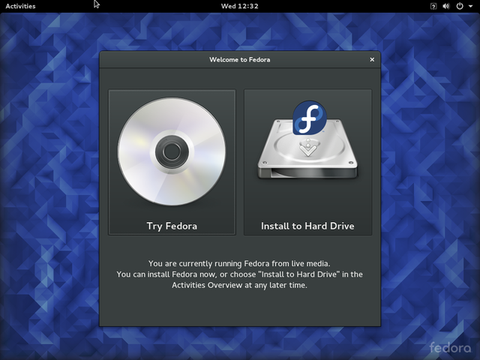
Before we actually install Fedora, we need to partition the usb disk. Open up a terminal and type the following the commands.
Find your usb disk location (Ex: /dev/sda) and use parted to partition it.
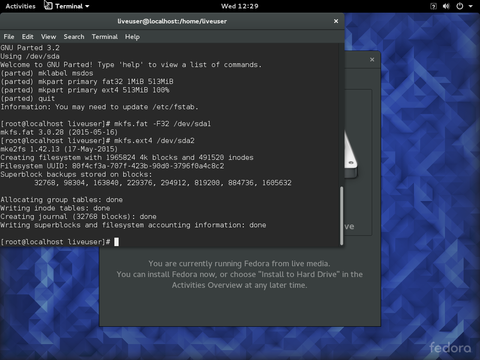
Keeping the terminal open, go back to the welcome screen and click “Install to Hard Drive”. Click on “Installation Destination” once the summary page comes up.
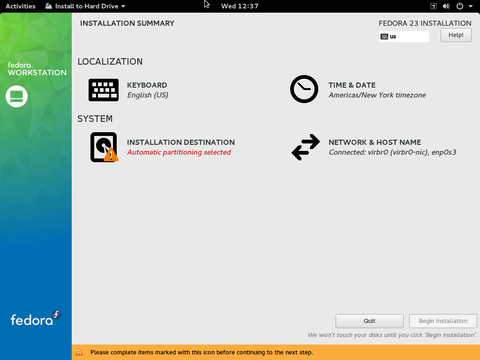
Select your disk and click on “I will configure partitioning” under storage options. Then click “Done”.
[ATTACH type="full"...
You can find it below, to quote from OsirisX: Installing Steam on PS4 Linux
This guide is WIP and more pics will follow.
You may have seen my video running Steam on the PS4 and this tutorial will explain the procedure. Originally I intended to use Ubuntu for this guide since there's already a tutorial for that but I was having problems enabling graphics acceleration. Instead I chose Fedora which seems to work fine.
Required Hardware:
1. PS4 with FW 1.76
2. USB disk with at least 8 GB
Required Downloads:
1. Fedora-Live-Workstation-x86_64-23-10.iso
2. ps4-radeon-rpms.zip
3. bZimage & initramfs.cpio.gz
4. VirtualBox
Boot up Fedora using VirtualBox (with your usb disk attached) and wait until it reaches the welcome screen.
Before we actually install Fedora, we need to partition the usb disk. Open up a terminal and type the following the commands.
Code:
su
fdisk -l
Code:
parted /dev/sda
mklabel msdos
mkpart primary fat32 1MiB 513MiB
mkpart primary ext4 513MiB 100%
quit
mkfs.fat -F32 /dev/sda1
mkfs.ext4 /dev/sda2
Keeping the terminal open, go back to the welcome screen and click “Install to Hard Drive”. Click on “Installation Destination” once the summary page comes up.
Select your disk and click on “I will configure partitioning” under storage options. Then click “Done”.
[ATTACH type="full"...
- PS4 Fake PKG (FPKG) Sharing Guide
- 6.XX Webkit / 6.72 PS4 Jailbreak
- 7.00-7.02 Webkit Exploit
- 7.02 Webkit / 7.02 Kernel / PS4JB
- 7.50 Kernel Exploit / PS4JB 7.55
- 7.55 / 8.00 Payloads / PS4JB2 7.55
- 9.00 PS4 Webkit Exploit
- 9.00 PS4 Payloads / GoldHEN (Latest)
- 9.00 PS4 Jailbreak Kernel Exploit
- 11.00 PS4 Jailbreak Kernel Exploit
- 13.00 PS4 Kernel Exploit / 13.02 BD-J Bug
- 4.03 PS5 Webkit Exploit
- PS5 Kernel Exploit (ExFAT Bug)
- PS5 Root Keys Obtained
- 4.03 PS5 Kernel Build String
- 4.03 PS5 Webkit Execution
- 4.03 PS5 Kernel Vulnerability
- 4.03 PS5 Filesystem Dumps
- 4.51 PS5 BD-JB Sandbox Escape
- PS5 BD-JB Exploit Hack Source Code
- Mast1c0re PS5 Userland Exploit
- PS5 Kernel Access via PS4 Exploit
- PS5 exFAT Vulnerability Disclosed
- 4.03 PS5 Kernel Exploit Webkit ROP
- 4.50 PS5 Kernel Exploit Webkit ROP
- 4.51 PS5 Kernel Exploit Webkit ROP
- 4.xx PS5 Kernel Exploit v1.01
- 4.xx PS5 Kernel Exploit v1.02 / v1.03
- PS5 1.00-6.50 Firmware Webkit
- Native PS5 ROP Chain Execution
- Mast1c0re PS5 Compiler Attack
- PS5 FreeBSD Kernel Bug & WebKit
- PS5 UMTX 2 Exploit & PS5 Jailbreak
- Byepervisor PS5 Hypervisor Exploit
- Lua Lapse PS5 Kxploit & Laps3c0re / Y2JB
- 12.00 / 12.70 PS5 Kernel Exploit