PSXHAX.COM website and domain for sale. Contact Us with your offer!

You are using an out of date browser. It may not display this or other websites correctly.
You should upgrade or use an alternative browser.
You should upgrade or use an alternative browser.
Author Description


Author Description
I am G991, also know as 'golden.' I really do not know why I picked G991 for this forum? Maybe someday I can get my handle golden back. I started modding for the Xbox 360, I've created tons of game mods, tutorials, and homebrew for that console. I plan on messing around with the PlayStation 4; creating homebrew and documenting functionality.
PS4Debug: PlayStation 4 Debugger Updates by G991 (Golden)
Following the previous release, here are some recent PS4Debug updates to my PlayStation 4 debugger application introducing the Debug Watch utility. 
A debugger with software breakpoints, hardware breakpoints, pause, stop, read memory, write memory, and all other sorts of functionality! You can use this along side my old project jkpatch or by itself.
Debug Watch - A simple tool I made to test the debugger out!
Download: debugwatch.zip (1.36 MB) / debugwatch.zip (Mirror) / ps4debug.bin / PS4 Debug fork via jormbs / ps4debug.bin (52 KB) / libdebug.dll (26 KB) / ps4debug672_GiantPluto_DeathRGH.rar (32.14 KB) / ps4debug.bin / libdebug.dll (For 6.72) (with ASLR fix) / GIT Fork via GiantPluto / ps4debug.bin for 7.02 / ps4debug_for_755.bin (51.8 KB) / Unified ps4debug.bin (5.0X, 6.72, 7.02, 7.5X) / ps4debug.bin (52 KB - 9.00 Port / Mirror via @karo218) /...
A debugger with software breakpoints, hardware breakpoints, pause, stop, read memory, write memory, and all other sorts of functionality! You can use this along side my old project jkpatch or by itself.
Debug Watch - A simple tool I made to test the debugger out!
Download: debugwatch.zip (1.36 MB) / debugwatch.zip (Mirror) / ps4debug.bin / PS4 Debug fork via jormbs / ps4debug.bin (52 KB) / libdebug.dll (26 KB) / ps4debug672_GiantPluto_DeathRGH.rar (32.14 KB) / ps4debug.bin / libdebug.dll (For 6.72) (with ASLR fix) / GIT Fork via GiantPluto / ps4debug.bin for 7.02 / ps4debug_for_755.bin (51.8 KB) / Unified ps4debug.bin (5.0X, 6.72, 7.02, 7.5X) / ps4debug.bin (52 KB - 9.00 Port / Mirror via @karo218) /...
JKPatch: PS4 4.05 Jailbreak Kernel Patches, Process Memory View Tool
Process Memory View is a cool little memory tool! Do not press backspace in the Hex View, it will delete a byte so when you poke it messes it all up.. idrc to fix it. If anyone wants it, I can make a much much better tool later.
Edit the ip file and change it to your PlayStation's ip address, make sure you have jkpatch loaded first. If your console goes into rest mode, then doing anything with RPC may crash it.
Download: memview-r4.zip (45.57 KB)
Look at the release page for payload.bin and kpayload.bin!
Use the send.sh bash script to easily send it to the console!
To be honest, this is not about the Memory View tool... This is about jkpatch! A little project I have been working on. I want the community to help me develop this, so please send some pull requests or open an issue!
The RPC networking is light speed! On LAN there is basically no latency.
Please help commit to my project!
https://github.com/xemio/jkpatch
And from the README.md: Jailbreak Kernel Patches
Spoiler
Edit the ip file and change it to your PlayStation's ip address, make sure you have jkpatch loaded first. If your console goes into rest mode, then doing anything with RPC may crash it.
Download: memview-r4.zip (45.57 KB)
Look at the release page for payload.bin and kpayload.bin!
Use the send.sh bash script to easily send it to the console!
To be honest, this is not about the Memory View tool... This is about jkpatch! A little project I have been working on. I want the community to help me develop this, so please send some pull requests or open an issue!
The RPC networking is light speed! On LAN there is basically no latency.
Please help commit to my project!
https://github.com/xemio/jkpatch
And from the README.md: Jailbreak Kernel Patches
Spoiler
How to Create Emulated PS2 PS4 Packages (PKGs) Guide by G991!
This is a user-friendly tutorial on how to play your favorite PlayStation 2 games on your jailbroken PlayStation 4 as can be seen HERE. I am not going to go into specifics here; but if you need help or have a question, feel free to reply and I will answer.

1. Download the ps2emu.rar and Fake PKG Tools_1v1.rar (look above)
2. Extract both archives (as you would...)
3. Put your favorite PlayStation 2 game ISO in the ps2emu\image\ folder
4. Rename the iso to 'disc01.iso' (the emulator can take multiple discs, but this is more advanced and you have to specify things in lua or the command line arguments)
5. Go to sce_sys and edit 'param.sfo' with 'orbis-pub-sfo.exe'
a. Change content ID to (UP9000-CUSAXXXXX_00-SCUS974900000001) where XXXXX is any string of numbers
b. The content ID can be somewhat random, but has to be in the enforced format. Who really cares what you do, but the original emulated game (Rogue Galaxy) was like this and I just decided to change the title ID portion.
c. Go to Title Text tab and change the text to the title of your game (ex. Ratchet & Clank, Crash Bandicoot)
6. Save the param.sfo
7. In Fake PKG Tools, rename 'orbis-pub-cmd-ps2.exe' to 'orbis-pub-cmd.exe' (delete or rename original 'orbis-pub-cmd.exe')
8. Open 'orbis-pub-gen.exe'
9. Double click on 'Image0' (we are going to add the files from ps2emu, including disc01.iso/disc0X.iso)
10. Drag and drop all the files from ps2emu into the Image0 Root (right side is files, left is directory view)
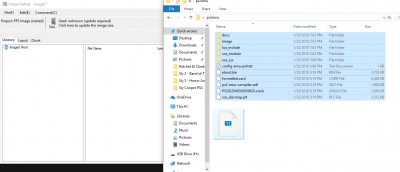 [ATTACH...
- ps2emu (2.36 MB)
- Fake PKG Tools (Someone please make a better Fake PKG Tools! This is aids to work with...)
- Custom configuration files for PS2 emulator used in PS4
1. Download the ps2emu.rar and Fake PKG Tools_1v1.rar (look above)
2. Extract both archives (as you would...)
3. Put your favorite PlayStation 2 game ISO in the ps2emu\image\ folder
4. Rename the iso to 'disc01.iso' (the emulator can take multiple discs, but this is more advanced and you have to specify things in lua or the command line arguments)
5. Go to sce_sys and edit 'param.sfo' with 'orbis-pub-sfo.exe'
a. Change content ID to (UP9000-CUSAXXXXX_00-SCUS974900000001) where XXXXX is any string of numbers
b. The content ID can be somewhat random, but has to be in the enforced format. Who really cares what you do, but the original emulated game (Rogue Galaxy) was like this and I just decided to change the title ID portion.
c. Go to Title Text tab and change the text to the title of your game (ex. Ratchet & Clank, Crash Bandicoot)
6. Save the param.sfo
7. In Fake PKG Tools, rename 'orbis-pub-cmd-ps2.exe' to 'orbis-pub-cmd.exe' (delete or rename original 'orbis-pub-cmd.exe')
8. Open 'orbis-pub-gen.exe'
9. Double click on 'Image0' (we are going to add the files from ps2emu, including disc01.iso/disc0X.iso)
10. Drag and drop all the files from ps2emu into the Image0 Root (right side is files, left is directory view)
[ATTACH...- PS4 Fake PKG (FPKG) Sharing Guide
- 6.XX Webkit / 6.72 PS4 Jailbreak
- 7.00-7.02 Webkit Exploit
- 7.02 Webkit / 7.02 Kernel / PS4JB
- 7.50 Kernel Exploit / PS4JB 7.55
- 7.55 / 8.00 Payloads / PS4JB2 7.55
- 9.00 PS4 Webkit Exploit
- 9.00 PS4 Payloads / GoldHEN (Latest)
- 9.00 PS4 Jailbreak Kernel Exploit
- 11.00 PS4 Jailbreak Kernel Exploit
- 13.00 PS4 Kernel Exploit / 13.02 BD-J Bug
- 4.03 PS5 Webkit Exploit
- PS5 Kernel Exploit (ExFAT Bug)
- PS5 Root Keys Obtained
- 4.03 PS5 Kernel Build String
- 4.03 PS5 Webkit Execution
- 4.03 PS5 Kernel Vulnerability
- 4.03 PS5 Filesystem Dumps
- 4.51 PS5 BD-JB Sandbox Escape
- PS5 BD-JB Exploit Hack Source Code
- Mast1c0re PS5 Userland Exploit
- PS5 Kernel Access via PS4 Exploit
- PS5 exFAT Vulnerability Disclosed
- 4.03 PS5 Kernel Exploit Webkit ROP
- 4.50 PS5 Kernel Exploit Webkit ROP
- 4.51 PS5 Kernel Exploit Webkit ROP
- 4.xx PS5 Kernel Exploit v1.01
- 4.xx PS5 Kernel Exploit v1.02 / v1.03
- PS5 1.00-6.50 Firmware Webkit
- Native PS5 ROP Chain Execution
- Mast1c0re PS5 Compiler Attack
- PS5 FreeBSD Kernel Bug & WebKit
- PS5 UMTX 2 Exploit & PS5 Jailbreak
- Byepervisor PS5 Hypervisor Exploit
- Lua Lapse PS5 Kxploit & Laps3c0re / Y2JB
- 12.00 / 12.70 PS5 Kernel Exploit