
You are using an out of date browser. It may not display this or other websites correctly.
You should upgrade or use an alternative browser.
You should upgrade or use an alternative browser.
Live in Your World, HAX in Ours!

Live in Your World, HAX in Ours!
Hello World! I've been reporting on Sony PlayStation hacking news since 2000 and started PSXHAX in 2014 to cover PlayStation (PSX), PlayStation 2 (PS2), PlayStation 3 (PS3), PlayStation 4 (PS4), PlayStation Portable (PSP), PlayStation Vita (PS Vita), PlayStation TV (PS TV) and next-gen PlayStation 5 (PS5) platforms along with anything else of interest.
Click on my UserName author link above and you'll be able to view a curated list of all the articles I've contributed thus far to PSXHAX.COM!
Click on my UserName author link above and you'll be able to view a curated list of all the articles I've contributed thus far to PSXHAX.COM!
Latest PlayStation 5 Launch Game Trailer Video Releases Arrive!
In PlayStation 5 News today since the last PS5 Game Trailer Videos update, the Official PS5 Launch and the Ultimate PS5 FAQ we have a new batch of PS5 launch game trailer video releases to enjoy before the overseas console arrival next week on November 19th. 
Devil May Cry 5 Special Edition - PS5 Launch Trailer
The critically-acclaimed Devil May Cry 5 is back and better than ever in the series’ most Stylish and most action-packed entry yet. Now Available on Digital for PlayStation 5! Coming to retail on December 1, 2020.
Demon’s Souls – PS5 Launch Trailer
From PlayStation Studios and Bluepoint Games comes a remake of the PlayStation classic, Demon's Souls. Entirely rebuilt from the ground up and masterfully enhanced, this remake introduces the horrors of a fog-laden, dark fantasy land to a whole new generation of gamers.
Those who’ve faced its trials and tribulations before, can once again challenge the darkness in stunning visual quality and incredible performance.
WRC 9 - Accolades PS5 Trailer
Acclaimed by both players and critics since its launch on PlayStation 4, WRC 9 is ready for the launch of PlayStation 5 with beautiful 4K visuals and smooth 60 frames-per-second gameplay. Take your driving experience further with the new DualSense features:
Devil May Cry 5 Special Edition - PS5 Launch Trailer
The critically-acclaimed Devil May Cry 5 is back and better than ever in the series’ most Stylish and most action-packed entry yet. Now Available on Digital for PlayStation 5! Coming to retail on December 1, 2020.
Demon’s Souls – PS5 Launch Trailer
From PlayStation Studios and Bluepoint Games comes a remake of the PlayStation classic, Demon's Souls. Entirely rebuilt from the ground up and masterfully enhanced, this remake introduces the horrors of a fog-laden, dark fantasy land to a whole new generation of gamers.
Those who’ve faced its trials and tribulations before, can once again challenge the darkness in stunning visual quality and incredible performance.
WRC 9 - Accolades PS5 Trailer
Acclaimed by both players and critics since its launch on PlayStation 4, WRC 9 is ready for the launch of PlayStation 5 with beautiful 4K visuals and smooth 60 frames-per-second gameplay. Take your driving experience further with the new DualSense features:
- Haptic feedback gives a more realistic feeling of the road surface, the car's traction and the damage your car has taken.
- Feel the sensations of the car's pedals with a harder brake trigger at the end of a race, the vibrations when the ABS activates, and a more resistant acceleration trigger if the car is damaged.
- Localised...
How to Access the Hidden PlayStation 5 (PS5) Web Browser via Backdoor
Sony's confirmation that PlayStation 5 currently doesn't include a dedicated Web browser app isn't deterring PS5 Scene users including @KIWIDOGGIE (kd_tech_ on Twitter) and @SilicaAndPina (siliccan on Twitter) from using backdoors in to access the hidden in-app PS5 Web Browser as others examine the PlayStation 5 WebKit software source code for potential vulnerabilities. 
Recently ArsTechnica.com shared a tutorial on how to do it for those interested dubbed The PlayStation 5 Has a Hidden Web Browser; Here's How to Find It:
 Tl;dr: A Twitter login backdoor lets you hop around to any site with a convenient link.
To quote: Officially, the PlayStation 5 doesn't include a Web browser, marking an apparent software downgrade from the PlayStation 4. But Ars has discovered the PS5 does actually include a limited, hidden Web browsing interface that you can use to load up generic websites on your TV in a pinch.
Getting in
The easiest way to get into the PS5 Web browser is to go to the system settings and load up the User's Guide. Unlike most other informational menus on the system, this one loads up inside a Web browser that points to the live URL at manuals.playstation.net.
If you visit that address from a standard PC or mobile Web browser, the site gives an error message. But if you access it from the PS5 menu, you see a picture explaining "how to navigate this user's guide" with the DualSense controller, as seen below.
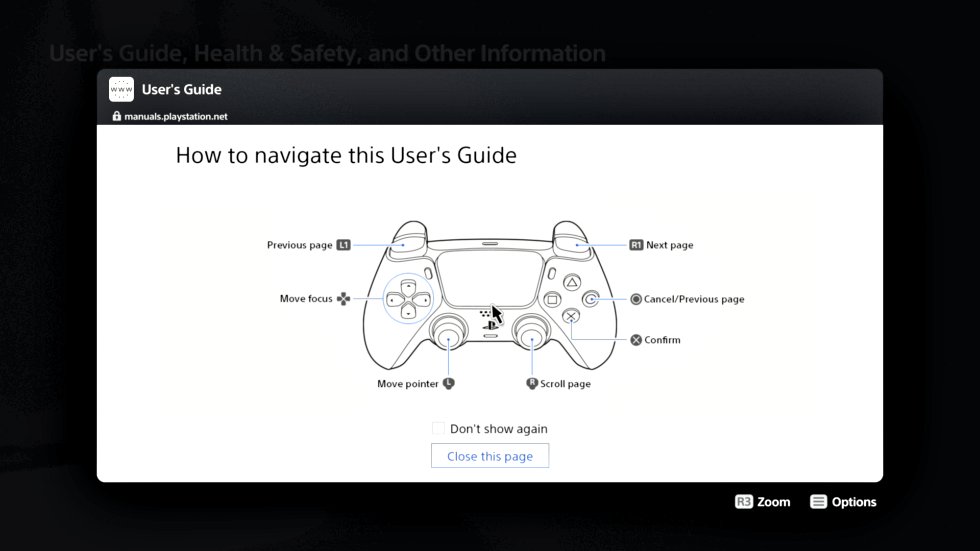
Loading manuals.playstation.net from the PS5 menu brings up this set of "How to navigate"...
Recently ArsTechnica.com shared a tutorial on how to do it for those interested dubbed The PlayStation 5 Has a Hidden Web Browser; Here's How to Find It:
Tl;dr: A Twitter login backdoor lets you hop around to any site with a convenient link. To quote: Officially, the PlayStation 5 doesn't include a Web browser, marking an apparent software downgrade from the PlayStation 4. But Ars has discovered the PS5 does actually include a limited, hidden Web browsing interface that you can use to load up generic websites on your TV in a pinch.
Getting in
The easiest way to get into the PS5 Web browser is to go to the system settings and load up the User's Guide. Unlike most other informational menus on the system, this one loads up inside a Web browser that points to the live URL at manuals.playstation.net.
If you visit that address from a standard PC or mobile Web browser, the site gives an error message. But if you access it from the PS5 menu, you see a picture explaining "how to navigate this user's guide" with the DualSense controller, as seen below.
Loading manuals.playstation.net from the PS5 menu brings up this set of "How to navigate"...
PlayStation 5 (PS5) Camera Disassembled with PCB Pictures by HackInside
Proceeding the PS4 Camera Drivers fork and PlayStation 5 Camera updates from bigboss, today @Hackinside (Github / Twitter) shared some PlayStation 5 (PS5) Camera Disassembly PCB Pictures and a PS5 Camera Unboxing video connecting it to a Windows 10 PC via his YouTube Channel below. 
This comes following both the PlayStation 5 Teardown and DualSense PS5 Controller Teardown videos for those who missed them previously.
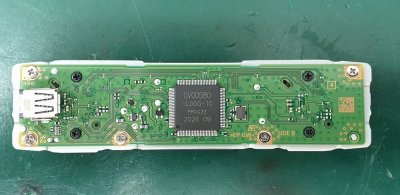


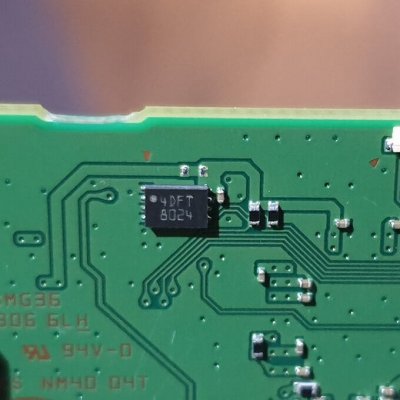
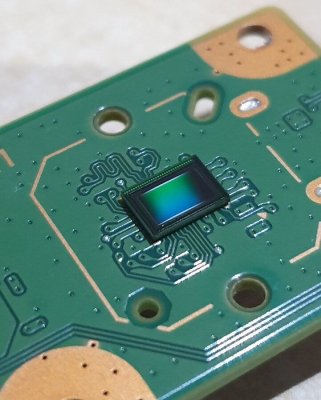



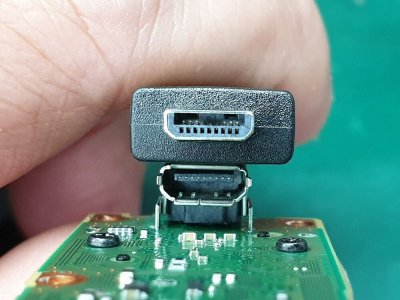
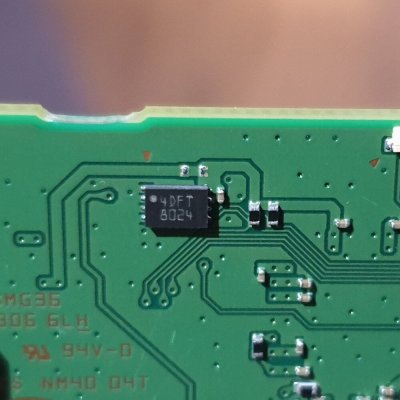

 [ATTACH alt="PlayStation 5 (PS5) Camera Disassembled with PCB Pictures by HackInside...
This comes following both the PlayStation 5 Teardown and DualSense PS5 Controller Teardown videos for those who missed them previously.
[ATTACH alt="PlayStation 5 (PS5) Camera Disassembled with PCB Pictures by HackInside...
How to Stream Games Using Twitch on PlayStation 5 (PS5) Guide
A few weeks back Sony unveiled which Media Entertainment Streaming PS5 Apps will be available at the PlayStation 5 Launch, and today Twitch's Community Marketing Specialist Ray Apollo shared a PS5 Guide on How to Stream Games Using Twitch on PlayStation 5 below. 

Here's how to set up your Twitch Stream for PS5, to quote:
Congratulations! You and your PlayStation 5 are ready to start creating content on Twitch. Thanks to the Create button on your DualSense wireless controller it’s now faster than ever to start up a stream from the comfort of your console. The guide below will show you how to set up a Twitch account and how to adjust some of your Twitch settings, as well as how to go live on Twitch from your PS5.
While many streamers choose to start streaming with a laptop or computer, the good news is that for most gamers, you have everything you need to start streaming already in your living room. If you’ve got a PlayStation 5 console, you can be live on Twitch in just a few simple steps*.
1. Create a Twitch account from a mobile device or computer. We recommend downloading Twitch on your iOS or Android phone to adjust your stream settings on the fly, which is easy to do with your Stream Manager in the Twitch app.
2. Personalize your channel so viewers know who you are when they discover your page! You can modify your profile photo and bio on mobile, or customize a number of additional settings via a web browser. We’ve set up an entire Creator Camp page on Personal Branding to show you all of the places you can customize your channel page to reflect you and your brand.
[ATTACH type="full" alt="How to Stream Games Using Twitch on PlayStation 5 (PS5) Guide...
Here's how to set up your Twitch Stream for PS5, to quote:
Congratulations! You and your PlayStation 5 are ready to start creating content on Twitch. Thanks to the Create button on your DualSense wireless controller it’s now faster than ever to start up a stream from the comfort of your console. The guide below will show you how to set up a Twitch account and how to adjust some of your Twitch settings, as well as how to go live on Twitch from your PS5.
While many streamers choose to start streaming with a laptop or computer, the good news is that for most gamers, you have everything you need to start streaming already in your living room. If you’ve got a PlayStation 5 console, you can be live on Twitch in just a few simple steps*.
1. Create a Twitch account from a mobile device or computer. We recommend downloading Twitch on your iOS or Android phone to adjust your stream settings on the fly, which is easy to do with your Stream Manager in the Twitch app.
2. Personalize your channel so viewers know who you are when they discover your page! You can modify your profile photo and bio on mobile, or customize a number of additional settings via a web browser. We’ve set up an entire Creator Camp page on Personal Branding to show you all of the places you can customize your channel page to reflect you and your brand.
[ATTACH type="full" alt="How to Stream Games Using Twitch on PlayStation 5 (PS5) Guide...
PS5 System Software / Firmware Update Live, PS5UPDATE.PUP Unpacked!
Hello World, PlayStation 5! With the official PS5 Launch today, Sony recently made available a PS5 System Software / Firmware Update PS5UPDATE.PUP Version 20.02-02.20.00 (828 MB) alongside a Recovery / Reinstallation PS5UPDATE.PUP (960 MB) following yesterday's PS5 WebKit Open Source Software and confirmation of an in-app PS5 Web Browser (Sony previously confirmed the PS5 System doesn't include a dedicated Web browser application).
PS5 Scene developer @SilicaAndPina already determined via Twitter the correct PS5 XML Updater (updatelist.xml) for downloading the latest retail PS5UPDATE.PUP file, but if the link hash changes the current one can be obtained from Sony's PS5 System Software page... however, the jury is still out on a PS5 Recovery / Reinstallation PUP file XML Updater so for the time being the current one can also be downloaded from Sony's PS5 System Software page.
 As always, DON'T UPDATE if you wish to use PS5 game backups and PlayStation 5 homebrew apps, emulators, etc whenever a...
With the official PS5 Launch today, Sony recently made available a PS5 System Software / Firmware Update PS5UPDATE.PUP Version 20.02-02.20.00 (828 MB) alongside a Recovery / Reinstallation PS5UPDATE.PUP (960 MB) following yesterday's PS5 WebKit Open Source Software and confirmation of an in-app PS5 Web Browser (Sony previously confirmed the PS5 System doesn't include a dedicated Web browser application).PS5 Scene developer @SilicaAndPina already determined via Twitter the correct PS5 XML Updater (updatelist.xml) for downloading the latest retail PS5UPDATE.PUP file, but if the link hash changes the current one can be obtained from Sony's PS5 System Software page... however, the jury is still out on a PS5 Recovery / Reinstallation PUP file XML Updater so for the time being the current one can also be downloaded from Sony's PS5 System Software page.
As always, DON'T UPDATE if you wish to use PS5 game backups and PlayStation 5 homebrew apps, emulators, etc whenever a...- PS4 Fake PKG (FPKG) Sharing Guide
- 6.XX Webkit / 6.72 PS4 Jailbreak
- 7.00-7.02 Webkit Exploit
- 7.02 Webkit / 7.02 Kernel / PS4JB
- 7.50 Kernel Exploit / PS4JB 7.55
- 7.55 / 8.00 Payloads / PS4JB2 7.55
- 9.00 PS4 Webkit Exploit
- 9.00 PS4 Payloads / GoldHEN (Latest)
- 9.00 PS4 Jailbreak Kernel Exploit
- 11.00 PS4 Jailbreak Kernel Exploit
- 13.00 PS4 Kernel Exploit / 13.02 BD-J Bug
- 4.03 PS5 Webkit Exploit
- PS5 Kernel Exploit (ExFAT Bug)
- PS5 Root Keys Obtained
- 4.03 PS5 Kernel Build String
- 4.03 PS5 Webkit Execution
- 4.03 PS5 Kernel Vulnerability
- 4.03 PS5 Filesystem Dumps
- 4.51 PS5 BD-JB Sandbox Escape
- PS5 BD-JB Exploit Hack Source Code
- Mast1c0re PS5 Userland Exploit
- PS5 Kernel Access via PS4 Exploit
- PS5 exFAT Vulnerability Disclosed
- 4.03 PS5 Kernel Exploit Webkit ROP
- 4.50 PS5 Kernel Exploit Webkit ROP
- 4.51 PS5 Kernel Exploit Webkit ROP
- 4.xx PS5 Kernel Exploit v1.01
- 4.xx PS5 Kernel Exploit v1.02 / v1.03
- PS5 1.00-6.50 Firmware Webkit
- Native PS5 ROP Chain Execution
- Mast1c0re PS5 Compiler Attack
- PS5 FreeBSD Kernel Bug & WebKit
- PS5 UMTX 2 Exploit & PS5 Jailbreak
- Byepervisor PS5 Hypervisor Exploit
- Lua Lapse PS5 Kxploit & Laps3c0re / Y2JB
- 12.00 / 12.70 PS5 Kernel Exploit