
Interested in investing time and money into PSXHAX.COM? Read More and Contact Us for details!
Category PS4 Guides and Tutorials       Thread starter Thread starter PSXHAX       Date / timeStart date Mar 12, 2018 at 7:48 AM       Replies 534      
Status
Not open for further replies.
Today @Codsworth let us know about an ESP Host project he's been working on, and shared a guide on a simple way to serve PS4 payloads using the ESP8266 Wifi Module board with at least 4 MB flash. :winkxf2:

Download: esphost.bin / esphostmulti.bin / esphostmulti405.bin / GIT

Here's all the details from the README.md: ESP Host

Today I show you a simple way to serve payload using the ESP8266.

Benefits of using the ESP8266:
  • Extremely low cost hardware, available worldwide
  • Ability to run 24/7 via USB, self-hosted payload, no external apps or programs required
  • Completely block all updates
  • No need for custom DNS server or settings, features automatic redirect
  • Easy to program and update via USB
  • Very low power consumption
Requirements:
Payloads included in esphost.bin
  • VORTEX HEN 1.4
Payloads included in esphostmulti.bin
  • HEN
  • HEN+VR
  • FTP
  • DUMPER
  • BACKUP
https://github.com/pearlxcore/ps4-playground-455

Instructions:

Flash esphost.bin using the following command:
Code:
sudo esptool.py --port /dev/ttyUSB0 write_flash 0x00000 0x400000 ./esphost.bin
  • After flashing completes, connect to "PS4-WIFI" using "easy setting" then go to [Settings] > [User Guide]
NOTE: Windows users must use the appropriate com port when flashing with esptool.py

NOTE2: Users can optionally flash using the GUI version of ESPTool

Compatible boards:

These are the most popular ESP8266 boards, but any esp8266 with 4M flash or larger will work.
Updates (via Codsworth)
  • More stable payloads , no memory errors or reloading pages
  • Updated esp-host to include payloads from ps4-playground
  • Added file compression - save space and serve payloads quickly.
  • Upgraded payload index to a better design thanks to pearlxcore
To-Do
  • Add ability to upload files/payloads
Notice and credits

Credit should be given to original authors of payloads - you know who you are.

How to run PS4 exploit offline using ESP-12E (ESP8266)
PS4 with ESP8266 7 seconds for the hen + playground
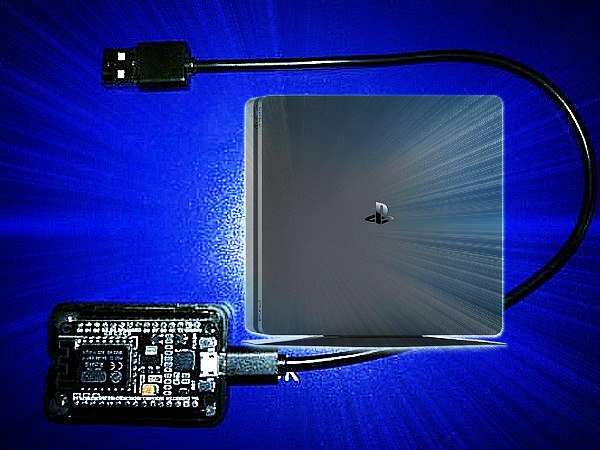
ESP Host Serve PS4 Payloads Using the ESP8266 Guide by Codsworth.jpg
 

Comments

@muxi THANKS!!! I'll try it in new version. I finally managed to complete Easy Settings And pass internet connection test successfully (actually there is no internet at all, but PS4 does not think so):) All settings are in automatic mode, no need in manual DNS configuration. But it needs some tests also!!!

By the way I saw that App2Usb was updated to v17 https://github.com/stooged/AppToUsb-455/releases/tag/v17

@muxi I see I've already included it - nice work!!! Include FTP Server in your sketch code, it will greatly simplify the process of js files substitution - no need to wait SPIFFS loading and compilation!!!
 
@Keeperdy yes, app2usb v17 was already included in my firmware from scratch (this version is not included in al-azifs 0.4.2.), also HEN+VR v2.

What exactly is the advantage of "Easy Settings"
If I set up my module in the network and leave everything on automatically, it is not necessary to enter the DNS manually. Or do you mean something else?

I don't know how to do that with the FTP Server, but now that everything is running smoothly, I do not have to do it that often anymore, and if so, I have time ......
 
@muxi you just select mode "easy" during wifi configuration, choose network and provide password, that's all + can pass test internet connection successfully, no network errors etc. In some cases if choose "custom" and proceed every step in auto mode, finally you get a network error or invalid dns if it's not set in the sketch. Nothing special, but less errors you have, more stable will be the working process in general :)
 
How can i configure ESP8266 online ? i have the internet connection failed as it shows in the video above , so when i hit original i dont have an open internet connection and the port 9020 port will be close.

Is there a way to configure the ESP8266 online so when i hit original will load , open the 9020 port and be able to use ps4 cheater ?
 
@matias3ds An internet connection is not possible with the ESP8266 as far as I know and for these purposes also not necessary, also to prevent unwanted updates. You also have to check the IP-Adress of your PS4 beforehand, since it has to be entered in the PS4Cheater to send the jkpatch.

You should proceed in the following order:

1. Connect PC with ESP8266 via WLAN
2. Upload HEN
3. Check PS4 IP address
4. Open PS4Cheater
5. Load "ORIGINAL"
6. Enter the IP in the PS4Cheater and press "Send Payload"
7. If jkpatch has been successfully loaded, press the PS key to return to the main menu and start the game and load the save
8.In the PS4Cheater, select "refresh process", then select eboot.bin.

Happy cheating!!!!
 
Sorry im not understanding point 1
i have the ps4 connected with a usb cable to the ESP8266
and the ps4 wifi connected to the offline ESP2866 .
 
You need to look at the PC to see what networks are available in your environment, and then you will find your ESP module with the appropriate name. With that you connect your PC.

At that moment, of course, you will no longer have an internet connection with your PC because you are now connected to the ESP module. What you are describing is required for it to work.
 
Status
Not open for further replies.
Back
Top
