
Proceeding his OpenTyrian Homebrew Game Port PS4 PKG and PEMU Portable FinalBurn Neo Emulator PS4 PKG, PlayStation 4 Scene developer @Cpasjuste recently updated the pPlay video player for Nintendo Switch in his Github repository with a pPlay v3.6 PS4 PKG adding PlayStation 4 support for Jailbroken PS4 consoles followed by a pPlay v3.7 PS4 PKG, pPlay v3.8 PS4 PKG update, PPLAY v3.09 PS4 PKG and PPLAY v4.0 PS4 PKG updates with more revisions linked below compiled by @psbax4. 
Download: pplay-3.8_ps4.zip (34.5 MB - includes IV0001-PPLA00001_00-PPLA000013080000.pkg and subfont.ttf) / GIT / IV0001-PPLA00001_00-PPLA000013090000.zip (41.93 MB - PPLAY 3.09 includes IV0001-PPLA00001_00-PPLA000013090000.pkg) / IV0001-PPLA00001_00-PPLA000010400000.zip (44.32 MB - PPLAY v4.0 includes IV0001-PPLA00001_00-PPLA000010400000.pkg) compiled by @psbax4 / IV0001-PPLA00001_00-PPLA000010400100.zip (46.09 MB - PPLAY v4.01) / IV0001-PPLA00001_00-PPLA000010400200.zip (47.66 MB - PPLAY v4.02) / IV0001-PPLA00001_00-PPLA000010400300.zip (45.83 MB - PPLAY v4.03)
Spoiler: Depreciated
 In the changelog below @Cpasjuste notes he's currently seeking donations to buy a PS5 to develop on, so those interested in supporting his ongoing homebrew work in the scene can do so directly HERE via PayPal.
pPlay v3.8 Changelog:
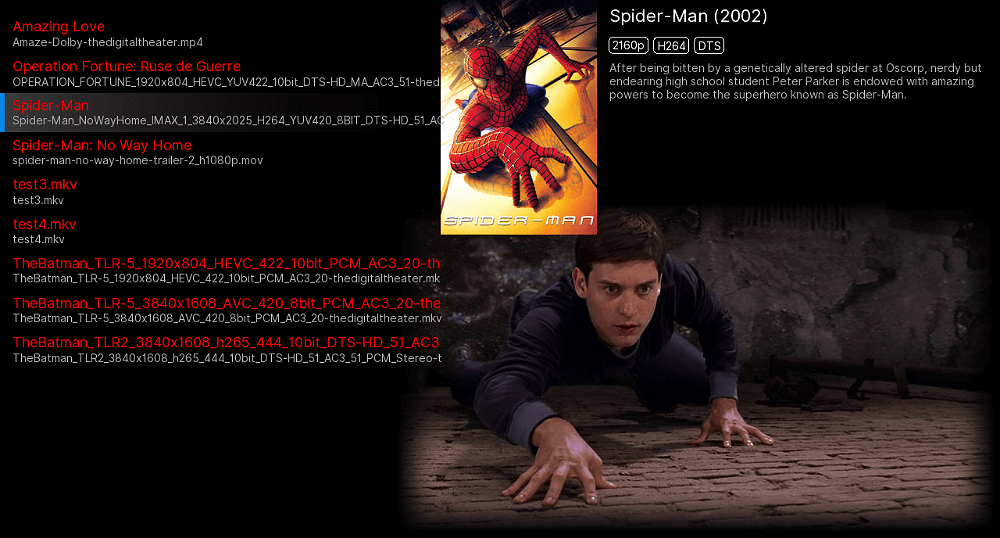
pPlay is a video player for the Nintendo Switch. pPlay support most popular video format, subtitles, http and ftp streaming and more. pPlay use the MPV interface to handle ffmpeg interoperability, which provide a fast, stable and powerful experience.
Installation

Download: pplay-3.8_ps4.zip (34.5 MB - includes IV0001-PPLA00001_00-PPLA000013080000.pkg and subfont.ttf) / GIT / IV0001-PPLA00001_00-PPLA000013090000.zip (41.93 MB - PPLAY 3.09 includes IV0001-PPLA00001_00-PPLA000013090000.pkg) / IV0001-PPLA00001_00-PPLA000010400000.zip (44.32 MB - PPLAY v4.0 includes IV0001-PPLA00001_00-PPLA000010400000.pkg) compiled by @psbax4 / IV0001-PPLA00001_00-PPLA000010400100.zip (46.09 MB - PPLAY v4.01) / IV0001-PPLA00001_00-PPLA000010400200.zip (47.66 MB - PPLAY v4.02) / IV0001-PPLA00001_00-PPLA000010400300.zip (45.83 MB - PPLAY v4.03)
Spoiler: Depreciated
In the changelog below @Cpasjuste notes he's currently seeking donations to buy a PS5 to develop on, so those interested in supporting his ongoing homebrew work in the scene can do so directly HERE via PayPal. pPlay v3.8 Changelog:
- PS4: correctly fix some clock/sync problems (previous fix was running all videos at 60 fps, they now correctly sync at video fps as on other platforms)
- PS4: fix some clock/sync problems (fix lag problems on 1080p videos)
- PS4: fix "watch-later" mpv option
- PS4: add new shader (support more videos)
- common: correctly show currently selected video/audio/subtitle track in options menus
- common: correctly restore video/audio/subtitle track selection and position on video restart
- common: create pplay data directory on launch
- add PS4 support
- further improvements to overall system stability and other minor adjustments to enhance the user experience...
- note: I'm actually seeking donations to start developing on the PS5 (to buy a device). If you want to support this, please donate here!
pPlay is a video player for the Nintendo Switch. pPlay support most popular video format, subtitles, http and ftp streaming and more. pPlay use the MPV interface to handle ffmpeg interoperability, which provide a fast, stable and powerful experience.
Installation
- Switch: copy "pplay" folder to switch sdcard ("/switch/pplay")
- PS4: install pkg and copy "data" folder on ps4 internal hdd
- Use left/right to switch menu's and windows... select a media and... have fun.
- When playing a media, you can press the "DOWN" or "A" button to bring the UI, the "R" shoulder for fast forward ("L" button to stop), and "LEFT" to access video, audio and subtitles selection.
- pPlay can stream media from an http server with directory listing enabled, or an ftp server. To do so, you must edit the configuration file (pplay.cfg) to add your server address:
- NETWORK = "http://samples.ffmpeg.org/";
- NETWORK = "ftp://user:password@ip:port/";
- As pPlay use MPV, you can put a file named "mpv.conf" in the "mpv" folder to play with. See the CONFIGURATION FILES and OPTIONS sections in the MPV manual for more information.
- pPlay should be able to play most media. While 720p and 1080p medias should be fine, you can unlock all the switch cpu speed for heavy medias in the main options menu (LEFT button)



