
Interested in investing time and money into PSXHAX.COM? Read More and Contact Us for details!
Category PS4 News       Thread starter Thread starter spotanjo3       Replies 4      
Status
Not open for further replies.

spotanjo3

Senior Member
Is there a tool or something that I can open PS4 Iso and check to see which FW version is ?

PS3 Iso can be open easy without a tool and check PS3 ISO fw version. What about PS4 Iso ? I want to check the PS4 Game Iso to see what kind FW version is it.
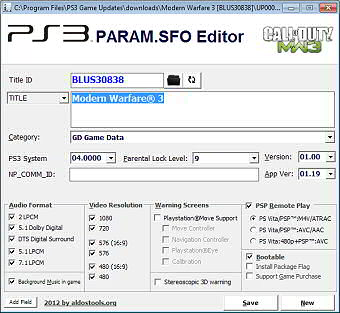
 
Whether it's a dumped game from a PS4 Disc or image off the Internet if you see a PARAM.SFO file in it you may be able to open it with a PARAM.SFO editor / viewer as can be done with PS3, etc.

paramsfo.jpg

There are also some spreadsheet lists of PS4 game Firmware requirements already documented to save time, and the PS4 Package Database which also tells you the Firmware version based on the PS4 game's Title ID.
 
Thanks.. I test PS4 Package Database for:

inFamous - First Light - EUR - 1.76

inFamous - Second Son - EUR - 1.60

but the fw versions showing in PS4 Package Database says otherwise:

inFamous - First Light - EUR - 4.05

inFamous - Second Son - EUR - 4.05

I am confused. I haven't trying PS3 Param.sfo Editor yet. Should I ? PS4 have sfo file too ?

I just realize that PS4 Package Database is for FW already patched so it is update to 4.05 instead of 1.76 as original FW. I will test PS3 Param.sfo Editor for PS4 iso files. Before I do that.. Awaiting for your answer.
 
Status
Not open for further replies.
Back
Top