PSXHAX.COM website and domain for sale. Contact Us with your offer!

You are using an out of date browser. It may not display this or other websites correctly.
You should upgrade or use an alternative browser.
You should upgrade or use an alternative browser.
Live in Your World, HAX in Ours!

Live in Your World, HAX in Ours!
Hello World! I've been reporting on Sony PlayStation hacking news since 2000 and started PSXHAX in 2014 to cover PlayStation (PSX), PlayStation 2 (PS2), PlayStation 3 (PS3), PlayStation 4 (PS4), PlayStation Portable (PSP), PlayStation Vita (PS Vita), PlayStation TV (PS TV) and next-gen PlayStation 5 (PS5) platforms along with anything else of interest.
Click on my UserName author link above and you'll be able to view a curated list of all the articles I've contributed thus far to PSXHAX.COM!
Click on my UserName author link above and you'll be able to view a curated list of all the articles I've contributed thus far to PSXHAX.COM!
PSN Pub Party Sale Features Deals from 505 Games, Kalyspo & Bigben
This week PlayStation Store is offering savings of up to 60% off featuring video game deals from 505 Games, Kalypso and Bigben or up to 70% off for PS Plus members!
PS Store's Pub Party sale comes to an end on September 25 at 8 a.m. PT, so check out the full list below courtesy of Sony Digital Games Business Manager Brian Fujimoto, as follows:
Games
PS Store's Pub Party sale comes to an end on September 25 at 8 a.m. PT, so check out the full list below courtesy of Sony Digital Games Business Manager Brian Fujimoto, as follows:
Games
| Platform | Title | Sale Price | PS Plus Price | Original Price |
| PS4 | 2DARK | $11.99 | $8.99 | $29.99 |
| PS4 | ABZU | $13.99 | $11.99 | $19.99 |
| PS4 | ADR1FT | $5.99 | $3.99 | $19.99 |
| PS4 | AIR CONFLICTS: PACIFIC CARRIERS | $5.99 | $3.99 | $19.99 |
| PS4 | ASSETTO CORSA | $17.99 | $14.99 | $29.99 |
| PS4 | ASSETTO CORSA ULTIMATE EDITION | $27.99 | $23.99 | $39.99 |
| PS4 | ASSETTO CORSA SEASON PASS | $11.99 | $9.99 | $19.99 |
| PS4 | BLACKGUARDS 2 | $11.99 | $7.99 | $39.99 |
| PS4 | BRICK BREAKER | $3.99 | $2.99 | $9.99 |
| PS4 | BROTHERS: A TALE OF TWO SONS | $5.99 | $3.99 | $19.99 |
| PS4 | DEFENSE GRID 2 | $4.49 | $2.99 | $14.99 |
| PS4 | DUNGEONS 2 | $8.99 | $5.99 | $29.99 |
| PS4 | DUNGEONS 3 | $14.99 | $9.99 | $49.99 |
| PS4... |
OrbisMAN (BETA) PS4 Homebrew Application by LightningMods
Following his previous updates, today PlayStation 4 developer @LightningMods made available a BETA release of his PS4 OrbisMAN homebrew application which handles tasks similar to what multiple PS4 Payloads do in an all-in-one PKG file for jailbroken 4.55 and 5.05 consoles. 
Download:ORBISMAN_BETA.pkg (188 MB) / ORBISMAN_BETA.pkg (v2 - 94.7 MB) / ORBISMAN_BETA.pkg (With Flat_z HotFix - 94.8 MB) / payload505.bin (27.1 KB) / PS4 Syscall 9 GIT / PS4-EAP-KEY-DUMPER-672.bin (6.6 KB - dumps to /mnt/usb0/eap_key.bin)
Here's more on the OrbisMAN PlayStation 4 PKG release from LightningMods_, to quote: ORBISMAN 1.02-2 BETA
Changelog
Download:
Here's more on the OrbisMAN PlayStation 4 PKG release from LightningMods_, to quote: ORBISMAN 1.02-2 BETA
- 4.55 & 5.05 Supported (FW Auto-Detect)
- 2much4u
- 3226:2143
- Abkarino
- AlAzif
- AlexAltea
- Anonymous
- bigboss
- Golden a.k.a Xemio
- CelesteBlue123
- CrazyVoid
- crypt0s
- CTurt
- droogie
- EvilSperm
- fail0verflow
- IDC
- Joonie86
- LightningMods
- m0rph3us1987
- masterzorag
- Mathieulh
- OpenOrbis
- qwertyoruiopz
- SKFU
- SiSTRo
- SpecterDev
- valentinbreiz
- Vortex
- xerpi
- xorloser
- XVortex
- zecoxao
- ZeraTron
- Flatz
- TheoryWrong
- SiSTRo
- Golden
- Znullptr
- X41
- _iggy4
- AlAzif
- Alzeric
- boogeyman
- CelesteBlue
- Darkmage1991
- GradSdk
- Klairm
- Kraken
- MADPYRO21
- Mogi_Codemasterv
- PotsAlott
- red-j
- retrogamer
- Shiro
- SiSTRo
- Znullptr
- Almighty
Changelog
- Build ORBISMAN V1.02-2 HOT-FIX BETA Testers Only
- Fixed broken things
- Added new names "eap_key_455.bin" and "eap_key_505.bin"
- Fixed...
Call of Duty: Black Ops 4 PS4 Blackout Beta Update by Treyarch
Earlier this month the CoD: BO4 Blackout Private Beta launched, and today Treyarch returns with details on how the Blackout Beta experience will continue to evolve leading up to the official Call of Duty: Black Ops 4 release on October 12th. 
Pre-orders are still available, and here's the feedback from Treyarch Director of Communications John Rafacz, to quote:
With the Beta wrapped up and everyone counting the days to October 12th, we'd like to take this opportunity to look back at the biggest feedback items that came from the community and provide some deeper insights into what we're doing to improve the game, just as we did following the Multiplayer Beta.
Armor
Armor's role in Blackout is inherently unique compared to its role in MP. You only live once in Blackout, and you’re rewarded for scavenging in areas that often put you in perilous positions, especially as the Collapse gets smaller in the late game. For this and other reasons, we’ve been cautious about making sweeping changes to the way Armor works, though we’ve made some tweaks during the Beta and continue to evaluate how Armor will work at launch.
Every Item in the game, from Armor to Weapons to Perks, is constantly re-evaluated to ensure they fit in the correct place in the game’s meta. You can expect Armor to be tuned multiple times as the game, and the gameplay content, evolves over time.
Some changes to Armor since the start of the Beta include:
Pre-orders are still available, and here's the feedback from Treyarch Director of Communications John Rafacz, to quote:
With the Beta wrapped up and everyone counting the days to October 12th, we'd like to take this opportunity to look back at the biggest feedback items that came from the community and provide some deeper insights into what we're doing to improve the game, just as we did following the Multiplayer Beta.
Armor
Armor's role in Blackout is inherently unique compared to its role in MP. You only live once in Blackout, and you’re rewarded for scavenging in areas that often put you in perilous positions, especially as the Collapse gets smaller in the late game. For this and other reasons, we’ve been cautious about making sweeping changes to the way Armor works, though we’ve made some tweaks during the Beta and continue to evaluate how Armor will work at launch.
Every Item in the game, from Armor to Weapons to Perks, is constantly re-evaluated to ensure they fit in the correct place in the game’s meta. You can expect Armor to be tuned multiple times as the game, and the gameplay content, evolves over time.
Some changes to Armor since the start of the Beta include:
- Spawn frequency of Level 3 Armor has been reduced by 75% compared to its initial spawn rate in the Beta.
- Level 3 Armor will now most frequently be found in Stashes and Supply Drops, though it may occasionally spawn in the world.
- Level 3 Armor now breaks sooner and passes more damage to the player wearing it, and still offers headshot and other types of damage mitigation. We’ve heard your concerns that Level 3 Armor was still perhaps too powerful by the end of the Beta, and will be evaluating the data to see what other tweaks may be required.
- Level 2 Armor was also minorly adjusted during the Beta and will potentially be tweaked further in time for launch.
- Players will see an indicator of the...
SHM: Sony Homebrew Manager for PS4, PS Vita and PS3 by MRGhidini
Over the weekend PlayStation homebrew developer @MRGhidini (GuidoGhidini on Twitter) made available his SHM open-source Sony Homebrew Manager covering PS4, PS Vita and PS3 consoles on Github with a quick guide, further details and download links below. 
Download: Sony Homebrew Manager (Latest Version) / Sony Homebrew Manager 1.0 (Source Code) / GIT
To quote from the README.md: SHM
Sony Homebrew Manager
It is a manager of homebrews for Psvita / PS3 / PS4 that can read tsv files on your computer or via hospetado link on some server, listing the homebrews, doing the control of download.
Requirements for use
Operational system: Windows 7 (32bits / 64bits), Windows 8 (32bits / 64bits), Windows 10 (32bits / 64bits) and UP
Target Framework: .NET Framework 4.6.1 - Minimum required
Initial setting
1 - Download the latest version here: Download last version
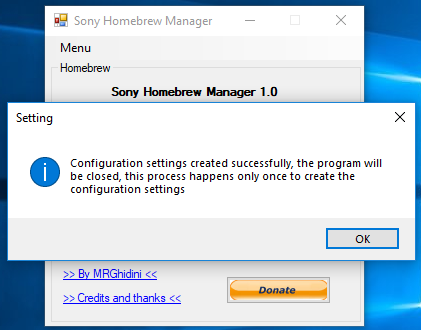
2 - Run SHM.exe and select any option, note that SHM will send a warning and will close happens only the first time it runs on your pc, this process is necessary for SHM to create the configuration settings.
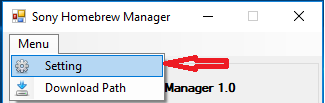
3 - Run SHM.exe and select Menu > Setting
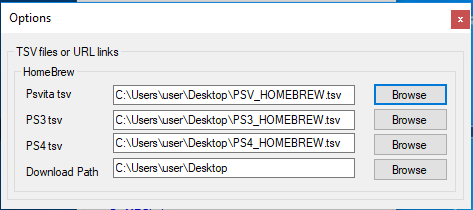
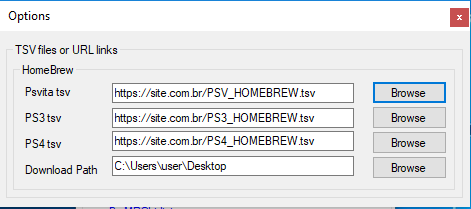
4 - Now configure the paths below, remembering that where you request tsv files you can point to website link instead of pointing to the physical file (To help with this task, I left 3 sample files in the tsv folder use as an example).
Example of physical file
Example of files through website
How to use
1 - Choose one of the options below for Psvita / PS3 / PS4
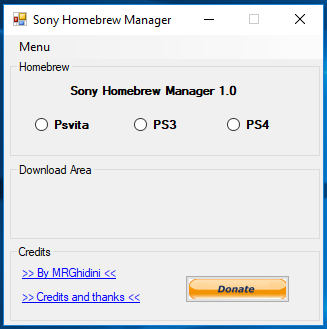
2 - It will display a list with all the homebrews, and based on the selection it is possible to access other information and even videos.
3 - After selecting your homebrew, press Download that SHM will start the downlaod of your homebrew
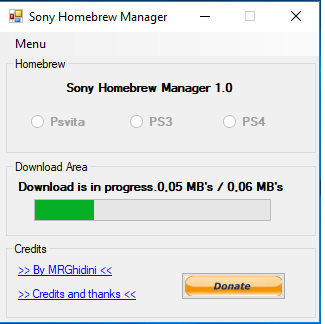
4 - After download realize that by clicking on the list of homebrews again, SHM marked the homebrew that you...
Download: Sony Homebrew Manager (Latest Version) / Sony Homebrew Manager 1.0 (Source Code) / GIT
To quote from the README.md: SHM
Sony Homebrew Manager
It is a manager of homebrews for Psvita / PS3 / PS4 that can read tsv files on your computer or via hospetado link on some server, listing the homebrews, doing the control of download.
Requirements for use
Operational system: Windows 7 (32bits / 64bits), Windows 8 (32bits / 64bits), Windows 10 (32bits / 64bits) and UP
Target Framework: .NET Framework 4.6.1 - Minimum required
Initial setting
1 - Download the latest version here: Download last version
2 - Run SHM.exe and select any option, note that SHM will send a warning and will close happens only the first time it runs on your pc, this process is necessary for SHM to create the configuration settings.
3 - Run SHM.exe and select Menu > Setting
4 - Now configure the paths below, remembering that where you request tsv files you can point to website link instead of pointing to the physical file (To help with this task, I left 3 sample files in the tsv folder use as an example).
Example of physical file
Example of files through website
How to use
1 - Choose one of the options below for Psvita / PS3 / PS4
2 - It will display a list with all the homebrews, and based on the selection it is possible to access other information and even videos.
3 - After selecting your homebrew, press Download that SHM will start the downlaod of your homebrew
4 - After download realize that by clicking on the list of homebrews again, SHM marked the homebrew that you...
Grand Theft Auto V PS4 Glitches with Demonstration Videos
Since the Grand Theft Auto Online PS4 After Hours Nightclub update release, some PlayStation 4 Grand Theft Auto V glitches have been discovered by GTA V hackers with a compilation of the recent findings below. 
Here are some on some of the latest Grand Theft Auto 5 glitch guides with demonstration videos, including a Teleport Glitch, Dupe Glitch with Teleport and God Mode for Teleport via GlitchSquad, to quote:
 Teleport Glitch
1 - Enter Creator, go to create a Last Team Standing and fill out the name, description and take the photo
2 - In details set min teams to 2 and max teams to 2 as well
3 - Place trigger, take lobby photo, set play bounds to 60m and place it
4 - Place team start point for team 1
5 - Go to props, activate prop stacking and place 65 of the construction fences (hold R1 to rotate and spam X until you have 65)
6 - Save the LTS you created
7 - Now go to Online -> Play GTA Online -> Closed friends session and then go back into creator from there (this adds lag to the creator menu which we need)
8 - In creator go to load creation -> Saved and find your created LTS (don't choose it yet)
9 - Now press X and half a second later Options (not at the same time and not too fast back to back)
10 - You should see the start menu without a loading swoosh on the bottom right (if there is a loading swoosh repeat from step 7)
11 - Now press the PS Button and find a recent activity which says 'Start GTA Online' on the bottom right, press it -> nothing should happen ingame
12 - Tell your friend to join a friends session and start up any R* created mission, he has to wait on the job settings screen (don't start it completely)
13 - Find your friend in your PSN friends list and click on his name, hover over 'Join Session'
- This part is timing sensitive and depends on your internet connection speed -
Slow Internet:
14 - Join your friend, wait for the first black alert screen, count to 6, press X to accept, second black alert screen comes up, count to 10, press...
Here are some on some of the latest Grand Theft Auto 5 glitch guides with demonstration videos, including a Teleport Glitch, Dupe Glitch with Teleport and God Mode for Teleport via GlitchSquad, to quote:
Teleport Glitch- Founder of the new reset: Cyteex
- Founder of the teleport: jbtw1
- PS4
- Friend in the same aim mode as you
1 - Enter Creator, go to create a Last Team Standing and fill out the name, description and take the photo
2 - In details set min teams to 2 and max teams to 2 as well
3 - Place trigger, take lobby photo, set play bounds to 60m and place it
4 - Place team start point for team 1
5 - Go to props, activate prop stacking and place 65 of the construction fences (hold R1 to rotate and spam X until you have 65)
6 - Save the LTS you created
7 - Now go to Online -> Play GTA Online -> Closed friends session and then go back into creator from there (this adds lag to the creator menu which we need)
8 - In creator go to load creation -> Saved and find your created LTS (don't choose it yet)
9 - Now press X and half a second later Options (not at the same time and not too fast back to back)
10 - You should see the start menu without a loading swoosh on the bottom right (if there is a loading swoosh repeat from step 7)
11 - Now press the PS Button and find a recent activity which says 'Start GTA Online' on the bottom right, press it -> nothing should happen ingame
12 - Tell your friend to join a friends session and start up any R* created mission, he has to wait on the job settings screen (don't start it completely)
13 - Find your friend in your PSN friends list and click on his name, hover over 'Join Session'
- This part is timing sensitive and depends on your internet connection speed -
Slow Internet:
14 - Join your friend, wait for the first black alert screen, count to 6, press X to accept, second black alert screen comes up, count to 10, press...
- PS4 Fake PKG (FPKG) Sharing Guide
- 6.XX Webkit / 6.72 PS4 Jailbreak
- 7.00-7.02 Webkit Exploit
- 7.02 Webkit / 7.02 Kernel / PS4JB
- 7.50 Kernel Exploit / PS4JB 7.55
- 7.55 / 8.00 Payloads / PS4JB2 7.55
- 9.00 PS4 Webkit Exploit
- 9.00 PS4 Payloads / GoldHEN (Latest)
- 9.00 PS4 Jailbreak Kernel Exploit
- 11.00 PS4 Jailbreak Kernel Exploit
- 13.00 PS4 Kernel Exploit / 13.02 BD-J Bug
- 4.03 PS5 Webkit Exploit
- PS5 Kernel Exploit (ExFAT Bug)
- PS5 Root Keys Obtained
- 4.03 PS5 Kernel Build String
- 4.03 PS5 Webkit Execution
- 4.03 PS5 Kernel Vulnerability
- 4.03 PS5 Filesystem Dumps
- 4.51 PS5 BD-JB Sandbox Escape
- PS5 BD-JB Exploit Hack Source Code
- Mast1c0re PS5 Userland Exploit
- PS5 Kernel Access via PS4 Exploit
- PS5 exFAT Vulnerability Disclosed
- 4.03 PS5 Kernel Exploit Webkit ROP
- 4.50 PS5 Kernel Exploit Webkit ROP
- 4.51 PS5 Kernel Exploit Webkit ROP
- 4.xx PS5 Kernel Exploit v1.01
- 4.xx PS5 Kernel Exploit v1.02 / v1.03
- PS5 1.00-6.50 Firmware Webkit
- Native PS5 ROP Chain Execution
- Mast1c0re PS5 Compiler Attack
- PS5 FreeBSD Kernel Bug & WebKit
- PS5 UMTX 2 Exploit & PS5 Jailbreak
- Byepervisor PS5 Hypervisor Exploit
- Lua Lapse PS5 Kxploit & Laps3c0re / Y2JB
- 12.00 / 12.70 PS5 Kernel Exploit