
You are using an out of date browser. It may not display this or other websites correctly.
You should upgrade or use an alternative browser.
You should upgrade or use an alternative browser.
Live in Your World, HAX in Ours!

Live in Your World, HAX in Ours!
Hello World! I've been reporting on Sony PlayStation hacking news since 2000 and started PSXHAX in 2014 to cover PlayStation (PSX), PlayStation 2 (PS2), PlayStation 3 (PS3), PlayStation 4 (PS4), PlayStation Portable (PSP), PlayStation Vita (PS Vita), PlayStation TV (PS TV) and next-gen PlayStation 5 (PS5) platforms along with anything else of interest.
Click on my UserName author link above and you'll be able to view a curated list of all the articles I've contributed thus far to PSXHAX.COM!
Click on my UserName author link above and you'll be able to view a curated list of all the articles I've contributed thus far to PSXHAX.COM!
PS4 Cover Generator Tool to Create PSN Cover Images on PlayStation 4
Recently developer Seth Clydesdale (SethC1995 on Twitter) made available a work-in-progress PS4 Cover Generator tool to create customized cover images for your PlayStation Network account on both a desktop PC and PlayStation 4 Web browser directly. 
Links: PS4 Cover Generator (Beta) / ps4-cover-generator-master.zip / GIT
To quote from the README.md: PS4 Cover Generator
A tool for creating profile Cover Images directly in the PS4 web browser.
IMPORTANT : This tool is still under development, so it is subject to change. If you have any suggestions or questions, feel free to open a new issue to let us know.
You can beta test this tool both on desktop and the PS4 browser. Simply go to the link below to try it out ! https://sethclydesdale.github.io/ps4-cover-generator/
Help : If you need help with PS4 Cover Generator, feel free to check out our wiki or contact me. (See links below) I'll be adding to the wiki as development continues, so check back from time to time!
Links: PS4 Cover Generator (Beta) / ps4-cover-generator-master.zip / GIT
To quote from the README.md: PS4 Cover Generator
A tool for creating profile Cover Images directly in the PS4 web browser.
IMPORTANT : This tool is still under development, so it is subject to change. If you have any suggestions or questions, feel free to open a new issue to let us know.
You can beta test this tool both on desktop and the PS4 browser. Simply go to the link below to try it out ! https://sethclydesdale.github.io/ps4-cover-generator/
Help : If you need help with PS4 Cover Generator, feel free to check out our wiki or contact me. (See links below) I'll be adding to the wiki as development continues, so check back from time to time!
- Wiki : https://github.com/SethClydesdale/ps4-cover-generator/wiki
- Contact Seth @
- Github - SethClydesdale
- Twitter - @SethC1995
- PSN - Seth9977
- You can also join our community on PS4. Just search for "PS4 Cover Generator"
PS4 CoD Ghosts RTE Mod Tool 1.76 Demo by MODDED_WARFARE
Last we saw a PS4 Advanced Warfare RTE Mod Tool demo from PlayStation 4 developer @MODDEDWARFARE, and today he added a new 1.76 demonstration video to his YouTube Channel showcasing a Call of Duty: Ghosts RTE modification. 
To quote from MODDED_WARFARE on NGU: Ghosts RTE Mod Tool 1.76
So I basically just ported my AW mod tool over to ghosts.
I mean if Activision can copy and paste their games then why shouldn't I do the same with a mod tool.
Again credit to the one and only Sabotage for giving me access to his private peek/poke tool.
Cheers to @VultraBabe for sharing the news in the PSXHAX Shoutbox!
To quote from MODDED_WARFARE on NGU: Ghosts RTE Mod Tool 1.76
So I basically just ported my AW mod tool over to ghosts.
I mean if Activision can copy and paste their games then why shouldn't I do the same with a mod tool.
Again credit to the one and only Sabotage for giving me access to his private peek/poke tool.
Cheers to @VultraBabe for sharing the news in the PSXHAX Shoutbox!
PS4 Save Wizard Guide to Edit PlayStation 4 Game Saves by Nitrowolf2
Earlier this week we reported on the Save Wizard for PS4 MAX with some source code, and today Nitrowolf2 made available a PS4 Save Wizard guide for those considering getting it to edit PlayStation 4 game saves. 
To quote: PS4 Save Wizard Tutorial
I see a lot of people are having some issues with this so I figured lets start a tutorial thread. Down below is a step-by-step tutorial on how to use the Save Wizard Editor.
PLEASE DO NOT REQUEST ME TO MOD YOUR SAVE, I WILL NOT DO THIS. Also buy at own risk, I can't promise you that you won't get banned for using this. Also the product is in a pretty early stage it seems, a lot of issues with EU saves it seems.
Step 1: Purchase and Download The Save Wizard
This is an obvious step, don't be expecting a crack version of it either as all the application is, is a client. The work is done on the server end of things, which is why an internet connection is required.
Step 2: Look at the Capability list of Games
On the official website, Save Wizard, you can view a full list of supported titles. More will be added as time goes on. It's also to take notice that the advance editor mode ONLY WORKS ON SUPPORTED TITLES, meaning if its not on the list it won't work with it.
Step 3: Copy a Supported Gamesave From The PS4 Console Onto A USB Drive
If you don't know how to copy a gamesave, on the PS4 go to Settings then Application Save Data Managment, Save Date On System Storage, and then Copy To USB.
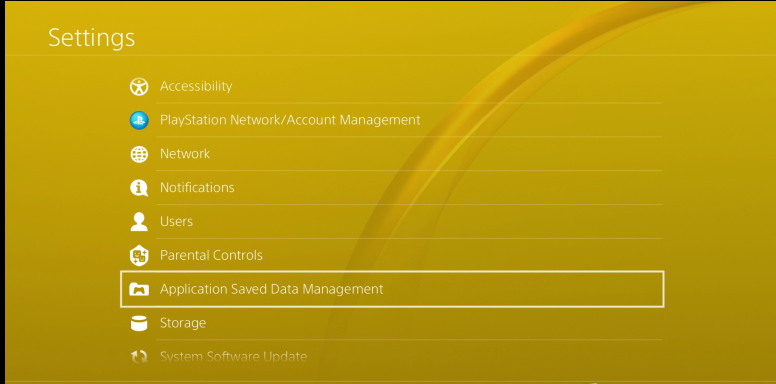
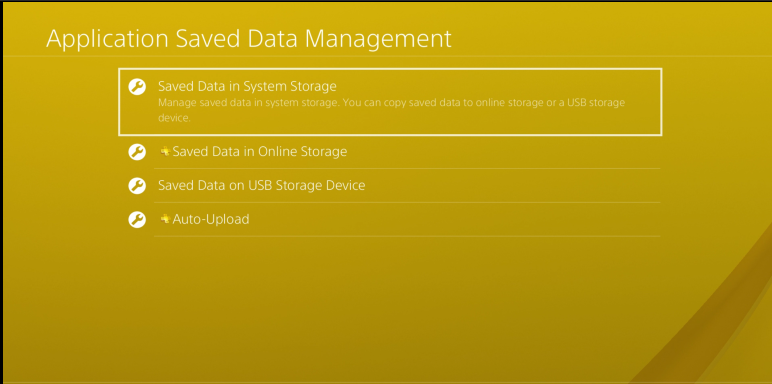
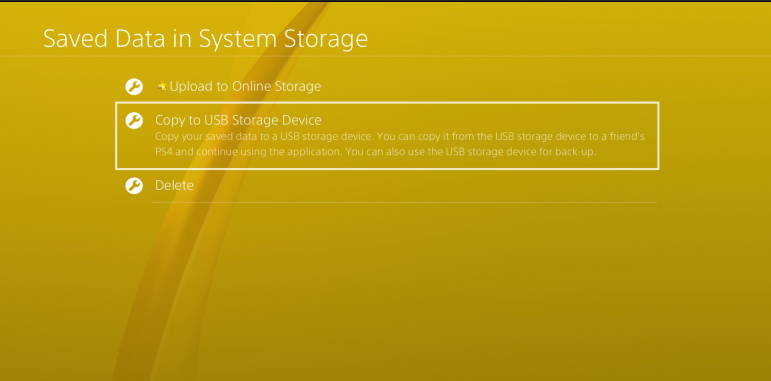
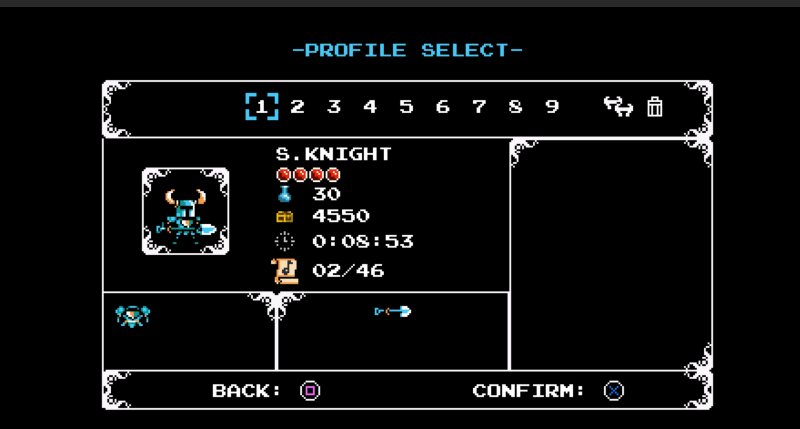
In this example we are gonna use Shovel Knight
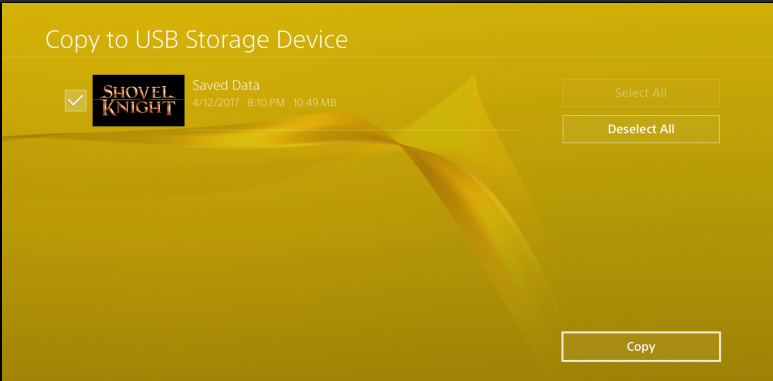
This image below is proof that my save was unedited before hand
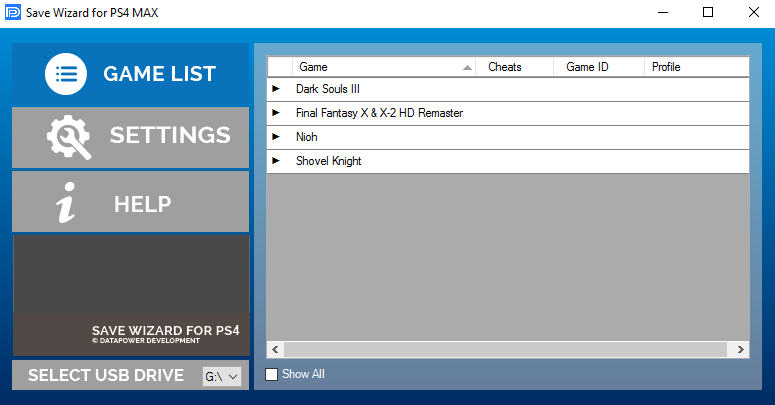
Step 4: Plug In The USB Into The Computer And Open Up Save Wizard
If for whatever reason it doesn't auto-detect the USB Drive, unmount it (unplug) and reMount (plug back in) while the app is open. You should have a screen like this.
Step 5: Go To Settings And Assign The...
To quote: PS4 Save Wizard Tutorial
I see a lot of people are having some issues with this so I figured lets start a tutorial thread. Down below is a step-by-step tutorial on how to use the Save Wizard Editor.
PLEASE DO NOT REQUEST ME TO MOD YOUR SAVE, I WILL NOT DO THIS. Also buy at own risk, I can't promise you that you won't get banned for using this. Also the product is in a pretty early stage it seems, a lot of issues with EU saves it seems.
Step 1: Purchase and Download The Save Wizard
This is an obvious step, don't be expecting a crack version of it either as all the application is, is a client. The work is done on the server end of things, which is why an internet connection is required.
Step 2: Look at the Capability list of Games
On the official website, Save Wizard, you can view a full list of supported titles. More will be added as time goes on. It's also to take notice that the advance editor mode ONLY WORKS ON SUPPORTED TITLES, meaning if its not on the list it won't work with it.
Step 3: Copy a Supported Gamesave From The PS4 Console Onto A USB Drive
If you don't know how to copy a gamesave, on the PS4 go to Settings then Application Save Data Managment, Save Date On System Storage, and then Copy To USB.
In this example we are gonna use Shovel Knight
This image below is proof that my save was unedited before hand
Step 4: Plug In The USB Into The Computer And Open Up Save Wizard
If for whatever reason it doesn't auto-detect the USB Drive, unmount it (unplug) and reMount (plug back in) while the app is open. You should have a screen like this.
Step 5: Go To Settings And Assign The...
PS4ME (PS4 Memory Editor) PS4ME.dll & PS4METool Payload by J0lama
Last month we saw a PS4 Real Time Memory Editor for Linux from PlayStation 4 developer @j0lama, and today j0lama returns with PS4ME (PS4 Memory Editor) PS4ME.dll and PS4METool Payload with details below. 
Download: PS4METool.rar (23.4 KB) / Github
To quote from j0lama's WebSite, roughly translated: # PS4ME (PS4 Memory Editor)
Description
As I said in my previous post on RTM on PS4, my main goal is to develop a system similar to PS3TMAPI / PS3CCAPI but for PS4 that is simple to use and so developers can create their own tools. This project I want it to be a community project and that all people who want to collaborate to improve the system contact me and so I can create a team.
PS4ME.dll is a Windows library with all the necessary functions to be able to link to a PS4 (Version 1.76 for now) and to be able to read / write process memory. For now it only has the following functions:
SendPayload (string IP, string payloadPath) : Allows to send a payload to a certain IP through port 9023 so that it can be executed by the PS4 Playground of cTurt.
I also include a Payload add-on to PS4ME.dll which is what will run on the PS4 allowing all PS4ME functions to be successful. It is recommended that a payload be executed before starting any game since it...
Download: PS4METool.rar (23.4 KB) / Github
To quote from j0lama's WebSite, roughly translated: # PS4ME (PS4 Memory Editor)
Description
As I said in my previous post on RTM on PS4, my main goal is to develop a system similar to PS3TMAPI / PS3CCAPI but for PS4 that is simple to use and so developers can create their own tools. This project I want it to be a community project and that all people who want to collaborate to improve the system contact me and so I can create a team.
PS4ME.dll is a Windows library with all the necessary functions to be able to link to a PS4 (Version 1.76 for now) and to be able to read / write process memory. For now it only has the following functions:
SendPayload (string IP, string payloadPath) : Allows to send a payload to a certain IP through port 9023 so that it can be executed by the PS4 Playground of cTurt.
- Connect (string ip) : Connects to the PS4 with the specified IP.
- Disconnect () : Disconnects from the PS4.
- string [] getProcesses () : Gets an array of processes that are currently running on the PS4.
- string AttachProcess (string ProcessName) : Link to a given process returning an error message in case of failure.
- byte [] dumpMemory (string Offset, string size) : Performs a memory dump of the specified size and starts in the memory address specified by the offset returning the byte array.
- writeMemory (string Offset, string value) : Write in the memory address specified by Offset a byte specified by value.
- string readMemory (String Offset) : Returns the read byte of the memory location specified by Offset.
I also include a Payload add-on to PS4ME.dll which is what will run on the PS4 allowing all PS4ME functions to be successful. It is recommended that a payload be executed before starting any game since it...
Save Wizard for PS4 MAX PlayStation 4 Game Save Editor Incoming
Following the PS4SaveEditor Leak, Cyber Save Editor 4.50 Bypass, news of the Xploder PS4 Cheats System and PS4 Save Wizard initial announcement, today @harryoke passed along word on Twitter that the Save Wizard for PS4 MAX is incoming and allows the editing of PS4 Game Saves from all regions (USA / Europe / Pacific Asia) except for Japan according to the official site SaveWizard.net.
Download: Save Wizard For PS4 MAX (2.11 MB) / Save Wizard for PS4 MAX Source Unfixed.rar (1.92 MB) via maris / SWPS4MAX Source Code Fixed.rar / Game Support Suggestions / SWPS4-master.zip (includes PS4CRYPTOR.cs and PS4USB.cs by k3dt (shellTeMP) / SWPS4
Before getting too excited, be aware this isn't a open source project so be prepared to cough up $49.99 / €47.99 for a 24-month subscription to obtain a 'License Key' for the application that will inevitably be cracked / reverse-engineered by PS4 scene hackers for free at some point in the future.
To quote from their official site: Introducing the Save Wizard for PS4 MAX, the first and only save editor for PlayStation 4!
Giving you access to some of the most popular games for the PlayStation 4, Save Wizard for PS4 MAX allows you to cheat on YOUR save...
Download: Save Wizard For PS4 MAX (2.11 MB) / Save Wizard for PS4 MAX Source Unfixed.rar (1.92 MB) via maris / SWPS4MAX Source Code Fixed.rar / Game Support Suggestions / SWPS4-master.zip (includes PS4CRYPTOR.cs and PS4USB.cs by k3dt (shellTeMP) / SWPS4
Before getting too excited, be aware this isn't a open source project so be prepared to cough up $49.99 / €47.99 for a 24-month subscription to obtain a 'License Key' for the application that will inevitably be cracked / reverse-engineered by PS4 scene hackers for free at some point in the future.
To quote from their official site: Introducing the Save Wizard for PS4 MAX, the first and only save editor for PlayStation 4!
Giving you access to some of the most popular games for the PlayStation 4, Save Wizard for PS4 MAX allows you to cheat on YOUR save...
- PS4 Fake PKG (FPKG) Sharing Guide
- 6.XX Webkit / 6.72 PS4 Jailbreak
- 7.00-7.02 Webkit Exploit
- 7.02 Webkit / 7.02 Kernel / PS4JB
- 7.50 Kernel Exploit / PS4JB 7.55
- 7.55 / 8.00 Payloads / PS4JB2 7.55
- 9.00 PS4 Webkit Exploit
- 9.00 PS4 Payloads / GoldHEN (Latest)
- 9.00 PS4 Jailbreak Kernel Exploit
- 11.00 PS4 Jailbreak Kernel Exploit
- 13.00 PS4 Kernel Exploit / 13.02 BD-J Bug
- 4.03 PS5 Webkit Exploit
- PS5 Kernel Exploit (ExFAT Bug)
- PS5 Root Keys Obtained
- 4.03 PS5 Kernel Build String
- 4.03 PS5 Webkit Execution
- 4.03 PS5 Kernel Vulnerability
- 4.03 PS5 Filesystem Dumps
- 4.51 PS5 BD-JB Sandbox Escape
- PS5 BD-JB Exploit Hack Source Code
- Mast1c0re PS5 Userland Exploit
- PS5 Kernel Access via PS4 Exploit
- PS5 exFAT Vulnerability Disclosed
- 4.03 PS5 Kernel Exploit Webkit ROP
- 4.50 PS5 Kernel Exploit Webkit ROP
- 4.51 PS5 Kernel Exploit Webkit ROP
- 4.xx PS5 Kernel Exploit v1.01
- 4.xx PS5 Kernel Exploit v1.02 / v1.03
- PS5 1.00-6.50 Firmware Webkit
- Native PS5 ROP Chain Execution
- Mast1c0re PS5 Compiler Attack
- PS5 FreeBSD Kernel Bug & WebKit
- PS5 UMTX 2 Exploit & PS5 Jailbreak
- Byepervisor PS5 Hypervisor Exploit
- Lua Lapse PS5 Kxploit & Laps3c0re / Y2JB
- 12.00 / 12.70 PS5 Kernel Exploit