
You are using an out of date browser. It may not display this or other websites correctly.
You should upgrade or use an alternative browser.
You should upgrade or use an alternative browser.


I've been a follower of the hacking scene since the ps2 days.
Making a PS4 Theme PKG for 4.05 / 4.55 Tutorial by Mangekyou222
Previously we saw some PS4 Custom BGM and Theme PKG Files followed by the PS4 Custom Theme Preview Image Creation Method for PS4 Theme Editor, and today following my fully functional MGS V Theme (and a Blonde Theme by diegoshark  ) here's the guide I made:
How to Make a PS4 Theme PKG for 4.05 / 4.55 Tutorial:
Needed Tools
Download the images you need for the "background" folder (recommended to be jpeg because you need PNG 24bits and i found that you can't convert PNG 32bits to PNG 24bits for some reason it stays on 32bits so converting jpeg to png using Photoshop will do the trick, more on that below)
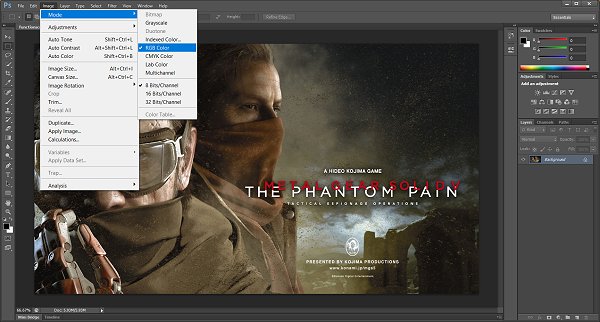
After that save as PNG and copy the file to the background folder
Next folder is content_icon (those...
) here's the guide I made:How to Make a PS4 Theme PKG for 4.05 / 4.55 Tutorial:
Needed Tools
- Theme sample (my theme sample if you need one): Metal gear solid V TPP.7z (7.94 MB)
- PS4_Theme_Editor_0-1-3beta
- Fake_PKG_Tools_v1.3
- Photoshop (or other advanced photo editing tools)
- AT9_AT3_Converter_V2.3 (Mirror)
- Audacity
- A brain
Download the images you need for the "background" folder (recommended to be jpeg because you need PNG 24bits and i found that you can't convert PNG 32bits to PNG 24bits for some reason it stays on 32bits so converting jpeg to png using Photoshop will do the trick, more on that below)
- homescreen (resolution 1920x1080)
- functionscreen (resolution 1920x1080)
- functionareabar (resolution 1920x164)
After that save as PNG and copy the file to the background folder
Next folder is content_icon (those...
- PS4 Fake PKG (FPKG) Sharing Guide
- 6.XX Webkit / 6.72 PS4 Jailbreak
- 7.00-7.02 Webkit Exploit
- 7.02 Webkit / 7.02 Kernel / PS4JB
- 7.50 Kernel Exploit / PS4JB 7.55
- 7.55 / 8.00 Payloads / PS4JB2 7.55
- 9.00 PS4 Webkit Exploit
- 9.00 PS4 Payloads / GoldHEN (Latest)
- 9.00 PS4 Jailbreak Kernel Exploit
- 11.00 PS4 Jailbreak Kernel Exploit
- 13.00 PS4 Kernel Exploit / 13.02 BD-J Bug
- 4.03 PS5 Webkit Exploit
- PS5 Kernel Exploit (ExFAT Bug)
- PS5 Root Keys Obtained
- 4.03 PS5 Kernel Build String
- 4.03 PS5 Webkit Execution
- 4.03 PS5 Kernel Vulnerability
- 4.03 PS5 Filesystem Dumps
- 4.51 PS5 BD-JB Sandbox Escape
- PS5 BD-JB Exploit Hack Source Code
- Mast1c0re PS5 Userland Exploit
- PS5 Kernel Access via PS4 Exploit
- PS5 exFAT Vulnerability Disclosed
- 4.03 PS5 Kernel Exploit Webkit ROP
- 4.50 PS5 Kernel Exploit Webkit ROP
- 4.51 PS5 Kernel Exploit Webkit ROP
- 4.xx PS5 Kernel Exploit v1.01
- 4.xx PS5 Kernel Exploit v1.02 / v1.03
- PS5 1.00-6.50 Firmware Webkit
- Native PS5 ROP Chain Execution
- Mast1c0re PS5 Compiler Attack
- PS5 FreeBSD Kernel Bug & WebKit
- PS5 UMTX 2 Exploit & PS5 Jailbreak
- Byepervisor PS5 Hypervisor Exploit
- Lua Lapse PS5 Kxploit & Laps3c0re / Y2JB
- 12.00 / 12.70 PS5 Kernel Exploit