
You are using an out of date browser. It may not display this or other websites correctly.
You should upgrade or use an alternative browser.
You should upgrade or use an alternative browser.
Live in Your World, HAX in Ours!

Live in Your World, HAX in Ours!
Hello World! I've been reporting on Sony PlayStation hacking news since 2000 and started PSXHAX in 2014 to cover PlayStation (PSX), PlayStation 2 (PS2), PlayStation 3 (PS3), PlayStation 4 (PS4), PlayStation Portable (PSP), PlayStation Vita (PS Vita), PlayStation TV (PS TV) and next-gen PlayStation 5 (PS5) platforms along with anything else of interest.
Click on my UserName author link above and you'll be able to view a curated list of all the articles I've contributed thus far to PSXHAX.COM!
Click on my UserName author link above and you'll be able to view a curated list of all the articles I've contributed thus far to PSXHAX.COM!
Resident Evil 7, RE2, RE3 on PS5 Today & New PlayStation 5 Trailers
Resident Evil 7 Biohazard, Resident Evil 2 and Resident Evil 3 arrive on PlayStation 5 today with 4K, high framerate, 3D Audio, DualSense wireless controller and raytracing support alongside some fresh PS5 game trailers since the last batch below. 
Here's further details on these latest additions from Capcom Producer Tsuyoshi Kanda via PlayStation Blog, to quote:
Earlier this year, we announced that Resident Evil 7 (2017), Resident Evil 2 (2019), and Resident Evil 3 (2020) are making their way onto PlayStation 5, and that current owners of the PlayStation 4 versions of these games will be eligible for upgrades at no additional cost through the PS4 to digital PS5 upgrade option. I’m happy to announce that the PS5 versions of all three titles will be available at PlayStation Store today.
These upgrades include features such as ray traced visuals, 3D Audio and DualSense wireless controller support that will offer deeper levels of immersion, and we’re really excited for you to get your hands on them. In this blog, I’ll be reflecting on some of the things that made these games so special.
A new perspective on fear
On its release in 2017, Resident Evil 7 biohazard completely stirred up the biohazardous pot, we focused on the fear aspect, as the fast-paced gameplay and the third-person perspective of the modern Resident Evil games was transformed into a slower-paced, dread-filled first-person experience that essentially put you in the shoes of the main character, Ethan Winters, as he explored the dark nooks and crannies of the Baker estate.
Our goal with reimagining the gameplay of Resident Evil for this title was to focus on the fear of the unknown – just like when players got their hands on the first game all those years ago and had no idea what to expect, this new setting, character and the first-person perspective made for completely unfamiliar ground and a truly new kind of horror.
That said, we also made sure that the game felt like a real Resident Evil game in many ways, preserving the critical survival horror element of escaping dire situations, from the “mansion”-like Baker house to those familiar herbs...
Here's further details on these latest additions from Capcom Producer Tsuyoshi Kanda via PlayStation Blog, to quote:
Earlier this year, we announced that Resident Evil 7 (2017), Resident Evil 2 (2019), and Resident Evil 3 (2020) are making their way onto PlayStation 5, and that current owners of the PlayStation 4 versions of these games will be eligible for upgrades at no additional cost through the PS4 to digital PS5 upgrade option. I’m happy to announce that the PS5 versions of all three titles will be available at PlayStation Store today.
These upgrades include features such as ray traced visuals, 3D Audio and DualSense wireless controller support that will offer deeper levels of immersion, and we’re really excited for you to get your hands on them. In this blog, I’ll be reflecting on some of the things that made these games so special.
A new perspective on fear
On its release in 2017, Resident Evil 7 biohazard completely stirred up the biohazardous pot, we focused on the fear aspect, as the fast-paced gameplay and the third-person perspective of the modern Resident Evil games was transformed into a slower-paced, dread-filled first-person experience that essentially put you in the shoes of the main character, Ethan Winters, as he explored the dark nooks and crannies of the Baker estate.
Our goal with reimagining the gameplay of Resident Evil for this title was to focus on the fear of the unknown – just like when players got their hands on the first game all those years ago and had no idea what to expect, this new setting, character and the first-person perspective made for completely unfamiliar ground and a truly new kind of horror.
That said, we also made sure that the game felt like a real Resident Evil game in many ways, preserving the critical survival horror element of escaping dire situations, from the “mansion”-like Baker house to those familiar herbs...
PS5 BD-J Test: Pong PS3 Homebrew Game Demo Video by Yyoossk
Since last week's PS4 Blu-ray Disc Java Sandbox Escape and the corresponding PS5 BD-JB Exploitation, scene developer @yyoossk (Cloud0835 on Twitter) shared on his Yyoossk.Blogspot.com page a demonstration video showcasing PS5 BD-J with the homebrew game PS3 2 Player Pong 1.0 By Dragula96 from Yyoossk's YouTube Channel that was since repacked by @SocraticBliss (Twitter) via Discord as a test. 
Download: PS3_Pong_Ready_to_Go_Pack.rar (80.4 KB)
 As noted by KameleonRe on Twitter, "this is not the actual exploit... it's just testing a Java app under BD-J."
Here's a brief guide for those in the PS5Scene from his PS4 & PS5 Blu-ray Java Test page, roughly translated below:
Download: PS3_Pong_Ready_to_Go_Pack.rar (80.4 KB)
As noted by KameleonRe on Twitter, "this is not the actual exploit... it's just testing a Java app under BD-J."Here's a brief guide for those in the PS5Scene from his PS4 & PS5 Blu-ray Java Test page, roughly translated below:
I tested Blu-ray Java released the other day with PS4 & PS5.
- Insert a BD-RE disc that can be written many times (or a BD-R disc that can be written only once) into the PC.
- Download & unzip the PS3_Pong_Ready_to_Go_Pack.rar file created by Socratic Bliss
- Rename INDEX.BDM in the AVCHD / BDMV folder to index.bdmv and MOVIEO BJ.BDM to MovieObject.bdmv
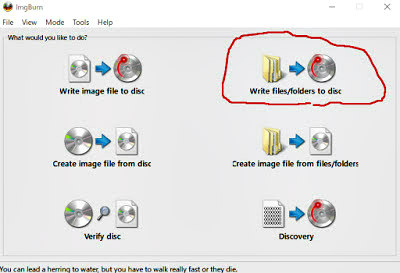
- Download and install ImgBurn from the link below and start it:
- Write files / folders to disc:
PS4 DualShock 4 (DS4) Controller USB-C Circuit Board Mod by Marius Heier
Proceeding the PS4 SAA / SAB HDMI Patch PCB for DIY (Do-It-Yourself) PlayStation 4 console modders, those seeking to modify their current DualShock 4 USB-Micro Circuit Board upgrading the PS4's DS4 Controller to the new industry standard USB-C type can now do so for around $20 thanks to Marius Heier of MariusHeier.com (mariusheier on Twitter) noting some plastic from the controller needs to be removed with a rotary tool such as a Dremel to fit the bigger connector. 
To begin, locate the JDS number for your controller on the bottom of the USB-micro circuit board following the instructions linked below... only the JDS-55 / JDS-50 version is currently available for the PS4Scene, with the JDS-001, JDS-011, JDS-030 and JDS-040 coming from @MariusHeier soon:
Then check-out on the webshop page above, or from his TinDie.com or Lectronz.com pages.
Why did you make it?
For some reason, Sony doesn't want to add the USB-C connector to the PS4 controller. The USB-C connector has been here for many years now.
The original usb-micro connector that comes with the PS4 controller does not last very long. So I made a circuit board that has a USB-C connector. I published a video about this on my YouTube channel and I got a lot of requests from people who wanted to buy it.
I developed a custom open-source version of the board that was possible to order directly from JLCPCB. However, this requires you to buy a minimum of 5 boards. Many people wanted just one. And my original idea was to just provide people with designs and not finished hardware. However, I'm changing that with this Tindie store. Link to my open-source version here:
To begin, locate the JDS number for your controller on the bottom of the USB-micro circuit board following the instructions linked below... only the JDS-55 / JDS-50 version is currently available for the PS4Scene, with the JDS-001, JDS-011, JDS-030 and JDS-040 coming from @MariusHeier soon:
Then check-out on the webshop page above, or from his TinDie.com or Lectronz.com pages.
Why did you make it?
For some reason, Sony doesn't want to add the USB-C connector to the PS4 controller. The USB-C connector has been here for many years now.
The original usb-micro connector that comes with the PS4 controller does not last very long. So I made a circuit board that has a USB-C connector. I published a video about this on my YouTube channel and I got a lot of requests from people who wanted to buy it.
I developed a custom open-source version of the board that was possible to order directly from JLCPCB. However, this requires you to buy a minimum of 5 boards. Many people wanted just one. And my original idea was to just provide people with designs and not finished hardware. However, I'm changing that with this Tindie store. Link to my open-source version here:
PS3 Scorpion Menu by RF0oDxM0Dz Now Free on RDROysters.com
Following his free PS4 RDR2 Oysters Mod Menu v1.3.6, this weekend developer @RF0oDxM0Dz announced via Twitter that his PS3 Scorpion (SPRX) GTA V 1.27 (BLES Only) Mod Menu is now available for free on RDROysters.com for those in the PS3Scene that would like to check it out! 
Download: ScorpionMenuV3.0.8-[CEX-DEX-HEN][FREE].7z (43.9 MB)
Here's some additional details from RDROysters.com alongside a demonstration video below courtesy of @LushModz (Twitter) via his YouTube Channel: Scorpion Menu | Info
Current Version: v3.0.8
Supported:
How to Install:
(FOR HEN USERS)
PS3 NEW GTA 5 SCORPION BETA v2.0 SPRX MOD MENU - Dex/Cex/Hen/Cfw + BEST MODDER PROTECTION!
PS3 GTA IV SPRX Orbit Mod Menu v1.2 - Showcase
...
Download: ScorpionMenuV3.0.8-[CEX-DEX-HEN][FREE].7z (43.9 MB)
Here's some additional details from RDROysters.com alongside a demonstration video below courtesy of @LushModz (Twitter) via his YouTube Channel: Scorpion Menu | Info
Current Version: v3.0.8
Supported:
- CEX
- DEX
- HEN
- 1.27 (BLES Only)
How to Install:
- Transfer the "EBOOT.BIN" to path "/dev_hdd0/game/BLES01807/USRDIR" on your PS3
- Transfer "ScorpionData" folder to path "/dev_hdd0/tmp" on your PS3 (This folder must be replaced in every update)
- Transfer your "Scorpion.sprx" to path "/dev_hdd0/tmp" on your PS3
(FOR HEN USERS)
- If you use HEN firmware you should know what type of your Game PSN or Backup.
- PSN game is installed by PKG file and the game appears on a XMB screen.
- Backup Game is copied game and you can startup the game from Multiman or Webman.
- Hold on (Left + X)
PS3 NEW GTA 5 SCORPION BETA v2.0 SPRX MOD MENU - Dex/Cex/Hen/Cfw + BEST MODDER PROTECTION!
PS3 GTA IV SPRX Orbit Mod Menu v1.2 - Showcase
...
PS4 Hacking 9.03-9.04: BD-JB Blu-ray Disc Java Sandbox Escape by TheFloW!
While confirmed working by hacker theflow0 on PlayStation 4 consoles below 9.50 PS4 Firmware in addition to today's PS5 Hacking 4.51 (and Under), since the pOOBs4 PS4 Jailbreak 9.00 Exploit is already released much of the focus will be on PS4 Firmware 9.03 and PS4 Firmware 9.04 consoles for this latest BD-JB Blu-ray Disc Java Sandbox Escape unveiled at the HardWear.io Conference 2022 (Official Site) that does NOT allow PS4 Game Backups burned on Blu-ray Disc to be ran without a kernel exploit due to JIT capabilities being present... later clarifying, "because we don't have enough RAM in the BD-J process and there are some other constraints. It was only a theoretical impact." 
Download: 2022-hardwear-io-bd-jb.pdf (444 KB)
The current system software is 9.60 PS4 Firmware, and according to the Tweets below Andy Nguyen's talk video will be uploaded in a few weeks... until then those in the PS4Scene can check out the latest PlayStation Hacktivity disclosure from...
Download: 2022-hardwear-io-bd-jb.pdf (444 KB)
The current system software is 9.60 PS4 Firmware, and according to the Tweets below Andy Nguyen's talk video will be uploaded in a few weeks... until then those in the PS4Scene can check out the latest PlayStation Hacktivity disclosure from...
- PS4 Fake PKG (FPKG) Sharing Guide
- 6.XX Webkit / 6.72 PS4 Jailbreak
- 7.00-7.02 Webkit Exploit
- 7.02 Webkit / 7.02 Kernel / PS4JB
- 7.50 Kernel Exploit / PS4JB 7.55
- 7.55 / 8.00 Payloads / PS4JB2 7.55
- 9.00 PS4 Webkit Exploit
- 9.00 PS4 Payloads / GoldHEN (Latest)
- 9.00 PS4 Jailbreak Kernel Exploit
- 11.00 PS4 Jailbreak Kernel Exploit
- 13.00 PS4 Kernel Exploit / 13.02 BD-J Bug
- 4.03 PS5 Webkit Exploit
- PS5 Kernel Exploit (ExFAT Bug)
- PS5 Root Keys Obtained
- 4.03 PS5 Kernel Build String
- 4.03 PS5 Webkit Execution
- 4.03 PS5 Kernel Vulnerability
- 4.03 PS5 Filesystem Dumps
- 4.51 PS5 BD-JB Sandbox Escape
- PS5 BD-JB Exploit Hack Source Code
- Mast1c0re PS5 Userland Exploit
- PS5 Kernel Access via PS4 Exploit
- PS5 exFAT Vulnerability Disclosed
- 4.03 PS5 Kernel Exploit Webkit ROP
- 4.50 PS5 Kernel Exploit Webkit ROP
- 4.51 PS5 Kernel Exploit Webkit ROP
- 4.xx PS5 Kernel Exploit v1.01
- 4.xx PS5 Kernel Exploit v1.02 / v1.03
- PS5 1.00-6.50 Firmware Webkit
- Native PS5 ROP Chain Execution
- Mast1c0re PS5 Compiler Attack
- PS5 FreeBSD Kernel Bug & WebKit
- PS5 UMTX 2 Exploit & PS5 Jailbreak
- Byepervisor PS5 Hypervisor Exploit
- Lua Lapse PS5 Kxploit & Laps3c0re / Y2JB
- 12.00 / 12.70 PS5 Kernel Exploit