Category PS4 Jailbreaking       Thread starter Thread starter stooged       Date / timeStart date Feb 11, 2018 at 7:08 AM       Replies 323      
Status
Not open for further replies.
Following the PS4HEN on Android Phone tutorial and my recent PS4HEN on Wifi USB Drive guide, I put together an Android app to host the PlayStation 4 exploit and payloads.

You have to setup a wifi hotspot with your phone/tablet and connect the PS4 to that hotspot or connect the phone/tablet to the same network the PS4 is on.

Then install the app and open it and at the top will be the address you need to connect to with the PS4.

Your device might ask you about installing an application from "unknown sources" this is ok to allow, it just means its not coming from Google Play.

You just select the payload you want to run in the app and then use the PS4 to goto the address that you see in the app.

To change the payload just select it in the app and then use the ps4 to revisit/refresh the address again.

Download: Ps4_Serve_v1_8.apk (1.8 MB - Changes) / PS4_Serve GIT

Spoiler: Depreciated

The payloads used are:
Thanks again @XVortex and a picture of the app:
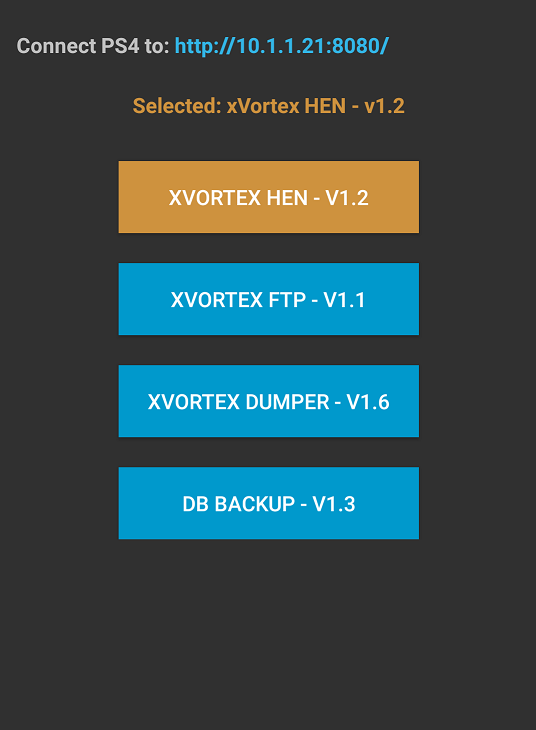
Android App to Host PS4 Exploit and Payloads by Stooged.png
 

Comments

@stooged I still haven't been able to get the web browser to work. followed two dif guides and when i get back to the web browser i still get error. I setup the pc to the ps4 installed the latest pythin ran the ps4 exploit host.exe -->DNS server thread is running. PS4 setup the wifi go to setting-userguideexpolit page shows selected xvortex hen...it ran (can see debug settings). then tried the spector it said it ran. back out and to web browser - error trying to connect to psn?

SO tired local ip address- server running. on ps4 -settings-userguide-clicked the spector-->waiting for payload. back to pc-ran NETCAT-put in ps4 ip addy- changed port to 9020--put in enablebrowser405.bin--hit inject payload--DONE!. back to PS4 go to ps4 web browser same thing..error connecting to psn blah blah? Really starting to get me mad :( I CAN'T unlock the browser??
 
All you should need to do to unlock the www is download the exploit host by al-azif

https://github.com/Al-Azif/ps4-exploit-host

Then get the enablebrowser405.bin and paste it into the payloads folder of the al-azif exploit host.

Then setup the ps4 and dns to connect to your pc and run exploit host then goto ps4 settings then user guide.
Select idc exploit and once that loads goto pc and select the payload to send in the exploit host > "enablebrowser405"

Once thats done www should work.

If it still dont work then something is different on your ps4 to other ps4s and www might not work at all
 
What I did and work perfectly. Wifi hotspot on phone, opened the app, selected hen. On PS4, wifi, custom wifi setup, connect on phone's ssid, everything else automatic. Opened the browser, got an error can't display page. Then I pressed the options button, new window, went to the ip the app says and after a while got the error and welcome to hen message. It's quite simple.
 
I'll try again tonight when i get home from work. @stooged - yep that's what i did except i selected the spector NOT IDC - maybe it has to be the IDC you select? But ya those are the steps i used and i also tired with the NETCAT (which also showed DONE!) but when going to the web browser i get the error. @dkmaster7 i can't use the phone method yet as @stooged said the pc to ps4 has to be run one time first in order to patch the webpage??!
 
I probably misunderstood stooged with the "must apply web patch one time" thinking i had to use the pc to do that? Either way I will try again tonight when I get home. I have terabytes of games just waiting :)
 
I have problem....

Everything was working on the first try, but now, when i open browser, and try to run payload from phone i get an error:

Bad leak! Terminating

And of course, hen dont work.

Closed apk on phone, tried again and it worked, but why the error?

Idea was to use old phone, with non stop hotspot and apk always running. Or this is not possible?
 
Dont pay attention to what other people say they did or didnt have to do.

Its simple if you open the www and it asks you to sign into psn it means a registry flag has to be changed in the ps4 and you do that by loading enablebrowser405.bin

The www is not going to work until you run that payload.
 
@stripnwild I don't say you misunderstood stooged. I just say what I did and it actually worked. I just did what is described in the first post from stooged, so no I didn't use enablebrowser. I was on 4.01 and then updated to 4.05 and immediately used the application for android and used only xvortex hen. I am just mentioning all this in order to help understand the nature of your problem. Maybe sth can trigger stooged to help you even more. I am not playing smartass really.
 
Status
Not open for further replies.
Back
Top