PSXHAX.COM website and domain for sale. Contact Us with your offer!

You are using an out of date browser. It may not display this or other websites correctly.
You should upgrade or use an alternative browser.
You should upgrade or use an alternative browser.


History Blocker Payload for Exploited PS4 Web Browser by Stooged
Following my ApplicationCache.db release, this is just a simple payload to enable or disable the auto loading of the last page used in the PS4 webbrowser when you open it.
To toggle the enable or disable state just run the payload again and it will turn it on or off.
History Block: Enabled
To toggle the enable or disable state just run the payload again and it will turn it on or off.
History Block: Enabled
- when enabled the browser will not auto load the last page used when you open it.
- the browser will show the Frequently Used Pages tab instead
- when disabled the browser will operate normally and auto load the last used page.
- History-Blocker (History_Blocker.bin or History_Blocker.html)
Offline Cache (ApplicationCache.db) Install Payload to PS4
Following my previous update, I have created a payload to install the ApplicationCache.db for hosting offline PS4 exploits.
Download: Cache_Install.zip / Cache_Install_html.zip / Source Code (GIT) / 9.00 Port fork by kmeps4
The payload contains a basic set of exploits for anyone that just wants a simple set of exploits.. just run the payload then go to http://cache/index.html or the user guide. If you delete the browser data just run the payload again and it will reinstall the basic exploits.
You don't need to disable the network connection so the ftp payload will still work.
The DB_SG_Backup payload also backs up the cache db, if you already have a offline cache setup you can back that up.
If you delete the browser data you can put the ApplicationCache.db file from the backup on the root of a usb drive and reinstall it using this payload.
For anyone that is looking to make their own db file I have included the SQL File to create a db using DB Browser.
Just modify the sql to suit your needs and create a new database in DB Browser called ApplicationCache.db and execute the sql and save.. you can put the ApplicationCache.db on the root of a usb drive and run the install payload to install it.
If you want to modify the payload to contain your version of the db file just encode your db file with base64 and put the data into the ApplicationCache.h file of the source and compile.
Inbuilt (basic) exploits:
How to Cache PS4 Jailbreak Payloads on Firmware 5.05 or Lower Offline Tutorial
Download: Cache_Install.zip / Cache_Install_html.zip / Source Code (GIT) / 9.00 Port fork by kmeps4
The payload contains a basic set of exploits for anyone that just wants a simple set of exploits.. just run the payload then go to http://cache/index.html or the user guide. If you delete the browser data just run the payload again and it will reinstall the basic exploits.
You don't need to disable the network connection so the ftp payload will still work.
The DB_SG_Backup payload also backs up the cache db, if you already have a offline cache setup you can back that up.
If you delete the browser data you can put the ApplicationCache.db file from the backup on the root of a usb drive and reinstall it using this payload.
For anyone that is looking to make their own db file I have included the SQL File to create a db using DB Browser.
Just modify the sql to suit your needs and create a new database in DB Browser called ApplicationCache.db and execute the sql and save.. you can put the ApplicationCache.db on the root of a usb drive and run the install payload to install it.
If you want to modify the payload to contain your version of the db file just encode your db file with base64 and put the data into the ApplicationCache.h file of the source and compile.
Inbuilt (basic) exploits:
How to Cache PS4 Jailbreak Payloads on Firmware 5.05 or Lower Offline Tutorial
PS4 Internal Webserver Project for ESP8266 D1 Mini by Stooged
Yes its another esp8266 project 
I made this for my own personal use but I will post it for other people to use too.
This is a project designed for the esp8266 D1 Mini to be installed inside the console much like a modchip but to provide a wifi http server and dns server.
The D1 Mini is perfect for this project because it is only 34mm x 25mm in size and can operate off 5v using the 5v pin onboard so the usb connection is not needed and the ps4 has 5v solder points.
The firmware is updatable via http and the exploit files can be managed via http so the esp8266 board once installed never needs to be accessed again.
This is designed to use the 5.05 exploit and payloads in a single html file format like ApptoUsb.html
I would not call this a modchip but its the closest thing we have right now to having a totally self contained method for the PS4 to launch mirafw and the payloads.
Implemented Internal Pages
The User's Guide in the ps4 settings menu will be redirected to the main index.html
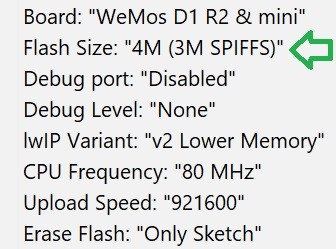
Installation is simple you just use the arduino ide to flash the sketch/firmware to the esp8266 board.
Make sure you set the flash size to 4M (3M SPIFFS)
I made this for my own personal use but I will post it for other people to use too.
This is a project designed for the esp8266 D1 Mini to be installed inside the console much like a modchip but to provide a wifi http server and dns server.
The D1 Mini is perfect for this project because it is only 34mm x 25mm in size and can operate off 5v using the 5v pin onboard so the usb connection is not needed and the ps4 has 5v solder points.
The firmware is updatable via http and the exploit files can be managed via http so the esp8266 board once installed never needs to be accessed again.
This is designed to use the 5.05 exploit and payloads in a single html file format like ApptoUsb.html
I would not call this a modchip but its the closest thing we have right now to having a totally self contained method for the PS4 to launch mirafw and the payloads.
Implemented Internal Pages
- admin.html - the main landing page for administration.
- index.html - if no index.html is found the server will generate a simple index page and list the payloads automatically.
- info.html - provides information about the esp board.
- format.html - used to format the internal storage(SPIFFS) of the esp board.
- upload.html - used to upload files(html) to the esp board for the webserver.
- update.html - used to update the firmware on the esp board (fwupdate.bin).
- fileman.html - used to view / download / delete files on the internal storage of the esp board.
- config.html - used to configure wifi ap and ip settings.
The User's Guide in the ps4 settings menu will be redirected to the main index.html
Installation is simple you just use the arduino ide to flash the sketch/firmware to the esp8266 board.
Make sure you set the flash size to 4M (3M SPIFFS)
- Next you connect to the wifi...
BIN2HTML: Convert .BIN Into Index.html for 5.05 Exploit and Payloads Guide
I have had a few people asking about converting payloads to .js so I will post this here.
With 5.05 we don't need to use payload.js anymore you can just make a single .html file with the exploit and payload in a single file, thank you to @XVortex you will notice this on his PS4 HEN GitHub inside the exploit folder.
I put together this .py file that you can use to convert a .bin into index.html
bin2html.py [binfile]
example:
bin2html.py AppToUsb.bin
With 5.05 we don't need to use payload.js anymore you can just make a single .html file with the exploit and payload in a single file, thank you to @XVortex you will notice this on his PS4 HEN GitHub inside the exploit folder.
I put together this .py file that you can use to convert a .bin into index.html
- bin2html.zip / bin2html.zip (GIT) by iCyb3r (aka Cyb3rr) / Bin2HtmlGui by Riccardo82 (GUI to create Payload in HTML format from BIN files) / bin2html.zip (Latest Version) / GIT / BIN2HTML for 9.00
bin2html.py [binfile]
example:
bin2html.py AppToUsb.bin
Android App to Host PS4 5.05 Exploit and Payloads by Stooged
This is an update to my Android app to host the PS4 5.0X exploit and payloads.
This initial release just contains the 3 main payloads.
To use it you have to setup a wifi hotspot with your phone/tablet and connect the PS4 to that hotspot or connect the phone/tablet to the same network the PS4 is on.
Then install the app and open it and at the top will be the address you need to connect to with the PS4.
Your device might ask you about installing an application from "unknown sources" this is ok to allow, it just means its not coming from Google Play.
You just select the payload you want to run in the app and then use the PS4 to goto the address that you see in the app.
To change the payload just select it in the app and then use the ps4 to revisit/refresh the address again.
you can add more payloads to the app you just plug your phone into your computer and copy any payload BIN file you like into the PS4_50X_Payloads directory.
you will get one "There is not enough free system memory" because that's how this exploit works, just click ok and the page should reload and load the selected payload.
Download:
ps4_serve3_v2_3.zip / GIT
Spoiler: Depreciated
This initial release just contains the 3 main payloads.
To use it you have to setup a wifi hotspot with your phone/tablet and connect the PS4 to that hotspot or connect the phone/tablet to the same network the PS4 is on.
Then install the app and open it and at the top will be the address you need to connect to with the PS4.
Your device might ask you about installing an application from "unknown sources" this is ok to allow, it just means its not coming from Google Play.
You just select the payload you want to run in the app and then use the PS4 to goto the address that you see in the app.
To change the payload just select it in the app and then use the ps4 to revisit/refresh the address again.
you can add more payloads to the app you just plug your phone into your computer and copy any payload BIN file you like into the PS4_50X_Payloads directory.
you will get one "There is not enough free system memory" because that's how this exploit works, just click ok and the page should reload and load the selected payload.
Download:
ps4_serve3_v2_3.zip / GIT
Spoiler: Depreciated
- PS4 Fake PKG (FPKG) Sharing Guide
- 6.XX Webkit / 6.72 PS4 Jailbreak
- 7.00-7.02 Webkit Exploit
- 7.02 Webkit / 7.02 Kernel / PS4JB
- 7.50 Kernel Exploit / PS4JB 7.55
- 7.55 / 8.00 Payloads / PS4JB2 7.55
- 9.00 PS4 Webkit Exploit
- 9.00 PS4 Payloads / GoldHEN (Latest)
- 9.00 PS4 Jailbreak Kernel Exploit
- 11.00 PS4 Jailbreak Kernel Exploit
- 13.00 PS4 Kernel Exploit / 13.02 BD-J Bug
- 4.03 PS5 Webkit Exploit
- PS5 Kernel Exploit (ExFAT Bug)
- PS5 Root Keys Obtained
- 4.03 PS5 Kernel Build String
- 4.03 PS5 Webkit Execution
- 4.03 PS5 Kernel Vulnerability
- 4.03 PS5 Filesystem Dumps
- 4.51 PS5 BD-JB Sandbox Escape
- PS5 BD-JB Exploit Hack Source Code
- Mast1c0re PS5 Userland Exploit
- PS5 Kernel Access via PS4 Exploit
- PS5 exFAT Vulnerability Disclosed
- 4.03 PS5 Kernel Exploit Webkit ROP
- 4.50 PS5 Kernel Exploit Webkit ROP
- 4.51 PS5 Kernel Exploit Webkit ROP
- 4.xx PS5 Kernel Exploit v1.01
- 4.xx PS5 Kernel Exploit v1.02 / v1.03
- PS5 1.00-6.50 Firmware Webkit
- Native PS5 ROP Chain Execution
- Mast1c0re PS5 Compiler Attack
- PS5 FreeBSD Kernel Bug & WebKit
- PS5 UMTX 2 Exploit & PS5 Jailbreak
- Byepervisor PS5 Hypervisor Exploit
- Lua Lapse PS5 Kxploit & Laps3c0re / Y2JB
- 12.00 / 12.70 PS5 Kernel Exploit