PSXHAX.COM website and domain for sale. Contact Us with your offer!

You are using an out of date browser. It may not display this or other websites correctly.
You should upgrade or use an alternative browser.
You should upgrade or use an alternative browser.


ESP8266 Server From SD Card for PS4 4.55 Payloads by Stooged
I managed to get some time to goto my local Jaycar store and pickup some ESP8266 boards and some SD breakout boards.
I have put together a small example of a webserver with the files hosted off a SD card. Using an SD card allows you to update the payloads without needing to flash the ESP board and it allows you to have more than around 4MB of files because the ESP boards have a low amount of storage memory. It also has a DNS server built in so you can use it via the user guide on the PS4.
You can also configure the webserver and wifi access point from a file on the SD card with CONFIG.INI.
The Arduino SD library is limited to 8:3 file name format which means all the file names must be 8 characters or less and the file extension must be 3 characters or less, this would be the limit FILENAME.TXT
 Make sure you use a SD card that is formatted to fat or fat32.
On my board (d1 mini compatible) the following pins are used with the SD breakout board
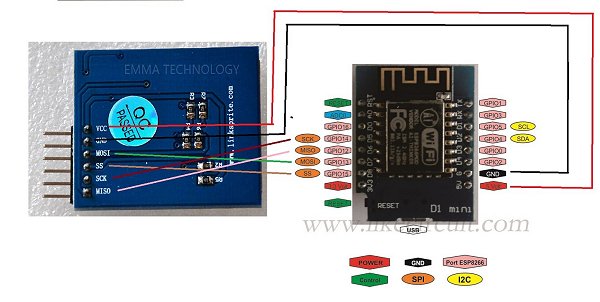
You can find datasheets online for all the different types of boards so you should be able to find the pins you need to connect to.
The ino sketch and SD files are here: https://github.com/stooged/ESP-Server
@pearlxcore has a guide here on how to program the ESP8266 board using the Arduino ide.
I might look at opening up one of my PS4s and installing it inside the PS4 and soldering it in because it is pretty small.
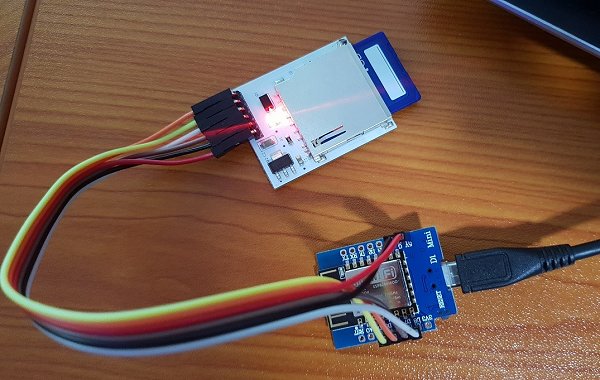
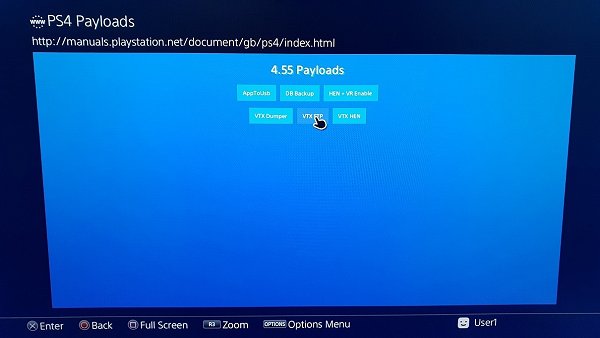
I have put together a small example of a webserver with the files hosted off a SD card. Using an SD card allows you to update the payloads without needing to flash the ESP board and it allows you to have more than around 4MB of files because the ESP boards have a low amount of storage memory. It also has a DNS server built in so you can use it via the user guide on the PS4.
You can also configure the webserver and wifi access point from a file on the SD card with CONFIG.INI.
The Arduino SD library is limited to 8:3 file name format which means all the file names must be 8 characters or less and the file extension must be 3 characters or less, this would be the limit FILENAME.TXT
Make sure you use a SD card that is formatted to fat or fat32.On my board (d1 mini compatible) the following pins are used with the SD breakout board
- D5 = SCK
- D6 = MISO
- D7 = MOSI
- D8 = SS
You can find datasheets online for all the different types of boards so you should be able to find the pins you need to connect to.
The ino sketch and SD files are here: https://github.com/stooged/ESP-Server
@pearlxcore has a guide here on how to program the ESP8266 board using the Arduino ide.
I might look at opening up one of my PS4s and installing it inside the PS4 and soldering it in because it is pretty small.
App2USB / AppToUSB by Stooged: A Modification of PKG2USB for PS4
I will post this as a separate thread from the PS4 PKG2USB as the 2 payloads vary and it saves confusion.
Original Post: I was playing around with the ext0 mount and recreating the file structure that would be there if the pkg was installed to external storage.
There is a trick I found where if you copy the CUSAXXXXX folder from /user/app to /mnt/ext0/user/app and then unplug the hdd and plug it back in it causes the ps4 to do a repair and then the game is recognized as installed on external storage and from there there are other issues.
BUT with the great work SiSTRo has done in PKG2USB with the symlinks its a lot easier to manage with exfat and just normal USB.
So building on his PKG2USB and symlinks I modified what I was working on for the ext0 mount to work with the usb0 or usb1 and symlinks.
Downloads:
 Changlog via dbsuarez
This payload searches the entire /user/app folder and copies all installed fpkg games to usb from the system drive and creates the symlinks like SiSTRo has kindly shown us the ability to do.
If you want to target a single game not the whole folder use PKG2USB.
If you install more games just run the payload again and it will copy any new games to the USB and so on.
With symlinks you are making a link to a directory so you want to pick which USB port to...
Original Post: I was playing around with the ext0 mount and recreating the file structure that would be there if the pkg was installed to external storage.
There is a trick I found where if you copy the CUSAXXXXX folder from /user/app to /mnt/ext0/user/app and then unplug the hdd and plug it back in it causes the ps4 to do a repair and then the game is recognized as installed on external storage and from there there are other issues.
BUT with the great work SiSTRo has done in PKG2USB with the symlinks its a lot easier to manage with exfat and just normal USB.
So building on his PKG2USB and symlinks I modified what I was working on for the ext0 mount to work with the usb0 or usb1 and symlinks.
Downloads:
- 455 Source GIT
- 405 Source GIT
- AppToUsb 5.05 (Latest Release)
- AppToUsb 4.55 (Latest Release)
- AppToUsb 4.05 (Latest Release)
- PS4 App2USB (Scene Collective)
Changlog via dbsuarezThis payload searches the entire /user/app folder and copies all installed fpkg games to usb from the system drive and creates the symlinks like SiSTRo has kindly shown us the ability to do.
If you want to target a single game not the whole folder use PKG2USB.
If you install more games just run the payload again and it will copy any new games to the USB and so on.
With symlinks you are making a link to a directory so you want to pick which USB port to...
Android App to Host PS4 4.55 Exploit and Payloads by Stooged
Following my previous release, I put together an Android app to host the 4.55 exploit and payloads.
You have to setup a wifi hotspot with your phone/tablet and connect the PS4 to that hotspot or connect the phone/tablet to the same network the PS4 is on.
Then install the app and open it and at the top will be the address you need to connect to with the PS4.
Your device might ask you about installing an application from "unknown sources" this is ok to allow, it just means its not coming from Google Play.
You just select the payload you want to run in the app and then use the PS4 to goto the address that you see in the app.
To change the payload just select it in the app and then use the ps4 to revisit/refresh the address again.
you can add more payloads to the app you just plug your phone into your computer and copy any payload BIN file you like into the PS4_455_Payloads directory.
Right now the 4.55 exploit and hen payload are really unstable and you will have to try loading it again and again until the exploit works and payload injects properly.
You will get a lot of "There is not enough free system memory" errors, just select ok and keep trying
Once you fight it enough the payload will work and you will be able to install and play pkg games.
Download: Ps4_Serve2_v2_0.apk (1.8 MB - Changes)
Spoiler: Depreciated
You have to setup a wifi hotspot with your phone/tablet and connect the PS4 to that hotspot or connect the phone/tablet to the same network the PS4 is on.
Then install the app and open it and at the top will be the address you need to connect to with the PS4.
Your device might ask you about installing an application from "unknown sources" this is ok to allow, it just means its not coming from Google Play.
You just select the payload you want to run in the app and then use the PS4 to goto the address that you see in the app.
To change the payload just select it in the app and then use the ps4 to revisit/refresh the address again.
you can add more payloads to the app you just plug your phone into your computer and copy any payload BIN file you like into the PS4_455_Payloads directory.
Right now the 4.55 exploit and hen payload are really unstable and you will have to try loading it again and again until the exploit works and payload injects properly.
You will get a lot of "There is not enough free system memory" errors, just select ok and keep trying
Once you fight it enough the payload will work and you will be able to install and play pkg games.
Download: Ps4_Serve2_v2_0.apk (1.8 MB - Changes)
Spoiler: Depreciated
PS4 HEN Enable Updated PlayStation VR Payload with Source Code
I have been messing around with trying to get my VR headset to work with 4.05 for a little while, and because the VR headset is updated to the latest firmware it wouldn't work.
Just recently @XVortex pointed out you can poke a memory value to sort of spoof the system firmware version, so I tried what he said and put together a Enable_VR.bin payload (load the HEN payload and then load the VR payload because the Web exploit will say invalid import map, or use this idc.zip modified IDC exploit to launch it as I have added the 5.05 sections so it does not complain about import map) to poke the offset and found it allowed my VR headset to work.
Update: Ok I sorted out the problem and merged the enable VR mod into XVortex's HEN 1.3 so you can now just run this 1 HEN payload and play VR with the source code below:
Download: ps4-hen-VR.zip (0.01 MB) / ps4-hen-VR.tar.gz (0.05 MB - Source Code) / usb_hen_vr.zip (0.03 MB - for USB Stick) / Ps4_Serve_v1_8.apk / Enable_VR_455.zip / usb_455_vr_enable.zip (0.02 MB) / ps4-hen-VR.zip (0.01 MB) / Enable-VR-50X
I only have 1 VR game to test on at the moment as I have to download the VR games now, but it is Resident Evil 7 and its working with my latest updated VR 3.10 and 4.05 + HEN.
Huge thanks to @XVortex, as you can see this is my VR information:
And this is the game running on VR:
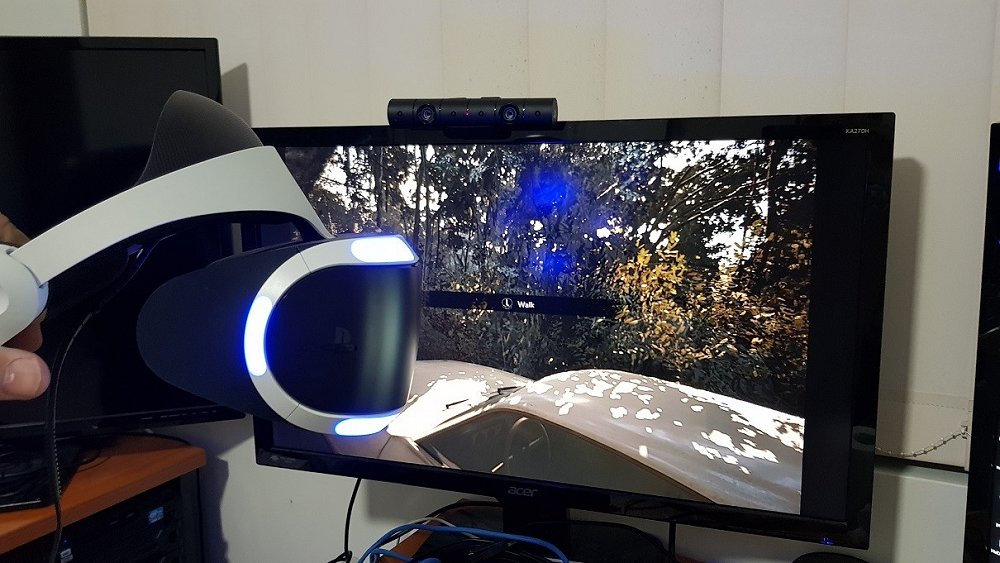
Tested a few more VR...
Just recently @XVortex pointed out you can poke a memory value to sort of spoof the system firmware version, so I tried what he said and put together a Enable_VR.bin payload (load the HEN payload and then load the VR payload because the Web exploit will say invalid import map, or use this idc.zip modified IDC exploit to launch it as I have added the 5.05 sections so it does not complain about import map) to poke the offset and found it allowed my VR headset to work.
Update: Ok I sorted out the problem and merged the enable VR mod into XVortex's HEN 1.3 so you can now just run this 1 HEN payload and play VR with the source code below:Download: ps4-hen-VR.zip (0.01 MB) / ps4-hen-VR.tar.gz (0.05 MB - Source Code) / usb_hen_vr.zip (0.03 MB - for USB Stick) / Ps4_Serve_v1_8.apk / Enable_VR_455.zip / usb_455_vr_enable.zip (0.02 MB) / ps4-hen-VR.zip (0.01 MB) / Enable-VR-50X
I only have 1 VR game to test on at the moment as I have to download the VR games now, but it is Resident Evil 7 and its working with my latest updated VR 3.10 and 4.05 + HEN.
Huge thanks to @XVortex, as you can see this is my VR information:
And this is the game running on VR:
Tested a few more VR...
Android App to Host PS4 Exploit and Payloads by Stooged
Following the PS4HEN on Android Phone tutorial and my recent PS4HEN on Wifi USB Drive guide, I put together an Android app to host the PlayStation 4 exploit and payloads.
You have to setup a wifi hotspot with your phone/tablet and connect the PS4 to that hotspot or connect the phone/tablet to the same network the PS4 is on.
Then install the app and open it and at the top will be the address you need to connect to with the PS4.
Your device might ask you about installing an application from "unknown sources" this is ok to allow, it just means its not coming from Google Play.
You just select the payload you want to run in the app and then use the PS4 to goto the address that you see in the app.
To change the payload just select it in the app and then use the ps4 to revisit/refresh the address again.
Download: Ps4_Serve_v1_8.apk (1.8 MB - Changes) / PS4_Serve GIT
Spoiler: Depreciated
You have to setup a wifi hotspot with your phone/tablet and connect the PS4 to that hotspot or connect the phone/tablet to the same network the PS4 is on.
Then install the app and open it and at the top will be the address you need to connect to with the PS4.
Your device might ask you about installing an application from "unknown sources" this is ok to allow, it just means its not coming from Google Play.
You just select the payload you want to run in the app and then use the PS4 to goto the address that you see in the app.
To change the payload just select it in the app and then use the ps4 to revisit/refresh the address again.
Download: Ps4_Serve_v1_8.apk (1.8 MB - Changes) / PS4_Serve GIT
Spoiler: Depreciated
- PS4 Fake PKG (FPKG) Sharing Guide
- 6.XX Webkit / 6.72 PS4 Jailbreak
- 7.00-7.02 Webkit Exploit
- 7.02 Webkit / 7.02 Kernel / PS4JB
- 7.50 Kernel Exploit / PS4JB 7.55
- 7.55 / 8.00 Payloads / PS4JB2 7.55
- 9.00 PS4 Webkit Exploit
- 9.00 PS4 Payloads / GoldHEN (Latest)
- 9.00 PS4 Jailbreak Kernel Exploit
- 11.00 PS4 Jailbreak Kernel Exploit
- 13.00 PS4 Kernel Exploit / 13.02 BD-J Bug
- 4.03 PS5 Webkit Exploit
- PS5 Kernel Exploit (ExFAT Bug)
- PS5 Root Keys Obtained
- 4.03 PS5 Kernel Build String
- 4.03 PS5 Webkit Execution
- 4.03 PS5 Kernel Vulnerability
- 4.03 PS5 Filesystem Dumps
- 4.51 PS5 BD-JB Sandbox Escape
- PS5 BD-JB Exploit Hack Source Code
- Mast1c0re PS5 Userland Exploit
- PS5 Kernel Access via PS4 Exploit
- PS5 exFAT Vulnerability Disclosed
- 4.03 PS5 Kernel Exploit Webkit ROP
- 4.50 PS5 Kernel Exploit Webkit ROP
- 4.51 PS5 Kernel Exploit Webkit ROP
- 4.xx PS5 Kernel Exploit v1.01
- 4.xx PS5 Kernel Exploit v1.02 / v1.03
- PS5 1.00-6.50 Firmware Webkit
- Native PS5 ROP Chain Execution
- Mast1c0re PS5 Compiler Attack
- PS5 FreeBSD Kernel Bug & WebKit
- PS5 UMTX 2 Exploit & PS5 Jailbreak
- Byepervisor PS5 Hypervisor Exploit
- Lua Lapse PS5 Kxploit & Laps3c0re / Y2JB
- 12.00 / 12.70 PS5 Kernel Exploit