
You are using an out of date browser. It may not display this or other websites correctly.
You should upgrade or use an alternative browser.
You should upgrade or use an alternative browser.
Medieval Savage


Medieval Savage
When the biblical stories were written
They left out the one they call Lord Infamous
Because the Horror he possess was one of a magnificence
He was set to be Lucifer's only Mortal kin
And he was set to lead the world into unholy acts of sin
The Devil fever flowin through the fire hemisphere
Evil n**** throw yo sets in da air, if you dare
They left out the one they call Lord Infamous
Because the Horror he possess was one of a magnificence
He was set to be Lucifer's only Mortal kin
And he was set to lead the world into unholy acts of sin
The Devil fever flowin through the fire hemisphere
Evil n**** throw yo sets in da air, if you dare
PS4 MK XL Modding 4.05 / 4.55 Demo Videos by GrimDoe
As we all know by now there have been a lot of great progress within the PS4 community thanks to the kernel exploits and F-PKG's and so on.... bring on the PS4 4.05 & 4.55 Fake PKG modding!
Now it's Mortal Kombat XL time to shine on the PS4
Following my MKXL Player Switch Intros (PoC) here are 2 more videos. The 1st one was just a (POC) video to show that it is possible to mod or modify the files within the PKG and rebuild it.
And the 2nd Video was a continuing of further work and possibilities.
1st Video
2nd Video
Now it's Mortal Kombat XL time to shine on the PS4
Following my MKXL Player Switch Intros (PoC) here are 2 more videos. The 1st one was just a (POC) video to show that it is possible to mod or modify the files within the PKG and rebuild it.
And the 2nd Video was a continuing of further work and possibilities.
1st Video
2nd Video
MKXL Player Switch Intros (PoC) for PS4 4.05 by GrimDoe
Whats up to all of ya'll.. after my 4.05 PS4 Backgrounds and Making Fake PS2 PKGs for PS4HEN guide today I'm bringing all ya'll a Proof of Concept video from my YouTube Channel.
So this is no big news with in the MKXL PC community, BUT it is big news for us all within the PS4 jailbreaking community!
I was trying at 1st to modify files in MKXL then use FTP to transfer the newer files over, unfortunately the files would not copy over at all ?
So I decide to tackle the situation differently by building the PKG with the modify files. It was a bit more time-consuming but it works !
With that being said this technique could be applied towards other games as well. Enjoy the video !
One more thing for some reason the game black out's...
When I try to exit right out from the game it self, but if I Close the App its just fine and also if you do try any other games and you get a black screen lock/loop just (hold down the power button) I had to learn the hard way by unplugging it.
 By doing that I had to reformat it & back it up my PS4 so be careful!
So this is no big news with in the MKXL PC community, BUT it is big news for us all within the PS4 jailbreaking community!
I was trying at 1st to modify files in MKXL then use FTP to transfer the newer files over, unfortunately the files would not copy over at all ?
So I decide to tackle the situation differently by building the PKG with the modify files. It was a bit more time-consuming but it works !
With that being said this technique could be applied towards other games as well. Enjoy the video !
One more thing for some reason the game black out's...
When I try to exit right out from the game it self, but if I Close the App its just fine and also if you do try any other games and you get a black screen lock/loop just (hold down the power button) I had to learn the hard way by unplugging it.
By doing that I had to reformat it & back it up my PS4 so be careful!
QuickBMS: Making BMS Scripts Tutorial by ThatTrueStruggle
For those interested in extracting and unpacking game files, here is a great tutorial for making BMS Scripts by ThatTrueStruggle over at VG-Resource.com. 
To quote: At first glance, creating a QuickBMS script seems very difficult. However, creating them is not very difficult! Throughout this tutorial, we'll go through a sample file, figure out the format and write a QuickBMS script in order to extract the contents.
Before we start, let's get prepared:
Download a Hex Editor, and get the sample file demo_file.kyp (350 KB - Mirror) that we'll be working on in this tutorial. My personal preference is H x D Editor, it's free and very lightweight, though anyone will do
Open up your hex editor and open the kyp file.
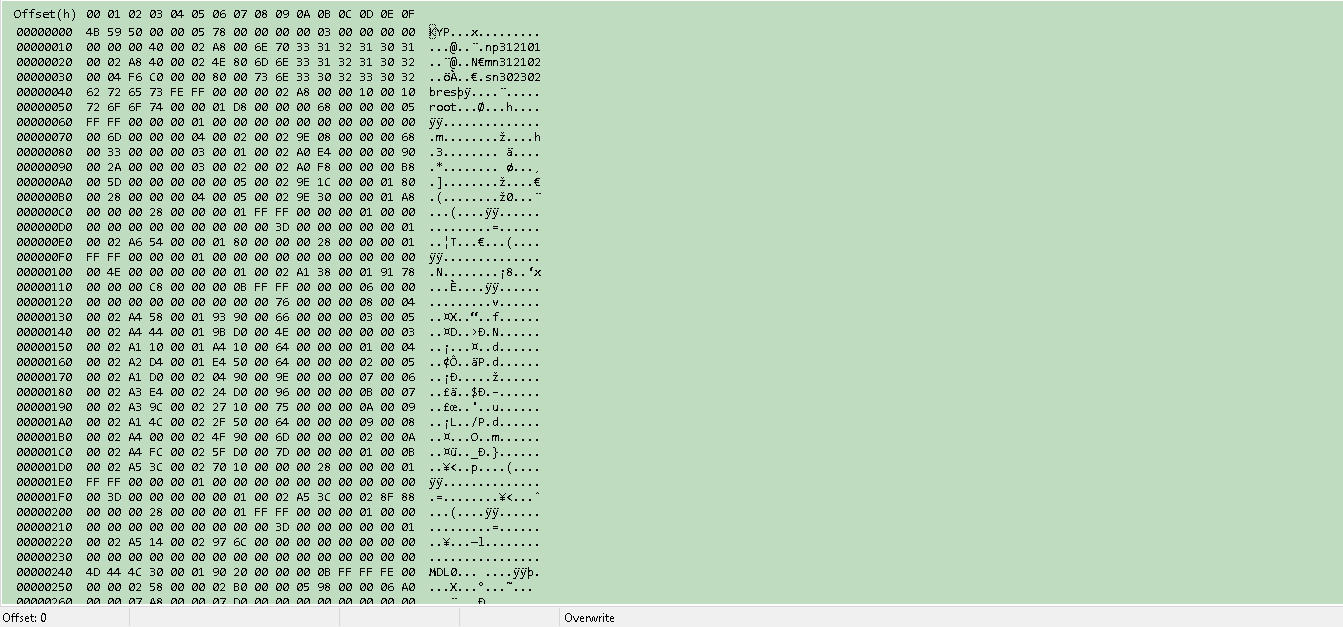
So first thing is to figure out the endianness. The endianness is the way bytes are read from the file. Take the value 0x0c80 for example. In Little Endian, this value would be read as 0x800c, so basically the value is read backwards. Big Endian is 0x0c80, so the value stays the same. So in order to figure out the endianness, there are a few ways to figure this out.
Look at the file and look for some definite values and compare.


So what we do is at the top of the script is write out the function, "endian big". This sets our script to run in Big Endianness.
endian big
Next, we need to read through the...
To quote: At first glance, creating a QuickBMS script seems very difficult. However, creating them is not very difficult! Throughout this tutorial, we'll go through a sample file, figure out the format and write a QuickBMS script in order to extract the contents.
Before we start, let's get prepared:
Download a Hex Editor, and get the sample file demo_file.kyp (350 KB - Mirror) that we'll be working on in this tutorial. My personal preference is H x D Editor, it's free and very lightweight, though anyone will do
Open up your hex editor and open the kyp file.
So first thing is to figure out the endianness. The endianness is the way bytes are read from the file. Take the value 0x0c80 for example. In Little Endian, this value would be read as 0x800c, so basically the value is read backwards. Big Endian is 0x0c80, so the value stays the same. So in order to figure out the endianness, there are a few ways to figure this out.
Look at the file and look for some definite values and compare.
- This is the method I use in order to figure out the endianness. Say I find a value that looks like a size. I can compare it to the file's actual size and see if it's correct. Or if I find a pointer to an offset, I can compare it to an actual value. If the value is reversed, then it's a Little Endian file. If it's a complete match, it's a Big Endian file.
- Guess if it's Little or Big.
I really don't recommend this, as this can lead to mistakes. I'd recommend just using the first method.
So what we do is at the top of the script is write out the function, "endian big". This sets our script to run in Big Endianness.
endian big
Next, we need to read through the...
PS4 Azura Menu / 2Much4U (GTAV Mod Menu) 1.76 Video Tutorial
Since his GTA V Simple Mod Menu and PS4 GTA V Native Caller updates, PlayStation 4 developer @2much4u has been working on Azura Menu located at AzuraMenu.com for running PS4 GTA V Menu Mods currently on 1.76 consoles.
Here's a PS4 Azura Menu GTAV Mod Menu 1.76 video tutorial from my YouTube Channel for those seeking some guidance with it!
Here's a PS4 Azura Menu GTAV Mod Menu 1.76 video tutorial from my YouTube Channel for those seeking some guidance with it!
Singularity RTM Tool Version 1.00 for PS3 CFW by Grim Doe
After my Mortal Kombat 9 RTM Tool v1.07 I have a new Real-Time Mod for PS3 CFW users, this time for Singularity version 1.00 with some PlayStation 3 demonstration videos in the SPOILER below.
SINGULARITY RTM TOOL (1.00)
Spoiler: SINGULARITY VIDEOS
SINGULARITY RTM TOOL (1.00)
- Ammo Never Decreases
- Ghost Mode (Can Walk Through Most Things) On/Off
- Have All Upgrades & TMD
- High Jump On/Off
- Moon Jump On/Off (Make Sure to check it off or you will Keep going up)
- Enemies Never Attack Nor Move
- Medkits + Weapon Tech Never Decrease
- Max Medkit's (On Gain)
- TMD Energy Never Decreases
- Rapid Fire Impulse
- Max E99 Tech Upon Gain
Spoiler: SINGULARITY VIDEOS
- PS4 Fake PKG (FPKG) Sharing Guide
- 6.XX Webkit / 6.72 PS4 Jailbreak
- 7.00-7.02 Webkit Exploit
- 7.02 Webkit / 7.02 Kernel / PS4JB
- 7.50 Kernel Exploit / PS4JB 7.55
- 7.55 / 8.00 Payloads / PS4JB2 7.55
- 9.00 PS4 Webkit Exploit
- 9.00 PS4 Payloads / GoldHEN (Latest)
- 9.00 PS4 Jailbreak Kernel Exploit
- 11.00 PS4 Jailbreak Kernel Exploit
- 13.00 PS4 Kernel Exploit / 13.02 BD-J Bug
- 4.03 PS5 Webkit Exploit
- PS5 Kernel Exploit (ExFAT Bug)
- PS5 Root Keys Obtained
- 4.03 PS5 Kernel Build String
- 4.03 PS5 Webkit Execution
- 4.03 PS5 Kernel Vulnerability
- 4.03 PS5 Filesystem Dumps
- 4.51 PS5 BD-JB Sandbox Escape
- PS5 BD-JB Exploit Hack Source Code
- Mast1c0re PS5 Userland Exploit
- PS5 Kernel Access via PS4 Exploit
- PS5 exFAT Vulnerability Disclosed
- 4.03 PS5 Kernel Exploit Webkit ROP
- 4.50 PS5 Kernel Exploit Webkit ROP
- 4.51 PS5 Kernel Exploit Webkit ROP
- 4.xx PS5 Kernel Exploit v1.01
- 4.xx PS5 Kernel Exploit v1.02 / v1.03
- PS5 1.00-6.50 Firmware Webkit
- Native PS5 ROP Chain Execution
- Mast1c0re PS5 Compiler Attack
- PS5 FreeBSD Kernel Bug & WebKit
- PS5 UMTX 2 Exploit & PS5 Jailbreak
- Byepervisor PS5 Hypervisor Exploit
- Lua Lapse PS5 Kxploit & Laps3c0re / Y2JB
- 12.00 / 12.70 PS5 Kernel Exploit