
You are using an out of date browser. It may not display this or other websites correctly.
You should upgrade or use an alternative browser.
You should upgrade or use an alternative browser.

PS3 Backup Injection for Games with LIC.EDAT on OFW 4.81 / 4.82
Following the previous PS3 DTU / Backup Injection / CFW to OFW Methods, the recent PS3Xploit Tools v2.0 release by @esc0rtd3w and his latest file updates, today @ErikPshat let us know on Twitter that as a result you can now run any PS3 games on 4.81 and 4.82 OFW without the need of a second PS3 on CFW using a new method of injecting through backups any games with LIC.EDAT on OFW 4.81 / 4.82 (Step 3)! 
To quote from the latest update on PSPX.ru, roughly translated: Running backup games on the PS3 OFW without any ODE and IDPS
Special requirements:
New method of injecting through BACKUP any games with LIC.EDAT on OFW 4.81 / 4.82 (step 3) by slai7 (Apostol)
Thanks to Jason Borowski for *...
To quote from the latest update on PSPX.ru, roughly translated: Running backup games on the PS3 OFW without any ODE and IDPS
- Step 1. Convert the game
- Step 2. We make an injection into the backup
- Step 3. We use the exploit to upload the license file LIC.EDAT
Special requirements:
New method of injecting through BACKUP any games with LIC.EDAT on OFW 4.81 / 4.82 (step 3) by slai7 (Apostol)
Thanks to Jason Borowski for *...
PS3 Game Backups on OFW 4.70 Consoles Without ODE and IDPS Guide
For those who haven't been following the PlayStation 3 scene lately, now you can run PS3 game backups on official Firmware (OFW) 4.70 consoles without any ODE and IDPS using the game injection method detailed below.
This is a bit reminiscent of the PS4 PSN Trick to Unlimited Share Games and PS4 Russian Jailbreak Method using a Raspberry Pi.
To quote from tukil, roughly translated: Starting backup on PS3 OFW 4.70 Tutorial
Now you can run backup games on the PS3 OFW 4.70 consoles without any ODE and IDPS.
What you will need:
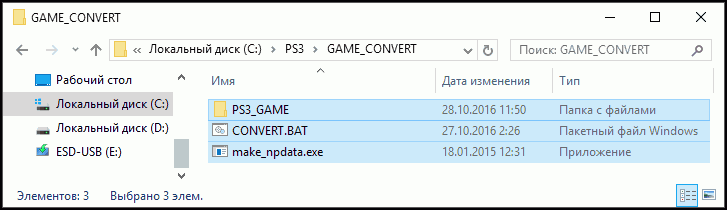
2. If you have downloaded the game in an ISO you need to unpack it or mount a virtual drive. Of all the files we need only PS3_GAME folder, copy it to GAME_CONVERT. This also unpack the archive GAME_CONVERT.zip, containing script-BAT and utility make_npdata. As a result, you should get this:
3. We go in and check out there PS3_GAME presence LICDIR folder. If...
This is a bit reminiscent of the PS4 PSN Trick to Unlimited Share Games and PS4 Russian Jailbreak Method using a Raspberry Pi.
To quote from tukil, roughly translated: Starting backup on PS3 OFW 4.70 Tutorial
Now you can run backup games on the PS3 OFW 4.70 consoles without any ODE and IDPS.
What you will need:
- The disc version of the game and the patch (and) it
- Converter: GAME_CONVERT.zip
- Injector: TrueAncestor the BACKUP Injector (Mirror: TrueAncestor_BACKUP_Injector_v1.70.zip)
- Hex editor: HX-D - the Hex Editor is Freeware
2. If you have downloaded the game in an ISO you need to unpack it or mount a virtual drive. Of all the files we need only PS3_GAME folder, copy it to GAME_CONVERT. This also unpack the archive GAME_CONVERT.zip, containing script-BAT and utility make_npdata. As a result, you should get this:
3. We go in and check out there PS3_GAME presence LICDIR folder. If...
- PS4 Fake PKG (FPKG) Sharing Guide
- 6.XX Webkit / 6.72 PS4 Jailbreak
- 7.00-7.02 Webkit Exploit
- 7.02 Webkit / 7.02 Kernel / PS4JB
- 7.50 Kernel Exploit / PS4JB 7.55
- 7.55 / 8.00 Payloads / PS4JB2 7.55
- 9.00 PS4 Webkit Exploit
- 9.00 PS4 Payloads / GoldHEN (Latest)
- 9.00 PS4 Jailbreak Kernel Exploit
- 11.00 PS4 Jailbreak Kernel Exploit
- 13.00 PS4 Kernel Exploit / 13.02 BD-J Bug
- 4.03 PS5 Webkit Exploit
- PS5 Kernel Exploit (ExFAT Bug)
- PS5 Root Keys Obtained
- 4.03 PS5 Kernel Build String
- 4.03 PS5 Webkit Execution
- 4.03 PS5 Kernel Vulnerability
- 4.03 PS5 Filesystem Dumps
- 4.51 PS5 BD-JB Sandbox Escape
- PS5 BD-JB Exploit Hack Source Code
- Mast1c0re PS5 Userland Exploit
- PS5 Kernel Access via PS4 Exploit
- PS5 exFAT Vulnerability Disclosed
- 4.03 PS5 Kernel Exploit Webkit ROP
- 4.50 PS5 Kernel Exploit Webkit ROP
- 4.51 PS5 Kernel Exploit Webkit ROP
- 4.xx PS5 Kernel Exploit v1.01
- 4.xx PS5 Kernel Exploit v1.02 / v1.03
- PS5 1.00-6.50 Firmware Webkit
- Native PS5 ROP Chain Execution
- Mast1c0re PS5 Compiler Attack
- PS5 FreeBSD Kernel Bug & WebKit
- PS5 UMTX 2 Exploit & PS5 Jailbreak
- Byepervisor PS5 Hypervisor Exploit
- Lua Lapse PS5 Kxploit & Laps3c0re / Y2JB
- 12.00 / 12.70 PS5 Kernel Exploit