PSXHAX.COM website and domain for sale. Contact Us with your offer!

You are using an out of date browser. It may not display this or other websites correctly.
You should upgrade or use an alternative browser.
You should upgrade or use an alternative browser.


hello, i'm from Indonesia and i'm just a regular teacher in a regular school, been a teacher for 11 years. i don't have any coding/programming skills, that's not my area of expertise, i'm just a PS3-PS4 gamer/scene tester/service provider.
i'm also known as w0313 in other legendary forum, it was great until new people with power came around. i love being active here at psxhax.com, hope to contribute more.
i'm also known as w0313 in other legendary forum, it was great until new people with power came around. i love being active here at psxhax.com, hope to contribute more.
How to Create SND0.AT3 Files for PS3 Tutorial by Albatawy
Following my PS3 XMB Music Converted to SND0.AT3 service thread and the BMK AT9 & AT3 Converter v2.1, here is a guide I made for those seeking to create their own SND0.AT3 files for Sony's PlayStation 3 video gaming and entertainment system. 
How to Create SND0.AT3 Files for PS3 Tutorial
1. DOWNLOAD AND INSTALL ALL THE TOOLS NEEDED ON YOUR PC https://drive.google.com/file/d/0B4BylYxiMuCkaW1OS1Y2MUlab00/view?usp=sharing / SND0.AT3 TOOLS.rar (Mirror)
2. OPEN MP3 CUTTER AND PICK AN MP3 FILE, CUT IT WHEREVER YOU WANT,SAVE AND NAME IT AS "TEST CUT.MP3"
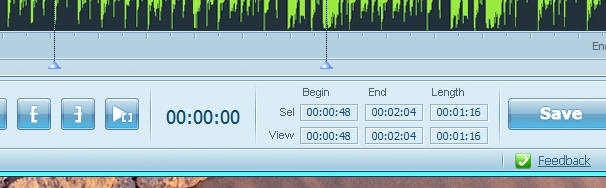
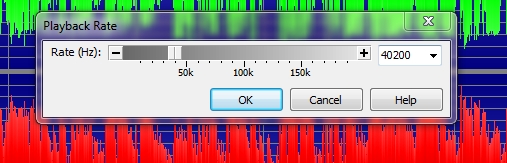
3. OPEN GOLDWAVE, PICK YOUR TEST FILE, GO TO EFFECT>PLAYBACK RATE>ENTER 40200 AND SAVE AS

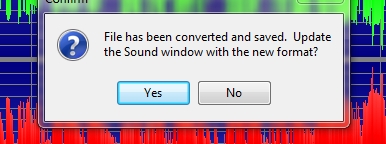
CHOOSE NO
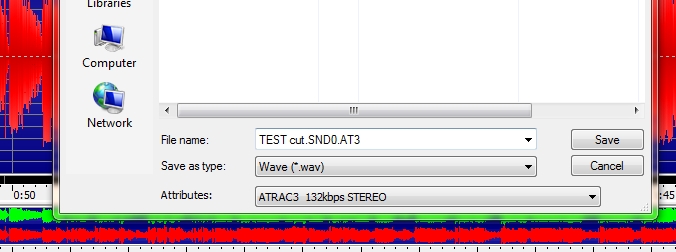
SAVE THE FILE AS SHOWN ABOVE
4. GO TO THE DIRECTORY WHERE YOU SAVE THE FILE AND RENAME IT


5. OPEN GWAT3 LOOPING, DRAG AND DROP THE FILE, CLICK START
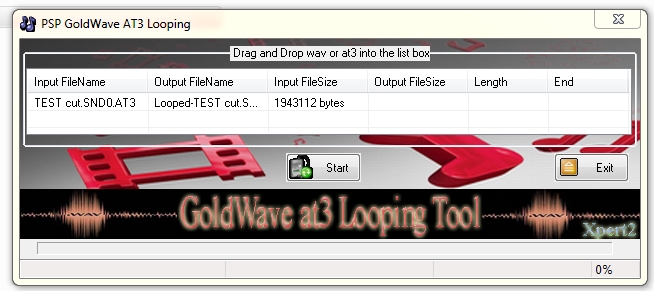

THIS IS THE RESULT
6. COPY THE FILE TO ANY BACKUP GAMES FOLDER, AND PASTE IT
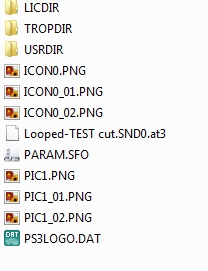
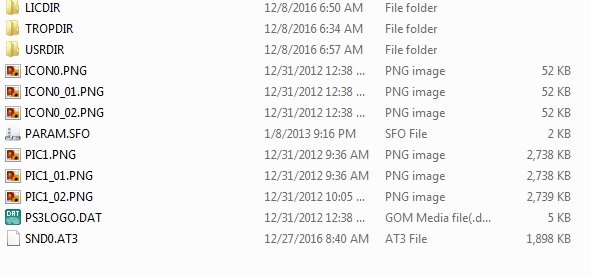
RENAME THE LOOPED FILE JUST LIKE THE PICTURE SHOWN ABOVE
7. DONE
*MAKE SURE ATRAC3 CODEC IS WELL INSTALLED AND AVAILABLE IN GOLDWAVE BEFORE PROCESSING ANY FURTHER, GOOGLE IS YOUR FRIEND IF YOU FOUND PROBLEM WITH IT.
How to Create SND0.AT3 Files for PS3 Tutorial
1. DOWNLOAD AND INSTALL ALL THE TOOLS NEEDED ON YOUR PC https://drive.google.com/file/d/0B4BylYxiMuCkaW1OS1Y2MUlab00/view?usp=sharing / SND0.AT3 TOOLS.rar (Mirror)
2. OPEN MP3 CUTTER AND PICK AN MP3 FILE, CUT IT WHEREVER YOU WANT,SAVE AND NAME IT AS "TEST CUT.MP3"
3. OPEN GOLDWAVE, PICK YOUR TEST FILE, GO TO EFFECT>PLAYBACK RATE>ENTER 40200 AND SAVE AS
CHOOSE NO
SAVE THE FILE AS SHOWN ABOVE
4. GO TO THE DIRECTORY WHERE YOU SAVE THE FILE AND RENAME IT
5. OPEN GWAT3 LOOPING, DRAG AND DROP THE FILE, CLICK START
THIS IS THE RESULT
6. COPY THE FILE TO ANY BACKUP GAMES FOLDER, AND PASTE IT
RENAME THE LOOPED FILE JUST LIKE THE PICTURE SHOWN ABOVE
7. DONE
*MAKE SURE ATRAC3 CODEC IS WELL INSTALLED AND AVAILABLE IN GOLDWAVE BEFORE PROCESSING ANY FURTHER, GOOGLE IS YOUR FRIEND IF YOU FOUND PROBLEM WITH IT.
PS3 XMB Music Converted to SND0.AT3 for PlayStation 3 Games
I've studied this long time ago just for my own pleasure and created many songs converted to SND0.AT3 for my backups collection, now I want share two of them for you. Enjoy.
How to Use:
Just replace the one inside PS3_GAMES or NPEB12345 alongside LICDIR-PARAM.SFO-TROPDIR-USRDIR-PS3_LOGO.DAT etc and listen to it via XMB while your game is highlighted.
If you want me to create one of your favorite songs to be converted, just post it as usual, name the song and the singer or you can post the YouTube link of it. I'll be happy to help, but do not force me, I'll do it when I have spare time.
Download: WW SOUND THEME.rar
That will sound like this:
Download: SND0.AT3.rar
This will sound like:
@PSXHAX is this the right section? if not, you know what to do
thanks
How to Use:
Just replace the one inside PS3_GAMES or NPEB12345 alongside LICDIR-PARAM.SFO-TROPDIR-USRDIR-PS3_LOGO.DAT etc and listen to it via XMB while your game is highlighted.
If you want me to create one of your favorite songs to be converted, just post it as usual, name the song and the singer or you can post the YouTube link of it. I'll be happy to help, but do not force me, I'll do it when I have spare time.
Download: WW SOUND THEME.rar
That will sound like this:
Download: SND0.AT3.rar
This will sound like:
@PSXHAX is this the right section? if not, you know what to do
thanks
How to Make PS3 CFW Games Work on Any PlayStation 3 OFW Guide
Following the PS3 Game Backups on OFW 4.70 guide, this method by me (Hibatullah Albatawy on YouTube) details how to make PS3 CFW games work on any PlayStation 3 OFW with a summary from @djurist located HERE.
Note that it needs two units of PS3 the CFW as the master and OFW as the target.
STEPS:
1. download GAME_CONVERT.rar
2. extract it to C:, it will be PS3>Game Convert>Convert.bat and make_npdata.exe
3. copy any PS3_GAME that have LICDIR folder in it, if it doesn't have then you have to find it yourself with LIC.DAT Generator online http://jonnysp.bplaced.net/lic.php#
4. paste it inside Game Convert folder, it will be PS3_GAME, Convert.bat, make_npdata.exe
5. double click Convert.bat, type NPxxxxxx, these x are your retail game id. for instance, the game id is BLES12345, then you must type NPEB12345.
6. wait untill it finishes its job
7. make a glass of hot cocoa
8. when it's done, you can see a new folder exist.
9. download the patch update for that game (BLES12345) and extract it. put the eboot.bin out of it. place it in NPEB12345/USRDIR/
10. create a folder named TEST on an external HDD (FAT 32)
11. copy NPEB12345 and BLES12345 (the extracted patch update), paste it into folder TEST.
12. on PS3 CFW 4.81, copy the two files into dev_hdd0/game..
13. do Rebuild Database
14. the game will be shown in XMB
15. turn on PS3 OFW 4.81 and plug an ethernet cable and connect it to PS3 CFW one.
16. on CFW, go to Settings> System Settings> Data Transfer Utitlity> pick number 1> say no> say no> waiting for transfer> enter
17. on OFW do the same way, but pick number 2, just wait till it gets questions for asking to format, hit yes and yes.
18. and transferring, happy waiting
19. drink your no longer hot cocoa
20. profit
TESTED GAMES:
...
Note that it needs two units of PS3 the CFW as the master and OFW as the target.
STEPS:
1. download GAME_CONVERT.rar
2. extract it to C:, it will be PS3>Game Convert>Convert.bat and make_npdata.exe
3. copy any PS3_GAME that have LICDIR folder in it, if it doesn't have then you have to find it yourself with LIC.DAT Generator online http://jonnysp.bplaced.net/lic.php#
4. paste it inside Game Convert folder, it will be PS3_GAME, Convert.bat, make_npdata.exe
5. double click Convert.bat, type NPxxxxxx, these x are your retail game id. for instance, the game id is BLES12345, then you must type NPEB12345.
6. wait untill it finishes its job
7. make a glass of hot cocoa
8. when it's done, you can see a new folder exist.
9. download the patch update for that game (BLES12345) and extract it. put the eboot.bin out of it. place it in NPEB12345/USRDIR/
10. create a folder named TEST on an external HDD (FAT 32)
11. copy NPEB12345 and BLES12345 (the extracted patch update), paste it into folder TEST.
12. on PS3 CFW 4.81, copy the two files into dev_hdd0/game..
13. do Rebuild Database
14. the game will be shown in XMB
15. turn on PS3 OFW 4.81 and plug an ethernet cable and connect it to PS3 CFW one.
16. on CFW, go to Settings> System Settings> Data Transfer Utitlity> pick number 1> say no> say no> waiting for transfer> enter
17. on OFW do the same way, but pick number 2, just wait till it gets questions for asking to format, hit yes and yes.
18. and transferring, happy waiting
19. drink your no longer hot cocoa
20. profit
TESTED GAMES:
...
- PS4 Fake PKG (FPKG) Sharing Guide
- 6.XX Webkit / 6.72 PS4 Jailbreak
- 7.00-7.02 Webkit Exploit
- 7.02 Webkit / 7.02 Kernel / PS4JB
- 7.50 Kernel Exploit / PS4JB 7.55
- 7.55 / 8.00 Payloads / PS4JB2 7.55
- 9.00 PS4 Webkit Exploit
- 9.00 PS4 Payloads / GoldHEN (Latest)
- 9.00 PS4 Jailbreak Kernel Exploit
- 11.00 PS4 Jailbreak Kernel Exploit
- 13.00 PS4 Kernel Exploit / 13.02 BD-J Bug
- 4.03 PS5 Webkit Exploit
- PS5 Kernel Exploit (ExFAT Bug)
- PS5 Root Keys Obtained
- 4.03 PS5 Kernel Build String
- 4.03 PS5 Webkit Execution
- 4.03 PS5 Kernel Vulnerability
- 4.03 PS5 Filesystem Dumps
- 4.51 PS5 BD-JB Sandbox Escape
- PS5 BD-JB Exploit Hack Source Code
- Mast1c0re PS5 Userland Exploit
- PS5 Kernel Access via PS4 Exploit
- PS5 exFAT Vulnerability Disclosed
- 4.03 PS5 Kernel Exploit Webkit ROP
- 4.50 PS5 Kernel Exploit Webkit ROP
- 4.51 PS5 Kernel Exploit Webkit ROP
- 4.xx PS5 Kernel Exploit v1.01
- 4.xx PS5 Kernel Exploit v1.02 / v1.03
- PS5 1.00-6.50 Firmware Webkit
- Native PS5 ROP Chain Execution
- Mast1c0re PS5 Compiler Attack
- PS5 FreeBSD Kernel Bug & WebKit
- PS5 UMTX 2 Exploit & PS5 Jailbreak
- Byepervisor PS5 Hypervisor Exploit
- Lua Lapse PS5 Kxploit & Laps3c0re / Y2JB
- 12.00 / 12.70 PS5 Kernel Exploit