
You are using an out of date browser. It may not display this or other websites correctly.
You should upgrade or use an alternative browser.
You should upgrade or use an alternative browser.
Live in Your World, HAX in Ours!

Live in Your World, HAX in Ours!
Hello World! I've been reporting on Sony PlayStation hacking news since 2000 and started PSXHAX in 2014 to cover PlayStation (PSX), PlayStation 2 (PS2), PlayStation 3 (PS3), PlayStation 4 (PS4), PlayStation Portable (PSP), PlayStation Vita (PS Vita), PlayStation TV (PS TV) and next-gen PlayStation 5 (PS5) platforms along with anything else of interest.
Click on my UserName author link above and you'll be able to view a curated list of all the articles I've contributed thus far to PSXHAX.COM!
Click on my UserName author link above and you'll be able to view a curated list of all the articles I've contributed thus far to PSXHAX.COM!
Microsoft Unveils XBox One X Launch Game Lineup in New Video
Arriving this November 7th for $499, Microsoft recently unveiled the video game launch lineup for their upcoming XBox One X console... is anyone here planning to grab one? 
Stranger things have happened, eh? Check out the XBox One X launch title listing and video trailer below, and have a scary great Friday the 13th today!
XBox One X Launch Lineup
Stranger things have happened, eh? Check out the XBox One X launch title listing and video trailer below, and have a scary great Friday the 13th today!
XBox One X Launch Lineup
- Assassin's Creed Origins
- Call of Duty: WWII
- Crackdown 3
- Cuphead
- Destiny 2 - Launch Edition
- Far Cry 5
- FIFA 18
- Forza Motorsport 7
- Gears of War 4
- Halo 5: Guardians
- Life is Strange: Before the Storm Complete Season
- Madden NFL 18
- Middle-earth: Shadow of War
- Minecraft
- NBA 2K18
- Player Unknown's Battlegrounds
- Red Dead Redemption 2
- Sea of Thieves
- South Park: The Fractured but Whole
- STAR WARS Battlefront II
- State of Decay 2
- Super Lucky's Tale
- Tacoma
- Wolfenstein II: The New Colossus
Cities: Skylines is Getting Snowfall DLC on PlayStation 4, Details
Since the PS4 release trailer, Paradox Interactive just announced a new weather-centric Snowfall expansion is coming to their city-builder Cities: Skylines PlayStation 4 Edition soon! 
Snowfall will not only add a weather system to the game, but also Winter-themed towns where you'll need to plow streets full of streetcars and pipe in heating to keep residents warm at night.
Here's more on the Snowfall expansion from Producer Niklas Lundstrom, to quote: We have some pretty cool news to tell you today.
It’s so cool, in fact, that it’s making all of your residents unreasonably cold and driving up electricity demands across town as everyone cranks up their heaters.
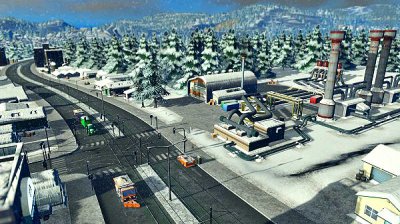 Today, the Paradox team and I are excited to let you know that the weather-centric “Snowfall” expansion is coming to Cities: Skylines – PlayStation 4 Edition! Not only that, but Snowfall is just the first of many — we’re announcing an entire season (not just Winter) of DLC for our city-builder, all coming to your town in the near future.
Since the launch of Cities: Skylines in August, we’ve been hearing a lot from PlayStation fans. Everyone has had great things to say, but one thing we’ve heard often is a desire to expand the core experience with some of the other features that Cities players have come to expect from the game.
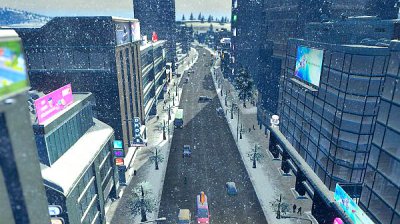 From the stylish street-level architecture of the Art Deco Pack to the high-flying blimps of Mass Transit, there’s enough customization and new features coming to the PlayStation 4 Edition to make your town as attractive, efficient, or completely-on-fire as you’ve ever wanted.
If you’ve already tried out Cities: Skylines but you’ve been hungry for more, we’re going to offer a Season Pass that includes seven pieces of DLC. Or, if you’ve been waiting for the right time to run for the Mayor’s Office, we’re also introducing the Cities: Skylines – Premium Edition, which will come with the base game (and After Dark) plus all the content from the Season Pass as it...
Snowfall will not only add a weather system to the game, but also Winter-themed towns where you'll need to plow streets full of streetcars and pipe in heating to keep residents warm at night.
Here's more on the Snowfall expansion from Producer Niklas Lundstrom, to quote: We have some pretty cool news to tell you today.
It’s so cool, in fact, that it’s making all of your residents unreasonably cold and driving up electricity demands across town as everyone cranks up their heaters.
Today, the Paradox team and I are excited to let you know that the weather-centric “Snowfall” expansion is coming to Cities: Skylines – PlayStation 4 Edition! Not only that, but Snowfall is just the first of many — we’re announcing an entire season (not just Winter) of DLC for our city-builder, all coming to your town in the near future.Since the launch of Cities: Skylines in August, we’ve been hearing a lot from PlayStation fans. Everyone has had great things to say, but one thing we’ve heard often is a desire to expand the core experience with some of the other features that Cities players have come to expect from the game.
From the stylish street-level architecture of the Art Deco Pack to the high-flying blimps of Mass Transit, there’s enough customization and new features coming to the PlayStation 4 Edition to make your town as attractive, efficient, or completely-on-fire as you’ve ever wanted.If you’ve already tried out Cities: Skylines but you’ve been hungry for more, we’re going to offer a Season Pass that includes seven pieces of DLC. Or, if you’ve been waiting for the right time to run for the Mayor’s Office, we’re also introducing the Cities: Skylines – Premium Edition, which will come with the base game (and After Dark) plus all the content from the Season Pass as it...
VitaShellMod 1.75 Update for PS Vita is Released by BenMitnicK
Following the official release, today PlayStation Vita developer @BenMitnicK of BMK Studio updated his VitaShellMod to version 1.75 with the changes outlined below. 
Download: VitaShellMod_1.75.vpk
To quote from his release page on what's new in this revision: VitaShellMod 1.75
Changelog:
 Warning, it will replace VitaShell. I haven't finished my MOD but I give you a version to use it.
Download: VitaShellMod_1.75.vpk
To quote from his release page on what's new in this revision: VitaShellMod 1.75
Changelog:
- Add the pic0 to the launch of the application
- Add background image random "20 max"
- Add language selection in options
- Remove PluginsManager
- Add DataBaseMenu (LTRIGGER+Right_Joystick_Left to activate the menu)
- Add Vitaident (LTRIGGER+Right_Joystick_Right to activate the menu)
- Add NetProfileCheck (LTRIGGER+Right_Joystick_UP to activate the menu)
- Add ForeCast (RTRIGGER+Right_Joystick_Right to activate the menu)
- Add the language of the different menu and options in the language file
- Add color options for different menus
- Add credit
- Add Theme manager
- Add somes options to color.txt
- Add noPreview image and square+triangle button image to theme folder
- Add param.ini for 100% Customizing Select Manager
- Add Filter for your Wallpapers
- Settings menu remapped to LTRIGGER+START
- Add Battery Percent
- Add Time Second
- Add Save CID (In root of ux0)
Warning, it will replace VitaShell. I haven't finished my MOD but I give you a version to use it.
New Sony PlayStation Vue Campaign: Change the Way You Watch
Sony is seeking to snag customers from traditional cable television and Internet companies with their online live streaming TV service PlayStation Vue, and their latest PS Vue campaign encourages people to 'change the way you watch' although many already have using Streaming Sites or Kodi to watch their favorite movies and shows for free.
To quote from their official site: PlayStation Vue is a live streaming TV service with sports, news, and your favorite must-watch shows.
Experience premium channels, a powerful cloud DVR (available in your home and on the go), streaming on up to five devices at once, and no annual contracts.
Those interested in PlayStation Vue can check out their latest promotional video below alongside Channel Lists, Plans & Pricing and a PS Vue FAQ.
Here are some more PlayStation Vue Tutorial videos for those interested as well:
PlayStation Vue - Subscription Management
PlayStation Vue - Welcome
PlayStation Vue - TV Anywhere
PlayStation Vue - Explore Filters
PlayStation Vue - Program Guide
To quote from their official site: PlayStation Vue is a live streaming TV service with sports, news, and your favorite must-watch shows.
Experience premium channels, a powerful cloud DVR (available in your home and on the go), streaming on up to five devices at once, and no annual contracts.
Those interested in PlayStation Vue can check out their latest promotional video below alongside Channel Lists, Plans & Pricing and a PS Vue FAQ.
Here are some more PlayStation Vue Tutorial videos for those interested as well:
PlayStation Vue - Subscription Management
PlayStation Vue - Welcome
PlayStation Vue - TV Anywhere
PlayStation Vue - Explore Filters
PlayStation Vue - Program Guide
PS4 Homebrew WIP Displaying PSID / IDPS by TheoryWrong & ZeraTron
Recently we profiled a PS4 Homebrew Demo, and today PlayStation 4 developers @theorywrong (Twitter) and @ZeraTron (Twitter) shared a PS4 Homebrew WIP video on his YouTube Channel showcasing color, font and text rendering, displaying the PSID / IDPS and listing the active processes on the machine. 
Check it out below, and to quote from the PlayStation 4 v1.76 OFW video's caption: PS4 Homebrew WIP showcase
Just a WIP homebrew that can actually do:
Some log with a hook of sceShellCore:
Check it out below, and to quote from the PlayStation 4 v1.76 OFW video's caption: PS4 Homebrew WIP showcase
Just a WIP homebrew that can actually do:
- Render text
- Render colors separately for BG, FG, fontBG, fontFG
- Display PSID/IDPS
- List all active processes Planned features:
- Render .png
- Play sounds
- psxdev/BigBoss : OG libOrbis
- TheoryWrong : helped with the code
- All the PS4 scene
Some log with a hook of sceShellCore:
Code:
$ socat readline TCP-LISTEN:8181,crlf sceHttpCreateConnectionWithURL => {url: https://csla.np.community.playstation.net/csla/v1/console/consoleToken} sceHttpCreateRequestWithURL => {url: https://csla.np.community.playstation.net/csla/v1/console/consoleToken} sceHttpCreateRequestWithURL => {url: https://csla.np.community.playstation.net/csla/v1/console/consoleToken} sceHttpCreateConnectionWithURL => {url: http://feu01.ps4.update.playstation.net/update/ps4/beta/list/eu/ps4-updatelist.xml} sceHttpCreateRequestWithURL => {url: http://feu01.ps4.update.playstation.net/update/ps4/beta/list/eu/ps4-updatelist.xml} sceHttpAddRequestHeader => {name: Accept-Encoding, value: gzip} sceHttpCreateConnectionWithURL => {url: http://feu01.ps4.update.playstation.net/update/ps4/list/eu/ps4-updatelist.xml} sceHttpCreateRequestWithURL => {url: http://feu01.ps4.update.playstation.net/update/ps4/list/eu/ps4-updatelist.xml} sceHttpAddRequestHeader => {name: Accept-Encoding, value: gzip}...- PS4 Fake PKG (FPKG) Sharing Guide
- 6.XX Webkit / 6.72 PS4 Jailbreak
- 7.00-7.02 Webkit Exploit
- 7.02 Webkit / 7.02 Kernel / PS4JB
- 7.50 Kernel Exploit / PS4JB 7.55
- 7.55 / 8.00 Payloads / PS4JB2 7.55
- 9.00 PS4 Webkit Exploit
- 9.00 PS4 Payloads / GoldHEN (Latest)
- 9.00 PS4 Jailbreak Kernel Exploit
- 11.00 PS4 Jailbreak Kernel Exploit
- 13.00 PS4 Kernel Exploit / 13.02 BD-J Bug
- 4.03 PS5 Webkit Exploit
- PS5 Kernel Exploit (ExFAT Bug)
- PS5 Root Keys Obtained
- 4.03 PS5 Kernel Build String
- 4.03 PS5 Webkit Execution
- 4.03 PS5 Kernel Vulnerability
- 4.03 PS5 Filesystem Dumps
- 4.51 PS5 BD-JB Sandbox Escape
- PS5 BD-JB Exploit Hack Source Code
- Mast1c0re PS5 Userland Exploit
- PS5 Kernel Access via PS4 Exploit
- PS5 exFAT Vulnerability Disclosed
- 4.03 PS5 Kernel Exploit Webkit ROP
- 4.50 PS5 Kernel Exploit Webkit ROP
- 4.51 PS5 Kernel Exploit Webkit ROP
- 4.xx PS5 Kernel Exploit v1.01
- 4.xx PS5 Kernel Exploit v1.02 / v1.03
- PS5 1.00-6.50 Firmware Webkit
- Native PS5 ROP Chain Execution
- Mast1c0re PS5 Compiler Attack
- PS5 FreeBSD Kernel Bug & WebKit
- PS5 UMTX 2 Exploit & PS5 Jailbreak
- Byepervisor PS5 Hypervisor Exploit
- Lua Lapse PS5 Kxploit & Laps3c0re / Y2JB
- 12.00 / 12.70 PS5 Kernel Exploit