PSXHAX.COM website and domain for sale. Contact Us with your offer!

You are using an out of date browser. It may not display this or other websites correctly.
You should upgrade or use an alternative browser.
You should upgrade or use an alternative browser.
PSXHAX - PSXHACKS: PSX HAX - PSX HACKS - PLAYSTATION HAX - PLAYSTATION HACKS
PS4-to-PS5 Free Digital Game Upgrades Maintain Both Separate Versions
For those curious how free digital PS4-to-PS5 Game Upgrades will be handled such as in Scarlet Nexus, Sony's PlayStation Support confirmed when asked by bigpapijugg that both versions will be maintained separately leading to two copies of the game... one for the current generation PS4 and another for the next-gen PS5 video gaming platforms. 
This PlayStation 5 Scene news comes following the recent PS4 and PS5 Trophy Levelling Changes and Sony's latest addition of a new PlayStation Library to Manage PS4 / PS5 Games downloaded from PSN.
With the PlayStation 5 Launch just weeks away, here's the scoop from PlayStation Support rep David on the PS4-to-PS5 Free Digital Game Upgrades to quote:
"Since the PS4 and PS5 copies will be separate, and the PS5 copy is a complimentary access to that platform; you should still retain access to the progress and data for PS4.
In essence, it's like having two copies: One for each platform."
Two copies of each free-to-upgrade game will consume additional hard drive space, and it sounds like purchasing the PS4 version of eligible PS5 upgradable titles may be the less expensive way to go... let us know your thoughts on this in the PS5 Forum comments below.
This PlayStation 5 Scene news comes following the recent PS4 and PS5 Trophy Levelling Changes and Sony's latest addition of a new PlayStation Library to Manage PS4 / PS5 Games downloaded from PSN.
With the PlayStation 5 Launch just weeks away, here's the scoop from PlayStation Support rep David on the PS4-to-PS5 Free Digital Game Upgrades to quote:
"Since the PS4 and PS5 copies will be separate, and the PS5 copy is a complimentary access to that platform; you should still retain access to the progress and data for PS4.
In essence, it's like having two copies: One for each platform."
Two copies of each free-to-upgrade game will consume additional hard drive space, and it sounds like purchasing the PS4 version of eligible PS5 upgradable titles may be the less expensive way to go... let us know your thoughts on this in the PS5 Forum comments below.
- ...
PS5 Fan to Receive Optimization Software Updates Confirms Sony VP
Similar to many of Sony's other consoles, the PlayStation 5 will indubitably receive PS5 Firmware Updates, DualSense PS5 Wireless Controller Software Updates (now appearing at retailers including Walmart and Best Buy on October 30th) and in PS5 Scene news today Sony Interactive Entertainment Vice President of mechanical design Yasuhiro Ootori confirmed the PS5 Fan will also receive regular optimization software updates over time after the official PS5 Launch next month. 
Following their PS5 Japanese Preview Videos a few weeks ago, here's a rough translation of this latest PS5 News via MP1st.com to quote:
"In an interview with Japanese site 4Gamer.net, Ootori explained that the behavior of the Accelerated Processing Unit (APU) in each game will determine how Sony will optimize fan control, using the data to deliver updates that will fix and adjust each unit accordingly:
“Various games will be released in the future, and data in the APU’s behaviour in each game will be collected,” Ootori said. “We have a plan to optimise the fan control based on this data.”
In Sony's recently released PS5 teardown video, it was revealed that the next generation system has a double-sided air intake fan to help cool the...
Following their PS5 Japanese Preview Videos a few weeks ago, here's a rough translation of this latest PS5 News via MP1st.com to quote:
"In an interview with Japanese site 4Gamer.net, Ootori explained that the behavior of the Accelerated Processing Unit (APU) in each game will determine how Sony will optimize fan control, using the data to deliver updates that will fix and adjust each unit accordingly:
“Various games will be released in the future, and data in the APU’s behaviour in each game will be collected,” Ootori said. “We have a plan to optimise the fan control based on this data.”
In Sony's recently released PS5 teardown video, it was revealed that the next generation system has a double-sided air intake fan to help cool the...
WWE 2K19 PS4 Mod Ports and Modding Tutorial by Tekken57
These are mods which I have sculpted and created for the steam version of the game and have now ported to the PS4 version of the game. The video clips are recorded on the PS4.
WWE 2k mods by @tekken57 created using X-Packer and X-Rey.
Disclaimer: I do not support or condone backups in any shape or form. I purchased and own WWE 2k19 on Steam and on the PS4. Please do not ask me to supply you with copyrighted files or game assets. All copyrights belong to their respective owners.
This trainer is based on Skiffaw's PS4 Memory Editor & ELF Loader (Matrix on Twitter) tool which I extended with functions for WWE 2k19.
The trainer only works with firmware up to 5.05 and is for the CUSA12320 version of the game.
Download: ps4_memory_editor_wwe_2k19.rar (86 KB)
Usage
To dump the wrestler info and movesets do the following:
Wrestler info:
Follow the same process as with wrestler info, but use the following values:
WWE 2k mods by @tekken57 created using X-Packer and X-Rey.
Disclaimer: I do not support or condone backups in any shape or form. I purchased and own WWE 2k19 on Steam and on the PS4. Please do not ask me to supply you with copyrighted files or game assets. All copyrights belong to their respective owners.
This trainer is based on Skiffaw's PS4 Memory Editor & ELF Loader (Matrix on Twitter) tool which I extended with functions for WWE 2k19.
The trainer only works with firmware up to 5.05 and is for the CUSA12320 version of the game.
Download: ps4_memory_editor_wwe_2k19.rar (86 KB)
Usage
- On your PS4 Load HEN
- On your PS4 Load Bin Loader
- Enter PS4 IP into the PS4 Memory Editor tool and select firmware version (5.05)
- Send Payload to PS4 webkit
- Start WWE 2k19 and get to the title screen where the different match types are displayed (one on one, two on two, etc).
- In the tool click on Update Processes and select the game process (in this case Eboot.bin).
- Click on Select process
To dump the wrestler info and movesets do the following:
Wrestler info:
- Enter the value of 0x3DCCCA0 into the address text box in both the Memory editor and Memory viewer areas
- Enter the value of 0x30544 into the length text box in both the Memory editor and Memory viewer areas
- Click on Peek to view the moveset data in the Hex viewer, click on dump memory to save the wrestler info file. Save the wrestler info as wrestler_info_dump.save
Follow the same process as with wrestler info, but use the following values:
| File | Address | Length | Filename |
| Wrestler info universe 1 | 0x431F298 | 0x30544 | wrestler_info_dump.save.uni1 |
| Wrestler info universe 1 | 0x4509C60 | 0x30544 | ... |
PS4 6.72 Exploit Menu Updates by Leeful74, PlayStation Bounty by TheFloW
Following his PS4 6.72 Jailbreak Exploit Menu & PS-Phwoar! Host Menu Demo, PlayStation 4 homebrew developer @Leeful (Leeful74 on Twitter) recently shared some new PS4 6.72 Exploit Menu Updates including v9a / v9b Menus, PS-Phwoar! For 6.72, some New Features and a v6 Mod with the latest Sleirsgoevy exploit code and a v10 Test version. 
To quote from Leeful on these latest updates: 5 New 6.72 Exploit Menus To Try
Here are 5 new 6.72 Exploit Host Menus for people to try out. Please consider all of these menus as tests. Self host versions of each menu can be found at the bottom of the post.
v9a and v9b Menus
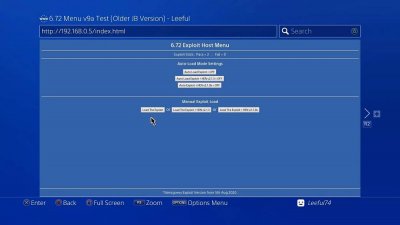
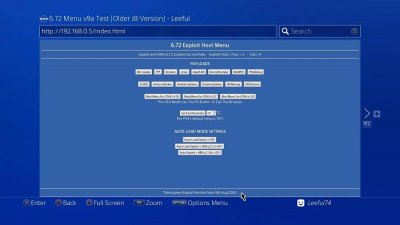
This is v9 of my basic menu for 6.72. I have made 2 versions (a&b). version v9a uses the older more common version of the Sleirsgoevy exploit (5th Aug 2020) and v9b uses the most recent one (9th Oct 2020). You can load the exploit and HEN manually or you can set it to auto-load whatever you want when the menu loads.
The latest exploit takes slightly longer to load but in tests I have gotten a better success rate of the exploit loading. The latest exploit also causes an initial lag on the PS4 home screen once it has been loaded but a simple tip to overcome this is to press L2 then L1 on the home screen.
PS-Phwoar! For 6.72
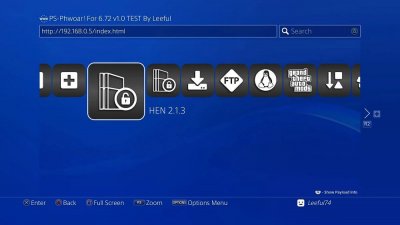
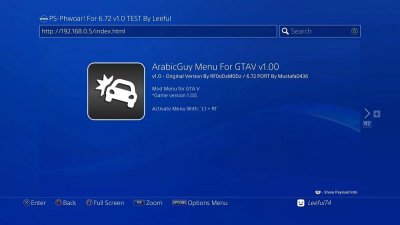
I initially did not want to release a version of PS-Phwoar! for 6.72 because of the instability of the 6.72 exploit but a lot of people have asked for it so here it is. 
This is still considered a work in progress and...
To quote from Leeful on these latest updates: 5 New 6.72 Exploit Menus To Try
Here are 5 new 6.72 Exploit Host Menus for people to try out. Please consider all of these menus as tests. Self host versions of each menu can be found at the bottom of the post.
v9a and v9b Menus
The latest exploit takes slightly longer to load but in tests I have gotten a better success rate of the exploit loading. The latest exploit also causes an initial lag on the PS4 home screen once it has been loaded but a simple tip to overcome this is to press L2 then L1 on the home screen.
PS-Phwoar! For 6.72
This is still considered a work in progress and...
How to Update Codebreaker Cheat Database on PS4 with PS2 Games Tutorial
Let's get this out of the way. Yes, things have gotten fancier, gaming has come on leaps and bounds but the PlayStation 2 was (and still is) the best video game console of all time!
And as funny as it may sound, the PS2 didn't just rule the 6th generation but survived throughout the past two gens as well, from PS2 remasters are being made left and right, to the PS2 hacking scene that managed to keep our interests piqued!
All said, today I'm gonna be showing you how to update Codebreaker cheat database on PS4 with over 2048 titles for both PAL and NTSC games (V10 has over 1342 titles) so we'll be adding 706 new titles
Here's a list of tools we're gonna be using:
Let's get started!
Step 1: PC
(you can do this process while injecting Codebreaker with your game files)
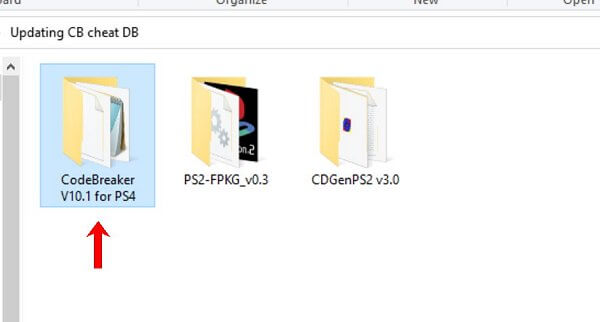
1. Open CodeBreaker V10.1 for PS4 folder
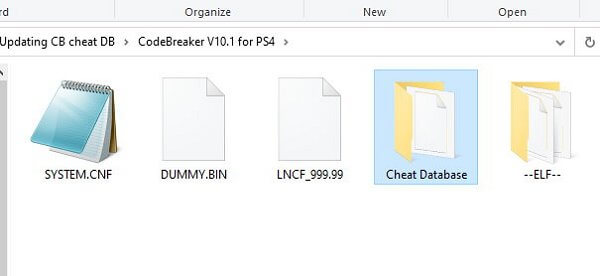
2. Move your "cheat" file into the folder (for the sake of this tutorial we're gonna put it in another newly created folder inside entitled "Cheat Database") you can put it anywhere you like inside the Codebreaker folder.
P.s I included the new cheat DB file inside
3. Launch CDGenPS2 v3.0
(you can use any other tool of your choice to create your PS2 ISO properly depends on the game itself, some games requires their LBA's sorting order to get the game to work with CB)
4. Drag all the content from the CodeBreaker V10.1 for PS4 folder
(you may include your game files as well)
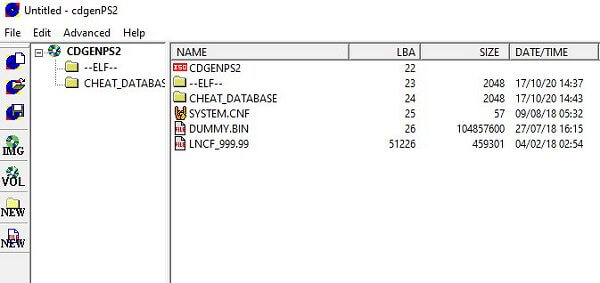
5. Click on IMG (left panel) to create your PS2 ISO
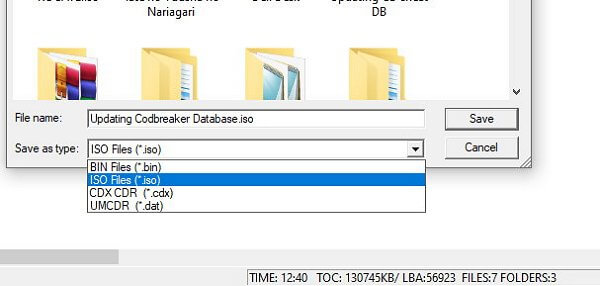
6. Click on Save as Type and choose "Iso"
(You can pick any name you want in the upper field/ Now save your iso file on you desktop)
7. Launch PS2-FPKG v0.3 to...
And as funny as it may sound, the PS2 didn't just rule the 6th generation but survived throughout the past two gens as well, from PS2 remasters are being made left and right, to the PS2 hacking scene that managed to keep our interests piqued!
All said, today I'm gonna be showing you how to update Codebreaker cheat database on PS4 with over 2048 titles for both PAL and NTSC games (V10 has over 1342 titles) so we'll be adding 706 new titles
Here's a list of tools we're gonna be using:
- PS2-FPKG v0.3
- Code Breaker Version 10 for PS4
- Cheat Database file
- CDGenPS2 v3.0
Let's get started!
Step 1: PC
(you can do this process while injecting Codebreaker with your game files)
1. Open CodeBreaker V10.1 for PS4 folder
2. Move your "cheat" file into the folder (for the sake of this tutorial we're gonna put it in another newly created folder inside entitled "Cheat Database") you can put it anywhere you like inside the Codebreaker folder.
P.s I included the new cheat DB file inside
3. Launch CDGenPS2 v3.0
(you can use any other tool of your choice to create your PS2 ISO properly depends on the game itself, some games requires their LBA's sorting order to get the game to work with CB)
4. Drag all the content from the CodeBreaker V10.1 for PS4 folder
(you may include your game files as well)
5. Click on IMG (left panel) to create your PS2 ISO
6. Click on Save as Type and choose "Iso"
(You can pick any name you want in the upper field/ Now save your iso file on you desktop)
7. Launch PS2-FPKG v0.3 to...
- PS4 Fake PKG (FPKG) Sharing Guide
- 6.XX Webkit / 6.72 PS4 Jailbreak
- 7.00-7.02 Webkit Exploit
- 7.02 Webkit / 7.02 Kernel / PS4JB
- 7.50 Kernel Exploit / PS4JB 7.55
- 7.55 / 8.00 Payloads / PS4JB2 7.55
- 9.00 PS4 Webkit Exploit
- 9.00 PS4 Payloads / GoldHEN (Latest)
- 9.00 PS4 Jailbreak Kernel Exploit
- 11.00 PS4 Jailbreak Kernel Exploit
- 13.00 PS4 Kernel Exploit / 13.02 BD-J Bug
- 4.03 PS5 Webkit Exploit
- PS5 Kernel Exploit (ExFAT Bug)
- PS5 Root Keys Obtained
- 4.03 PS5 Kernel Build String
- 4.03 PS5 Webkit Execution
- 4.03 PS5 Kernel Vulnerability
- 4.03 PS5 Filesystem Dumps
- 4.51 PS5 BD-JB Sandbox Escape
- PS5 BD-JB Exploit Hack Source Code
- Mast1c0re PS5 Userland Exploit
- PS5 Kernel Access via PS4 Exploit
- PS5 exFAT Vulnerability Disclosed
- 4.03 PS5 Kernel Exploit Webkit ROP
- 4.50 PS5 Kernel Exploit Webkit ROP
- 4.51 PS5 Kernel Exploit Webkit ROP
- 4.xx PS5 Kernel Exploit v1.01
- 4.xx PS5 Kernel Exploit v1.02 / v1.03
- PS5 1.00-6.50 Firmware Webkit
- Native PS5 ROP Chain Execution
- Mast1c0re PS5 Compiler Attack
- PS5 FreeBSD Kernel Bug & WebKit
- PS5 UMTX 2 Exploit & PS5 Jailbreak
- Byepervisor PS5 Hypervisor Exploit
- Lua Lapse PS5 Kxploit & Laps3c0re / Y2JB
- 12.00 / 12.70 PS5 Kernel Exploit