Following the PS4HEN on Android Phone tutorial and my recent PS4HEN on Wifi USB Drive guide, I put together an Android app to host the PlayStation 4 exploit and payloads.
You have to setup a wifi hotspot with your phone/tablet and connect the PS4 to that hotspot or connect the phone/tablet to the same network the PS4 is on.
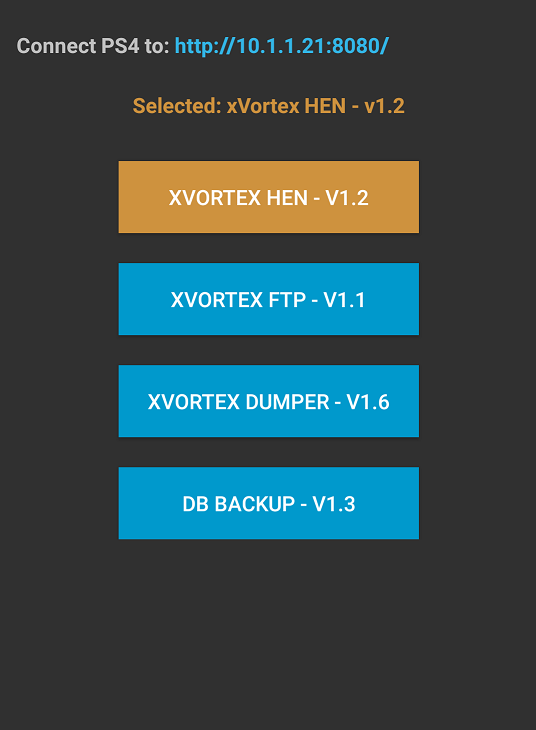
Then install the app and open it and at the top will be the address you need to connect to with the PS4.
Your device might ask you about installing an application from "unknown sources" this is ok to allow, it just means its not coming from Google Play.
You just select the payload you want to run in the app and then use the PS4 to goto the address that you see in the app.
To change the payload just select it in the app and then use the ps4 to revisit/refresh the address again.
Download: Ps4_Serve_v1_8.apk (1.8 MB - Changes) / PS4_Serve GIT
Spoiler: Depreciated
The payloads used are:
Thanks again @XVortex and a picture of the app:
You have to setup a wifi hotspot with your phone/tablet and connect the PS4 to that hotspot or connect the phone/tablet to the same network the PS4 is on.
Then install the app and open it and at the top will be the address you need to connect to with the PS4.
Your device might ask you about installing an application from "unknown sources" this is ok to allow, it just means its not coming from Google Play.
You just select the payload you want to run in the app and then use the PS4 to goto the address that you see in the app.
To change the payload just select it in the app and then use the ps4 to revisit/refresh the address again.
Download: Ps4_Serve_v1_8.apk (1.8 MB - Changes) / PS4_Serve GIT
Spoiler: Depreciated
The payloads used are:
Thanks again @XVortex and a picture of the app: