
You are using an out of date browser. It may not display this or other websites correctly.
You should upgrade or use an alternative browser.
You should upgrade or use an alternative browser.
Live in Your World, HAX in Ours!

Live in Your World, HAX in Ours!
Hello World! I've been reporting on Sony PlayStation hacking news since 2000 and started PSXHAX in 2014 to cover PlayStation (PSX), PlayStation 2 (PS2), PlayStation 3 (PS3), PlayStation 4 (PS4), PlayStation Portable (PSP), PlayStation Vita (PS Vita), PlayStation TV (PS TV) and next-gen PlayStation 5 (PS5) platforms along with anything else of interest.
Click on my UserName author link above and you'll be able to view a curated list of all the articles I've contributed thus far to PSXHAX.COM!
Click on my UserName author link above and you'll be able to view a curated list of all the articles I've contributed thus far to PSXHAX.COM!
PS3 Firmware 4.80 Update Arrives, Improves System Stability
Following Sony's previous updates, today they've made available PS3 Firmware Update v4.80 which improves the PlayStation 3 System Software stability with PSN 2-step verification.
Download: PS3 Firmware 4.80 (EU) Update / PS3 Firmware 4.80 (US) Update / PS3 Firmware 4.80 (AU/NZ) Update / PS3 Firmware 4.80 (JP) Update / multiman_480.rar (33.96 MB - 4.78 Renamed to 4.80) / multiMAN_ver_04.78.03_BASE_(20160425).pkg (35 MB) / multiMAN_ver_04.78.03_UPD_CEX_(20160425).pkg (2 MB) via j1ni0r
About PlayStation 3 system software update version 4.80
PS3 system software version 4.80 was released on April 19, 2016. Version 4.80 adds or updates the following features.
New for 4.80
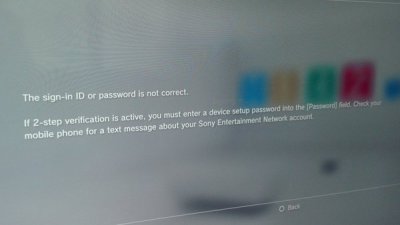 For those curious, according to carlitos92jose: I...
Download: PS3 Firmware 4.80 (EU) Update / PS3 Firmware 4.80 (US) Update / PS3 Firmware 4.80 (AU/NZ) Update / PS3 Firmware 4.80 (JP) Update / multiman_480.rar (33.96 MB - 4.78 Renamed to 4.80) / multiMAN_ver_04.78.03_BASE_(20160425).pkg (35 MB) / multiMAN_ver_04.78.03_UPD_CEX_(20160425).pkg (2 MB) via j1ni0r
About PlayStation 3 system software update version 4.80
PS3 system software version 4.80 was released on April 19, 2016. Version 4.80 adds or updates the following features.
New for 4.80
- This system software update improves system performance.
For those curious, according to carlitos92jose: I...
PS3ITA 4.75 DEX v1.0 PS3 CFW and Debug / Test Firmware Released
The PS3ITA Team have just released PS3ITA 4.75 DEX v1.0 PS3 CFW which follows suit after the leak of PlayStation 3 Debug / Test 4.75 Firmware from Sony followed by a 4.80 spoofer below.
Download: PS3UPDAT.PUP.475.001.forDEX.release.20150421 (182.1 MB) / PS3UPDAT.PUP.475.001.forDEX.release.20150421 (Mirror) / ps3ita475.rar (198.7 MB - RAR Password: guinness) / cfw_setup_5.78.2.pkg (20.5 MB) / src_cfw_setup_v5.78.2.rar (19.9 MB)
PS3 Debug / Test PUP MD5 Hash: E0AB2CD332A8B9647EDE83815A80CC39
PS3ITA 4.75 DEX v1.0 MD5 Hash: 5FCBA3230C5C5952A980A42DC93EF180
To quote, roughly translated: CFW PS3ITA 4.75 DEX v1.0
A bit 'late, anyway ..
Ps3ita Team is proud to present: CFW 4.75 PS3ITA DEX v1.0.
CFW just installed is a simple CFW 4.75 DEX BASE ..
GENERAL CHARACTERISTICS
Download: PS3UPDAT.PUP.475.001.forDEX.release.20150421 (182.1 MB) / PS3UPDAT.PUP.475.001.forDEX.release.20150421 (Mirror) / ps3ita475.rar (198.7 MB - RAR Password: guinness) / cfw_setup_5.78.2.pkg (20.5 MB) / src_cfw_setup_v5.78.2.rar (19.9 MB)
PS3 Debug / Test PUP MD5 Hash: E0AB2CD332A8B9647EDE83815A80CC39
PS3ITA 4.75 DEX v1.0 MD5 Hash: 5FCBA3230C5C5952A980A42DC93EF180
To quote, roughly translated: CFW PS3ITA 4.75 DEX v1.0
A bit 'late, anyway ..
Ps3ita Team is proud to present: CFW 4.75 PS3ITA DEX v1.0.
CFW just installed is a simple CFW 4.75 DEX BASE ..
GENERAL CHARACTERISTICS
- Added support to films on DVD and BLURAY
- Possibility to install the CFW on PS3 BD player and Bluetooth card missing
- Bypass RSOD
- Boot speeded
- Possibility of in-game screenshots
- Possibility of using the "Remote Play" from any PC
- Support ReactPSN
- Adding PSN icon
- The CFW can be installed directly from the XMB from 'OFW / CFW 3:55 DEX and any CFW DEX having the check of' spkg patched (all of our CFW and CFW Rebug ..)
- Removed ecdsa check from appldr, isoldr, lv1ldr and lv2ldr
- Removed from the lv2 'appldr memory protection
- Added syscalls lv2 peek, poke lv2, lv2_lv1 peek, poke lv2_lv1, lv2_lv1 call
- Added support for the lv1 syscalls lv1 peek, poke lv1 removed and check the version of CoreOS
- Patched nas_plugin the file to enable the installation of PKG Retail
- Patched the autodownload_plugin and download_plugin file to allow the installation of the update of the Retail games
- Patched category_game_tool2.xml to support the plugin Webman
- Patched the vsh files to add support to ReactPSN, allow d 'effect ScreenShot InGame, enable access to the PSN and speed up your boot.
- Patched the premo_game_plugin...
RPCS3 PS3 Emulator / Debugger v0.0.0.9 Updated with Demo Video
Following the previous updates, this weekend the RPCS3 Team has updated the PS3 emulator / debugger once again to version 0.0.0.9 with the changes and a demo video below.
Download: rpcs3-ReleaseLLVM-81780d19.zip / rpcs3-master.zip / RPCS3 (Github)
Here are the most recent RPCS3 changes courtesy of DSOGaming.com:
Download: rpcs3-ReleaseLLVM-81780d19.zip / rpcs3-master.zip / RPCS3 (Github)
Here are the most recent RPCS3 changes courtesy of DSOGaming.com:
- PPU/SPU
- PPU LLVM recompiler removed (not final)
- Old PPU interpreter removed completely
- RSX
- Added Vulkan renderer
- Common utilities for all backends
- Big accuracy improvements and bugfixes
- HLE
- Various HLE modules rewritten/removed temporarily
- More HLE functions implemented
- Accuracy improvements
- Vita
- ARMv7 core improvements
- Loader
- ELF loaders rewrittten and unified (PS3 and PSV)
- PRX loader improved
- Misc
- Big cleanups and rewrites
- Logging system rewritten
- Configuration system rewritten
- Various submodules updated
Movian Developer Now Seeking iPhone and iPad Beta Testers
Following the release of Movian 5.0 and Movian Remote Control, today the PS3 Media Center developer Andreas Smas announced they are seeking Beta testers for Movian on both iPhone and iPad.
Movian iOS beta testing signup
Note that the email address does not have to be the same address as your Appstore account uses. Only an invite link will be sent to the address which you can later redeem in the testflight app. Instructions will be included in the email sent.
If this is something that interests you, Movian iOS beta testing sign-ups are being taken here: https://movian.tv/news/63
Happy testing all!
Movian iOS beta testing signup
Note that the email address does not have to be the same address as your Appstore account uses. Only an invite link will be sent to the address which you can later redeem in the testflight app. Instructions will be included in the email sent.
If this is something that interests you, Movian iOS beta testing sign-ups are being taken here: https://movian.tv/news/63
Happy testing all!
Movian Remote Control for Movian PS3 Media Center 5.0.39 and Up!
Last month Movian 5.0 was released, and more recently Andreas Smas made available Movian Remote Control for Movian 5.0.39 and newer versions of the PS3 Media Center.
Download: movian-gh-5.0.66.pkg / movian-5.0.66.pkg / movian-5.0.66.self / Movian Bleeding Edge Builds
To quote: Movian Remote Control
I've finally finished a project I've been working on for a long time.
To put it simply it let you use Movian as a remote to control itself on another device.
For example, you can use Movian on your Android Phone or Table to control Movian on your Playstation or Raspberry Pi.
Available from Movian 5.0.39 and up.
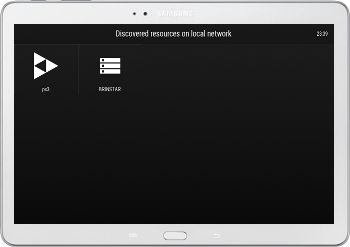 All running Movians on your local network will appear inside the Local Network item found on the Home screen.
Tap the Movian icon and you will immediately gain control of the device. Both user interfaces will now work in lock-step.
You can even have multiple controllers connected simultaneously and all will stay in sync with each other.
Video playback
During video playback an alternate screen is shown on the controlling devices rather than also dispalying the video. All controls and settings are also found on the controlling device.
Makes it very easy to select subtitles, adjust video pan, etc without disrupting the main view.
Settings
The ability for a device to be remote controlled can be turned off in Settings -> Network
You can pin devices to the Home screen on your controller in Settings -> Discovered Media Sources
Hope you'll like it. I certainly do.
Over and out,
Andreas
Download: movian-gh-5.0.66.pkg / movian-5.0.66.pkg / movian-5.0.66.self / Movian Bleeding Edge Builds
To quote: Movian Remote Control
I've finally finished a project I've been working on for a long time.
To put it simply it let you use Movian as a remote to control itself on another device.
For example, you can use Movian on your Android Phone or Table to control Movian on your Playstation or Raspberry Pi.
Available from Movian 5.0.39 and up.
All running Movians on your local network will appear inside the Local Network item found on the Home screen.Tap the Movian icon and you will immediately gain control of the device. Both user interfaces will now work in lock-step.
You can even have multiple controllers connected simultaneously and all will stay in sync with each other.
Video playback
During video playback an alternate screen is shown on the controlling devices rather than also dispalying the video. All controls and settings are also found on the controlling device.
Makes it very easy to select subtitles, adjust video pan, etc without disrupting the main view.
Settings
The ability for a device to be remote controlled can be turned off in Settings -> Network
You can pin devices to the Home screen on your controller in Settings -> Discovered Media Sources
Hope you'll like it. I certainly do.
Over and out,
Andreas
- PS4 Fake PKG (FPKG) Sharing Guide
- 6.XX Webkit / 6.72 PS4 Jailbreak
- 7.00-7.02 Webkit Exploit
- 7.02 Webkit / 7.02 Kernel / PS4JB
- 7.50 Kernel Exploit / PS4JB 7.55
- 7.55 / 8.00 Payloads / PS4JB2 7.55
- 9.00 PS4 Webkit Exploit
- 9.00 PS4 Payloads / GoldHEN (Latest)
- 9.00 PS4 Jailbreak Kernel Exploit
- 11.00 PS4 Jailbreak Kernel Exploit
- 13.00 PS4 Kernel Exploit / 13.02 BD-J Bug
- 4.03 PS5 Webkit Exploit
- PS5 Kernel Exploit (ExFAT Bug)
- PS5 Root Keys Obtained
- 4.03 PS5 Kernel Build String
- 4.03 PS5 Webkit Execution
- 4.03 PS5 Kernel Vulnerability
- 4.03 PS5 Filesystem Dumps
- 4.51 PS5 BD-JB Sandbox Escape
- PS5 BD-JB Exploit Hack Source Code
- Mast1c0re PS5 Userland Exploit
- PS5 Kernel Access via PS4 Exploit
- PS5 exFAT Vulnerability Disclosed
- 4.03 PS5 Kernel Exploit Webkit ROP
- 4.50 PS5 Kernel Exploit Webkit ROP
- 4.51 PS5 Kernel Exploit Webkit ROP
- 4.xx PS5 Kernel Exploit v1.01
- 4.xx PS5 Kernel Exploit v1.02 / v1.03
- PS5 1.00-6.50 Firmware Webkit
- Native PS5 ROP Chain Execution
- Mast1c0re PS5 Compiler Attack
- PS5 FreeBSD Kernel Bug & WebKit
- PS5 UMTX 2 Exploit & PS5 Jailbreak
- Byepervisor PS5 Hypervisor Exploit
- Lua Lapse PS5 Kxploit & Laps3c0re / Y2JB
- 12.00 / 12.70 PS5 Kernel Exploit