
You are using an out of date browser. It may not display this or other websites correctly.
You should upgrade or use an alternative browser.
You should upgrade or use an alternative browser.
Live in Your World, HAX in Ours!

Live in Your World, HAX in Ours!
Hello World! I've been reporting on Sony PlayStation hacking news since 2000 and started PSXHAX in 2014 to cover PlayStation (PSX), PlayStation 2 (PS2), PlayStation 3 (PS3), PlayStation 4 (PS4), PlayStation Portable (PSP), PlayStation Vita (PS Vita), PlayStation TV (PS TV) and next-gen PlayStation 5 (PS5) platforms along with anything else of interest.
Click on my UserName author link above and you'll be able to view a curated list of all the articles I've contributed thus far to PSXHAX.COM!
Click on my UserName author link above and you'll be able to view a curated list of all the articles I've contributed thus far to PSXHAX.COM!
How to Boot OrbisOS on VMware Workstation PS4 Tutorial by RjMan
This weekend PlayStation 4 developer RjMan shared a PS4 tutorial covering how to boot OrbisOS on VMware Workstation with the scene as detailed below.
To quote: Boot OrbisOS on VM
Hi, from this guide its also working on VM workstation.
I'm able to boot Orbis but keyboard isn't working, also able to run scripts when try boot from rootfs of the orbisresq
Here is my setup with Ubuntu 15:
Setup:

Thanks to @toni1988 for the news tip in the PSXHAX Shoutbox!
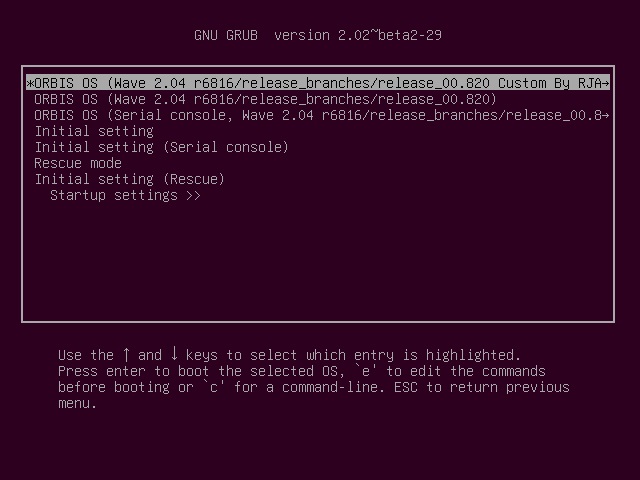
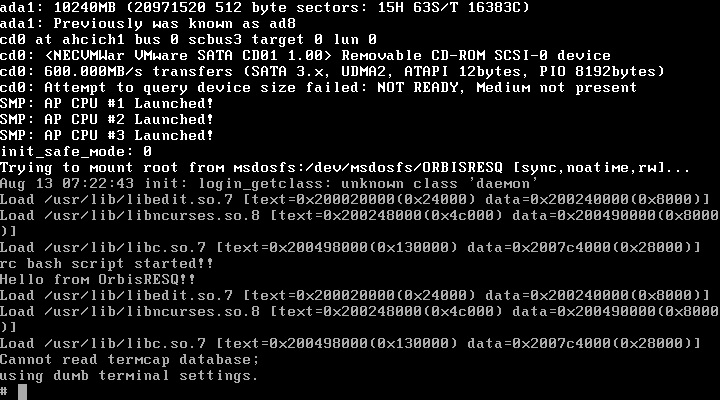
To quote: Boot OrbisOS on VM
Hi, from this guide its also working on VM workstation.
I'm able to boot Orbis but keyboard isn't working, also able to run scripts when try boot from rootfs of the orbisresq
Here is my setup with Ubuntu 15:
Setup:
- installed ubuntu on vmware workstation
- 8Gb ram at least
- add 3 virtual hdd's
- 1 ubuntu ext4
- 2 orbisos fat32
- 3 orbis rescue fat 32 with Disk Label "ORBISRESQ" (orbis will try load this rootfs)
- boot the linux copy all adm folder content from the OrbisOS zIP
- add this to the /etc/grub.d/40.custom file:
Code:menuentry "Load ps4 config" { set root=(hd1,msdos1) configfile /grub2_200.cfg } - update-grub
- reboot
- switch to orbis menu
Thanks to @toni1988 for the news tip in the PSXHAX Shoutbox!
How to Bypass PFS Protection PlayStation 4 Tutorial by Zecoxao
Today PlayStation 4 developer zecoxao shared a PS4 tutorial on how to bypass Sony PFS (PlayStation File System) protection entirely with other devs... check it out below! 
To quote: How to "bypass" pfs protection entirely
Things needed:
1- Go to http://www.extreme-modding.de/PS4/1.76/Playground/index.html and select the FTP Server (big Silver Star)
2- Enable it and minimize the browser
3- Start the game you want to copy/modify pfs content
4- Keep the game running (i believe this is the issue people are having)
5- Start your favourite ftp client
6- Navigate to:
where [TITLE-ID] is the id of the game you're running.
7- From there you can dump and modify files at will
I originally wondered if there was a way to do pfs bypass with the app.db so i asked around to see what would people say. Credits to flatz for the original idea.
PS:
contains the entire file listing (and also the files) in a big .dat file. You can also use it but you'll need an extractor later.
Now the eboot.bin protection is left to "crack". let's see how this plays out.
Thanks to @B7U3 C50SS for the news in the Shoutbox!
To quote: How to "bypass" pfs protection entirely
Things needed:
- PS4 on 1.76
- Disc game or PSN game activated on the console
- TITLE ID of the Game in question
- http://www.extreme-modding.de/PS4/1.76/Playground/index.html (the FTP Server + Debug Settings part)
- FTP client (filezilla or something like that)
- Brains you can use
1- Go to http://www.extreme-modding.de/PS4/1.76/Playground/index.html and select the FTP Server (big Silver Star)
2- Enable it and minimize the browser
3- Start the game you want to copy/modify pfs content
4- Keep the game running (i believe this is the issue people are having)
5- Start your favourite ftp client
6- Navigate to:
Rich (BB code):
/mnt/sandbox/pfsmnt/[TITLE-ID]-app07- From there you can dump and modify files at will
I originally wondered if there was a way to do pfs bypass with the app.db so i asked around to see what would people say. Credits to flatz for the original idea.
PS:
Code:
/mnt/sandbox/pfsmnt/[TITLE-ID]-app0-nestNow the eboot.bin protection is left to "crack". let's see how this plays out.
Thanks to @B7U3 C50SS for the news in the Shoutbox!
HENkaku Exploit Teardown Payload Update from Hexkyz / Mike H
Recently we reported on Part 1 and Part 2 of the PS Vita HENkaku Exploit Teardown by PlayStation Vita hacker hexkyz, and now a new Pastebin is available from Mike H covering the Payload Update. 
After the exploit was updated to support dynarec and a "special surprise", the second payload was changed and the following was added:
After the exploit was updated to support dynarec and a "special surprise", the second payload was changed and the following was added:
Code:
    // Old code
    ...

    sceNetDumpCreate(x_stack + 0x0000EDAC, 0x000C5F00, 0x00000000);
    sceNetDumpCreate(x_stack + 0x0000EDAC, 0x000C5E00, 0x00000000);
    sceNetDumpCreate(x_stack + 0x0000EDAC, 0x000C5D00, 0x00000000);
    sceNetDumpCreate(x_stack + 0x0000EDAC, 0x000C5B00, 0x00000000);
    sceNetDumpCreate(x_stack + 0x0000EDAC, 0x000C5A00, 0x00000000);
    sceNetDumpCreate(x_stack + 0x0000EDAC, 0x000C5900, 0x00000000);
    sceNetDumpCreate(x_stack + 0x0000EDAC, 0x000C5800, 0x00000000);
    sceNetDumpCreate(x_stack + 0x0000EDAC, 0x000C5700, 0x00000000);
    sceNetDumpCreate(x_stack + 0x0000EDAC, 0x000C5600, 0x00000000);
    sceNetDumpCreate(x_stack + 0x0000EDAC, 0x000C5500, 0x00000000);
    sceNetDumpCreate(x_stack + 0x0000EDAC, 0x000C5400, 0x00000000);
    sceNetDumpCreate(x_stack + 0x0000EDAC, 0x000C5300, 0x00000000);
    sceNetDumpCreate(x_stack + 0x0000EDAC, 0x000C5200, 0x00000000);
    sceNetDumpCreate(x_stack + 0x0000EDAC, 0x000C5100, 0x00000000);
    sceNetDumpCreate(x_stack + 0x0000EDAC, 0x000C5000, 0x00000000);
    sceNetDumpCreate(x_stack + 0x0000EDAC, 0x000C4F00, 0x00000000);
    sceNetDumpCreate(x_stack + 0x0000EDAC, 0x000C4E00, 0x00000000);
    sceNetDumpCreate(x_stack + 0x0000EDAC, 0x000C4D00, 0x00000000);
    sceNetDumpCreate(x_stack + 0x0000EDAC, 0x000C4B00, 0x00000000);
    sceNetDumpCreate(x_stack + 0x0000EDAC, 0x000C4A00, 0x00000000);
    sceNetDumpCreate(x_stack + 0x0000EDAC, 0x000C4900, 0x00000000);
    sceNetDumpCreate(x_stack + 0x0000EDAC, 0x000C4800, 0x00000000);
    sceNetDumpCreate(x_stack + 0x0000EDAC, 0x000C4700, 0x00000000);
    sceNetDumpCreate(x_stack + 0x0000EDAC, 0x000C4600, 0x00000000);
    sceNetDumpCreate(x_stack + 0x0000EDAC, 0x000C4500...
HENkaku Installs VitaShell 0.7 Now, Offline Installer from XYZZ
Following HENkaku Offline Hosting, today Team Molecule announced that HENkaku now installs VitaShell 0.7 and that a PlayStation Vita HENkaku offline installer is also available from PS Vita developer XYZZ.
Download: offlineInstaller.vpk / Source code (zip) / Source code (tar.gz) / Latest Release / GIT
offlineInstaller
To install the exploit (You need Internet connection to install the exploit, but not to run it):
Download: offlineInstaller.vpk / Source code (zip) / Source code (tar.gz) / Latest Release / GIT
offlineInstaller
To install the exploit (You need Internet connection to install the exploit, but not to run it):
- First, install and activate HENkaku from https://henkaku.xyz/
- Install the vpk
- Launch offlineInstaller bubble
- Follow the instructions: press CROSS to install
- (Do not delete the bubble after the exploit is installed. You should redo the installation when you have internet access to ensure that you get the latest version of HENkaku)
- Reboot your PS Vita
- Disable Wi-Fi
- Open Email app. If at some point it asks you to enable wifi, press "No". If you have wifi switched on, the message list will not load.
- If you have multiple email accounts, select "HENkaku Offline"
- Select "Inbox", then click on the first email
- Wait about 10-20 seconds. You might get a "Please wait" screen multiple times. You might also get an "An error has occurred" screen multiple times. If you get any of these more than five times in a row, reboot your Vita and try again.
- You should see the same screen as with online installation (black screen with text and molecule logo)
- Launch offlineInstaller
- Press CIRCLE to uninstall
PlayStation 4 NEO Expected Unveiling at Meeting on September 7th
Last month some new PlayStation NEO 4K details surfaced, and today according to reports Sony's upcoming PS4 NEO is expected to be unveiled at a PlayStation Meeting event hosted at the PlayStation Theater in NYC on September 7th at 3pm EST. 
If you're a member of the press, you've probably also received an invite like the one pictured below.
According to Polygon a livestream covering the PlayStation Meeting event will also be available (presumably so the world can catch a first glimpse of the PS4K aka PS4.5 upgraded PlayStation 4 video gaming console).
Hurry up and bring on the NEO Sony so PS4 developers can finally release l33t hacks, kernel exploits or something snazzy to kick off the PS4 scene!!
If you're a member of the press, you've probably also received an invite like the one pictured below.
According to Polygon a livestream covering the PlayStation Meeting event will also be available (presumably so the world can catch a first glimpse of the PS4K aka PS4.5 upgraded PlayStation 4 video gaming console).
Hurry up and bring on the NEO Sony so PS4 developers can finally release l33t hacks, kernel exploits or something snazzy to kick off the PS4 scene!!
- PS4 Fake PKG (FPKG) Sharing Guide
- 6.XX Webkit / 6.72 PS4 Jailbreak
- 7.00-7.02 Webkit Exploit
- 7.02 Webkit / 7.02 Kernel / PS4JB
- 7.50 Kernel Exploit / PS4JB 7.55
- 7.55 / 8.00 Payloads / PS4JB2 7.55
- 9.00 PS4 Webkit Exploit
- 9.00 PS4 Payloads / GoldHEN (Latest)
- 9.00 PS4 Jailbreak Kernel Exploit
- 11.00 PS4 Jailbreak Kernel Exploit
- 13.00 PS4 Kernel Exploit / 13.02 BD-J Bug
- 4.03 PS5 Webkit Exploit
- PS5 Kernel Exploit (ExFAT Bug)
- PS5 Root Keys Obtained
- 4.03 PS5 Kernel Build String
- 4.03 PS5 Webkit Execution
- 4.03 PS5 Kernel Vulnerability
- 4.03 PS5 Filesystem Dumps
- 4.51 PS5 BD-JB Sandbox Escape
- PS5 BD-JB Exploit Hack Source Code
- Mast1c0re PS5 Userland Exploit
- PS5 Kernel Access via PS4 Exploit
- PS5 exFAT Vulnerability Disclosed
- 4.03 PS5 Kernel Exploit Webkit ROP
- 4.50 PS5 Kernel Exploit Webkit ROP
- 4.51 PS5 Kernel Exploit Webkit ROP
- 4.xx PS5 Kernel Exploit v1.01
- 4.xx PS5 Kernel Exploit v1.02 / v1.03
- PS5 1.00-6.50 Firmware Webkit
- Native PS5 ROP Chain Execution
- Mast1c0re PS5 Compiler Attack
- PS5 FreeBSD Kernel Bug & WebKit
- PS5 UMTX 2 Exploit & PS5 Jailbreak
- Byepervisor PS5 Hypervisor Exploit
- Lua Lapse PS5 Kxploit & Laps3c0re / Y2JB
- 12.00 / 12.70 PS5 Kernel Exploit