
You are using an out of date browser. It may not display this or other websites correctly.
You should upgrade or use an alternative browser.
You should upgrade or use an alternative browser.
Live in Your World, HAX in Ours!

Live in Your World, HAX in Ours!
Hello World! I've been reporting on Sony PlayStation hacking news since 2000 and started PSXHAX in 2014 to cover PlayStation (PSX), PlayStation 2 (PS2), PlayStation 3 (PS3), PlayStation 4 (PS4), PlayStation Portable (PSP), PlayStation Vita (PS Vita), PlayStation TV (PS TV) and next-gen PlayStation 5 (PS5) platforms along with anything else of interest.
Click on my UserName author link above and you'll be able to view a curated list of all the articles I've contributed thus far to PSXHAX.COM!
Click on my UserName author link above and you'll be able to view a curated list of all the articles I've contributed thus far to PSXHAX.COM!
PS4Link Library Updated by BigBoss with LDR Creation and More!
Since the last revision, PlayStation 4 developer BigBoss has updated the PS4Link library which allows PS4 to communicate and utilize a host file system with the PS4Client host tool.
According to the developer, PS4Link is now updated with ldr creation and information to do it yourself
Download: ps4link-master.zip / PS4Link GIT
From the ReadMe file: PS4LINK FOR PS4
What does this do?
PS4Link is a group of tools (libps4link, libdebugnet, ps4sh) for PS4 and host. It is the same method that we used in ps2dev days, so basically it is the same protocol than ps2link and ps2client have been using since 2003.
Functions available are defined like native sce functions so it is easy for homebrew developer to use these new functions:
FILEIO functions
Remote Commands functions
1) execelf
This command let you load and exec elf files compiled with libps4. Check samples directory.
2) execsprx
Right now do nothing
3) execwhoami
Show you uid and gid
4) execshowdir
Let you list filenames in directory. With ftp server you will not need it
5) exitps4
Try to close ps4link resources. If you try to run ps4sh again when all is released you will get a messager saying that it can't connect. Now you can leave ps4 browser.
check ps4link_internal.h and commands.c to see how can you implements new commands
How do I use it?
1) Configure your environment:
You will need:
According to the developer, PS4Link is now updated with ldr creation and information to do it yourself
Download: ps4link-master.zip / PS4Link GIT
From the ReadMe file: PS4LINK FOR PS4
What does this do?
PS4Link is a group of tools (libps4link, libdebugnet, ps4sh) for PS4 and host. It is the same method that we used in ps2dev days, so basically it is the same protocol than ps2link and ps2client have been using since 2003.
Functions available are defined like native sce functions so it is easy for homebrew developer to use these new functions:
FILEIO functions
Code:
  int ps4LinkOpen(const char *file, int flags, int mode);
  int ps4LinkClose(int fd);
  int ps4LinkRead(int fd, void *data, size_t size);
  int ps4LinkWrite(int fd, const void *data, size_t size);
  int ps4LinkLseek(int fd, int offset, int whence);
  int ps4LinkRemove(const char *file);
  int ps4LinkMkdir(const char *dirname, int mode);
  int ps4LinkRmdir(const char *dirname);
  int ps4LinkDopen(const char *dirname);
  int ps4LinkDread(int fd, struct dirent *dir);
int ps4LinkDclose(int fd);1) execelf
This command let you load and exec elf files compiled with libps4. Check samples directory.
2) execsprx
Right now do nothing
3) execwhoami
Show you uid and gid
4) execshowdir
Let you list filenames in directory. With ftp server you will not need it
5) exitps4
Try to close ps4link resources. If you try to run ps4sh again when all is released you will get a messager saying that it can't connect. Now you can leave ps4 browser.
check ps4link_internal.h and commands.c to see how can you implements new commands
How do I use it?
1) Configure your environment:
You will need:
- [clang] 3.7 or upper i tested it on freebsd and osx. For osx :
For osx only (you will not need this for freebsd):
Downloading clang
Code:cd...
How to Run PS4 Linux Ubuntu Guide with Video Demo
Not far behind the PS4 Linux Install Guide comes another handy tutorial from fx0day (Twitter) covering how to run Ubuntu on PlayStation 4.
Check out the guide with a PS4 Running Linux Ubuntu demonstration video below!
To quote: We need:
So now you should have Ubuntu installed on your USB Hdd ...
Now go to the PS4-Playground and load Linux (you must have of course a USB key with bZimage & initramfs.cpio.gz in the PS4)
Now you should see better-initramfs shell ...
Plug the USB Hdd where you have your ubuntu install (At this point you can remove the USB key with bZimage & initramfs.cpio.gz everything is in RAM)
Type fdisk -l to see the name of your USB Hdd ( /dev/sdXX)
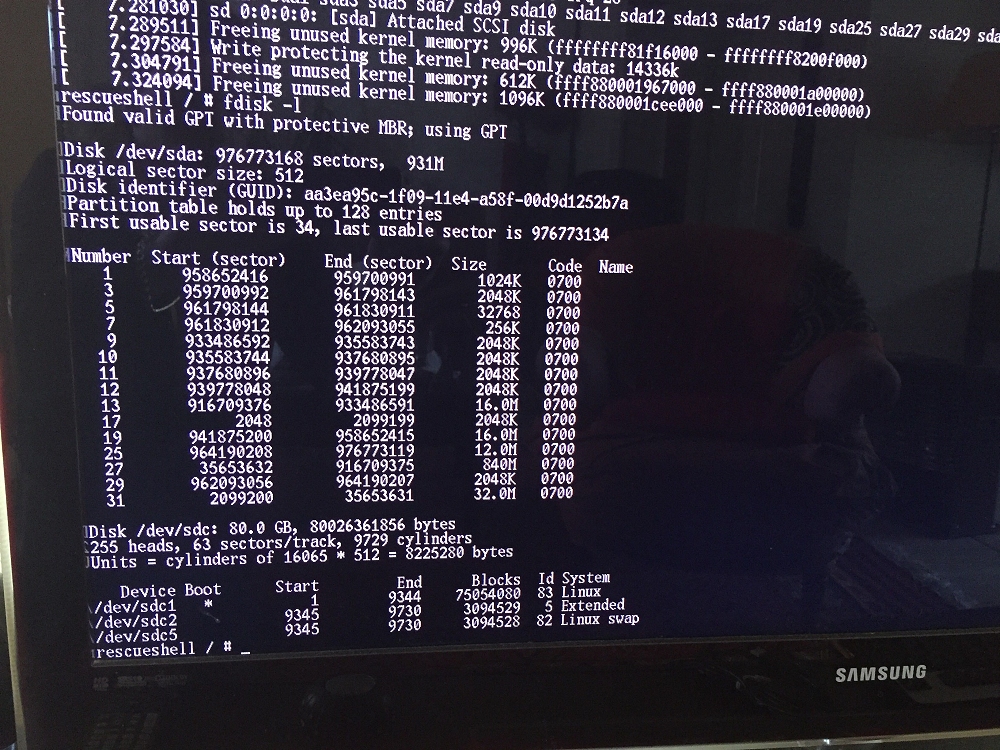
As you can see my ubuntu partition is in /dev/sdc1
Now just type (if your bootable partition is sdc1)
Sometimes exec switch_root don't start at the first time , just type the command again .. Wait a few seconds and you should see Ubuntu running 
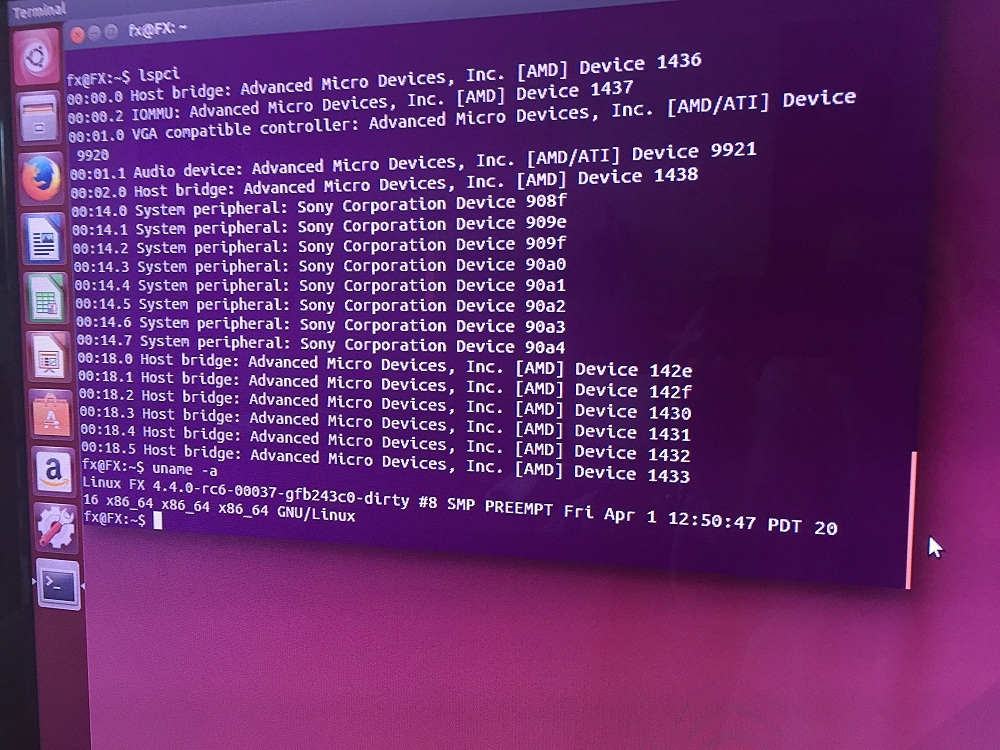
Keep in mind that there's no network working yet
PS4 Running Linux Ubuntu
How to Run Ubuntu on a PS4 with 1 USB Stick
Check out the guide with a PS4 Running Linux Ubuntu demonstration video below!
To quote: We need:
- 1 PS4 FW 1.76
- 1 USB Hdd or a USB Key big enough to install Ubuntu
- Download the ISO
- Copy the iso to Usb with a tool like unetbootin (Win/Mac/Linux) (You can burn on a DVD also)
- Boot on this USB or DVD
- Launch Install on your USB HDD or USB key (you can make small partition in Fat32 for Bzimage and initramfs) and the rest in Ext4
So now you should have Ubuntu installed on your USB Hdd ...
Now go to the PS4-Playground and load Linux (you must have of course a USB key with bZimage & initramfs.cpio.gz in the PS4)
Now you should see better-initramfs shell ...
Plug the USB Hdd where you have your ubuntu install (At this point you can remove the USB key with bZimage & initramfs.cpio.gz everything is in RAM)
Type fdisk -l to see the name of your USB Hdd ( /dev/sdXX)
As you can see my ubuntu partition is in /dev/sdc1
Now just type (if your bootable partition is sdc1)
Code:
mount /dev/sdc1 newroot/
exec switch_root /newroot/ /newroot/sbin/initKeep in mind that there's no network working yet
PS4 Running Linux Ubuntu
How to Run Ubuntu on a PS4 with 1 USB Stick
PlayStation Vita System Software 3.60 Update is Now Live
It's only been a few months since Sony's last update, and today in conjunction with PS4 Firmware 3.50 they have also released PS Vita System Software update 3.60 for PlayStation Vita handheld console owners.
Download: PS Vita Firmware 3.60 Update (US) / PS Vita Firmware 3.60 Update (EU) / PS Vita Firmware 3.60 Update (JP)
According to Sony's official site, the changes are simply as follows:
PlayStation Vita and PlayStation TV System Software Update 3.60
Main features in system software update version 3.60:
Vita IDA PhysDump
Vita 3.60 physical dump loader for IDA
Download: vita-ida-physdump-master.zip / GIT
Installation
Copy contents of this directory into your IDA 7.0/loaders directory.
Place db.yml into the directory with your physical dump.
Usage
Obtain a physical memory dump from a Vita running 3.60 (other versions are not supported).
You should dump physical addresses in the [0x40200000; 0x5FD00000) range. (wiki)
When opening a physical dump, this loader should be selected by default. You don't need to do anything, just click "OK".
Features
Download: PS Vita Firmware 3.60 Update (US) / PS Vita Firmware 3.60 Update (EU) / PS Vita Firmware 3.60 Update (JP)
According to Sony's official site, the changes are simply as follows:
PlayStation Vita and PlayStation TV System Software Update 3.60
Main features in system software update version 3.60:
- This system software update improves system performance.
Vita IDA PhysDump
Vita 3.60 physical dump loader for IDA
Download: vita-ida-physdump-master.zip / GIT
Installation
Copy contents of this directory into your IDA 7.0/loaders directory.
Place db.yml into the directory with your physical dump.
Usage
Obtain a physical memory dump from a Vita running 3.60 (other versions are not supported).
You should dump physical addresses in the [0x40200000; 0x5FD00000) range. (wiki)
When opening a physical dump, this loader should be selected by default. You don't need to do anything, just click "OK".
Features
- Physical dump loading
- Modules are found and detected with import/export parsing
- db.yml from vitasdk used for NID resolving
- A comment is added to every exported function...
MultiMAN Singstar Repack 4.78.02 (mmCM) by Lightra1n
Following the recent multiMAN updates, PlayStation 3 developer Lightra1n has now made available MultiMAN Singstar Repack 4.78.02 (mmCM) with details below.
Download: MM singstar-R_repack.pkg (131.9 MB) / MM singstar-LR_repack.pkg (Mirror)
To quote: Hi, guys!
First of all big THX to Deank and Arachetous for their job & it homebrew!
I've done repack of backup manager mmCM and I want share with all
Features:
Download: MM singstar-R_repack.pkg (131.9 MB) / MM singstar-LR_repack.pkg (Mirror)
To quote: Hi, guys!
First of all big THX to Deank and Arachetous for their job & it homebrew!
I've done repack of backup manager mmCM and I want share with all
Features:
- Based on MM 4.78.02
- Full edit theme (in rebug style)
- Edited fonts
- Edited sounds
- Updated Movian to 5.0.007 (from Deank)
- Add new MM motion Background
- Add motion icon in XMB
- Set default game folder to "GAMES" not "Dyrec'
PS4 Linux Installation Guide
A few days back PlayStation 4 developer kr105 released a PS4 Linux Loader Patch for 1.76 Firmware, and here's a follow-up PS4 Linux Installation Guide detailing how to install and run PS4 Linux from D-ecks via Wololo.
How to Install and Run Linux on your PS4
AT THE TIME OF THIS WRITING, THIS WORKS ONLY ON PS4 1.76 FW!
You'll need:
What to do:
0. Remove custom host from router (manuals.playstation.net 89.108.88.221) if added earlier
1. On PS4 Open Network > Set Up Internet Connection
2. Select LAN or Wi-Fi -> Select your network and enter password -> Custom
3. Set everything to Automatic, Do Not Specify, Do Not use, except DNS Settings
4. In DNS Settings set Primary DNS to 89.108.88.221, secondary set to 0.0.0.0
5. Download 2 files from http://kr105.com/ps4kerneltest/
6. Copy downloaded files on usb stick
7. Insert usb stick into PS4
8. Save settings and open User's Guide
9. Wait for a few seconds
OLD METHOD (use as fallback)
What to do:
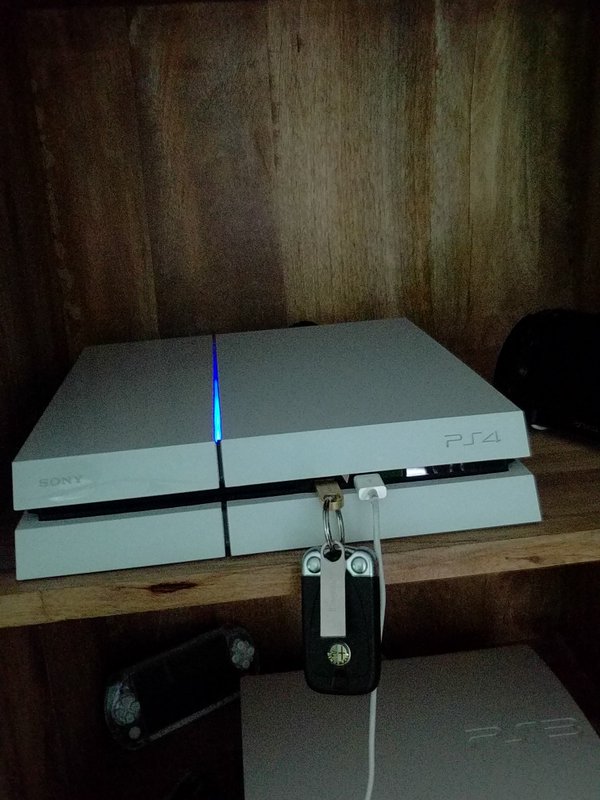
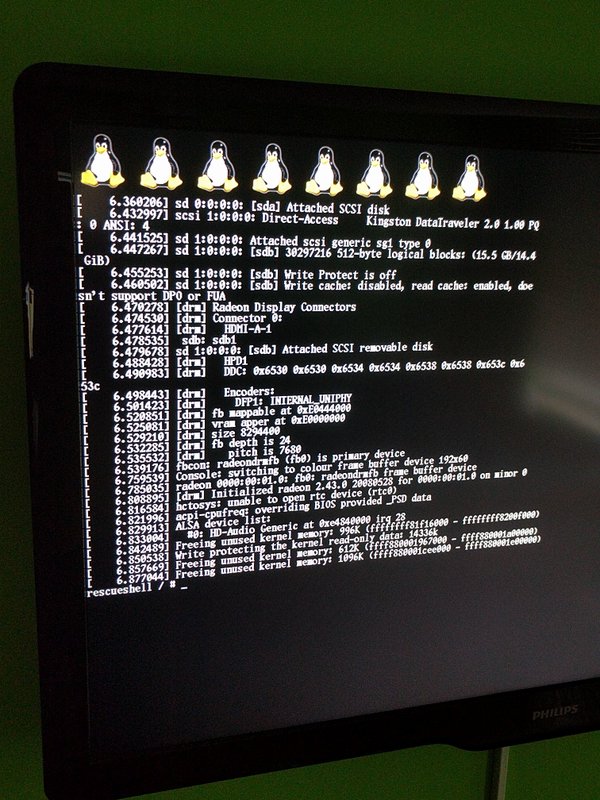
If you want do something in console, connect a USB keyboard.
VIDEO
Troubleshooting
“Not Enough System...
How to Install and Run Linux on your PS4
AT THE TIME OF THIS WRITING, THIS WORKS ONLY ON PS4 1.76 FW!
You'll need:
- USB flash drive
- USB keyboard
- Internet connection
What to do:
0. Remove custom host from router (manuals.playstation.net 89.108.88.221) if added earlier
1. On PS4 Open Network > Set Up Internet Connection
2. Select LAN or Wi-Fi -> Select your network and enter password -> Custom
3. Set everything to Automatic, Do Not Specify, Do Not use, except DNS Settings
4. In DNS Settings set Primary DNS to 89.108.88.221, secondary set to 0.0.0.0
5. Download 2 files from http://kr105.com/ps4kerneltest/
6. Copy downloaded files on usb stick
7. Insert usb stick into PS4
8. Save settings and open User's Guide
9. Wait for a few seconds
OLD METHOD (use as fallback)
What to do:
- You will need to get access to the browser from 1.76 without updating your console. How to do so is explained below.
- Download the Linux Kernel and ram init files from kr105.
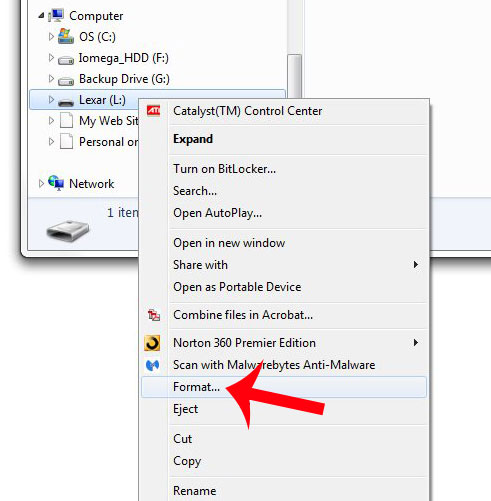
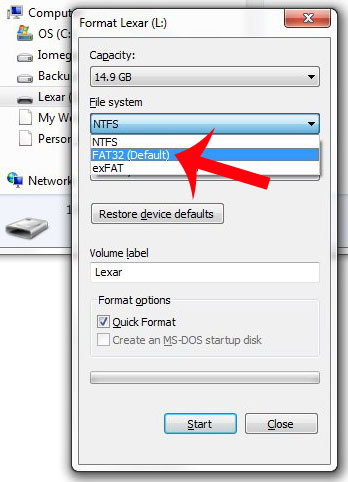
- Format usb stick to FAT32
- Copy downloaded files at the root of the usb stick
- Insert usb stick into PS4
- Get to PS4 WebKit Playground (http://cturt.github.io/PS4-playground/) using PS4 browser.
- Click Load! in Linux loader box.
- PROFIT.
If you want do something in console, connect a USB keyboard.
VIDEO
Troubleshooting
“Not Enough System...
- PS4 Fake PKG (FPKG) Sharing Guide
- 6.XX Webkit / 6.72 PS4 Jailbreak
- 7.00-7.02 Webkit Exploit
- 7.02 Webkit / 7.02 Kernel / PS4JB
- 7.50 Kernel Exploit / PS4JB 7.55
- 7.55 / 8.00 Payloads / PS4JB2 7.55
- 9.00 PS4 Webkit Exploit
- 9.00 PS4 Payloads / GoldHEN (Latest)
- 9.00 PS4 Jailbreak Kernel Exploit
- 11.00 PS4 Jailbreak Kernel Exploit
- 13.00 PS4 Kernel Exploit / 13.02 BD-J Bug
- 4.03 PS5 Webkit Exploit
- PS5 Kernel Exploit (ExFAT Bug)
- PS5 Root Keys Obtained
- 4.03 PS5 Kernel Build String
- 4.03 PS5 Webkit Execution
- 4.03 PS5 Kernel Vulnerability
- 4.03 PS5 Filesystem Dumps
- 4.51 PS5 BD-JB Sandbox Escape
- PS5 BD-JB Exploit Hack Source Code
- Mast1c0re PS5 Userland Exploit
- PS5 Kernel Access via PS4 Exploit
- PS5 exFAT Vulnerability Disclosed
- 4.03 PS5 Kernel Exploit Webkit ROP
- 4.50 PS5 Kernel Exploit Webkit ROP
- 4.51 PS5 Kernel Exploit Webkit ROP
- 4.xx PS5 Kernel Exploit v1.01
- 4.xx PS5 Kernel Exploit v1.02 / v1.03
- PS5 1.00-6.50 Firmware Webkit
- Native PS5 ROP Chain Execution
- Mast1c0re PS5 Compiler Attack
- PS5 FreeBSD Kernel Bug & WebKit
- PS5 UMTX 2 Exploit & PS5 Jailbreak
- Byepervisor PS5 Hypervisor Exploit
- Lua Lapse PS5 Kxploit & Laps3c0re / Y2JB
- 12.00 / 12.70 PS5 Kernel Exploit