PSXHAX.COM website and domain for sale. Contact Us with your offer!

You are using an out of date browser. It may not display this or other websites correctly.
You should upgrade or use an alternative browser.
You should upgrade or use an alternative browser.
PSXHAX - PSXHACKS: PSX HAX - PSX HACKS - PLAYSTATION HAX - PLAYSTATION HACKS
Obtaining Your PlayStation 4 SFlash via PS4 Root FTP Server Guide
PlayStation 4 developer zecoxao recently shared a simple guide on how to obtain your SFlash from a root FTP server should something go terribly wrong with your PS4 console while trying to hack the hell outta it 
Here's the brief tutorial on how to grab your SFLASH from Root FTP Server, to quote:
The SFlash is useful for when something might happen to your PS4 (some changes that affect the console in a way that it won't be able to boot later) and in case you need it you can use it together with your hardware flasher device to undo the changes you made to flash that caused the console to brick.
What you'll need:
1- Enable the ftp server (big silver star) located at the PS4 Playground Menu
2- Connect with the client
3- Navigate to /dev/
4- There should be a device called sflash0. Download it.
5- Make sure its exact size after the download is finished is 33554432 bytes / 32768 KB / 32 MB
Congratulations! You should have your SFlash Keep it safe in a location only you know in case something goes wrong with your PS4.
Here's the brief tutorial on how to grab your SFLASH from Root FTP Server, to quote:
The SFlash is useful for when something might happen to your PS4 (some changes that affect the console in a way that it won't be able to boot later) and in case you need it you can use it together with your hardware flasher device to undo the changes you made to flash that caused the console to brick.
What you'll need:
- PS4 Playground
- FTP client such as FileZilla or Flash FXP
1- Enable the ftp server (big silver star) located at the PS4 Playground Menu
2- Connect with the client
3- Navigate to /dev/
4- There should be a device called sflash0. Download it.
5- Make sure its exact size after the download is finished is 33554432 bytes / 32768 KB / 32 MB
Congratulations! You should have your SFlash
Keep it safe in a location only you know in case something goes wrong with your PS4.
PS4 Firmware 4.00 Codenamed Shingen Rolling Out, Feature Details!
We've seen some of the prospective PlayStation 4 Firmware 4.0 features and now those participating in the Open Beta will soon be able to check out the PS4 System Software 4.00 Shingen update first-hand! 
According to Sony PlayStation Marketing VP John Koller, the Shingen 4.00 PS4 System Software will feature Folders, Library Organization, PS4 Trophy improvements, UI Refresh and more detailed below!
To quote: Our beta for PS4’s upcoming 4.00 update, codenamed Shingen, rolls out soon for everyone included in the public beta program. If you signed up and were selected, be on the lookout for an email with instructions on how to download.
Whether you’re in the beta or not, we wanted to give everyone a glimpse at some of the new aspects of this system software. We’re refreshing the system UI, adding tools for organization, updating the Quick Menu, and much more.
UI Refresh
We’ve made a lot of adjustments and improvements to PS4’s main user interface. That includes some changes you may notice right away, like new system backgrounds and a revised What’s New tab, to smaller changes like updated popup notifications and redesigned system icons. As a whole, it all adds up to a more refined and easy to use UI. The overall look and feel of the UI remains the same — it just has a fresh coat of paint.
Quick Menu
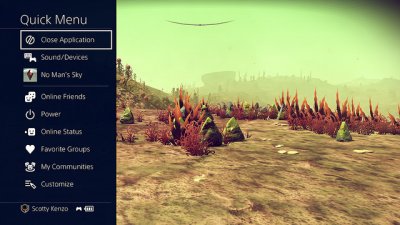 As you know, pressing and holding the PS button on your DualShock 4 brings up the Quick Menu. We’ve overhauled this menu to make it faster and easier to use. One big change is that the menu now only covers a portion of the screen, meaning you don’t need to leave gameplay entirely.
We’ve added several new items to the Quick Menu, letting you quickly get info without having to back to the home screen. You can see the online status of your friends, and shortcuts to quickly access your Party, Favorite Groups, Communities, and more. You can also customize the Quick Menu, removing or adding items as you see fit.
Share Menu
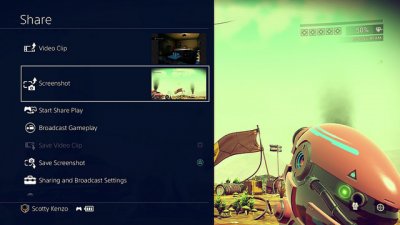 We’ve given a similar overhaul to the Share Menu, which appears once you...
According to Sony PlayStation Marketing VP John Koller, the Shingen 4.00 PS4 System Software will feature Folders, Library Organization, PS4 Trophy improvements, UI Refresh and more detailed below!
To quote: Our beta for PS4’s upcoming 4.00 update, codenamed Shingen, rolls out soon for everyone included in the public beta program. If you signed up and were selected, be on the lookout for an email with instructions on how to download.
Whether you’re in the beta or not, we wanted to give everyone a glimpse at some of the new aspects of this system software. We’re refreshing the system UI, adding tools for organization, updating the Quick Menu, and much more.
UI Refresh
We’ve made a lot of adjustments and improvements to PS4’s main user interface. That includes some changes you may notice right away, like new system backgrounds and a revised What’s New tab, to smaller changes like updated popup notifications and redesigned system icons. As a whole, it all adds up to a more refined and easy to use UI. The overall look and feel of the UI remains the same — it just has a fresh coat of paint.
Quick Menu
As you know, pressing and holding the PS button on your DualShock 4 brings up the Quick Menu. We’ve overhauled this menu to make it faster and easier to use. One big change is that the menu now only covers a portion of the screen, meaning you don’t need to leave gameplay entirely.We’ve added several new items to the Quick Menu, letting you quickly get info without having to back to the home screen. You can see the online status of your friends, and shortcuts to quickly access your Party, Favorite Groups, Communities, and more. You can also customize the Quick Menu, removing or adding items as you see fit.
Share Menu
We’ve given a similar overhaul to the Share Menu, which appears once you...
PS4 2-Step Verification to Increase PlayStation 4 Security Coming
Similar to our Two-Step Verification here at PSXHAX, according to reports Sony's rumored PS4 2-step verification will be coming soon in various regions to increase PlayStation 4 account security.
To quote from RiddicTH on the news: "Australia and New Zealand will be getting 2-step later tonight or tomorrow morning, where as other regions should be getting it next week if all goes to plan.
It will work as a SMS service where you will have to input a mobile number on your account and every new login from a PS4 or PC will send a SMS message with a verification code. This (from what we've been told) will not be largely publicised but will be an additional option under the Security section of your account on PS4 or PC.
Legacy consoles - AKA anything less than a PS4 - will use what's known as "Device Codes" which will basically be additional passwords you can have for the console. You'll be able to set a few if you're worried about forgetting them, from what we can understand.
I cant say anything for NA regions as that's outside my area of expertise and SIEE work differently from SIEA in some regards. No doubt it'll be next up to the chopping block though.
Any other questions, I'll be happy to answer the best I can. The training material we got for it wasn't... the best, but we've come to expect that from SIEE at this point.
EDIT 1: The planned launch for ANZ is tomorrow. We're not 100% if it's going to go to plan, but if it does the plan is to roll it out to other EU regions soon after.
Was just informed I probably shouldn't be talking about it till we're sure it works on ANZ. Whoops~"
 Update: Sony's PlayStation 4 2-Step Verification system is now going live across regions as planned, with screenshots available below thanks to TheOuterHaven.net!
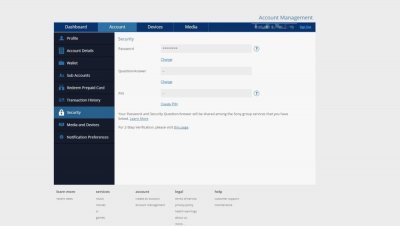
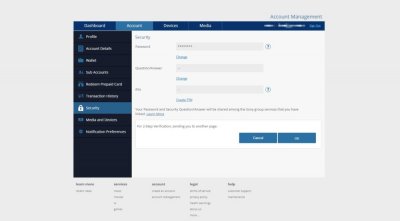
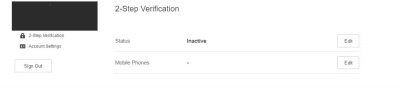
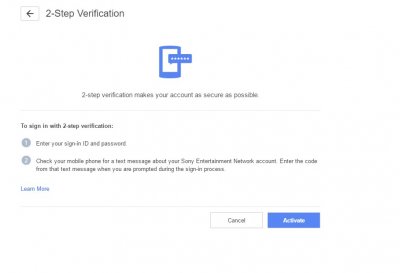
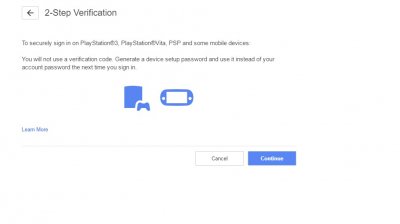
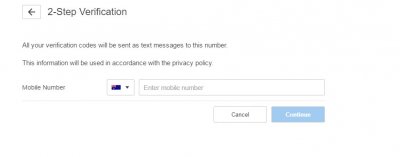 ...
...
To quote from RiddicTH on the news: "Australia and New Zealand will be getting 2-step later tonight or tomorrow morning, where as other regions should be getting it next week if all goes to plan.
It will work as a SMS service where you will have to input a mobile number on your account and every new login from a PS4 or PC will send a SMS message with a verification code. This (from what we've been told) will not be largely publicised but will be an additional option under the Security section of your account on PS4 or PC.
Legacy consoles - AKA anything less than a PS4 - will use what's known as "Device Codes" which will basically be additional passwords you can have for the console. You'll be able to set a few if you're worried about forgetting them, from what we can understand.
I cant say anything for NA regions as that's outside my area of expertise and SIEE work differently from SIEA in some regards. No doubt it'll be next up to the chopping block though.
Any other questions, I'll be happy to answer the best I can. The training material we got for it wasn't... the best, but we've come to expect that from SIEE at this point.
EDIT 1: The planned launch for ANZ is tomorrow. We're not 100% if it's going to go to plan, but if it does the plan is to roll it out to other EU regions soon after.
Was just informed I probably shouldn't be talking about it till we're sure it works on ANZ. Whoops~"
Update: Sony's PlayStation 4 2-Step Verification system is now going live across regions as planned, with screenshots available below thanks to TheOuterHaven.net! ...
PS VitaDump, VitaToolchain & PKG Installer 2.0 Tutorial by Silica
While we're still adding new VPK files to the VPK Mirror list and VPK Showcase, today PlayStation Vita developer Silica (YouTube Channel) made available PKG Installer 2.0 alongside a video tutorial for installing Package files and activating the Debug Utility on PS Vita. 
Meanwhile PSVita developers zecoxao updated VitaDump and ooPo shared a VitaToolchain script to autobuild a homebrew PS Vita toolchain.
Download: VitaDump v1.0.0 Source code (zip) / VitaDump v1.0.0 Source code (tar.gz) / VitaDump GIT / vitatoolchain-master.zip / VitaToolchain GIT / PKG_Installer.vpk (151 KB) / PKG_Installer.vpk (Mirror) / PKGInstaller_2.0_Setup.exe (9 MB) / PKGInstaller_2.0_Setup.exe (Mirror) / PS Vita PKG Files / PS Vita PKGs (Archive) / Apps / Demo PKG's (Archive) / Beta games + vpk.7z / DebugUtillity.zip (3.1 MB) / PKG Installer Mod.7z (316.79 KB) / PKGInstallerLauncher.vpk...
Meanwhile PSVita developers zecoxao updated VitaDump and ooPo shared a VitaToolchain script to autobuild a homebrew PS Vita toolchain.
Download: VitaDump v1.0.0 Source code (zip) / VitaDump v1.0.0 Source code (tar.gz) / VitaDump GIT / vitatoolchain-master.zip / VitaToolchain GIT / PKG_Installer.vpk (151 KB) / PKG_Installer.vpk (Mirror) / PKGInstaller_2.0_Setup.exe (9 MB) / PKGInstaller_2.0_Setup.exe (Mirror) / PS Vita PKG Files / PS Vita PKGs (Archive) / Apps / Demo PKG's (Archive) / Beta games + vpk.7z / DebugUtillity.zip (3.1 MB) / PKG Installer Mod.7z (316.79 KB) / PKGInstallerLauncher.vpk...
HENkaku PS4 Exploit Update for 3.15 / 3.50 PlayStation 4 Firmware
Just over a week back we reported on the 3.55 PS4 HENkaku Exploit, and since then PlayStation 4 developer Fire30 has been updating Github with FireKaku PS4 ports for both 3.15 and 3.50 Firmware as well.
Download: PS4-3.55-Code-Execution-PoC-master.zip / GIT / WhiteOverfl0w GIT
From the ReadMe file: PS4 3.55 Code Execution:
This repo contains a PoC for getting code execution on ps4's with firmware version 3.55 (Now with support for 3.15 and 3.50).
It uses the same webkit vulnerability as the henkaku project. So far there is basic ROP working and returning to normal execution is included.
I have also included some helper methods to make researching a tad easier. Currently the documentation is pretty poor but I will be updating it over time.
Usage:
You need to edit the dns.conf to point to the ip address of your machine, and modify your consoles dns settings to point to it as well. Then run:
then
Debug output will come from this process.
Navigate to the User's Guide page on the PS4 and information about the exploit and all loaded modules should be printed out. This is an example of what running it will look like: https://gist.github.com/Fire30/2e0ea2d73d3a1f6f95d80aea77b75df8
If you want to try the socket test to work. Change the IP address at the bottom of ps4sploit.html to your computers and run a command such as netcat -l 0.0.0.0 8989 -v. You should see something like:
There are a few notes:
Download: PS4-3.55-Code-Execution-PoC-master.zip / GIT / WhiteOverfl0w GIT
From the ReadMe file: PS4 3.55 Code Execution:
This repo contains a PoC for getting code execution on ps4's with firmware version 3.55 (Now with support for 3.15 and 3.50).
It uses the same webkit vulnerability as the henkaku project. So far there is basic ROP working and returning to normal execution is included.
I have also included some helper methods to make researching a tad easier. Currently the documentation is pretty poor but I will be updating it over time.
Usage:
You need to edit the dns.conf to point to the ip address of your machine, and modify your consoles dns settings to point to it as well. Then run:
Code:
python fakedns.py -c dns.conf
Code:
python server.pyNavigate to the User's Guide page on the PS4 and information about the exploit and all loaded modules should be printed out. This is an example of what running it will look like: https://gist.github.com/Fire30/2e0ea2d73d3a1f6f95d80aea77b75df8
If you want to try the socket test to work. Change the IP address at the bottom of ps4sploit.html to your computers and run a command such as netcat -l 0.0.0.0 8989 -v. You should see something like:
Code:
Listening on [0.0.0.0] (family 0, port 8989)
Connection from [192.168.1.72] port 8989 [tcp/sunwebadmins] accepted (family 2, sport 59389)
Hello From a PS4!- The exploit is not 100% reliable currently. It is more like 80% which is good...
- PS4 Fake PKG (FPKG) Sharing Guide
- 6.XX Webkit / 6.72 PS4 Jailbreak
- 7.00-7.02 Webkit Exploit
- 7.02 Webkit / 7.02 Kernel / PS4JB
- 7.50 Kernel Exploit / PS4JB 7.55
- 7.55 / 8.00 Payloads / PS4JB2 7.55
- 9.00 PS4 Webkit Exploit
- 9.00 PS4 Payloads / GoldHEN (Latest)
- 9.00 PS4 Jailbreak Kernel Exploit
- 11.00 PS4 Jailbreak Kernel Exploit
- 13.00 PS4 Kernel Exploit / 13.02 BD-J Bug
- 4.03 PS5 Webkit Exploit
- PS5 Kernel Exploit (ExFAT Bug)
- PS5 Root Keys Obtained
- 4.03 PS5 Kernel Build String
- 4.03 PS5 Webkit Execution
- 4.03 PS5 Kernel Vulnerability
- 4.03 PS5 Filesystem Dumps
- 4.51 PS5 BD-JB Sandbox Escape
- PS5 BD-JB Exploit Hack Source Code
- Mast1c0re PS5 Userland Exploit
- PS5 Kernel Access via PS4 Exploit
- PS5 exFAT Vulnerability Disclosed
- 4.03 PS5 Kernel Exploit Webkit ROP
- 4.50 PS5 Kernel Exploit Webkit ROP
- 4.51 PS5 Kernel Exploit Webkit ROP
- 4.xx PS5 Kernel Exploit v1.01
- 4.xx PS5 Kernel Exploit v1.02 / v1.03
- PS5 1.00-6.50 Firmware Webkit
- Native PS5 ROP Chain Execution
- Mast1c0re PS5 Compiler Attack
- PS5 FreeBSD Kernel Bug & WebKit
- PS5 UMTX 2 Exploit & PS5 Jailbreak
- Byepervisor PS5 Hypervisor Exploit
- Lua Lapse PS5 Kxploit & Laps3c0re / Y2JB
- 12.00 / 12.70 PS5 Kernel Exploit