
You are using an out of date browser. It may not display this or other websites correctly.
You should upgrade or use an alternative browser.
You should upgrade or use an alternative browser.
Live in Your World, HAX in Ours!

Live in Your World, HAX in Ours!
Hello World! I've been reporting on Sony PlayStation hacking news since 2000 and started PSXHAX in 2014 to cover PlayStation (PSX), PlayStation 2 (PS2), PlayStation 3 (PS3), PlayStation 4 (PS4), PlayStation Portable (PSP), PlayStation Vita (PS Vita), PlayStation TV (PS TV) and next-gen PlayStation 5 (PS5) platforms along with anything else of interest.
Click on my UserName author link above and you'll be able to view a curated list of all the articles I've contributed thus far to PSXHAX.COM!
Click on my UserName author link above and you'll be able to view a curated list of all the articles I've contributed thus far to PSXHAX.COM!
Dynasty Warriors 9 Arrives with New PlayStation 4 Games Next Week
In an all new open world setting, experience the thrill of one versus thousands in Dynasty Warriors 9 arriving with the new PlayStation 4 game releases next week! 
Below is a summary of the full listing of new PlayStation games from Sony Social Media Senior Specialist Ryan Clements, as follows:
New Releases: Week of February 13, 2018
The information above is subject to change without notice.
Below is a summary of the full listing of new PlayStation games from Sony Social Media Senior Specialist Ryan Clements, as follows:
New Releases: Week of February 13, 2018
- Crossing Souls - PS4 — Digital
- CubeWorks - PS VR — Digital
- Drunkn Bar Fight - PS VR — Digital
- Dynasty Warriors 9 - PS4 — Digital, Retail
- The Fall Part 2: Unbound - PS4 — Digital
- Fe - PS4 — Digital (Out 2/16)
- Guilt Battle Arena - PS4 — Digital (Out 2/14)
- Kingdom Come: Deliverance - PS4 — Digital, Retail
- Knockout League - PS VR — Digital
- The Longest Five Minutes - PS Vita — Digital
- Mahjong Carnival - PS4 — Digital
- Monster Energy Supercross: The Official Videogame - PS4 — Digital, Retail
- Pinstripe - PS4 — Digital
- Pop-Up Pilgrims - PS VR — Digital
- Schacht - PS4 — Digital
- Secret of Mana - PS4 — Digital, Retail (Out 2/15)
- Slice, Dice & Rice - PS4 — Digital (Out 2/14)
- Sprint Vector - PS VR — Digital
- True Fear: Forsaken Souls – Part 1 - PS4 — Digital
- Shadow of the Colossus Playlist
- Franz Ferdinand – Always Ascending
- Black Panther Original Motion Picture Soundtrack
- Justice League (plus Bonus Features)
- Coco (plus Bonus Features)
- Three Billboards Outside Ebbing, Missouri
- Homeland – Season 7 Premiere – Sunday February 11 at 9:00 pm ET/PT
- The Winter Olympics – Thursday February 8 – Sunday February 25 on the networks of NBCUniversal.
The information above is subject to change without notice.
PS Vita PUP Extractor with Source Code Released by Princess
PlayStation Vita developer Princess of Sleeping released via Twitter a PS Vita PUP Extractor utility to extract update files from PUP files alongside the source code today followed by a PKG Installer IDU Spoofer with details below. 
Download: PUP-Extractor.vpk / GIT / pkg-installer-idu-spoofer.suprx / GIT
To quote from the README.md: PSV-PUP-Extractor
How to use:
1. vpk install.
2. Launch PUP-Extractor once.
3. Since the PSP2UPDAT folder is created in "ux0:", put the PUP file you want to extract into this folder.(Multiple placement possible)
4. After placing the files, start PUP-Extractor.
5. Wait until the Extract of the PUP file is over.
6. The application closes automatically when extraction of PUP file is completed
7. The extracted file is in "ux0:pSP2UPDAT_Dec/"
Test FW
1.81
3.60
3.67
0.996.070
0.996.090
1.000.041
1.000.071
1.030.071
3.600.011
Notes
In theory it is possible to extract all FWs, but if a system error popup appears from the application when extracting FW please let us know on Twitter PoSsvkey.
Changelog:
1.0
Only NPXS10031 or SKGPKG2CH
*NPXS10031
or *SKGPKG2CH
+ PSP PKG install - ok
Download: PUP-Extractor.vpk / GIT / pkg-installer-idu-spoofer.suprx / GIT
To quote from the README.md: PSV-PUP-Extractor
How to use:
1. vpk install.
2. Launch PUP-Extractor once.
3. Since the PSP2UPDAT folder is created in "ux0:", put the PUP file you want to extract into this folder.(Multiple placement possible)
4. After placing the files, start PUP-Extractor.
5. Wait until the Extract of the PUP file is over.
6. The application closes automatically when extraction of PUP file is completed
7. The extracted file is in "ux0:pSP2UPDAT_Dec/"
Test FW
- retail FW
1.81
3.60
3.67
- devkit FW
0.996.070
0.996.090
1.000.041
1.000.071
1.030.071
3.600.011
- Testkit FW
Notes
In theory it is possible to extract all FWs, but if a system error popup appears from the application when extracting FW please let us know on Twitter PoSsvkey.
Changelog:
1.0
- Initial release
- While extracting, press and hold Start button to abort extraction
- Show number of extracted files
Only NPXS10031 or SKGPKG2CH
*NPXS10031
Code:
ur0:tai/pkg-installer-idu-spoofer.suprx
Code:
ur0:tai/pkg-installer-idu-spoofer.suprx
PS4API Server for PS4 4.05 Firmware Memory R/W Requests by BISOON
Following the 1.76 PS4 API, PSN API, PS4API Open Sourced and recent PS4API 4.05 Port work today PlayStation 4 developer @BISOON made available a PS4API Server for PS4 4.05 Firmware to handle client R/W game memory requests aiding devs in making RTE/RTM tools. 
Download: PS4API.bin / PS4 API Server GIT / PS4Lib-master.zip / PS4Lib GIT (Dynamic link library to create RTMs for PS4)
To quote from his post on NGU: Hello everybody after a while being away for a long time
Recently I got my PS4 (4.05) and thanks for everyone who spent his effort to make this happen on 4.5 and also we will not forget who is working on useful things for this community.
I spent the past two days looking for PS4API to control over the app memory using desktop tools/rtms, and unfortunately I got some but seems not worked with me or not stable enough (I am not underestimating their work, I really respect what they are done) also no new commits or updates on their projects for a long time.
So today I just pushed my PS4API server project into github for contribution, or for testing purposes. The client side not finished yet due the lack of time, so I will create the client lib based on the PS3Lib By iMCSx components (if he doesn't mind) to make it easy for people who already has created PS3 rtm tools and to make it simple for updating PS3 tools to PS4 (only changing the addresses will be enough) and the RPC as well if needed.
As I promised you guys I've finished the client side library in c# to make it easy for people who interested in making RTM tools. also demo app included for demonstration.
A Brief...
Download: PS4API.bin / PS4 API Server GIT / PS4Lib-master.zip / PS4Lib GIT (Dynamic link library to create RTMs for PS4)
To quote from his post on NGU: Hello everybody after a while being away for a long time
Recently I got my PS4 (4.05) and thanks for everyone who spent his effort to make this happen on 4.5 and also we will not forget who is working on useful things for this community.
I spent the past two days looking for PS4API to control over the app memory using desktop tools/rtms, and unfortunately I got some but seems not worked with me or not stable enough (I am not underestimating their work, I really respect what they are done) also no new commits or updates on their projects for a long time.
So today I just pushed my PS4API server project into github for contribution, or for testing purposes. The client side not finished yet due the lack of time, so I will create the client lib based on the PS3Lib By iMCSx components (if he doesn't mind) to make it easy for people who already has created PS3 rtm tools and to make it simple for updating PS3 tools to PS4 (only changing the addresses will be enough) and the RPC as well if needed.
As I promised you guys I've finished the client side library in c# to make it easy for people who interested in making RTM tools. also demo app included for demonstration.
A Brief...
PS4 Registry Editor and Viewer by Oct0xor & CXML Decompiler via SilicaAndPina
PlayStation 4 developer oct0xor (aka @Octopus) made available a PS4 Registry Editor and Viewer for other devs to examine the system.nvs, system.dat, system.idx, system.eap and system.rec. 
Download: ps4_registry_editor-master.zip / GIT
This comes following the PS4 EAP Kernel Dumps, and to quote from his Blog page on it: PS4 Registry Editor
Recently I reverse-engineered PS4 registry format and made a simple tool to view and edit it.
Sony likes to encrypt and obfuscate everything. Every time it is very fun to figure it out.
PS4 registry is represented by a few different files and file formats:
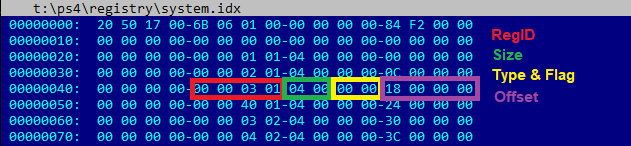
Entries inside system.eap and system.rec are stored in obfuscated format.
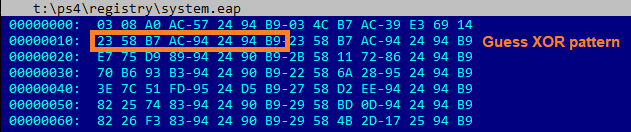
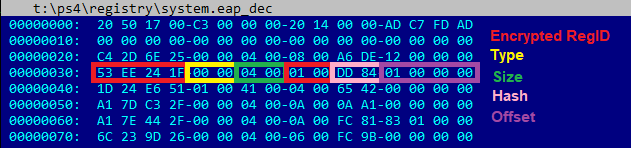
First of all, its XOR’ed with 8 bytes, there are a lot of Null bytes, so it’s easy to figure out them without reversing. But thats not all. RegID’s are encrypted, entries and data are hashed. Besides that, RegID’s for system.eap and system.rec are encrypted with different keys.
Why to obfuscate? Dunno.
Folders with those files should be not easily accessible.
My suggestions:
[ATTACH type="full" alt="PS4...
Download: ps4_registry_editor-master.zip / GIT
This comes following the PS4 EAP Kernel Dumps, and to quote from his Blog page on it: PS4 Registry Editor
Recently I reverse-engineered PS4 registry format and made a simple tool to view and edit it.
Sony likes to encrypt and obfuscate everything. Every time it is very fun to figure it out.
PS4 registry is represented by a few different files and file formats:
- /system_data/settings/system.nvs
- /system_data/settings/system.dat
- /system_data/settings/system.idx
- /user/settings/system.eap
- /system_data/settings/system.rec
Entries inside system.eap and system.rec are stored in obfuscated format.
First of all, its XOR’ed with 8 bytes, there are a lot of Null bytes, so it’s easy to figure out them without reversing. But thats not all. RegID’s are encrypted, entries and data are hashed. Besides that, RegID’s for system.eap and system.rec are encrypted with different keys.
Why to obfuscate? Dunno.
Folders with those files should be not easily accessible.
My suggestions:
- To prevent fuzzing of file format
- Implement new crypto and hash algorithms is the most fun thing to do at work
- This data is very sensitive
[ATTACH type="full" alt="PS4...
PS4 System Notification Types for 4.05 Firmware Detailed by 2much4u
Following the PS4 Notifications Mod and his GTA V Native Caller, today PlayStation 4 developer @2much4u detailed some PS4 System Notification Types for 4.05 Firmware via Twitter for devs as outlined below.
Download: PS4_405_System_Notification_Types.txt / PS4 GTA V Native Caller
To quote from the Github page: Message types for sceSysUtilSendSystemNotification functions on PS4 version 4.05
0: -Blank-
1: Unknown USB device connected.
2: Too many USB hubs connected.
3: Connect this device using a USB cable, or connect it again.
4: %s battery level low.
5: %s disconnected.
6: Too many USB devices connected.
7: Cannot connect another Bluetooth device.
8: -Blank-
9: Cannot connect another controller.
10: Cannot connect another mouse or keyboard.
11: Cannot use controller feature of keyboard.
12: Device not supported.
13: Cannot use wireless controllers for PS3.
14: %s connected their companion app.
15: %s disconnected their companion app.
16: %s connected using Remote Play.
17: %s disconnected from Remote Play.
18: %s cannot see the screen due to Remote Play blocked scene.
19: %s can see the screen again because Remote Play blocked scene ended.
20: -Blank-
21: -Blank-
22: Less than %s free in system storage.
23: LAN cable not connected.
24: Wi-Fi network connection lost.
25: Cannot connect to network.
26: %s logged in to PS4.
27: -Blank-
28: Your account is banned from PlayStation Network.
29: PlayStation Network access from this PS4 banned or temporarily suspended.
30: Update the system software.
31: PlayStation Network is currently busy.
32: PlayStation Network is currently undergoing maintenance.
33: PlayStation Network is no longer available.
34: -Blank-
35: Sign in to PSN to use network features.
36: Signed out of PSN.
37: Update application to use network features.
38: Update system software to use network features.
39...
Download: PS4_405_System_Notification_Types.txt / PS4 GTA V Native Caller
To quote from the Github page: Message types for sceSysUtilSendSystemNotification functions on PS4 version 4.05
0: -Blank-
1: Unknown USB device connected.
2: Too many USB hubs connected.
3: Connect this device using a USB cable, or connect it again.
4: %s battery level low.
5: %s disconnected.
6: Too many USB devices connected.
7: Cannot connect another Bluetooth device.
8: -Blank-
9: Cannot connect another controller.
10: Cannot connect another mouse or keyboard.
11: Cannot use controller feature of keyboard.
12: Device not supported.
13: Cannot use wireless controllers for PS3.
14: %s connected their companion app.
15: %s disconnected their companion app.
16: %s connected using Remote Play.
17: %s disconnected from Remote Play.
18: %s cannot see the screen due to Remote Play blocked scene.
19: %s can see the screen again because Remote Play blocked scene ended.
20: -Blank-
21: -Blank-
22: Less than %s free in system storage.
23: LAN cable not connected.
24: Wi-Fi network connection lost.
25: Cannot connect to network.
26: %s logged in to PS4.
27: -Blank-
28: Your account is banned from PlayStation Network.
29: PlayStation Network access from this PS4 banned or temporarily suspended.
30: Update the system software.
31: PlayStation Network is currently busy.
32: PlayStation Network is currently undergoing maintenance.
33: PlayStation Network is no longer available.
34: -Blank-
35: Sign in to PSN to use network features.
36: Signed out of PSN.
37: Update application to use network features.
38: Update system software to use network features.
39...
- PS4 Fake PKG (FPKG) Sharing Guide
- 6.XX Webkit / 6.72 PS4 Jailbreak
- 7.00-7.02 Webkit Exploit
- 7.02 Webkit / 7.02 Kernel / PS4JB
- 7.50 Kernel Exploit / PS4JB 7.55
- 7.55 / 8.00 Payloads / PS4JB2 7.55
- 9.00 PS4 Webkit Exploit
- 9.00 PS4 Payloads / GoldHEN (Latest)
- 9.00 PS4 Jailbreak Kernel Exploit
- 11.00 PS4 Jailbreak Kernel Exploit
- 13.00 PS4 Kernel Exploit / 13.02 BD-J Bug
- 4.03 PS5 Webkit Exploit
- PS5 Kernel Exploit (ExFAT Bug)
- PS5 Root Keys Obtained
- 4.03 PS5 Kernel Build String
- 4.03 PS5 Webkit Execution
- 4.03 PS5 Kernel Vulnerability
- 4.03 PS5 Filesystem Dumps
- 4.51 PS5 BD-JB Sandbox Escape
- PS5 BD-JB Exploit Hack Source Code
- Mast1c0re PS5 Userland Exploit
- PS5 Kernel Access via PS4 Exploit
- PS5 exFAT Vulnerability Disclosed
- 4.03 PS5 Kernel Exploit Webkit ROP
- 4.50 PS5 Kernel Exploit Webkit ROP
- 4.51 PS5 Kernel Exploit Webkit ROP
- 4.xx PS5 Kernel Exploit v1.01
- 4.xx PS5 Kernel Exploit v1.02 / v1.03
- PS5 1.00-6.50 Firmware Webkit
- Native PS5 ROP Chain Execution
- Mast1c0re PS5 Compiler Attack
- PS5 FreeBSD Kernel Bug & WebKit
- PS5 UMTX 2 Exploit & PS5 Jailbreak
- Byepervisor PS5 Hypervisor Exploit
- Lua Lapse PS5 Kxploit & Laps3c0re / Y2JB
- 12.00 / 12.70 PS5 Kernel Exploit