PSXHAX.COM website and domain for sale. Contact Us with your offer!

You are using an out of date browser. It may not display this or other websites correctly.
You should upgrade or use an alternative browser.
You should upgrade or use an alternative browser.
Live in Your World, HAX in Ours!

Live in Your World, HAX in Ours!
Hello World! I've been reporting on Sony PlayStation hacking news since 2000 and started PSXHAX in 2014 to cover PlayStation (PSX), PlayStation 2 (PS2), PlayStation 3 (PS3), PlayStation 4 (PS4), PlayStation Portable (PSP), PlayStation Vita (PS Vita), PlayStation TV (PS TV) and next-gen PlayStation 5 (PS5) platforms along with anything else of interest.
Click on my UserName author link above and you'll be able to view a curated list of all the articles I've contributed thus far to PSXHAX.COM!
Click on my UserName author link above and you'll be able to view a curated list of all the articles I've contributed thus far to PSXHAX.COM!
Sony Reveals New PlayStation Now Game Additions for February 2018
Topping the list of new additions to Sony's game-streaming service for this month are NBA 2K16, Yakuza 5 and more for those who subscribe to their PlayStation digital plans.
Here's the full rundown from PlayStation Now Senior Marketing Manager Brian Dunn, to quote:
2018 is in full swing, and we’ve got an exciting batch of new titles debuting on PlayStation Now this month, ready to stream to your PS4 and PC. Joining the library of more than 600 games – including more than 130 PS4 games – is NBA 2K16, Yakuza 5, and many more.
New PS4 Games
PS Now provides unlimited on-demand access to a growing library of over 600 games, with new games added every month, and no game downloads required. PS4 save data in PS Now is also compatible with PS Plus cloud saves, so you can upload/download save files to and from your own console.
Stay tuned for more updates on PS Now, and happy gaming!
Here's the full rundown from PlayStation Now Senior Marketing Manager Brian Dunn, to quote:
2018 is in full swing, and we’ve got an exciting batch of new titles debuting on PlayStation Now this month, ready to stream to your PS4 and PC. Joining the library of more than 600 games – including more than 130 PS4 games – is NBA 2K16, Yakuza 5, and many more.
New PS4 Games
- Anomaly 2 (PS4)
- Backgammon Blitz (PS4)
- Bombing Busters (PS4)
- DiRT Rally (PS4)
- Disgaea 5: Alliance of Vengeance (PS4)
- Enigmatis: The Ghosts of Maple Creek (PS4)
- Gal*Gun: Double Peace (PS4)
- Grand Kingdom (PS4)
- NBA 2K16 (PS4)
- Professional Farmer 2017 (PS4)
- Yakuza 4 (PS3)
- Yakuza 5 (PS3)
- Brothers: A Tale of Two Sons
- Guilty Gear Xrd Sign
- Motorcycle Club
- Payday 2: Crimewave Edition
PS Now provides unlimited on-demand access to a growing library of over 600 games, with new games added every month, and no game downloads required. PS4 save data in PS Now is also compatible with PS Plus cloud saves, so you can upload/download save files to and from your own console.
Stay tuned for more updates on PS Now, and happy gaming!
PS4 KEIJI: System Software 5.50 New Firmware Features Unveiled!
Since the 5.50 PS4 Beta Signups we've seen hints of PS4 Firmware 5.50 slip out including PS4 Pro Supersampling, and today Sony has unveiled what else is coming in the PS4 System Software 5.50 Update codenamed KEIJI including Play Time Management, custom wallpapers via USB, enhancements to notifications and the Quick Menu with more details below! 
To quote from Sony PlayStation Marketing VP Mary Yee on what to expect:
The beta for the PlayStation 4 system’s next major system software update 5.50 (codenamed KEIJI) rolls out today. If you signed up and were selected for the beta program, you’ll receive an email with instructions on how to download and get started.
Even if you are not in the beta program, we wanted to give you a sneak preview of features you can expect in this update. In 5.50, we’re introducing Play Time Management, Library UI updates, further enhancements to the Quick Menu, and much more.
Play Time Management
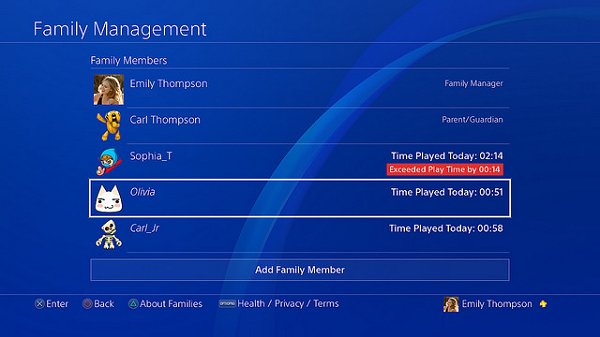
We’re introducing Play Time Management, which will allow family managers (and adult family members who are set as guardians) to manage PS4 playtime for child family members on family on PSN. Managing Playtime is easy; go to Settings > Family Management on your PS4, or log into your PlayStation account on your web browser from your PC or smartphone, to check and manage your child’s playtime each day. If needed, the family manager/guardians can apply playtime restrictions to make sure that the child is only playing for a set amount of time or within set playable hours.
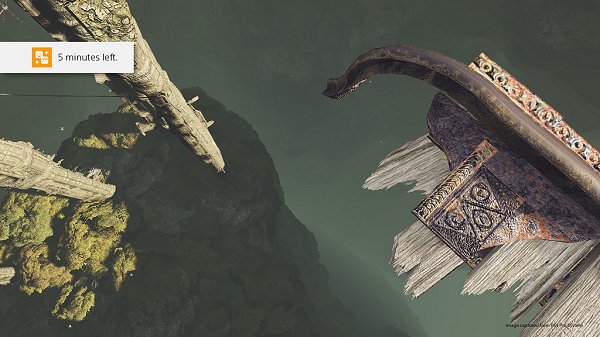
Notifications on PS4 will be sent to the child during gameplay so that he or she knows when they should save and quit. The family managers/guardians also have the option to add extra game time via their smartphone or PC. In addition, the family manager/guardians can choose whether or not to automatically log the child out of their PS4 once their playtime is over.
Library UI Updates - ‘This PS4’ and Name/Avatar tab
Two new tabs are being added...
To quote from Sony PlayStation Marketing VP Mary Yee on what to expect:
The beta for the PlayStation 4 system’s next major system software update 5.50 (codenamed KEIJI) rolls out today. If you signed up and were selected for the beta program, you’ll receive an email with instructions on how to download and get started.
Even if you are not in the beta program, we wanted to give you a sneak preview of features you can expect in this update. In 5.50, we’re introducing Play Time Management, Library UI updates, further enhancements to the Quick Menu, and much more.
Play Time Management
We’re introducing Play Time Management, which will allow family managers (and adult family members who are set as guardians) to manage PS4 playtime for child family members on family on PSN. Managing Playtime is easy; go to Settings > Family Management on your PS4, or log into your PlayStation account on your web browser from your PC or smartphone, to check and manage your child’s playtime each day. If needed, the family manager/guardians can apply playtime restrictions to make sure that the child is only playing for a set amount of time or within set playable hours.
Notifications on PS4 will be sent to the child during gameplay so that he or she knows when they should save and quit. The family managers/guardians also have the option to add extra game time via their smartphone or PC. In addition, the family manager/guardians can choose whether or not to automatically log the child out of their PS4 once their playtime is over.
Library UI Updates - ‘This PS4’ and Name/Avatar tab
Two new tabs are being added...
PS4 Theme Editor v0.1.1 Beta to Make PlayStation 4 Custom Themes
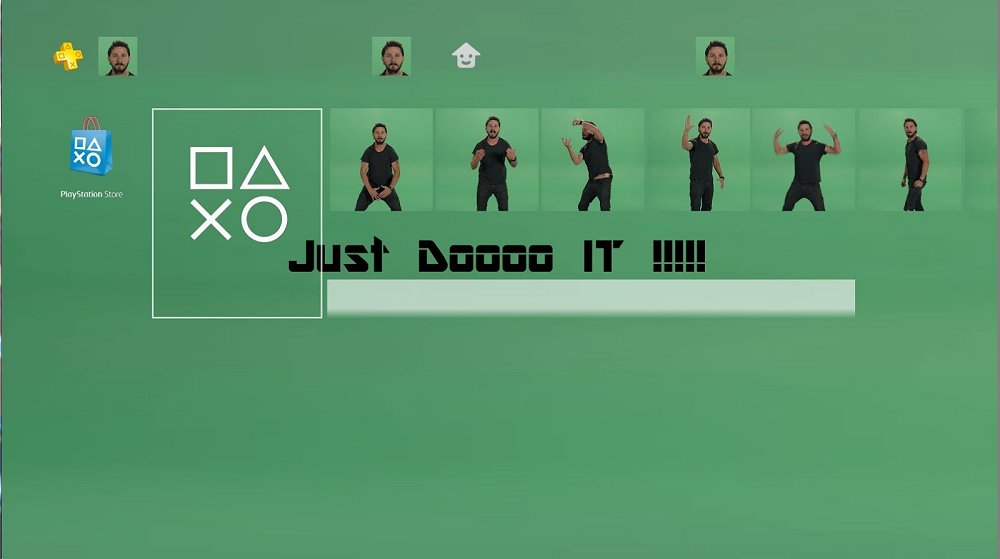
Following the recent PS4 Custom BGM and Theme PKG Files for exploited PlayStation 4 v4.05 consoles using PS4HEN, today @yyoossk let us know on Twitter that glanheit (glanheit_ST) made available PS4 Theme Editor v0.1.1 Beta followed by PS4 Theme Editor 0.1.2 Beta to make your own PS4 Custom Themes with a sample theme to use as a base template and demonstration video from his YouTube Channel below!
Download: PS4_Theme_Editor_0-1-1beta.zip (2.0 MB) / PS4_Theme_Editor_0-1-2beta.zip (2.0 MB) / PS4_Theme_Editor_0-1-3beta.zip (2.01 MB) / Shia LaBeouf Just Do It Make Your Dreams Come True Theme.rar (10.53 MB) / Base Template (Mirror) / ps4 sample custom theme + se.rar
To quote from his blog at Yyoossk.Blogspot.jp on how to use it, roughly translated: PS4 Custom Theme Preview Image Creation Method (PS4 Theme Editor)
Before trying this method or asking questions please be sure to watch the link below!
Here I will show you how to create a preview image necessary for creating PS4 custom theme using PS4 Theme Editor created by Empty Space:
Download & decompress PS4 Theme Editor from Empire Space's blog:
Download: PS4_Theme_Editor_0-1-1beta.zip (2.0 MB) / PS4_Theme_Editor_0-1-2beta.zip (2.0 MB) / PS4_Theme_Editor_0-1-3beta.zip (2.01 MB) / Shia LaBeouf Just Do It Make Your Dreams Come True Theme.rar (10.53 MB) / Base Template (Mirror) / ps4 sample custom theme + se.rar
To quote from his blog at Yyoossk.Blogspot.jp on how to use it, roughly translated: PS4 Custom Theme Preview Image Creation Method (PS4 Theme Editor)
Before trying this method or asking questions please be sure to watch the link below!
Here I will show you how to create a preview image necessary for creating PS4 custom theme using PS4 Theme Editor created by Empty Space:
Download & decompress PS4 Theme Editor from Empire Space's blog:
- ...
DbBackup.bin Payload: Backup PS4 Database to USB Drive by Stooged
Recently @stooged lent a hand sharing both details with source code on Backing Up and Restoring the PS4 Database, and he followed up with a handy DbBackup.bin Payload compiled for PS4 4.05 OFW users to backup their PlayStation 4 database to a USB Drive alongside one for dumping save data below. 
Download: DbBackup.zip / Source Code / DB_SG_Backup.zip (8.79 KB - dumps save data into a folder called GameSaves) / DB_SG_Backup_v2.zip (8.27 KB - Dumps All User Accounts) / DB_SG_Backup3.zip (8.82 KB - Adds Notification Messages from 2much4u) / DB_Backup_455.zip (Updated for 4.55) / usb_455_db_backup.zip (0.02 MB) / Cache-Install: ApplicationCache.db / DB_SG_Backup-50X (Latest) / GIT
To quote from his recent post with...
Download: DbBackup.zip / Source Code / DB_SG_Backup.zip (8.79 KB - dumps save data into a folder called GameSaves) / DB_SG_Backup_v2.zip (8.27 KB - Dumps All User Accounts) / DB_SG_Backup3.zip (8.82 KB - Adds Notification Messages from 2much4u) / DB_Backup_455.zip (Updated for 4.55) / usb_455_db_backup.zip (0.02 MB) / Cache-Install: ApplicationCache.db / DB_SG_Backup-50X (Latest) / GIT
To quote from his recent post with...
New PlayStation Gold Wireless Headset Arrives Later This Month
If you're in the market for a new piece of PlayStation equipment, Sony has you covered with their Gold Wireless Headset scheduled to hits store shelves later this month featuring a sleek new design and enhanced performance. 
Here's Sony Product Marketing Manager Steve Schwartz of Platforms Marketing with all the details, to quote:
We’re happy to announce that a new Gold Wireless Headset, which delivers enhanced comfort and performance, will be available in the next few weeks for $99.99 (MSRP) in the U.S.
The headset maintains everything you loved, while featuring a new sleek design with refined over-ear cushions that make it even more comfortable for long gaming sessions. The high fidelity 7.1 virtual surround sound intensifies the audio experience within compatible games. And the augmented noise-cancelling hidden microphones provide crisp, clear communication with your friends and teammates.
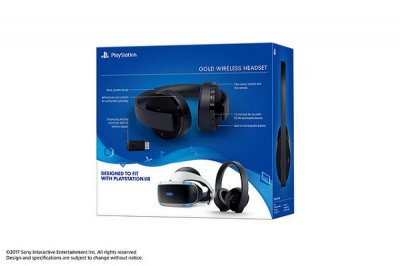 With the included 3.5mm audio cable, the Gold Headset is compatible with PlayStation VR and mobile devices. The new design makes the Gold Headset extra comfortable to wear with PS VR.
It’s a great way to immerse yourself in The Inpatient, a recently launched PS VR exclusive horror experience, with the unsettling sounds of scuttling insects and unexplained noises inside the Blackwood Pines Sanatorium (In addition to PS VR, you’ll need a PS4 system and PlayStation Camera to experience VR).
Also, don’t forget to download the Headset Companion App on your PS4 to load custom audio modes that are specifically tuned to enhance the audio in your favorite games.
Here's Sony Product Marketing Manager Steve Schwartz of Platforms Marketing with all the details, to quote:
We’re happy to announce that a new Gold Wireless Headset, which delivers enhanced comfort and performance, will be available in the next few weeks for $99.99 (MSRP) in the U.S.
The headset maintains everything you loved, while featuring a new sleek design with refined over-ear cushions that make it even more comfortable for long gaming sessions. The high fidelity 7.1 virtual surround sound intensifies the audio experience within compatible games. And the augmented noise-cancelling hidden microphones provide crisp, clear communication with your friends and teammates.
With the included 3.5mm audio cable, the Gold Headset is compatible with PlayStation VR and mobile devices. The new design makes the Gold Headset extra comfortable to wear with PS VR.It’s a great way to immerse yourself in The Inpatient, a recently launched PS VR exclusive horror experience, with the unsettling sounds of scuttling insects and unexplained noises inside the Blackwood Pines Sanatorium (In addition to PS VR, you’ll need a PS4 system and PlayStation Camera to experience VR).
Also, don’t forget to download the Headset Companion App on your PS4 to load custom audio modes that are specifically tuned to enhance the audio in your favorite games.
- PS4 Fake PKG (FPKG) Sharing Guide
- 6.XX Webkit / 6.72 PS4 Jailbreak
- 7.00-7.02 Webkit Exploit
- 7.02 Webkit / 7.02 Kernel / PS4JB
- 7.50 Kernel Exploit / PS4JB 7.55
- 7.55 / 8.00 Payloads / PS4JB2 7.55
- 9.00 PS4 Webkit Exploit
- 9.00 PS4 Payloads / GoldHEN (Latest)
- 9.00 PS4 Jailbreak Kernel Exploit
- 11.00 PS4 Jailbreak Kernel Exploit
- 13.00 PS4 Kernel Exploit / 13.02 BD-J Bug
- 4.03 PS5 Webkit Exploit
- PS5 Kernel Exploit (ExFAT Bug)
- PS5 Root Keys Obtained
- 4.03 PS5 Kernel Build String
- 4.03 PS5 Webkit Execution
- 4.03 PS5 Kernel Vulnerability
- 4.03 PS5 Filesystem Dumps
- 4.51 PS5 BD-JB Sandbox Escape
- PS5 BD-JB Exploit Hack Source Code
- Mast1c0re PS5 Userland Exploit
- PS5 Kernel Access via PS4 Exploit
- PS5 exFAT Vulnerability Disclosed
- 4.03 PS5 Kernel Exploit Webkit ROP
- 4.50 PS5 Kernel Exploit Webkit ROP
- 4.51 PS5 Kernel Exploit Webkit ROP
- 4.xx PS5 Kernel Exploit v1.01
- 4.xx PS5 Kernel Exploit v1.02 / v1.03
- PS5 1.00-6.50 Firmware Webkit
- Native PS5 ROP Chain Execution
- Mast1c0re PS5 Compiler Attack
- PS5 FreeBSD Kernel Bug & WebKit
- PS5 UMTX 2 Exploit & PS5 Jailbreak
- Byepervisor PS5 Hypervisor Exploit
- Lua Lapse PS5 Kxploit & Laps3c0re / Y2JB
- 12.00 / 12.70 PS5 Kernel Exploit