
You are using an out of date browser. It may not display this or other websites correctly.
You should upgrade or use an alternative browser.
You should upgrade or use an alternative browser.
Live in Your World, HAX in Ours!

Live in Your World, HAX in Ours!
Hello World! I've been reporting on Sony PlayStation hacking news since 2000 and started PSXHAX in 2014 to cover PlayStation (PSX), PlayStation 2 (PS2), PlayStation 3 (PS3), PlayStation 4 (PS4), PlayStation Portable (PSP), PlayStation Vita (PS Vita), PlayStation TV (PS TV) and next-gen PlayStation 5 (PS5) platforms along with anything else of interest.
Click on my UserName author link above and you'll be able to view a curated list of all the articles I've contributed thus far to PSXHAX.COM!
Click on my UserName author link above and you'll be able to view a curated list of all the articles I've contributed thus far to PSXHAX.COM!
Horizon Zero Dawn Gains New Story Mode, PS4 Patch 1.32 Features
Since going live on PlayStation Store, Horizon Zero Dawn recently gained a new story mode alongside the PS4 Patch 1.32 features outlined below complete with a trailer video! 
To quote from Guerrilla Community Manager Jeroen Roding on the update:
While development on the Horizon Zero Dawn expansion The Frozen Wilds is in full swing, we’re still finding time to add improvements to the main game. Last month’s Patch 1.30 added a new difficulty setting called ‘Ultra Hard’ which, as the name suggests, provides a greater challenge for hardcore Horizon Zero Dawn players.
Today’s patch adds a difficulty level that does quite the opposite: ‘Story’ difficulty allows you to immerse yourself in the narrative of Horizon Zero Dawn and the exploration of Aloy’s world without having to worry too much about combat.
Among the most noticeable changes, ‘Story’ difficulty boosts the player-inflicted damage and reduces the player-received damage considerably, making the combat encounters manageable for less experienced players.
It is our hope that the new difficulty setting will help us welcome more players into Aloy’s quest to discover her identity and the mysteries of the world she inhabits. In addition to the ‘Story’ difficulty, Patch 1.32 includes several fixes as outlined in the patch notes.
If you have a chance to try out ‘Story’ difficulty, we’d love to hear your thoughts! We’ll have more information on The Frozen Wilds soon, but in the meantime, keep an eye on the official Guerrilla Twitter and Facebook pages for all the latest Horizon Zero Dawn related news and developments.
And from the Horizon Zero Dawn 1.32 Patch Notes:
LATEST PATCH: 1.32
We’re pleased to announce that Patch 1.32 for Horizon Zero Dawn is available now. This patch fixes a number of technical issues, progression issues and crashes as outlined below. This patch also adds a new difficulty setting: Story.
 NOTE: This list may contain several spoilers!
If you encounter an issue while playing Horizon Zero Dawn, please try reloading a recent manual...
To quote from Guerrilla Community Manager Jeroen Roding on the update:
While development on the Horizon Zero Dawn expansion The Frozen Wilds is in full swing, we’re still finding time to add improvements to the main game. Last month’s Patch 1.30 added a new difficulty setting called ‘Ultra Hard’ which, as the name suggests, provides a greater challenge for hardcore Horizon Zero Dawn players.
Today’s patch adds a difficulty level that does quite the opposite: ‘Story’ difficulty allows you to immerse yourself in the narrative of Horizon Zero Dawn and the exploration of Aloy’s world without having to worry too much about combat.
Among the most noticeable changes, ‘Story’ difficulty boosts the player-inflicted damage and reduces the player-received damage considerably, making the combat encounters manageable for less experienced players.
It is our hope that the new difficulty setting will help us welcome more players into Aloy’s quest to discover her identity and the mysteries of the world she inhabits. In addition to the ‘Story’ difficulty, Patch 1.32 includes several fixes as outlined in the patch notes.
If you have a chance to try out ‘Story’ difficulty, we’d love to hear your thoughts! We’ll have more information on The Frozen Wilds soon, but in the meantime, keep an eye on the official Guerrilla Twitter and Facebook pages for all the latest Horizon Zero Dawn related news and developments.
And from the Horizon Zero Dawn 1.32 Patch Notes:
LATEST PATCH: 1.32
We’re pleased to announce that Patch 1.32 for Horizon Zero Dawn is available now. This patch fixes a number of technical issues, progression issues and crashes as outlined below. This patch also adds a new difficulty setting: Story.
NOTE: This list may contain several spoilers!If you encounter an issue while playing Horizon Zero Dawn, please try reloading a recent manual...
PS4 1.76 Database Mod by eXtreme to Run Installed PKG's on USB HDD
Following their recent updates, the PlayStation 4 modders at e✘treme-Modding.de shared a PS4 1.76 database modification today for running installed PS4 Package (PKG) files on a USB HDD. 
To quote: You can run your installed Apps and Games from USB HDD
I have tested it with OMSK, it’s simple. Install OMSK PKG (OMSK PKG / OMSK Debug PKG / OMSK RIF), copy user/app/NPXS29005 on your USB device (FAT32/exFAT) and delete the folder (NPXS29005) on your PS4 HDD afterwards.
With the Database we can mod a few things in our Home Menu, so you have to edit table tbl_appinfo and search for the title_Id (NPXS29005). Change _org_path to /mnt/usb0/user/app/NPXS29005, that’s all. Now you can run the App only if you plug in your USB device.
Just a solution for people who have a small hard drive in their PS4
Thanks to @HydrogenNGU for the news tip on Twitter!
 Update: Here's one more 1.76 database mod from e✘treme for those following, to quote: PS4 1.76 Database Mod – Add your installed PKG’s to Games Folder
Soon we can create custom PKGs to install Games without license. It’s recommended to add your installed PKGs to Games folder in the Home Menu if you have installed a lot of Games.
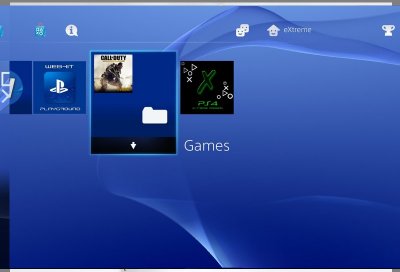
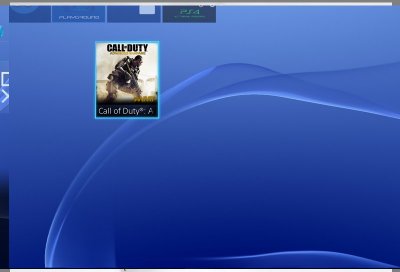
The Database Mod is very simple. Just edit 'dispLocation' -> 2 in app.db to add the Games to the folder. TV & Video is the Games folder, edit 'visible' -> 1.

To quote: You can run your installed Apps and Games from USB HDD
I have tested it with OMSK, it’s simple. Install OMSK PKG (OMSK PKG / OMSK Debug PKG / OMSK RIF), copy user/app/NPXS29005 on your USB device (FAT32/exFAT) and delete the folder (NPXS29005) on your PS4 HDD afterwards.
With the Database we can mod a few things in our Home Menu, so you have to edit table tbl_appinfo and search for the title_Id (NPXS29005). Change _org_path to /mnt/usb0/user/app/NPXS29005, that’s all. Now you can run the App only if you plug in your USB device.
Just a solution for people who have a small hard drive in their PS4
Thanks to @HydrogenNGU for the news tip on Twitter!
Update: Here's one more 1.76 database mod from e✘treme for those following, to quote: PS4 1.76 Database Mod – Add your installed PKG’s to Games FolderSoon we can create custom PKGs to install Games without license. It’s recommended to add your installed PKGs to Games folder in the Home Menu if you have installed a lot of Games.
DSMotion: DualShock 3 / DS4 Motion Control PlayStation TV Plugins
After being discontinued by PlayStation Now and receiving Enso CFW support, Sony's PlayStation TV just got a pair of Henkaku DSMotion plugins which add DS3 / DS4 motion control support for PS TV with DualShock controllers. 
Download: dsmotion.skprx / dsmotion.suprx / GIT
To quote from PlayStation TV developer OperationNT on the DSMotion control PS TV plug-ins: PlayStation TV driver for DualShock 3 and 4 controllers completly ignore their gyroscope and accelerometers values.
Therefore, games which require some motion control cannot be played. DSMotion plugins allow to fix this limitation. It is separated into a user and a kernel plugin.
Installation
In order to activate those plugins featues, you must edit your `ux0:tai/config.txt` file:
Replace TITLEID00 by a title identifier which needs motion control or by ALL to affect all titles.
Compatibility
Download: dsmotion.skprx / dsmotion.suprx / GIT
To quote from PlayStation TV developer OperationNT on the DSMotion control PS TV plug-ins: PlayStation TV driver for DualShock 3 and 4 controllers completly ignore their gyroscope and accelerometers values.
Therefore, games which require some motion control cannot be played. DSMotion plugins allow to fix this limitation. It is separated into a user and a kernel plugin.
Installation
In order to activate those plugins featues, you must edit your `ux0:tai/config.txt` file:
Code:
*KERNEL
ux0:tai/dsmotion.skprx

*TITLEID00
ux0:tai/dsmotion.suprxCompatibility
- PCSF00214 - Tearaway - Parts where you need to shake the PS Vita works now on PS TV by shaking the controller!
- It only works for titles which are not signed (homebrews or Vitamin/MaiDumpTools dumps).
- If a DualShock 3 controller is used, it must not be directly plugged with USB on the PS TV otherwise, signal will be sent through USB instead of BlueTooth (and it won't be catched): use an external charger for the controller.
- It doesn't work well on classic PS Vita with "ds4vita": for an unknown reason, motion control samples seems to be too much spaced over time.
- It hooks documented "SceMotion" user functions instead of undocumented "SceMotionDev" kernel functions: if we could understand those kernel functions, we could have more compatibility with a single kernel plugin (no more need for a user plugin).
- Device orientation quaternion and rotation matrix are not currently accurate: they give unstable result...
Uncharted: The Lost Legacy Joins New PlayStation Games Next Week
Adventure fans get ready to embark on a new journey in Uncharted: The Lost Legacy for PS4, launching on August 22nd as part of the new PlayStation game releases next week! 
Below is the official Uncharted: The Lost Legacy PlayStation 4 trailer video and a glimpse of what else is joining PS Store next week courtesy of Sony Social Media Senior Specialist Ryan Clements, as follows:
New Releases: Week of August 22, 2017
Below is the official Uncharted: The Lost Legacy PlayStation 4 trailer video and a glimpse of what else is joining PS Store next week courtesy of Sony Social Media Senior Specialist Ryan Clements, as follows:
New Releases: Week of August 22, 2017
- Bleed - PS4 — Digital
- The Book of Regrets - PS4 — Digital
- ChromaGun - PS4 — Digital
- Duck Game - PS4 — Digital
- The Escapists 2 - PS4 — Digital, Retail
- F1 2017 - PS4 — Digital, Retail (Out 8/25)
- Jak & Daxter: The Precursor Legacy (PS2) - PS4 — Digital
- Madden NFL 18 - PS4 — Digital, Retail (Out 8/25)
- Mages of Mystralia - PS4 — Digital
- Naruto: Ultimate Ninja Storm - PS4 — Digital (Out 8/25)
- Naruto Shippuden: Ultimate Ninja Storm 2 - PS4 — Digital (Out 8/25)
- Naruto Shippuden: Ultimate Ninja Storm 3 Full Burst - PS4 — Digital (Out 8/25)
- Naruto Shippuden: Ultimate Ninja Storm Legacy - PS4 — Retail (Out 8/25)
- Naruto Shippuden: Ultimate Ninja Storm Trilogy - PS4 — Digital (Out 8/25)
- NeverEnd - PS Vita — Digital (Out 8/25)
- One Piece Unlimited World Red - PS4 — Digital (Out 8/25)
- Soul Dimension - PS VR — Digital
- Spartan - PS4 — Digital (Out 8/23)
- Super ComboMan: Smash Edition - PS4 — Digital
- SwapQuest - PS4 — Digital
- Thimbleweed Park - PS4 — Digital
- Uncharted: The Lost Legacy - PS4 — Digital, Retail
- Velocity 2X: Critical Mass Edition - PS4, PS Vita — Digital
- A$AP Ferg – Still Striving
- Various Artists – Marvel The Defenders Soundtrack
- Grizzly Bear – Painted Ruins
- The Mummy (2017)
- All Eyez On Me (plus Bonus Features)
- Great American Eclipse – August 21 at 9/8c (Science Channel)
- 30 for 30: What Carter Lost – August 24 at 9:30/8:30c (ESPN)
- Game of Thrones – August 27 at 9/8c (HBO)
PlayStation 3 RSXploit is Now Updated and Working via Zecoxao
Following the previous work, PlayStation 3 developer @zecoxao with help from Zer0Tolerance, IronMan and AlexAltea updated their PS3 RSXploit with details below. 
Download: rsxploit.7z (154.79 KB)
To quote from zecoxao on the update: So, after some deliberation with Zer0Tolerance, we decided to release an updated version of the lv2 exploit that my friend released a long time ago.
First, some notes:
You can test this for instance on a 4.21 cfw console by specifying an address in one of the parameters and then dumping memory before and after running the syscall. just be careful that you need to be able to write to that region!
Many thanks to IronMan and AlexAltea for the help. this exploit will be even better later, so stick around
Update: In related PS3 hacking news, ZeroTolerance has released ps3encdec which is a port of flat_z's encdec emulator to C. source code (and...
Download: rsxploit.7z (154.79 KB)
To quote from zecoxao on the update: So, after some deliberation with Zer0Tolerance, we decided to release an updated version of the lv2 exploit that my friend released a long time ago.
First, some notes:
- This exploit was patched on 4.40, NOT on 4.45
- There isn't just ONE non checked pointer, there are FOUR! they are all 4 now checked in 4.40
Code:
/*
     * lv2 SysCall 670 (0x29E): sys_rsx_context_allocate
     * @param context_id (OUT): RSX context, E.g. 0x55555555 (in vsh.self)
     * @param lpar_dma_control (OUT): Control register area. E.g. 0x60100000 (in vsh.self)
     * @param lpar_driver_info (OUT): RSX data like frequencies, sizes, version... E.g. 0x60200000 (in vsh.self)
     * @param lpar_reports (OUT): Report data area. E.g. 0x60300000 (in vsh.self)
     * @param mem_ctx (IN): mem_ctx given by sys_rsx_memory_allocate
     * @param system_mode (IN):
     */

    /*
    After some verification it turns out that 4 pointers aren't checked
    They are:
    context_id
    lpar_dma_control
    lpar_driver_info
    lpar_reports

    we can write values at:
    rsx_context + 0x04 (4Bytes) - context_id
    rsx_context + 0x20 (8Bytes) - lpar_dma_control
    rsx_context + 0x30 (8Bytes) - lpar_driver_info
    rsx_context + 0x40 (8Bytes) - lpar_reports

    to properly specify a kernel address use ULL for big numbers
*/Many thanks to IronMan and AlexAltea for the help. this exploit will be even better later, so stick around
Update: In related PS3 hacking news, ZeroTolerance has released ps3encdec which is a port of flat_z's encdec emulator to C. source code (and...- PS4 Fake PKG (FPKG) Sharing Guide
- 6.XX Webkit / 6.72 PS4 Jailbreak
- 7.00-7.02 Webkit Exploit
- 7.02 Webkit / 7.02 Kernel / PS4JB
- 7.50 Kernel Exploit / PS4JB 7.55
- 7.55 / 8.00 Payloads / PS4JB2 7.55
- 9.00 PS4 Webkit Exploit
- 9.00 PS4 Payloads / GoldHEN (Latest)
- 9.00 PS4 Jailbreak Kernel Exploit
- 11.00 PS4 Jailbreak Kernel Exploit
- 13.00 PS4 Kernel Exploit / 13.02 BD-J Bug
- 4.03 PS5 Webkit Exploit
- PS5 Kernel Exploit (ExFAT Bug)
- PS5 Root Keys Obtained
- 4.03 PS5 Kernel Build String
- 4.03 PS5 Webkit Execution
- 4.03 PS5 Kernel Vulnerability
- 4.03 PS5 Filesystem Dumps
- 4.51 PS5 BD-JB Sandbox Escape
- PS5 BD-JB Exploit Hack Source Code
- Mast1c0re PS5 Userland Exploit
- PS5 Kernel Access via PS4 Exploit
- PS5 exFAT Vulnerability Disclosed
- 4.03 PS5 Kernel Exploit Webkit ROP
- 4.50 PS5 Kernel Exploit Webkit ROP
- 4.51 PS5 Kernel Exploit Webkit ROP
- 4.xx PS5 Kernel Exploit v1.01
- 4.xx PS5 Kernel Exploit v1.02 / v1.03
- PS5 1.00-6.50 Firmware Webkit
- Native PS5 ROP Chain Execution
- Mast1c0re PS5 Compiler Attack
- PS5 FreeBSD Kernel Bug & WebKit
- PS5 UMTX 2 Exploit & PS5 Jailbreak
- Byepervisor PS5 Hypervisor Exploit
- Lua Lapse PS5 Kxploit & Laps3c0re / Y2JB
- 12.00 / 12.70 PS5 Kernel Exploit