PSXHAX.COM website and domain for sale. Contact Us with your offer!

You are using an out of date browser. It may not display this or other websites correctly.
You should upgrade or use an alternative browser.
You should upgrade or use an alternative browser.
PS4 Linux Installation Guide
A few days back PlayStation 4 developer kr105 released a PS4 Linux Loader Patch for 1.76 Firmware, and here's a follow-up PS4 Linux Installation Guide detailing how to install and run PS4 Linux from D-ecks via Wololo.
How to Install and Run Linux on your PS4
AT THE TIME OF THIS WRITING, THIS WORKS ONLY ON PS4 1.76 FW!
You'll need:
What to do:
0. Remove custom host from router (manuals.playstation.net 89.108.88.221) if added earlier
1. On PS4 Open Network > Set Up Internet Connection
2. Select LAN or Wi-Fi -> Select your network and enter password -> Custom
3. Set everything to Automatic, Do Not Specify, Do Not use, except DNS Settings
4. In DNS Settings set Primary DNS to 89.108.88.221, secondary set to 0.0.0.0
5. Download 2 files from http://kr105.com/ps4kerneltest/
6. Copy downloaded files on usb stick
7. Insert usb stick into PS4
8. Save settings and open User's Guide
9. Wait for a few seconds
OLD METHOD (use as fallback)
What to do:
If you want do something in console, connect a USB keyboard.
VIDEO
Troubleshooting
“Not Enough System...
How to Install and Run Linux on your PS4
AT THE TIME OF THIS WRITING, THIS WORKS ONLY ON PS4 1.76 FW!
You'll need:
- USB flash drive
- USB keyboard
- Internet connection
What to do:
0. Remove custom host from router (manuals.playstation.net 89.108.88.221) if added earlier
1. On PS4 Open Network > Set Up Internet Connection
2. Select LAN or Wi-Fi -> Select your network and enter password -> Custom
3. Set everything to Automatic, Do Not Specify, Do Not use, except DNS Settings
4. In DNS Settings set Primary DNS to 89.108.88.221, secondary set to 0.0.0.0
5. Download 2 files from http://kr105.com/ps4kerneltest/
6. Copy downloaded files on usb stick
7. Insert usb stick into PS4
8. Save settings and open User's Guide
9. Wait for a few seconds
OLD METHOD (use as fallback)
What to do:
- You will need to get access to the browser from 1.76 without updating your console. How to do so is explained below.
- Download the Linux Kernel and ram init files from kr105.
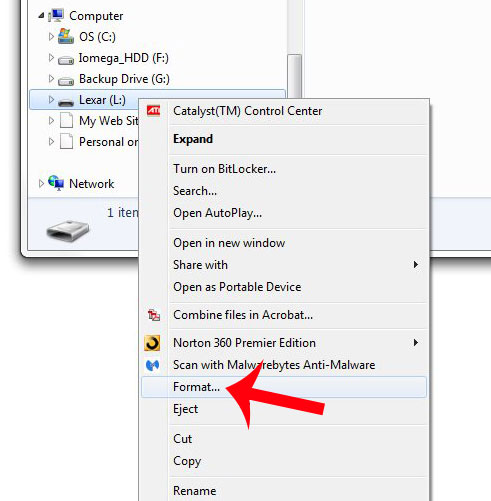
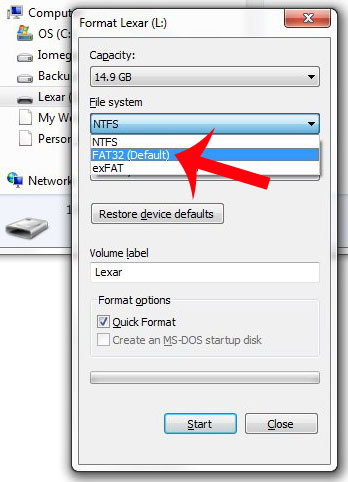
- Format usb stick to FAT32
- Copy downloaded files at the root of the usb stick
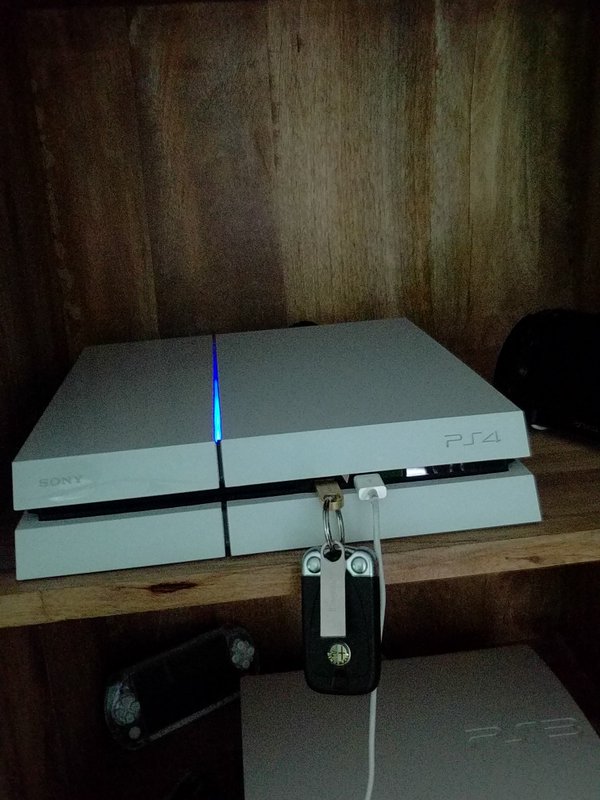
- Insert usb stick into PS4
- Get to PS4 WebKit Playground (http://cturt.github.io/PS4-playground/) using PS4 browser.
- Click Load! in Linux loader box.
- PROFIT.
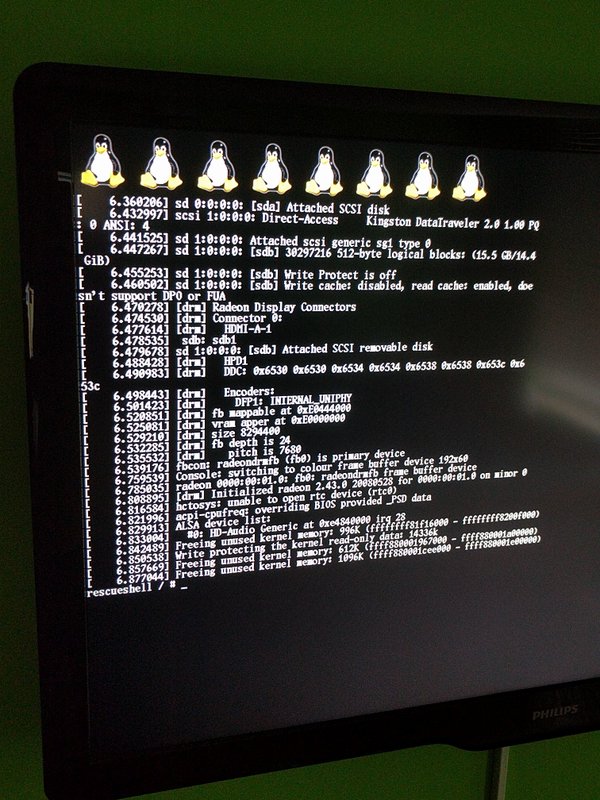
If you want do something in console, connect a USB keyboard.
VIDEO
Troubleshooting
“Not Enough System...
How to Use Your PS4 DualShock Controller with Windows (Cable/BT)
So hello everyone  . I just discovered that Sony has added support for their PS4 Controller to use it easily with your PC (No need for the crappy MotioninJoy tool like on PS3). So i tested it and want to share how it works for other users
Things you need:
-> DS4 to XInput Download
-> Microsoft .NET Framework 4.0 Download
-> Visual C 2010/2012 Runtime Download1
Download2
-> DirectX Runtime Download
-> Microsoft Xbox 360 Driver (Included on Windows 8 and 10 - Download
-> Bluetooth 2.1 + EDR Dongle (for Bluetooth)
-> Admin rights on PC
Use with cable:
In the first place you can easily just plug your PS4 Controller via Cable to the PC. Windows will automatically install the drivers for a standard Gamepad. But further steps are required to have the Correct Button mapping...so read on...
Use with Bluetooth:
To use the Controller with Bluetooth we need a compatible Bluetooth adapter like the PS3 ones you may used also for the PS3 Controller and MotionJoy (I use a Asus USB-BT211).
-> Open the Bluetooth settings on your PC an let Windows search for Bluetooth devices.
-> Hold the PS Button and the Share Button on the DualShock 4 for three seconds until the lightbar begins to flash.
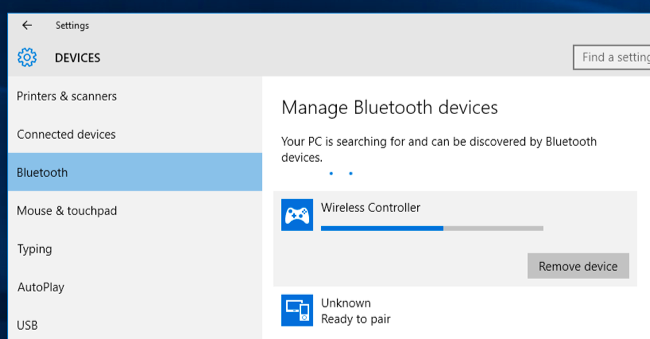
-> Now Connect to Wireless Controller.
-> If prompted to input a pair code, enter “0000”.
Your PS4 Controller should now be paired with your Bluetooth device on Windows
Windows installs a standard Gamepad so same thing as to use with Cable we need a tool for the correct Button mapping.
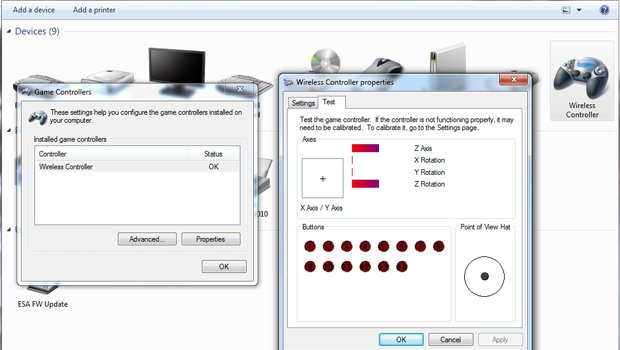
For the correct Mapping and to use the Controller with Games who supports X360 Controller we need the DS4 tool.
-> Extract the DS4 tool.
-> In folder Virtual Bus Driver we start first ScpDriver.exe and click Install.
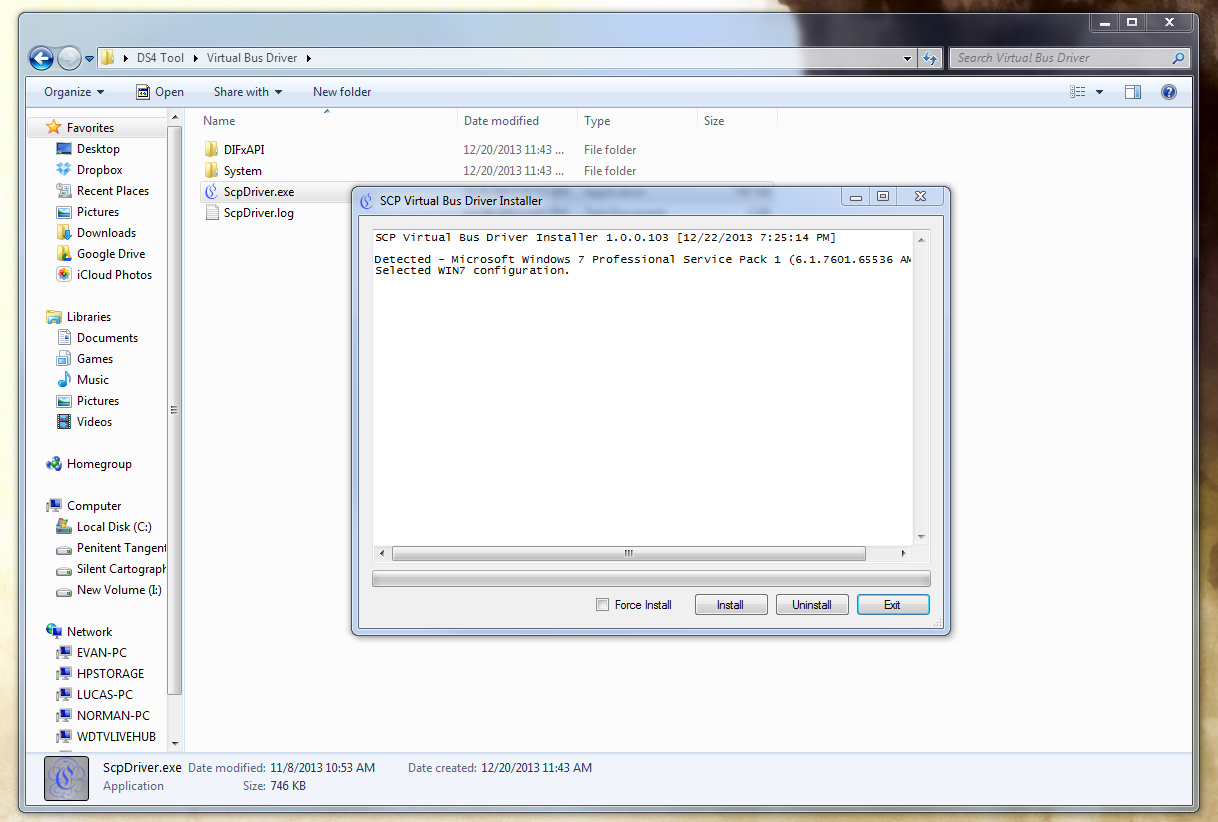
(Now you should see 2 Gamepads in your settings one for the standard Gamepad...
. I just discovered that Sony has added support for their PS4 Controller to use it easily with your PC (No need for the crappy MotioninJoy tool like on PS3). So i tested it and want to share how it works for other users Things you need:
-> DS4 to XInput Download
-> Microsoft .NET Framework 4.0 Download
-> Visual C 2010/2012 Runtime Download1
Download2
-> DirectX Runtime Download
-> Microsoft Xbox 360 Driver (Included on Windows 8 and 10 - Download
-> Bluetooth 2.1 + EDR Dongle (for Bluetooth)
-> Admin rights on PC
Use with cable:
In the first place you can easily just plug your PS4 Controller via Cable to the PC. Windows will automatically install the drivers for a standard Gamepad
. But further steps are required to have the Correct Button mapping...so read on...Use with Bluetooth:
To use the Controller with Bluetooth we need a compatible Bluetooth adapter like the PS3 ones you may used also for the PS3 Controller and MotionJoy (I use a Asus USB-BT211).
-> Open the Bluetooth settings on your PC an let Windows search for Bluetooth devices.
-> Hold the PS Button and the Share Button on the DualShock 4 for three seconds until the lightbar begins to flash.
-> Now Connect to Wireless Controller.
-> If prompted to input a pair code, enter “0000”.
Your PS4 Controller should now be paired with your Bluetooth device on Windows
Windows installs a standard Gamepad so same thing as to use with Cable we need a tool for the correct Button mapping.
For the correct Mapping and to use the Controller with Games who supports X360 Controller we need the DS4 tool.
-> Extract the DS4 tool.
-> In folder Virtual Bus Driver we start first ScpDriver.exe and click Install.
(Now you should see 2 Gamepads in your settings one for the standard Gamepad...
Convert Imported PS4 Console PSU with 4 Pins to 5 Pins Guide
Today PlayStation 4 modder 3absiso shared a brief guide on how to convert imported PS4 consoles with 4 pins on their Power Supply Unit to use a PSU with 5 pins.
Below are the details, to quote: Hi; Here we have a lot of PS4 that can be imported from USA and some from Europe, and for who does not know some comes with a 5Pins PSU and some with 4Pins PSU.
In this tutorial we will convert a 4Pin PS4 to use a 5Pin PSU, there may other methods to do that but i found this is the easiest:
You Will need One 4 Pins Power Cable and One 5 Pins Power Cable and follow the images and Diagram:
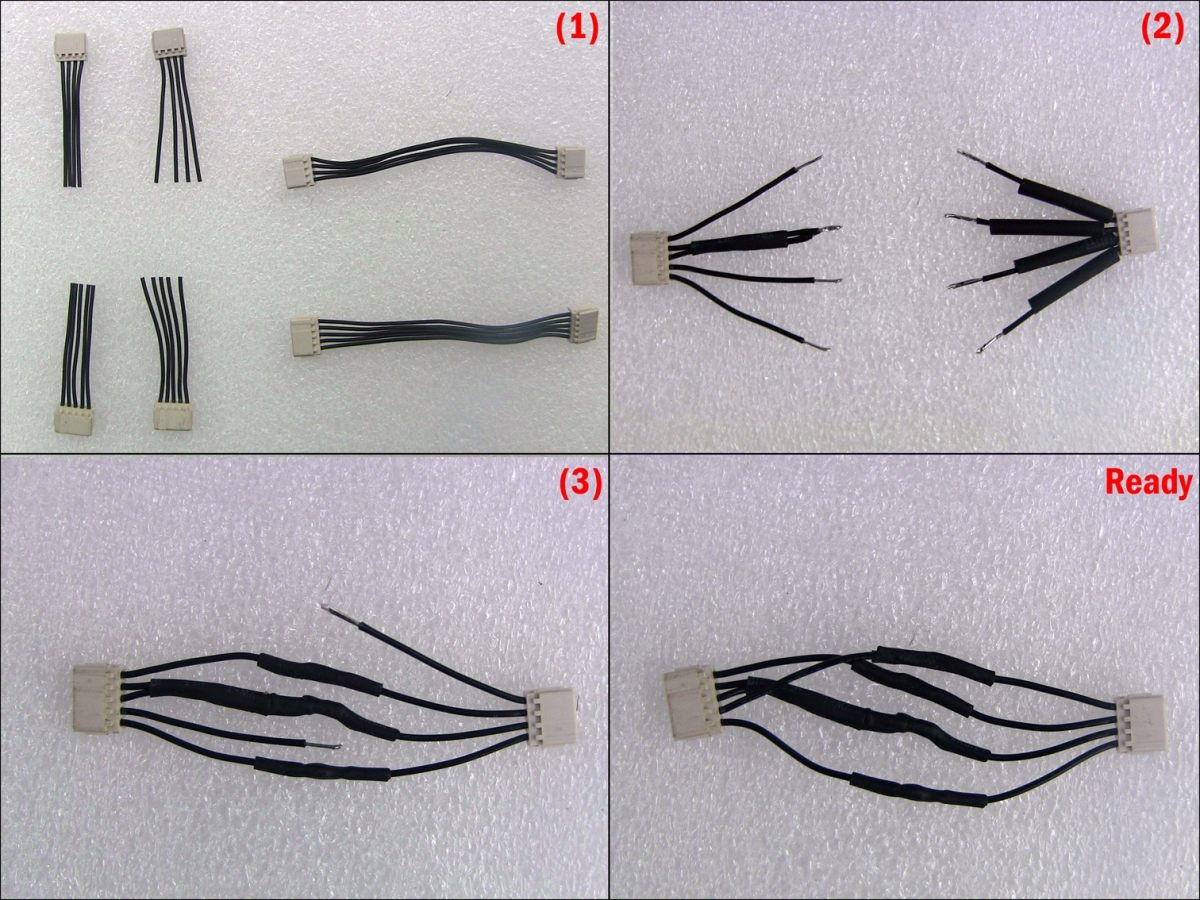
Thanx
Below are the details, to quote: Hi; Here we have a lot of PS4 that can be imported from USA and some from Europe, and for who does not know some comes with a 5Pins PSU and some with 4Pins PSU.
In this tutorial we will convert a 4Pin PS4 to use a 5Pin PSU, there may other methods to do that but i found this is the easiest:
You Will need One 4 Pins Power Cable and One 5 Pins Power Cable and follow the images and Diagram:
Thanx
- PS4 Fake PKG (FPKG) Sharing Guide
- 6.XX Webkit / 6.72 PS4 Jailbreak
- 7.00-7.02 Webkit Exploit
- 7.02 Webkit / 7.02 Kernel / PS4JB
- 7.50 Kernel Exploit / PS4JB 7.55
- 7.55 / 8.00 Payloads / PS4JB2 7.55
- 9.00 PS4 Webkit Exploit
- 9.00 PS4 Payloads / GoldHEN (Latest)
- 9.00 PS4 Jailbreak Kernel Exploit
- 11.00 PS4 Jailbreak Kernel Exploit
- 13.00 PS4 Kernel Exploit / 13.02 BD-J Bug
- 4.03 PS5 Webkit Exploit
- PS5 Kernel Exploit (ExFAT Bug)
- PS5 Root Keys Obtained
- 4.03 PS5 Kernel Build String
- 4.03 PS5 Webkit Execution
- 4.03 PS5 Kernel Vulnerability
- 4.03 PS5 Filesystem Dumps
- 4.51 PS5 BD-JB Sandbox Escape
- PS5 BD-JB Exploit Hack Source Code
- Mast1c0re PS5 Userland Exploit
- PS5 Kernel Access via PS4 Exploit
- PS5 exFAT Vulnerability Disclosed
- 4.03 PS5 Kernel Exploit Webkit ROP
- 4.50 PS5 Kernel Exploit Webkit ROP
- 4.51 PS5 Kernel Exploit Webkit ROP
- 4.xx PS5 Kernel Exploit v1.01
- 4.xx PS5 Kernel Exploit v1.02 / v1.03
- PS5 1.00-6.50 Firmware Webkit
- Native PS5 ROP Chain Execution
- Mast1c0re PS5 Compiler Attack
- PS5 FreeBSD Kernel Bug & WebKit
- PS5 UMTX 2 Exploit & PS5 Jailbreak
- Byepervisor PS5 Hypervisor Exploit
- Lua Lapse PS5 Kxploit & Laps3c0re / Y2JB
- 12.00 / 12.70 PS5 Kernel Exploit