PSXHAX.COM website and domain for sale. Contact Us with your offer!

You are using an out of date browser. It may not display this or other websites correctly.
You should upgrade or use an alternative browser.
You should upgrade or use an alternative browser.
PS4SwissKnife: PS4 Swiss Knife Beta by Riccardo82 (G1zm0)
Hello all,
I've developed this PS4 Swiss Knife Beta 1.5 tool that makes very easy the way to create pkg of your games.
Multi ftp upload and no need to switch between different apps just click and wait.
At the end of process the folder where pkg is located will shown.
Download: Ps4SwissKnife-1.852-5.05.zip (9.43 MB)
Spoiler: Depreciated
FEATURES
This app allows you to dump your PS4 Games to your HDD and create PKG to execute with latest HEN Exploit for PS4 Firmwares!
-) Multi FTP download
-) All in one app no need to use other software to create PKG!
REQUIREMENTS
-) .NET Framework 4
-) PS4 OFW 4.05
-) Gigabith Ethernet Connection (A 100Mb Connection will increase downloads times!!)
-) 200 GB HDD
USAGE
-) Extract Package
-) Dobule click on PS4SwissKnife.exe
-) Click on Load Server...
I've developed this PS4 Swiss Knife Beta 1.5 tool that makes very easy the way to create pkg of your games.
Multi ftp upload and no need to switch between different apps just click and wait.
At the end of process the folder where pkg is located will shown.
Download: Ps4SwissKnife-1.852-5.05.zip (9.43 MB)
Spoiler: Depreciated
FEATURES
This app allows you to dump your PS4 Games to your HDD and create PKG to execute with latest HEN Exploit for PS4 Firmwares!
-) Multi FTP download
-) All in one app no need to use other software to create PKG!
REQUIREMENTS
-) .NET Framework 4
-) PS4 OFW 4.05
-) Gigabith Ethernet Connection (A 100Mb Connection will increase downloads times!!)
-) 200 GB HDD
USAGE
-) Extract Package
-) Dobule click on PS4SwissKnife.exe
-) Click on Load Server...
PS4Notify: PS4 Notification Tool for 4.05 OFW by Vultra
# PS4Notify 4.05 + Source By Vultra
PS4Notify-master.zip / PS4Notify-master.zip (Mirror) / Github / PS4Notify 4.05 By Vultra.zip (16.79 KB - Compiled via mb2010) / PS4Notify_4.05_By_Vultra.zip (Mirror)
PS4 Notification Tool
Only Supports 4.05 OFW
Send Custom Notifications
Use PS4API Server Payload by Bisoon.
Send PS4API Payload in the /Payloads/ Folder using IDC or XVortex Exploit.
Enter PS4 IP in to PS4Notify
Connect & Attach The tool once success You can then send custom notifications.
# Credits
SpecterDEV - Code Execution And Kernel Exploit
Bisoon - PS4Lib & PS4API
CTurt - ***
& More
PS4 NOTIFIER TOOL 6.72 7.02 SEND CUSTOM NOTIFICATION very simple tool use any exploit host and load ps4debug connect tool (special thanks to TER1520)
Download: PS4-NOTIFY.rar (3.45 MB - includes PS4-NOTIFIER.exe)
Update: @oldschoolmodzhd (aka OLDSCHOOLMODZ) also added another PS4 Notify variant to his OSM-Made Github repository with details below, to quote: PS4-NotifyPS4Notify-master.zip / PS4Notify-master.zip (Mirror) / Github / PS4Notify 4.05 By Vultra.zip (16.79 KB - Compiled via mb2010) / PS4Notify_4.05_By_Vultra.zip (Mirror)
PS4 Notification Tool
Only Supports 4.05 OFW
Send Custom Notifications
Use PS4API Server Payload by Bisoon.
Send PS4API Payload in the /Payloads/ Folder using IDC or XVortex Exploit.
Enter PS4 IP in to PS4Notify
Connect & Attach The tool once success You can then send custom notifications.
# Credits
SpecterDEV - Code Execution And Kernel Exploit
Bisoon - PS4Lib & PS4API
CTurt - ***
& More
PS4 NOTIFIER TOOL 6.72 7.02 SEND CUSTOM NOTIFICATION very simple tool use any exploit host and load ps4debug connect tool (special thanks to TER1520)
Download: PS4-NOTIFY.rar (3.45 MB - includes PS4-NOTIFIER.exe)
A different way of calling the notify function on the PS4 for homebrew development.
Download: PS4-Notify-main.zip / GIT
Calling the new Notify
Code:
void Notify(char* IconURI, char* MessageFMT, ...);
PlayStation 4 Tool to Inject PS4 Game Mod Payloads by DeathRGH
Hey guys, since a lot of ppl have issues with injecting payload, peeking memory or saving it to a dump file, I have created a small tool for you.
It also has a few game mods for Modern Warfare Remastered, Infinite Warfare, Black Ops 3 and Ghosts. Advanced Warfare isn't added yet.
The payload also includes PS4HEN for all the games
Download: PlayStation 4 Tool by DeathRGH / Scan / GIT
Setup:
Select a save location and specify a name (doesn't need to have a file extension).
Known Issues:
A few pictures of the tool:
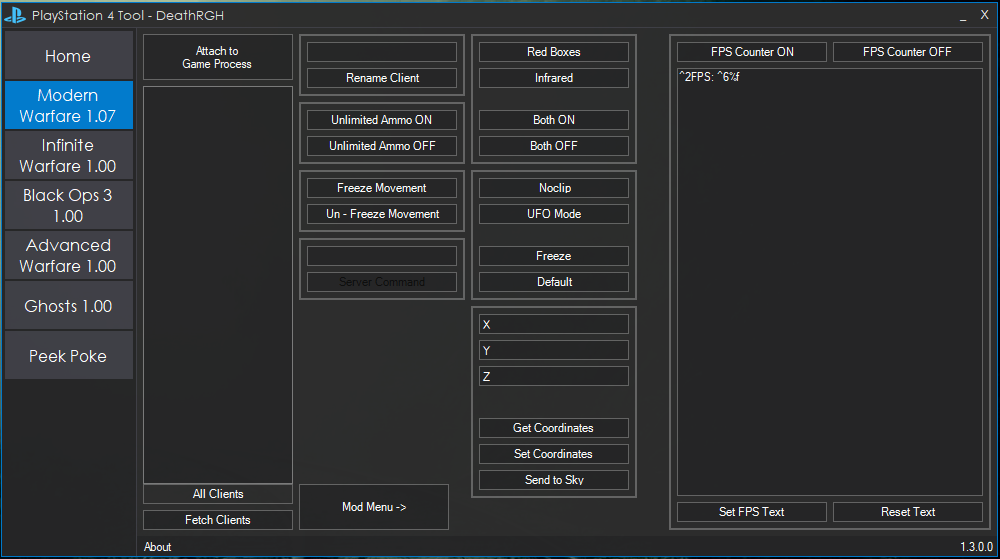
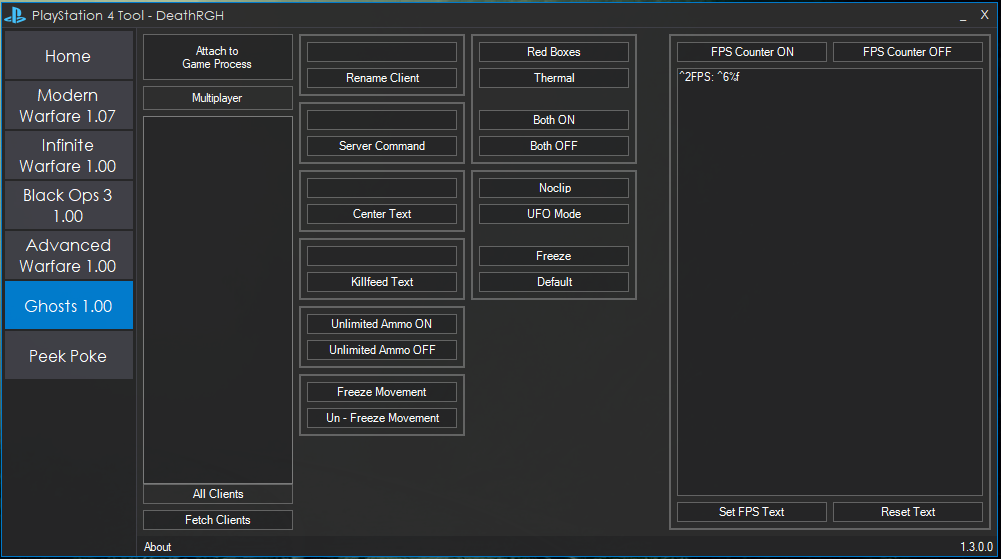
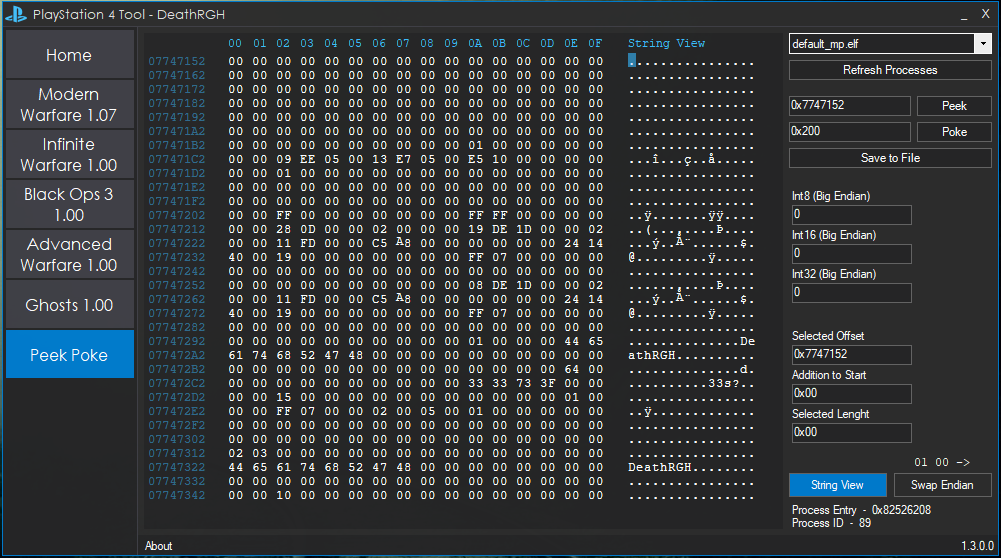
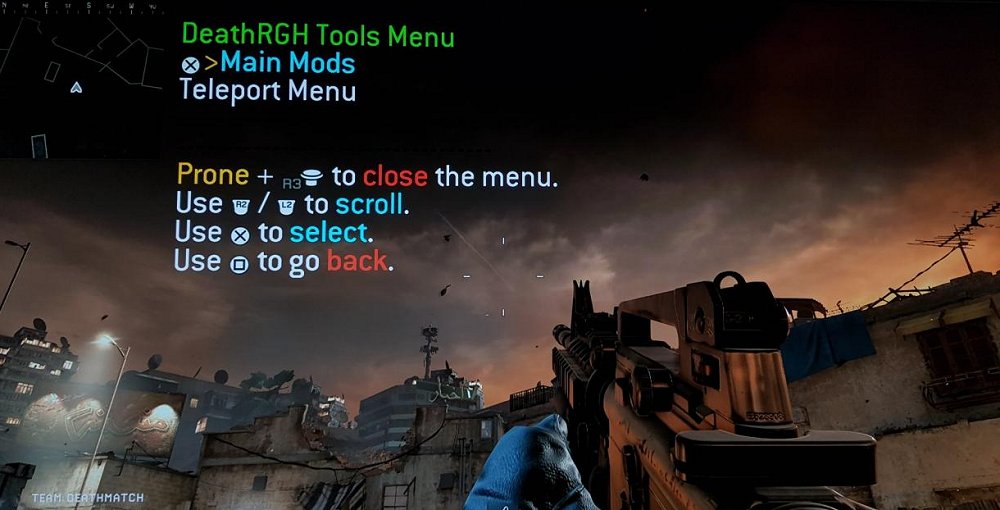
Pictures of the MWR mod menu:
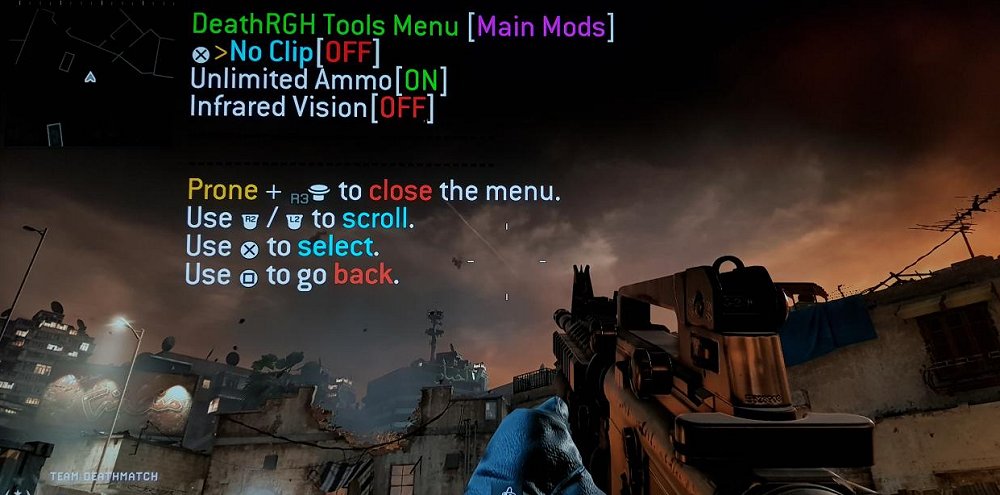
Changelog:
1.5.0.0
Tool and payload updated to 4.55. Please note that the cod ghost tool and notifys are only available on 4.05 for now!
It also has a few game mods for Modern Warfare Remastered, Infinite Warfare, Black Ops 3 and Ghosts. Advanced Warfare isn't added yet.
The payload also includes PS4HEN for all the games
Download: PlayStation 4 Tool by DeathRGH / Scan / GIT
Setup:
- Load up a payload loader webpage on your PS4 (specter seems to work best).
- Edit the IP in "ip.txt" to your PS4's IP.
- Open the tool and click "Send Payload" on the home tab.
- If you don't see any message boxes pop up and the red text on the right changes to green and says "Payload injected successfully!" it worked.
- Exit the web browser / user guide with the PS button and launch a game of your choice.
- Click the "Attach to Game Process" button once on the game.
- Start using the options.
- Click the "Refresh Processes" button.
- Select the process you want to read from / write to.
- Click "Peek".
- Make your changes.
- Click "Poke".
Select a save location and specify a name (doesn't need to have a file extension).
Known Issues:
- Integer conversation for the peek poking section isn't working for big endian.
- If payload injection fails, it notifies you but still says injected in the end.
- Memory changes don't highlight in the hex box.
A few pictures of the tool:
Pictures of the MWR mod menu:
Changelog:
1.5.0.0
Tool and payload updated to 4.55. Please note that the cod ghost tool and notifys are only available on 4.05 for now!
- temporary disabled notifys for 4.55 (general)
- added firmware selector (general)
- ui improvements/changes (general)
- added more tab controls...
PS4 EBOOT / ELF FW Patcher Barthen Method, Playable Scene Group
To kick things off on this Valentine's Day hot on the heels of recent PS4 scene group MarvTM comes news via Malatya of another known as Playable, who is also doing PS4 4.05 PKG releases including The_Last_of_US_Remastered_EUR_FW_405_PS4-Playable... and even DUPLEX is now doing 4.05-friendly PS4 releases including Uncharted.4.A.Thiefs.End.PS4-DUPLEX. 
Next up, @CelesteBlue passed along a Pastebin guide via Twitter from Barthen on how to lower the firmware requirement in ELF and PRX files which can be found below.
Following that method and the Free PS2 Pub Gen / Fake PKG Tools releases, PlayStation 4 developer @cfwprophet shared some updates on Twitter including Fake_PKG_Tools_v1.3.rar and an ELF FW Patcher v1.0 which patches the Firmware Version hex number of one or more PS4 ELF files for those working on getting newer titles running on 4.05 OFW.
From Barthen: How to lower the firmware requirement in ELF and PRX files
Example of lowering the firmware required for files compiled with the leaked 4.50 *** (tested on 4.05) hex editing some bytes:
1. In the ELF section called "sce_process_param" we patch the reversed *** version (there should only be one instance of the...
Next up, @CelesteBlue passed along a Pastebin guide via Twitter from Barthen on how to lower the firmware requirement in ELF and PRX files which can be found below.
Following that method and the Free PS2 Pub Gen / Fake PKG Tools releases, PlayStation 4 developer @cfwprophet shared some updates on Twitter including Fake_PKG_Tools_v1.3.rar and an ELF FW Patcher v1.0 which patches the Firmware Version hex number of one or more PS4 ELF files for those working on getting newer titles running on 4.05 OFW.
From Barthen: How to lower the firmware requirement in ELF and PRX files
Example of lowering the firmware required for files compiled with the leaked 4.50 *** (tested on 4.05) hex editing some bytes:
1. In the ELF section called "sce_process_param" we patch the reversed *** version (there should only be one instance of the...
Android App to Host PS4 Exploit and Payloads by Stooged
Following the PS4HEN on Android Phone tutorial and my recent PS4HEN on Wifi USB Drive guide, I put together an Android app to host the PlayStation 4 exploit and payloads.
You have to setup a wifi hotspot with your phone/tablet and connect the PS4 to that hotspot or connect the phone/tablet to the same network the PS4 is on.
Then install the app and open it and at the top will be the address you need to connect to with the PS4.
Your device might ask you about installing an application from "unknown sources" this is ok to allow, it just means its not coming from Google Play.
You just select the payload you want to run in the app and then use the PS4 to goto the address that you see in the app.
To change the payload just select it in the app and then use the ps4 to revisit/refresh the address again.
Download: Ps4_Serve_v1_8.apk (1.8 MB - Changes) / PS4_Serve GIT
Spoiler: Depreciated
You have to setup a wifi hotspot with your phone/tablet and connect the PS4 to that hotspot or connect the phone/tablet to the same network the PS4 is on.
Then install the app and open it and at the top will be the address you need to connect to with the PS4.
Your device might ask you about installing an application from "unknown sources" this is ok to allow, it just means its not coming from Google Play.
You just select the payload you want to run in the app and then use the PS4 to goto the address that you see in the app.
To change the payload just select it in the app and then use the ps4 to revisit/refresh the address again.
Download: Ps4_Serve_v1_8.apk (1.8 MB - Changes) / PS4_Serve GIT
Spoiler: Depreciated
- PS4 Fake PKG (FPKG) Sharing Guide
- 6.XX Webkit / 6.72 PS4 Jailbreak
- 7.00-7.02 Webkit Exploit
- 7.02 Webkit / 7.02 Kernel / PS4JB
- 7.50 Kernel Exploit / PS4JB 7.55
- 7.55 / 8.00 Payloads / PS4JB2 7.55
- 9.00 PS4 Webkit Exploit
- 9.00 PS4 Payloads / GoldHEN (Latest)
- 9.00 PS4 Jailbreak Kernel Exploit
- 11.00 PS4 Jailbreak Kernel Exploit
- 13.00 PS4 Kernel Exploit / 13.02 BD-J Bug
- 4.03 PS5 Webkit Exploit
- PS5 Kernel Exploit (ExFAT Bug)
- PS5 Root Keys Obtained
- 4.03 PS5 Kernel Build String
- 4.03 PS5 Webkit Execution
- 4.03 PS5 Kernel Vulnerability
- 4.03 PS5 Filesystem Dumps
- 4.51 PS5 BD-JB Sandbox Escape
- PS5 BD-JB Exploit Hack Source Code
- Mast1c0re PS5 Userland Exploit
- PS5 Kernel Access via PS4 Exploit
- PS5 exFAT Vulnerability Disclosed
- 4.03 PS5 Kernel Exploit Webkit ROP
- 4.50 PS5 Kernel Exploit Webkit ROP
- 4.51 PS5 Kernel Exploit Webkit ROP
- 4.xx PS5 Kernel Exploit v1.01
- 4.xx PS5 Kernel Exploit v1.02 / v1.03
- PS5 1.00-6.50 Firmware Webkit
- Native PS5 ROP Chain Execution
- Mast1c0re PS5 Compiler Attack
- PS5 FreeBSD Kernel Bug & WebKit
- PS5 UMTX 2 Exploit & PS5 Jailbreak
- Byepervisor PS5 Hypervisor Exploit
- Lua Lapse PS5 Kxploit & Laps3c0re / Y2JB
- 12.00 / 12.70 PS5 Kernel Exploit