PSXHAX.COM website and domain for sale. Contact Us with your offer!

You are using an out of date browser. It may not display this or other websites correctly.
You should upgrade or use an alternative browser.
You should upgrade or use an alternative browser.
PSXHAX - PSXHACKS: PSX HAX - PSX HACKS - PLAYSTATION HAX - PLAYSTATION HACKS
PS4 BadIRET PoC with LibPS4 / PS4Link / PS4SH by BigBoss and More
It's not been long since the PS4 BadIRET Kernel Exploit source code surfaced amid PS4 Scene drama, and today PlayStation 4 developer BigBoss tweeted that he has a working PS4 BadIRET Proof-of-Concept (PoC) with LibPS4 / PS4Link / PS4SH among more recent PS3 developments below.
badiret with libps4, ps4link, ps4sh output.txt
sys_dynlib_prepare_dclose poc with clang libps4/ps4link/ps4sh output.txt
badiret with libps4, ps4link, ps4sh output.txt
Code:
log: [PS4][DEBUG]: [PS4LINK] commands listener received packet size (266)
log: [PS4][DEBUG]: [PS4LINK] Received command execpayload argc=0 argv=
log: [PS4][DEBUG]: [PS4LINK] execpayload command thread UID: 0x80D2A520
log: [PS4][DEBUG]: [PS4LINK] commands listener waiting for next command
log: [PS4][DEBUG]: Loaded on corer 7
log: [PS4][DEBUG]: Setting affinity return 0x00000000
log: [PS4][DEBUG]: xpageEntryHi = ffffffff833249a8
log: [PS4][DEBUG]: mmap codepe0 825fc000
log: [PS4][DEBUG]: mmap codepe1 1825fc000
log: [PS4][DEBUG]: mmap codepe2 2825fc000
log: [PS4][DEBUG]: mmap codepe3 3825fc000
log: [PS4][DEBUG]: mmap codepe4 4825fc000
log: [PS4][DEBUG]: mmap codepe5 5825fc000
log: [PS4][DEBUG]: prefault codepe0
log: [PS4][DEBUG]: prefault codepe1
log: [PS4][DEBUG]: prefault codepe2
log: [PS4][DEBUG]: prefault codepe3
log: [PS4][DEBUG]: prefault codepe4
log: [PS4][DEBUG]: prefault codepe5
log: [PS4][DEBUG]: mmap codepw 200868000
log: [PS4][DEBUG]: payload 93a3030b4
log: [PS4][DEBUG]: dir payload 93a3030b4
log: [PS4][DEBUG]: tramp  0xB4 0x30 0x30 0x3A 0x09 0x00 0x00 0x00
log: [PS4][DEBUG]: prefault criticalPayloadMessage
log: [PS4][DEBUG]: Loaded 2 on core 6
log: [PS4][DEBUG]: Setting affinity return 0x00000000
log: [PS4][DEBUG]: sysarch return 0
[+] Entered critical payload

after this in we are in while(1) code on payload :) kernel execution achieved
sys_dynlib_prepare_dclose poc with clang libps4/ps4link/ps4sh output.txt
Code:
log: [PS4][INFO]: ready to have a lot of fun...
log: [PS4][DEBUG]: [PS4LINK] Server request thread UID: 0x80C43A20
log...
Rebug Toolbox 02.02.09 Visual Mod for PS3 CFW by Lightra1n
Following his Rebug CFW 4.78.2 Russian PKG Manager and the Rebug PS3 CFW 4.78.2 update, today PlayStation 3 developer Lightra1n returns with a Visual Mod for Rebug Toolbox 02.02.09.
Download: MOD_REBUG_TOOLBOX_02.02.09_[L].pkg (3.71 MB)
To quote: Hello, guys!
I very-very like CFW Rebug and I made Visual Mod of Rebug Toolbox 02.02.09 for all rebug lovers!
Enjoy if do you like it.
Download: MOD_REBUG_TOOLBOX_02.02.09_[L].pkg (3.71 MB)
To quote: Hello, guys!
I very-very like CFW Rebug and I made Visual Mod of Rebug Toolbox 02.02.09 for all rebug lovers!
Enjoy if do you like it.
How to Use Your PS4 DualShock Controller with Windows (Cable/BT)
So hello everyone  . I just discovered that Sony has added support for their PS4 Controller to use it easily with your PC (No need for the crappy MotioninJoy tool like on PS3). So i tested it and want to share how it works for other users
Things you need:
-> DS4 to XInput Download
-> Microsoft .NET Framework 4.0 Download
-> Visual C 2010/2012 Runtime Download1
Download2
-> DirectX Runtime Download
-> Microsoft Xbox 360 Driver (Included on Windows 8 and 10 - Download
-> Bluetooth 2.1 + EDR Dongle (for Bluetooth)
-> Admin rights on PC
Use with cable:
In the first place you can easily just plug your PS4 Controller via Cable to the PC. Windows will automatically install the drivers for a standard Gamepad. But further steps are required to have the Correct Button mapping...so read on...
Use with Bluetooth:
To use the Controller with Bluetooth we need a compatible Bluetooth adapter like the PS3 ones you may used also for the PS3 Controller and MotionJoy (I use a Asus USB-BT211).
-> Open the Bluetooth settings on your PC an let Windows search for Bluetooth devices.
-> Hold the PS Button and the Share Button on the DualShock 4 for three seconds until the lightbar begins to flash.
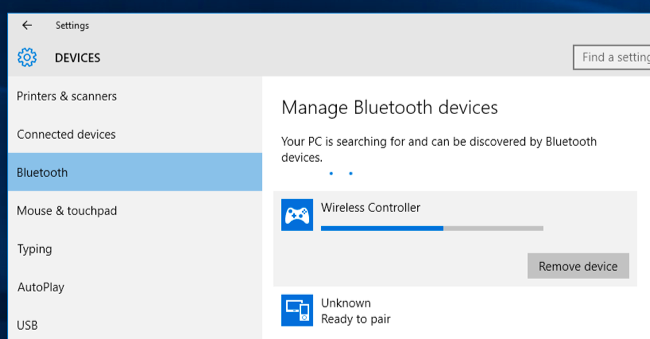
-> Now Connect to Wireless Controller.
-> If prompted to input a pair code, enter “0000”.
Your PS4 Controller should now be paired with your Bluetooth device on Windows
Windows installs a standard Gamepad so same thing as to use with Cable we need a tool for the correct Button mapping.
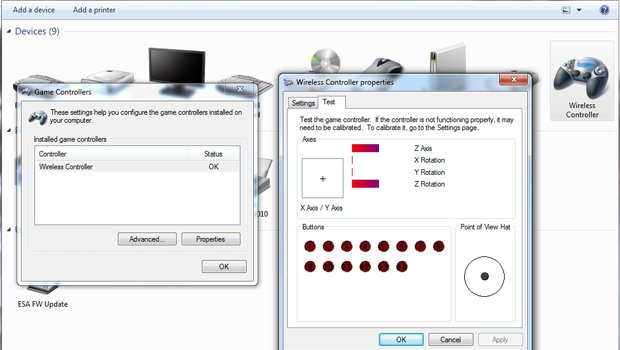
For the correct Mapping and to use the Controller with Games who supports X360 Controller we need the DS4 tool.
-> Extract the DS4 tool.
-> In folder Virtual Bus Driver we start first ScpDriver.exe and click Install.
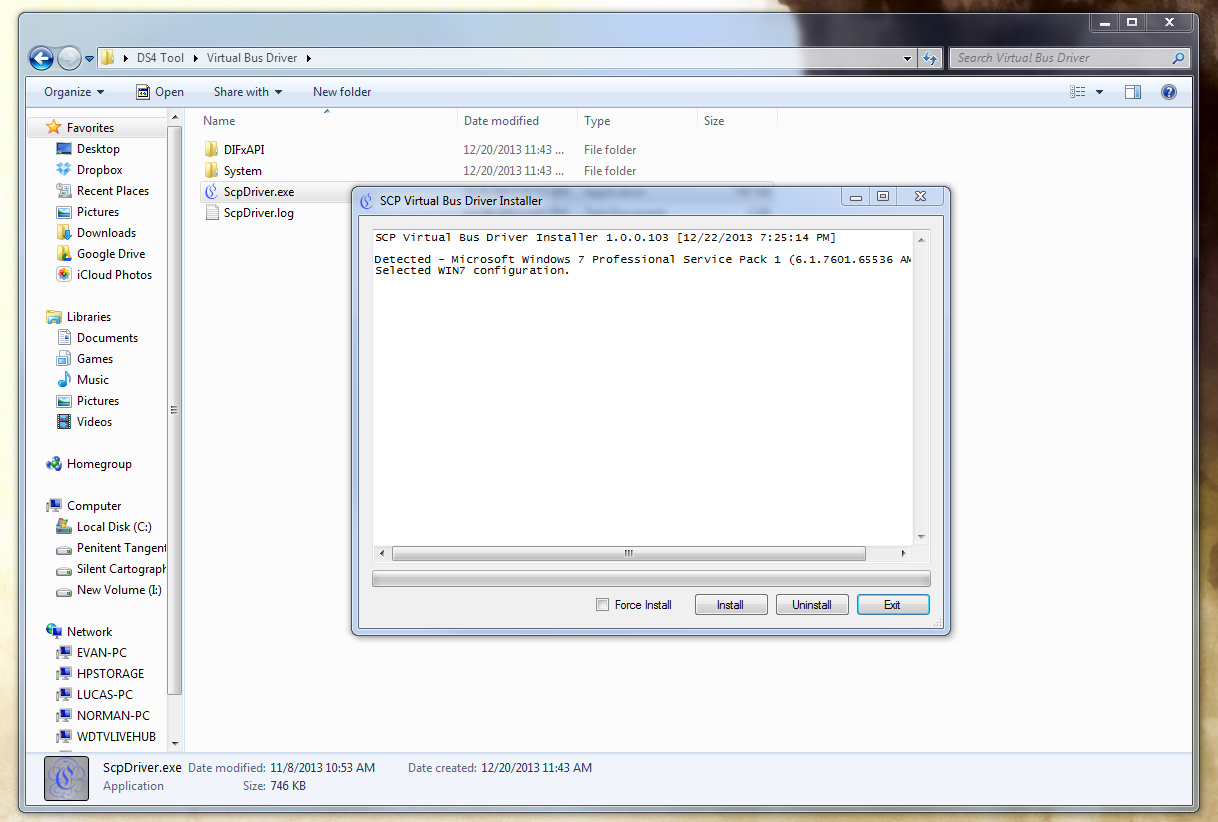
(Now you should see 2 Gamepads in your settings one for the standard Gamepad...
. I just discovered that Sony has added support for their PS4 Controller to use it easily with your PC (No need for the crappy MotioninJoy tool like on PS3). So i tested it and want to share how it works for other users Things you need:
-> DS4 to XInput Download
-> Microsoft .NET Framework 4.0 Download
-> Visual C 2010/2012 Runtime Download1
Download2
-> DirectX Runtime Download
-> Microsoft Xbox 360 Driver (Included on Windows 8 and 10 - Download
-> Bluetooth 2.1 + EDR Dongle (for Bluetooth)
-> Admin rights on PC
Use with cable:
In the first place you can easily just plug your PS4 Controller via Cable to the PC. Windows will automatically install the drivers for a standard Gamepad
. But further steps are required to have the Correct Button mapping...so read on...Use with Bluetooth:
To use the Controller with Bluetooth we need a compatible Bluetooth adapter like the PS3 ones you may used also for the PS3 Controller and MotionJoy (I use a Asus USB-BT211).
-> Open the Bluetooth settings on your PC an let Windows search for Bluetooth devices.
-> Hold the PS Button and the Share Button on the DualShock 4 for three seconds until the lightbar begins to flash.
-> Now Connect to Wireless Controller.
-> If prompted to input a pair code, enter “0000”.
Your PS4 Controller should now be paired with your Bluetooth device on Windows
Windows installs a standard Gamepad so same thing as to use with Cable we need a tool for the correct Button mapping.
For the correct Mapping and to use the Controller with Games who supports X360 Controller we need the DS4 tool.
-> Extract the DS4 tool.
-> In folder Virtual Bus Driver we start first ScpDriver.exe and click Install.
(Now you should see 2 Gamepads in your settings one for the standard Gamepad...
PS3 RSX Driver LV1 Reverse-Engineering Project by 3141card
Today PlayStation 3 developer 3141card shared a test LV1 RSX (Reality Synthesizer) that he's working on reverse-engineering for PS3 developers to examine.
Download: test_lv1_rsx.rar / lv1(rsx_driver-idb).rar via SorenAlke
To quote: Hi, a few weeks ago I start RE the RSX driver in LV1 to help my buddy AlexAltea for his PS3 emulator "nucleus" project, for this reason I code a little "emulator", a small static C program that help me with my RE work. I would share this code in case someone is interested too in this stuff. It is a work in progress, I am currently in creating of a RSX context, gpu_context_allocate().
Thx to AlexAltea and zecoxao for the help.
Download: test_lv1_rsx.rar / lv1(rsx_driver-idb).rar via SorenAlke
To quote: Hi, a few weeks ago I start RE the RSX driver in LV1 to help my buddy AlexAltea for his PS3 emulator "nucleus" project, for this reason I code a little "emulator", a small static C program that help me with my RE work. I would share this code in case someone is interested too in this stuff. It is a work in progress, I am currently in creating of a RSX context, gpu_context_allocate().
Thx to AlexAltea and zecoxao for the help.
PlayStation VR Safety Notice Spotted - Do You Plan to Get PS VR?
Recently KGrizzly spotted a PlayStation VR Safety Notice in the PS4 Firmware v3.50 Beta 2 for Sony's upcoming virtual reality platform geared towards PlayStation consoles.
With a release expected later this year, today's poll question is... Do you plan to get Sony's PlayStation Virtual Reality headset?
Below are some of the accessory's features from Sony's official site:
PlayStation VR Headset Key Features:

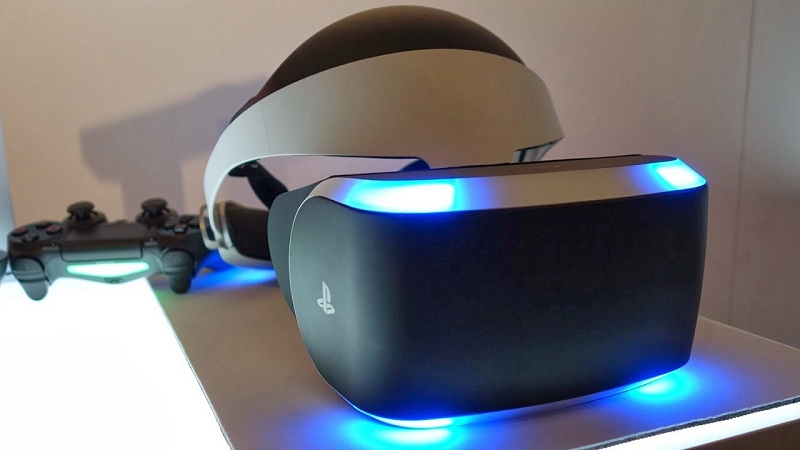
With a release expected later this year, today's poll question is... Do you plan to get Sony's PlayStation Virtual Reality headset?
Below are some of the accessory's features from Sony's official site:
PlayStation VR Headset Key Features:
- Advanced Display
PlayStation VR combines a landscape-scanning, full-HD LCD 1080p display and a uniquely developed optical unit with an approximate 100 degree field of view to create a vast 3D space in front of your eyes.
- Built for PlayStation
PlayStation VR allows you to experience the future of gaming through virtual reality with just the visor, your PlayStation 4 and the PlayStation Camera.
- 360 Degrees of Audio
Utilizing technology developed for the platform, PlayStation VR delivers a deeply immersive audio experience, putting you in the middle of the world with sound that comes from any direction in a 360-degree sphere.
- Industrial Design
PlayStation VR features a visor-style design, engineered to be balanced and comfortable for extended use. Its dual-banded form also adjusts to fit comfortably around various head sizes and over glasses.
- Movement and Position Tracking
The visor’s high-sensitivity accelerometer and gyroscope run at a frequency of 1000Hz, allowing PlayStation VR to detect your head’s movement with almost no latency. When used with a PlayStation Camera, your head’s movement, and the movement of controller can be tracked and reflected in the game’s images in real time.
- Multiplayer Gaming
Multiple PlayStation VR units connected to PS4 systems can be networked to play in the same virtual world. Additionally, PlayStation VR can also display what you’re looking at as a 2D image on your TV screen, allowing others to participate.
- PS4 Fake PKG (FPKG) Sharing Guide
- 6.XX Webkit / 6.72 PS4 Jailbreak
- 7.00-7.02 Webkit Exploit
- 7.02 Webkit / 7.02 Kernel / PS4JB
- 7.50 Kernel Exploit / PS4JB 7.55
- 7.55 / 8.00 Payloads / PS4JB2 7.55
- 9.00 PS4 Webkit Exploit
- 9.00 PS4 Payloads / GoldHEN (Latest)
- 9.00 PS4 Jailbreak Kernel Exploit
- 11.00 PS4 Jailbreak Kernel Exploit
- 13.00 PS4 Kernel Exploit / 13.02 BD-J Bug
- 4.03 PS5 Webkit Exploit
- PS5 Kernel Exploit (ExFAT Bug)
- PS5 Root Keys Obtained
- 4.03 PS5 Kernel Build String
- 4.03 PS5 Webkit Execution
- 4.03 PS5 Kernel Vulnerability
- 4.03 PS5 Filesystem Dumps
- 4.51 PS5 BD-JB Sandbox Escape
- PS5 BD-JB Exploit Hack Source Code
- Mast1c0re PS5 Userland Exploit
- PS5 Kernel Access via PS4 Exploit
- PS5 exFAT Vulnerability Disclosed
- 4.03 PS5 Kernel Exploit Webkit ROP
- 4.50 PS5 Kernel Exploit Webkit ROP
- 4.51 PS5 Kernel Exploit Webkit ROP
- 4.xx PS5 Kernel Exploit v1.01
- 4.xx PS5 Kernel Exploit v1.02 / v1.03
- PS5 1.00-6.50 Firmware Webkit
- Native PS5 ROP Chain Execution
- Mast1c0re PS5 Compiler Attack
- PS5 FreeBSD Kernel Bug & WebKit
- PS5 UMTX 2 Exploit & PS5 Jailbreak
- Byepervisor PS5 Hypervisor Exploit
- Lua Lapse PS5 Kxploit & Laps3c0re / Y2JB
- 12.00 / 12.70 PS5 Kernel Exploit