PSXHAX.COM website and domain for sale. Contact Us with your offer!

You are using an out of date browser. It may not display this or other websites correctly.
You should upgrade or use an alternative browser.
You should upgrade or use an alternative browser.
PSXHAX - PSXHACKS: PSX HAX - PSX HACKS - PLAYSTATION HAX - PLAYSTATION HACKS
PS4MovieList Toolbar Icon Script for PS4 Media Player by Aaronroth
We've covered online Streaming Sites for new films / movies and TV shows here alongside of my Kodi (WIP) Listing, and recently developer Aaronroth made available a browser action icon for your toolbar called PS4MovieList to simplify movie listings that work with the PS4 Media Player! 
Download: PS4MovieList-master.zip / GIT
It reminds me of something along the lines of a Greasemonkey script, and although there's no official ReadMe yet here's what the Github says about it:
PS4MovieList
Adds a browser action icon to the toolbar. Click the button when on thepiratebay.org movie pages to change the background color of all movie listings that the PS4 media player can play.
Cheers to @VultraBabe for the news in the PSXHAX Shoutbox on this yesterday!
Download: PS4MovieList-master.zip / GIT
It reminds me of something along the lines of a Greasemonkey script, and although there's no official ReadMe yet here's what the Github says about it:
PS4MovieList
Adds a browser action icon to the toolbar. Click the button when on thepiratebay.org movie pages to change the background color of all movie listings that the PS4 media player can play.
Cheers to @VultraBabe for the news in the PSXHAX Shoutbox on this yesterday!
QuickBMS: Making BMS Scripts Tutorial by ThatTrueStruggle
For those interested in extracting and unpacking game files, here is a great tutorial for making BMS Scripts by ThatTrueStruggle over at VG-Resource.com. 
To quote: At first glance, creating a QuickBMS script seems very difficult. However, creating them is not very difficult! Throughout this tutorial, we'll go through a sample file, figure out the format and write a QuickBMS script in order to extract the contents.
Before we start, let's get prepared:
Download a Hex Editor, and get the sample file demo_file.kyp (350 KB - Mirror) that we'll be working on in this tutorial. My personal preference is H x D Editor, it's free and very lightweight, though anyone will do
Open up your hex editor and open the kyp file.
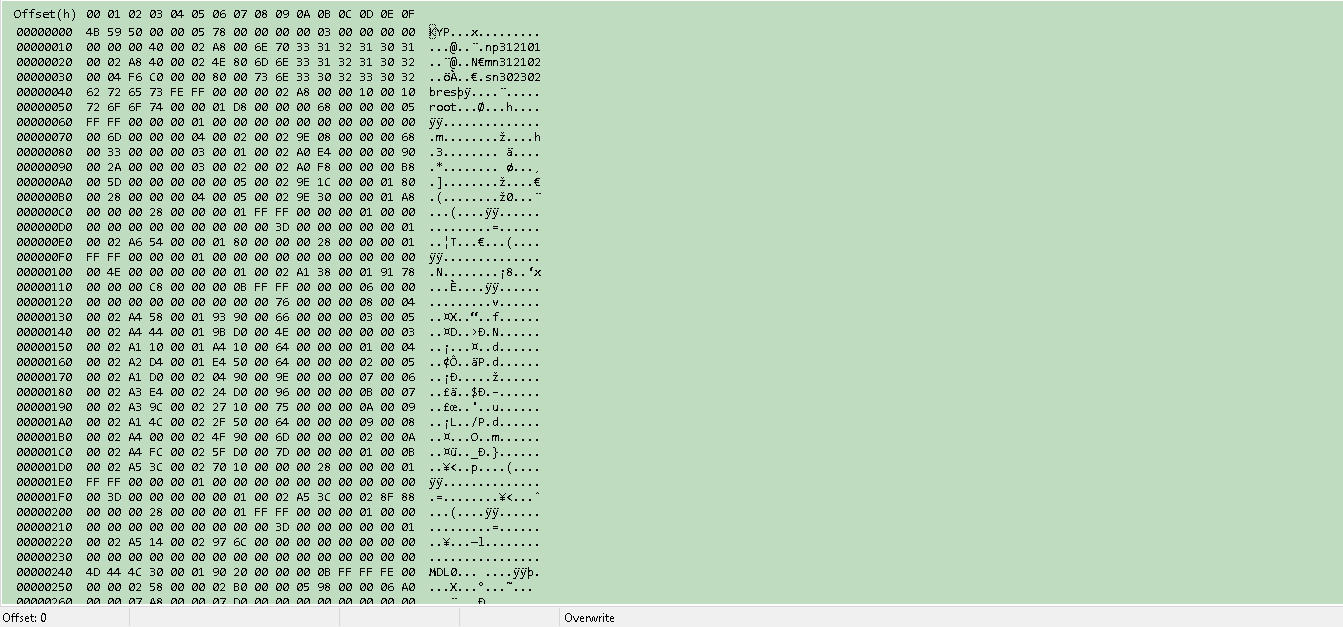
So first thing is to figure out the endianness. The endianness is the way bytes are read from the file. Take the value 0x0c80 for example. In Little Endian, this value would be read as 0x800c, so basically the value is read backwards. Big Endian is 0x0c80, so the value stays the same. So in order to figure out the endianness, there are a few ways to figure this out.
Look at the file and look for some definite values and compare.


So what we do is at the top of the script is write out the function, "endian big". This sets our script to run in Big Endianness.
endian big
Next, we need to read through the...
To quote: At first glance, creating a QuickBMS script seems very difficult. However, creating them is not very difficult! Throughout this tutorial, we'll go through a sample file, figure out the format and write a QuickBMS script in order to extract the contents.
Before we start, let's get prepared:
Download a Hex Editor, and get the sample file demo_file.kyp (350 KB - Mirror) that we'll be working on in this tutorial. My personal preference is H x D Editor, it's free and very lightweight, though anyone will do
Open up your hex editor and open the kyp file.
So first thing is to figure out the endianness. The endianness is the way bytes are read from the file. Take the value 0x0c80 for example. In Little Endian, this value would be read as 0x800c, so basically the value is read backwards. Big Endian is 0x0c80, so the value stays the same. So in order to figure out the endianness, there are a few ways to figure this out.
Look at the file and look for some definite values and compare.
- This is the method I use in order to figure out the endianness. Say I find a value that looks like a size. I can compare it to the file's actual size and see if it's correct. Or if I find a pointer to an offset, I can compare it to an actual value. If the value is reversed, then it's a Little Endian file. If it's a complete match, it's a Big Endian file.
- Guess if it's Little or Big.
I really don't recommend this, as this can lead to mistakes. I'd recommend just using the first method.
So what we do is at the top of the script is write out the function, "endian big". This sets our script to run in Big Endianness.
endian big
Next, we need to read through the...
Poll: Should Private PS4 GameSharing Methods Become Public?
Every now and then we poll what members think about various discussion topics, with the last asking your feedback on whether you'd support PS4 dongles or not if someone came out with one.
 In today's poll we'd like you to share your opinion on whether one of the rumored Brazilian methods used by online sites and local shops to fill PS4 HDD's full of games should remain private, or if the method should become public with a guide / tutorial documentation for the PlayStation 4 scene.
Before casting your vote, here are a few pros and cons to consider:
Pros:
In today's poll we'd like you to share your opinion on whether one of the rumored Brazilian methods used by online sites and local shops to fill PS4 HDD's full of games should remain private, or if the method should become public with a guide / tutorial documentation for the PlayStation 4 scene. Before casting your vote, here are a few pros and cons to consider:
Pros:
- Everyone would be able to try it and learn at least one method how mass PS4 gamesharing is currently being done
- The PS4 gamesharing method exploits Sony's PSN online account security, meaning it wouldn't burn a kernel exploit that may be valuable to developers working on Linux as most aren't interested in backups
- It would slow down or stop online sites and local shops from making money transferring PS4 games to someone's HDD or selling pre-loaded hard disk drives
- If the method went public there would likely be an increase in backups on the PlayStation 4 console
- Sony would protect their business interests as they have with all the PSP / PS Vita / PS3 / PS4 Firmware exploits and inevitably patch the method through increased PSN account security, mandatory SMS verification or the necessary online changes to their PlayStation 4 activation / deactivation and primary / secondary system
- Once patched, the gamesharing method would no longer work for anyone including end-users and those making money from it (or planning to based on recent Russian videos - Part 1 and Part 2) online and at shops unless a new method or work-around was shared
PS4 Sealedkey / pfsSKKey for SaveGame & Trophy Data Decryption
Following his PS4 PFS Protection Bypass Guide, initial GameArchives PFS Support, GameArchives Updates and MakePFS utility this weekend @zecoxao dropped a hint on Twitter of a retail PS4 Sealedkey / pfsSKKey and is seeking someone with a PlayStation 4 DevKit / TestKit to decrypt it... noting that both the PS4 retail and development Sealedkey / pfsSKKey should be the same. 
According to the PSDevWiki the Sealedkey / pfsSKKey can be obtained in different places and is used for SaveGame or Trophy Data decryption and encryption reminiscent of the PS4 Retail / Debug Game Transfusion Tutorial where savegames and trophies were confirmed as working.
To quote: Sealedkey / pfsSKKey
This key can be found on different places and will be used for eg. SaveGame or Trophy Data decryption and encryption.
Flags
According to the PSDevWiki the Sealedkey / pfsSKKey can be obtained in different places and is used for SaveGame or Trophy Data decryption and encryption reminiscent of the PS4 Retail / Debug Game Transfusion Tutorial where savegames and trophies were confirmed as working.
To quote: Sealedkey / pfsSKKey
This key can be found on different places and will be used for eg. SaveGame or Trophy Data decryption and encryption.
Flags
| Kind | Path |
| Trophys | /user/home/user Id/trophy/data/sce_trop/sealedkey |
| SaveGames | /user/home/user Id/title Id/save data directory/sce_sys/ |
- size always 96 bytes
| From | To | Description |
| 00 | 07 | MAGIC ("pfsSKKey") (?playstation file system sealed key key?) |
| 08 | 09 | KeySet for getSealedKeySecret (changed beyond kernel 1.73) |
| 0A | 0F | Just 0x00 Bytes |
| 10 | 1F | IV (16 bytes) |
| 20 | 3F | Encrypted key (32 bytes) |
| 40 | 5F | SHA-256 (32 bytes) |
Code:
typedef...
Call of Duty WWII Reveal April 26th, PS4 Box Art & DLC Details - #CODWWII
This weekend Activision in conjunction with Sledgehammer Games officially announced Call of Duty: WWII and confirmed that CoD: WWII will be revealed this Wednesday April 26, 2017 at 10AM PDT/1PM EDT! 
Call of Duty: WWII takes the series back to its roots set during World War II with a brief history of Call of Duty and World War II available on Activision's Blog.
 Those interested can register to get notified when their livestream begins, and according to the Amazon UK PS4 box art which displays "Play Map Packs 30 Days Early" it appears the PlayStation 4 will get DLC 30 days ahead of other platforms.
Thanks to @PLAYER 1 for the news tip on this, and if there are some CoD fans here let us know your thoughts on this upcoming title in the comments below!
Call of Duty: WWII takes the series back to its roots set during World War II with a brief history of Call of Duty and World War II available on Activision's Blog.
Those interested can register to get notified when their livestream begins, and according to the Amazon UK PS4 box art which displays "Play Map Packs 30 Days Early" it appears the PlayStation 4 will get DLC 30 days ahead of other platforms. Thanks to @PLAYER 1 for the news tip on this, and if there are some CoD fans here let us know your thoughts on this upcoming title in the comments below!
- PS4 Fake PKG (FPKG) Sharing Guide
- 6.XX Webkit / 6.72 PS4 Jailbreak
- 7.00-7.02 Webkit Exploit
- 7.02 Webkit / 7.02 Kernel / PS4JB
- 7.50 Kernel Exploit / PS4JB 7.55
- 7.55 / 8.00 Payloads / PS4JB2 7.55
- 9.00 PS4 Webkit Exploit
- 9.00 PS4 Payloads / GoldHEN (Latest)
- 9.00 PS4 Jailbreak Kernel Exploit
- 11.00 PS4 Jailbreak Kernel Exploit
- 13.00 PS4 Kernel Exploit / 13.02 BD-J Bug
- 4.03 PS5 Webkit Exploit
- PS5 Kernel Exploit (ExFAT Bug)
- PS5 Root Keys Obtained
- 4.03 PS5 Kernel Build String
- 4.03 PS5 Webkit Execution
- 4.03 PS5 Kernel Vulnerability
- 4.03 PS5 Filesystem Dumps
- 4.51 PS5 BD-JB Sandbox Escape
- PS5 BD-JB Exploit Hack Source Code
- Mast1c0re PS5 Userland Exploit
- PS5 Kernel Access via PS4 Exploit
- PS5 exFAT Vulnerability Disclosed
- 4.03 PS5 Kernel Exploit Webkit ROP
- 4.50 PS5 Kernel Exploit Webkit ROP
- 4.51 PS5 Kernel Exploit Webkit ROP
- 4.xx PS5 Kernel Exploit v1.01
- 4.xx PS5 Kernel Exploit v1.02 / v1.03
- PS5 1.00-6.50 Firmware Webkit
- Native PS5 ROP Chain Execution
- Mast1c0re PS5 Compiler Attack
- PS5 FreeBSD Kernel Bug & WebKit
- PS5 UMTX 2 Exploit & PS5 Jailbreak
- Byepervisor PS5 Hypervisor Exploit
- Lua Lapse PS5 Kxploit & Laps3c0re / Y2JB
- 12.00 / 12.70 PS5 Kernel Exploit