PSXHAX.COM website and domain for sale. Contact Us with your offer!

You are using an out of date browser. It may not display this or other websites correctly.
You should upgrade or use an alternative browser.
You should upgrade or use an alternative browser.
PSXHAX - PSXHACKS: PSX HAX - PSX HACKS - PLAYSTATION HAX - PLAYSTATION HACKS
MultiMAN Singstar Repack 4.78.02 (mmCM) by Lightra1n
Following the recent multiMAN updates, PlayStation 3 developer Lightra1n has now made available MultiMAN Singstar Repack 4.78.02 (mmCM) with details below.
Download: MM singstar-R_repack.pkg (131.9 MB) / MM singstar-LR_repack.pkg (Mirror)
To quote: Hi, guys!
First of all big THX to Deank and Arachetous for their job & it homebrew!
I've done repack of backup manager mmCM and I want share with all
Features:
Download: MM singstar-R_repack.pkg (131.9 MB) / MM singstar-LR_repack.pkg (Mirror)
To quote: Hi, guys!
First of all big THX to Deank and Arachetous for their job & it homebrew!
I've done repack of backup manager mmCM and I want share with all
Features:
- Based on MM 4.78.02
- Full edit theme (in rebug style)
- Edited fonts
- Edited sounds
- Updated Movian to 5.0.007 (from Deank)
- Add new MM motion Background
- Add motion icon in XMB
- Set default game folder to "GAMES" not "Dyrec'
PS4 Linux Installation Guide
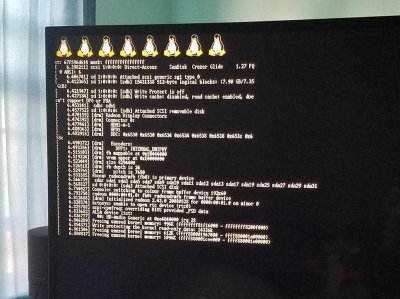
A few days back PlayStation 4 developer kr105 released a PS4 Linux Loader Patch for 1.76 Firmware, and here's a follow-up PS4 Linux Installation Guide detailing how to install and run PS4 Linux from D-ecks via Wololo.
How to Install and Run Linux on your PS4
AT THE TIME OF THIS WRITING, THIS WORKS ONLY ON PS4 1.76 FW!
You'll need:
What to do:
0. Remove custom host from router (manuals.playstation.net 89.108.88.221) if added earlier
1. On PS4 Open Network > Set Up Internet Connection
2. Select LAN or Wi-Fi -> Select your network and enter password -> Custom
3. Set everything to Automatic, Do Not Specify, Do Not use, except DNS Settings
4. In DNS Settings set Primary DNS to 89.108.88.221, secondary set to 0.0.0.0
5. Download 2 files from http://kr105.com/ps4kerneltest/
6. Copy downloaded files on usb stick
7. Insert usb stick into PS4
8. Save settings and open User's Guide
9. Wait for a few seconds
OLD METHOD (use as fallback)
What to do:
If you want do something in console, connect a USB keyboard.
VIDEO
Troubleshooting
“Not Enough System...
How to Install and Run Linux on your PS4
AT THE TIME OF THIS WRITING, THIS WORKS ONLY ON PS4 1.76 FW!
You'll need:
- USB flash drive
- USB keyboard
- Internet connection
What to do:
0. Remove custom host from router (manuals.playstation.net 89.108.88.221) if added earlier
1. On PS4 Open Network > Set Up Internet Connection
2. Select LAN or Wi-Fi -> Select your network and enter password -> Custom
3. Set everything to Automatic, Do Not Specify, Do Not use, except DNS Settings
4. In DNS Settings set Primary DNS to 89.108.88.221, secondary set to 0.0.0.0
5. Download 2 files from http://kr105.com/ps4kerneltest/
6. Copy downloaded files on usb stick
7. Insert usb stick into PS4
8. Save settings and open User's Guide
9. Wait for a few seconds
OLD METHOD (use as fallback)
What to do:
- You will need to get access to the browser from 1.76 without updating your console. How to do so is explained below.
- Download the Linux Kernel and ram init files from kr105.
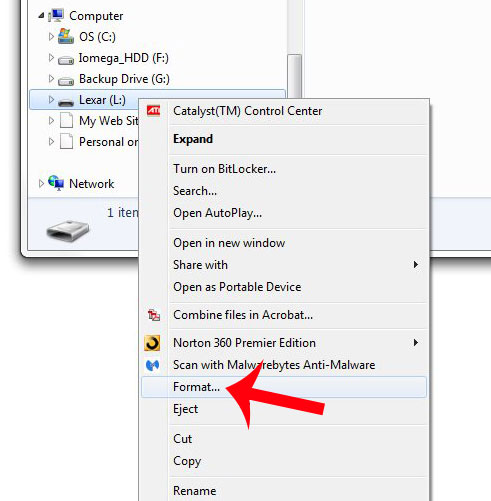
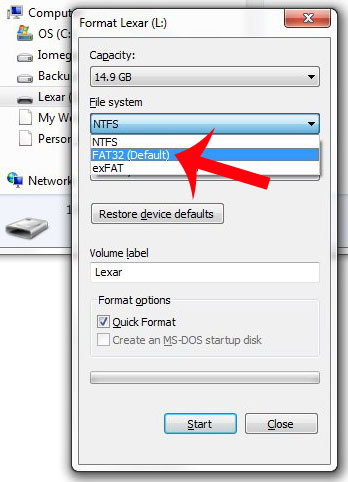
- Format usb stick to FAT32
- Copy downloaded files at the root of the usb stick
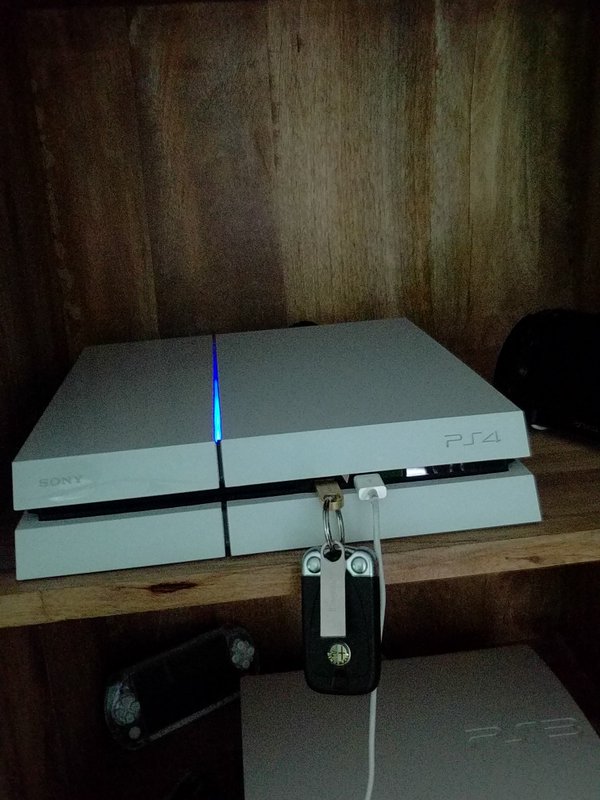
- Insert usb stick into PS4
- Get to PS4 WebKit Playground (http://cturt.github.io/PS4-playground/) using PS4 browser.
- Click Load! in Linux loader box.
- PROFIT.
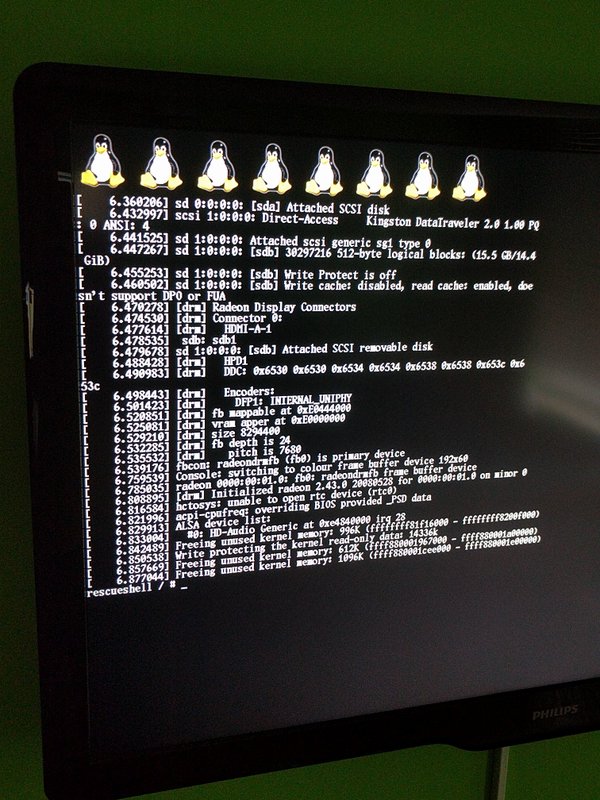
If you want do something in console, connect a USB keyboard.
VIDEO
Troubleshooting
“Not Enough System...
PS4 Dlclose Exploit for PlayStation 4 Firmware 1.76 is Released!
Not long ago news of a PS4 Root Privilege Escalation & Prison Break / Sandbox Break PoC was confirmed, and today kr105 dropped word in the Shoutbox that a usable dlclose exploit for PS4 Firmware 1.76 is now available to compile with CTurt's open-source work! 
Download: PS4-dlclose-master.zip / PS4 Dlclose GIT / GIT / Linux Loader Patch for 1.76 / bzImage / initramfs.cpio.gz by kr105 / PS4 Playground / PS4 Playground GIT / ps4link-master.zip / PS4Link GIT
From the ReadMe Files: PS4-dlclose
 Fully implemented dlclose exploit for PS4 fw 1.76. Compile it with CTurt's.
This is the bare working exploit, you must add your own payload code to make it do anything useful. Enjoy!
Linux loader
Download: PS4-dlclose-master.zip / PS4 Dlclose GIT / GIT / Linux Loader Patch for 1.76 / bzImage / initramfs.cpio.gz by kr105 / PS4 Playground / PS4 Playground GIT / ps4link-master.zip / PS4Link GIT
From the ReadMe Files: PS4-dlclose
Fully implemented dlclose exploit for PS4 fw 1.76. Compile it with CTurt's.This is the bare working exploit, you must add your own payload code to make it do anything useful. Enjoy!
Linux loader
Code:
@@ -28,6 +28,15 @@ If you're on Linux, the easiest way is probably to use `netcat`:

After you...
Movian 5.0 PS3 Media Center by Andreas Oman is Now Available
PlayStation 3 developer Andreas Oman updated Movian PS3 Media Center to version 5.0 today, which features a new user interface that works better with touch devices!
Download: movian-gh-5.0.pkg / movian-5.0.pkg / movian-5.0.self
To quote from the official blog via PS4 News: Movian 5.0
Finally I've decided to put the 5.0 release out. Downloads are available here.
This release comes with a new user interface which works better with touch devices as Movian is now also available in Google Play store, get it here.
Highlights from this version, in no particular order:
/Andreas
Download: movian-gh-5.0.pkg / movian-5.0.pkg / movian-5.0.self
To quote from the official blog via PS4 News: Movian 5.0
Finally I've decided to put the 5.0 release out. Downloads are available here.
This release comes with a new user interface which works better with touch devices as Movian is now also available in Google Play store, get it here.
Highlights from this version, in no particular order:
- New "flat" user interface
- Official Mac OS X builds (with built-in updater)
- Official Android builds (with built-in updater)
- Improved screen saver
- Better video decoding support on Raspberry Pi
- Raspberry Pi 3 supported
- Show current time in top-right corner
- Hardware accelerated video decoding on Android
/Andreas
PS3 lv0ldr Dumped: lv0ldr_with_clear.bin & PS3 lv0ldr: Teensy in the Middle Exploit by MikeM64
Seems something is going on for the PS3 scene here I am no dev but it seems lvl0 is dumped ^^
Following the recent PS3 lv0.2 (.2) Updated Hashes + Info as explained by @XxZer0ModZxX, today zecoxao reports news of PS3 lv0ldr being dumped.
Download: lv0ldr_with_clear.bin (171 KB)
Info from @pauline45: A bootloader is a bin file with many ways to run certain things on the ps3 and ps4 to gain access once broken it can be modified to run cfw and maybe bypass metler 2 for higher cfw and homebrew apps as you know sony patched after 3.55 but the file bin is from a debug unit so would have to be modified to a certain degree to allow this to happen.
From joonie86: It's a spu binary, dumped from DECR. Known as a decrypted bootloader.
From Pastebin: DECR-1000 Bootloader pwned
I am no dev but it seems lvl0 is dumped ^^Following the recent PS3 lv0.2 (.2) Updated Hashes + Info as explained by @XxZer0ModZxX, today zecoxao reports news of PS3 lv0ldr being dumped.
Download: lv0ldr_with_clear.bin (171 KB)
Info from @pauline45: A bootloader is a bin file with many ways to run certain things on the ps3 and ps4 to gain access once broken it can be modified to run cfw and maybe bypass metler 2 for higher cfw and homebrew apps as you know sony patched after 3.55 but the file bin is from a debug unit so would have to be modified to a certain degree to allow this to happen.
From joonie86: It's a spu binary, dumped from DECR. Known as a decrypted bootloader.
From Pastebin: DECR-1000 Bootloader pwned
Code:
(live)root@redribbon:/home/math/btldr8_fat# ./lv0Decrypt 0 nor.bin buffers.bin
Using spe 0
Creating buffers
Buffers created
File loaded
Buffer initialized
ChanCount 0: 0000000000000000
ChanCount 1: 0000000000000000
ChanCount 2: 0000000000000000
ChanCount 3: 0000000000000001
ChanCount 4: 0000000000000001
ChanCount 5: 0000000000000000
ChanCount 6: 0000000000000000
ChanCount 7: 0000000000000000
ChanCount 8: 0000000000000000
ChanCount 9: 0000000000000001
ChanCount 10: 0000000000000000
ChanCount 11: 0000000000000000
ChanCount 12: 0000000000000000
ChanCount 13: 0000000000000000
ChanCount 14: 0000000000000000
ChanCount 15: 0000000000000000
ChanCount 16: 0000000000000000
ChanCount 17: 0000000000000000
ChanCount 18: 0000000000000000
ChanCount 19: 0000000000000000
ChanCount 20: 0000000000000000
ChanCount 21: 0000000000000010
ChanCount 22: 0000000000000000
ChanCount 23: 0000000000000001
ChanCount 24: 0000000000000000
ChanCount 25: 0000000000000000
ChanCount 26: 0000000000000000
ChanCount 27: 0000000000000000
ChanCount 28: 0000000000000001
ChanCount 29: 0000000000000002
ChanCount 30: 0000000000000001
ChanCount 31: 0000000000000000
ChanCount 0: 0000000000000000
ChanCount 1: 0000000000000000
ChanCount 2: 0000000000000000
ChanCount 3: 0000000000000001
ChanCount 4: 0000000000000001
ChanCount 5: 0000000000000000
ChanCount 6...- PS4 Fake PKG (FPKG) Sharing Guide
- 6.XX Webkit / 6.72 PS4 Jailbreak
- 7.00-7.02 Webkit Exploit
- 7.02 Webkit / 7.02 Kernel / PS4JB
- 7.50 Kernel Exploit / PS4JB 7.55
- 7.55 / 8.00 Payloads / PS4JB2 7.55
- 9.00 PS4 Webkit Exploit
- 9.00 PS4 Payloads / GoldHEN (Latest)
- 9.00 PS4 Jailbreak Kernel Exploit
- 11.00 PS4 Jailbreak Kernel Exploit
- 13.00 PS4 Kernel Exploit / 13.02 BD-J Bug
- 4.03 PS5 Webkit Exploit
- PS5 Kernel Exploit (ExFAT Bug)
- PS5 Root Keys Obtained
- 4.03 PS5 Kernel Build String
- 4.03 PS5 Webkit Execution
- 4.03 PS5 Kernel Vulnerability
- 4.03 PS5 Filesystem Dumps
- 4.51 PS5 BD-JB Sandbox Escape
- PS5 BD-JB Exploit Hack Source Code
- Mast1c0re PS5 Userland Exploit
- PS5 Kernel Access via PS4 Exploit
- PS5 exFAT Vulnerability Disclosed
- 4.03 PS5 Kernel Exploit Webkit ROP
- 4.50 PS5 Kernel Exploit Webkit ROP
- 4.51 PS5 Kernel Exploit Webkit ROP
- 4.xx PS5 Kernel Exploit v1.01
- 4.xx PS5 Kernel Exploit v1.02 / v1.03
- PS5 1.00-6.50 Firmware Webkit
- Native PS5 ROP Chain Execution
- Mast1c0re PS5 Compiler Attack
- PS5 FreeBSD Kernel Bug & WebKit
- PS5 UMTX 2 Exploit & PS5 Jailbreak
- Byepervisor PS5 Hypervisor Exploit
- Lua Lapse PS5 Kxploit & Laps3c0re / Y2JB
- 12.00 / 12.70 PS5 Kernel Exploit