
You are using an out of date browser. It may not display this or other websites correctly.
You should upgrade or use an alternative browser.
You should upgrade or use an alternative browser.
Live in Your World, HAX in Ours!

Live in Your World, HAX in Ours!
Hello World! I've been reporting on Sony PlayStation hacking news since 2000 and started PSXHAX in 2014 to cover PlayStation (PSX), PlayStation 2 (PS2), PlayStation 3 (PS3), PlayStation 4 (PS4), PlayStation Portable (PSP), PlayStation Vita (PS Vita), PlayStation TV (PS TV) and next-gen PlayStation 5 (PS5) platforms along with anything else of interest.
Click on my UserName author link above and you'll be able to view a curated list of all the articles I've contributed thus far to PSXHAX.COM!
Click on my UserName author link above and you'll be able to view a curated list of all the articles I've contributed thus far to PSXHAX.COM!
PS4 System Software Update 5.50 Beta Signups Begin Today!
Those who missed their last PS4 Beta signup listen up: you can register now for Sony's PS4 System Software 5.50 Beta program beginning today in territories including Europe, Japan and the USA! 
The cool thing about being in Sony's official PlayStation 4 Beta program beyond the ability to install PS4 Beta PUPs to check out new features before they go public, is while on PS4 Beta System Software (until the Final public version) Sony lets you roll back the Firmware by going to System Update in Settings to reload your existing Firmware there. 
This means if you're on 4.05 OFW and update to 5.50 Beta to access PSN and play new PS4 games then you'll be able to 'downgrade' back to 4.05 as long as you remain on the Beta Firmware while in Sony's program. 
 Warning: If you're on a jailbroken PS4 console don't update to the BETA as @DEFAULTDNB confirmed the following via Twitter, to quote:
"You can only downgrade to the current highest released OFW (in this case 6.20) regardless of what firmware you updated from. It's hard coded now."
And to quote from Sony Senior Product Marketing Manager Brian Dunn on the PS4 5.50 Beta Firmware Signups:
We’re getting ready for the next major system update for PS4, and can use some help from PS4 owners to test it out ahead of launch. Starting today, you can sign up for a chance to be a beta tester and get an advance look at some of the improvements and new features coming to PS4. And good news for Canadian folks – beginning this beta, PS4 owners in Canada are also able to register for the beta testing.
You can register to be a beta tester anytime between today and the start of the beta expected in February. Users must be 18 years or older. Once the beta starts, we’ll close...
Warning: If you're on a jailbroken PS4 console don't update to the BETA as @DEFAULTDNB confirmed the following via Twitter, to quote:"You can only downgrade to the current highest released OFW (in this case 6.20) regardless of what firmware you updated from. It's hard coded now."
And to quote from Sony Senior Product Marketing Manager Brian Dunn on the PS4 5.50 Beta Firmware Signups:
We’re getting ready for the next major system update for PS4, and can use some help from PS4 owners to test it out ahead of launch. Starting today, you can sign up for a chance to be a beta tester and get an advance look at some of the improvements and new features coming to PS4. And good news for Canadian folks – beginning this beta, PS4 owners in Canada are also able to register for the beta testing.
You can register to be a beta tester anytime between today and the start of the beta expected in February. Users must be 18 years or older. Once the beta starts, we’ll close...
PS4 PUP Unpacker by Thunder07 to Unpack Decrypted PS4 PUP Images
Based on IDC's previous PS4 PUP_Unpack, PlayStation 4 developer Thunder07 (aka Zer0xFF on Twitter) made available a PS4 PUP Unpacker v1.0 to unpack decrypted PS4 PUP images such as the recent 3.70 Decrypted OFW by BurtE. 
Download: pup_unpacker.exe / GIT
In other news today since the PS4 Keys by RedEyeX32 released last month, Something Sinister shared a tool for PS4 developers to create RSA key pairs with source code stating the following: "Polarssl's rsa_genkey.exe generates RSA key pairs. All inputs generated internally.
This version generates RSA key pairs from user input. 2048bit keys only. User inputs the exponent and randoms p and q."
Download: polarssl_rsa_application.zip (58 KB) / polarssl_rsa_source.zip (18 KB) / ps4pkgdec.zip (7.2 KB - contains ps4pkgdec.exe) / ps4pkgdec_update.zip (14 KB) / ps4pkgdec_update_source.zip (10 KB)
Additional details on usage with the PKGDec Tool are available from Robbie Luong for those interested. To quote from the README.md file: pup_unpacker
A utility to unpack PS4 update blobs that have been previously decrypted...
Download: pup_unpacker.exe / GIT
In other news today since the PS4 Keys by RedEyeX32 released last month, Something Sinister shared a tool for PS4 developers to create RSA key pairs with source code stating the following: "Polarssl's rsa_genkey.exe generates RSA key pairs. All inputs generated internally.
This version generates RSA key pairs from user input. 2048bit keys only. User inputs the exponent and randoms p and q."
Download: polarssl_rsa_application.zip (58 KB) / polarssl_rsa_source.zip (18 KB) / ps4pkgdec.zip (7.2 KB - contains ps4pkgdec.exe) / ps4pkgdec_update.zip (14 KB) / ps4pkgdec_update_source.zip (10 KB)
Additional details on usage with the PKGDec Tool are available from Robbie Luong for those interested. To quote from the README.md file: pup_unpacker
A utility to unpack PS4 update blobs that have been previously decrypted...
PS4 Custom Notification Command via Notifications Mod by eXtreme
Following their PS4 APP.DB Mods and PS4 UI Mod Alpha 0.16 updates, the PlayStation 4 modders at e✘treme-Modding.de recently shared a NOTIFICATION.DB modification to open Settings via a custom notification... and see here for the PS4 4.05 System Notification Types. 
To quote from their blog, roughly translated: Custom Notification – Command via Notifications
You can modify the Notifications on 4.05 to call other entries. In this example I will show you how to open the Settings via custom notification.
First you need the notification.db (same directory as app.db). You find the action_uri of each tip which can be modified, so the command to open the Settings is: pssettings:play?mode=settings
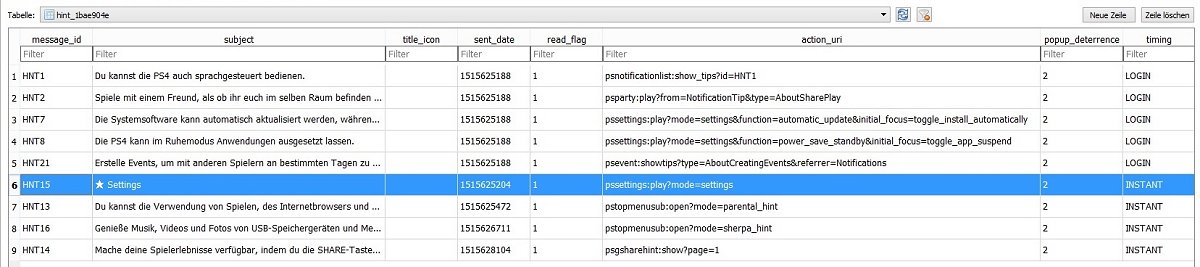
Now you can open Settings via a Notification
Maybe we find a way to modify the Capture Gallery to open the Debug Settings with such a custom command.
PS4 4.55 Mod - Custom Notification
Download: Content_Icons.rar
Spoiler
To quote from their blog, roughly translated: Custom Notification – Command via Notifications
You can modify the Notifications on 4.05 to call other entries. In this example I will show you how to open the Settings via custom notification.
First you need the notification.db (same directory as app.db). You find the action_uri of each tip which can be modified, so the command to open the Settings is: pssettings:play?mode=settings
Now you can open Settings via a Notification
Maybe we find a way to modify the Capture Gallery to open the Debug Settings with such a custom command.
PS4 4.55 Mod - Custom Notification
Download: Content_Icons.rar
Spoiler
PS3 ControlConsole API (CCAPI) v2.80 Rev 13 by Enstone (4.92 CEX / DEX)
While PlayStation 4 owners await further word on Swaqq's PS4 CCAPI 4.05 Port, proceeding his last updates today PlayStation 3 developer @Enstone made available via Twitter PS3 ControlConsole API (CCAPI) v2.80 Rev 1 for 4.82 CEX followed by CCAPI 2.80 Rev 2 / Rev 3 for 4.82 DEX, Rev 4 for 4.82 CEX, Rev 5 for 4.84 CEX / DEX, Rev 6 for 4.85 CEX, Rev 7 for 4.86, Rev 8 for 4.87, Rev 99 for 4.88, Rev 10 RTE for 4.89, Rev 11 for 4.90, Rev 12 for 4.91 and Rev 13 for 4.92 console owners! 
Download: CcApi_package_2.80_Rev1.rar (8.38 MB) / CcApi_package_2.80_Rev1.rar (Mirror) / CcApi_package_2.80_Rev1_dev.rar (10.1 MB) / CcApi_package_2.80_Rev2.rar (8.38 MB) / CcApi_package_2.80_Rev2_dev.rar (10.1 MB) / CcApi_package_2.80_Rev3.rar (8.37 MB) / CcApi_package_2.80_Rev3_dev.rar (10.1 MB) / CcApi_package_2.80_Rev4.rar (8.4 MB) / CcApi_package_2.80_Rev4_dev.rar (10.2 MB) / CcApi_package_2.80_Rev5.rar (8.4 MB) / CcApi_package_2.80_Rev5_dev.rar (10.2 MB) / CcApi_package_2.80_Rev6.rar (8.4 MB) /...
Download: CcApi_package_2.80_Rev1.rar (8.38 MB) / CcApi_package_2.80_Rev1.rar (Mirror) / CcApi_package_2.80_Rev1_dev.rar (10.1 MB) / CcApi_package_2.80_Rev2.rar (8.38 MB) / CcApi_package_2.80_Rev2_dev.rar (10.1 MB) / CcApi_package_2.80_Rev3.rar (8.37 MB) / CcApi_package_2.80_Rev3_dev.rar (10.1 MB) / CcApi_package_2.80_Rev4.rar (8.4 MB) / CcApi_package_2.80_Rev4_dev.rar (10.2 MB) / CcApi_package_2.80_Rev5.rar (8.4 MB) / CcApi_package_2.80_Rev5_dev.rar (10.2 MB) / CcApi_package_2.80_Rev6.rar (8.4 MB) /...
RetroList RetroArch Tool Updated by Quake of SubZero Dezigns
Following his previous updates, this weekend Quake of SubZero Dezigns updated his RetroList RetroArch Tool to v1.1.0.6 followed by v1.1.0.7 with the changes outlined below. 
Download: RetroList / RetroArch Tools (Latest Version)
To quote from his e-mail on this latest release: Hello World, RetroList: 1.1.0.6 / RetroTools 1.1.0.7
I've updated my RetroList RetroArch tool to include sub-directories for paths in the Playlist's for non-PC.
Are you sick of your Roms not showing up in the Playlist? Not any more. Manually make your Playlist of your Roms for RetroArch. RetroArch relies on a DB (Database) of a Rom List. If your Game (Rom) is not in the RetroArch DB it'll not show up in the Playlist under the Console Section. Rectify this by Manually Making your own Playlist.
RetroList 1.0.6
 Update: RetroTools update by SubZero DeZigns
I've recently updated the RetroList to version 1.0.7 to be more PS3 friendly. Here are the changes:
1.0.7
BTW, By using the Replace drive you can use sub-directories for your Roms. This is the whole idea of what Replace Drive is for. "Sub-Directories" ("RetroArch doesn't support this when it scans for files.")
Examples:
Thanks,
Quake aka SubZero DeZigns
Download: RetroList / RetroArch Tools (Latest Version)
To quote from his e-mail on this latest release: Hello World, RetroList: 1.1.0.6 / RetroTools 1.1.0.7
I've updated my RetroList RetroArch tool to include sub-directories for paths in the Playlist's for non-PC.
Are you sick of your Roms not showing up in the Playlist? Not any more. Manually make your Playlist of your Roms for RetroArch. RetroArch relies on a DB (Database) of a Rom List. If your Game (Rom) is not in the RetroArch DB it'll not show up in the Playlist under the Console Section. Rectify this by Manually Making your own Playlist.
RetroList 1.0.6
- Added: Drive Letter Replace
- Ability: PC/USB(Console) Grabs multiple Sub-Directories
- Useful if you keep Disc 1of4 files in their own Folders
Code:
X:/ROMS/PSX/FFVII/FFVII(Disc1of3).cue
X:/ROMS/PSX/FFVIII/FFVIII(Disc1of4).cue
X:/ROMS/PSX/FFIV/FFIV(Disc1of4).cue
X can be anything ur0, uma0, ms0, Or OtherI've recently updated the RetroList to version 1.0.7 to be more PS3 friendly. Here are the changes:
1.0.7
- Added: MKDIR for Image Dirs
- Added: Rom List Click Preview
- Added: Colon Remove check
- Added: Preset Slider selections
- Edited: 5 Char Lock to 15 - Replace textbox
- Fixed: A few minor issues
BTW, By using the Replace drive you can use sub-directories for your Roms. This is the whole idea of what Replace Drive is for. "Sub-Directories" ("RetroArch doesn't support this when it scans for files.")
Examples:
Code:
/dev_usb006/PSXISO/GAME 1/Disc 1
/dev_usb006/PSXISO/GAME 1/Disc 2
/dev_usb006/PSXISO/GAME 1/Disc 3
/dev_usb006/PSXISO/GAME 1/Disc 4

/dev_usb006/PSXISO/GAME 2/Disc 1
/dev_usb006/PSXISO/GAME 2/Disc 2
/dev_usb006/PSXISO/GAME 2/Disc 3
Thanks,
Quake aka SubZero DeZigns
- PS4 Fake PKG (FPKG) Sharing Guide
- 6.XX Webkit / 6.72 PS4 Jailbreak
- 7.00-7.02 Webkit Exploit
- 7.02 Webkit / 7.02 Kernel / PS4JB
- 7.50 Kernel Exploit / PS4JB 7.55
- 7.55 / 8.00 Payloads / PS4JB2 7.55
- 9.00 PS4 Webkit Exploit
- 9.00 PS4 Payloads / GoldHEN (Latest)
- 9.00 PS4 Jailbreak Kernel Exploit
- 11.00 PS4 Jailbreak Kernel Exploit
- 13.00 PS4 Kernel Exploit / 13.02 BD-J Bug
- 4.03 PS5 Webkit Exploit
- PS5 Kernel Exploit (ExFAT Bug)
- PS5 Root Keys Obtained
- 4.03 PS5 Kernel Build String
- 4.03 PS5 Webkit Execution
- 4.03 PS5 Kernel Vulnerability
- 4.03 PS5 Filesystem Dumps
- 4.51 PS5 BD-JB Sandbox Escape
- PS5 BD-JB Exploit Hack Source Code
- Mast1c0re PS5 Userland Exploit
- PS5 Kernel Access via PS4 Exploit
- PS5 exFAT Vulnerability Disclosed
- 4.03 PS5 Kernel Exploit Webkit ROP
- 4.50 PS5 Kernel Exploit Webkit ROP
- 4.51 PS5 Kernel Exploit Webkit ROP
- 4.xx PS5 Kernel Exploit v1.01
- 4.xx PS5 Kernel Exploit v1.02 / v1.03
- PS5 1.00-6.50 Firmware Webkit
- Native PS5 ROP Chain Execution
- Mast1c0re PS5 Compiler Attack
- PS5 FreeBSD Kernel Bug & WebKit
- PS5 UMTX 2 Exploit & PS5 Jailbreak
- Byepervisor PS5 Hypervisor Exploit
- Lua Lapse PS5 Kxploit & Laps3c0re / Y2JB
- 12.00 / 12.70 PS5 Kernel Exploit