
You are using an out of date browser. It may not display this or other websites correctly.
You should upgrade or use an alternative browser.
You should upgrade or use an alternative browser.
Developer and Ex-Moderator


Developer and Ex-Moderator
I'm a developer who created several Things....
PlayStation 4 (SAC-001) PS4 UART For Dummies Tutorial, E4 Flasher Development
Let me start by saying I'm writing this because a lot of people don't know how to setup UART (Universal Asynchronous Receiver / Transmitter) for their PS4, this tutorial is only for those who have a SAC-001 Motherboard following the previous SAA-001 board details.
Tools you would need:
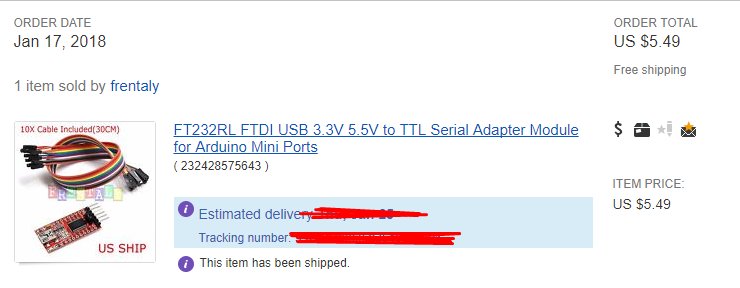
After you have your tools buy any cheap FTDI USB to TTL Serial Adapter I bought this one.
Step 2:
Open up your PS4
Video:
Step 3:
Got some wire and strip some of both ends
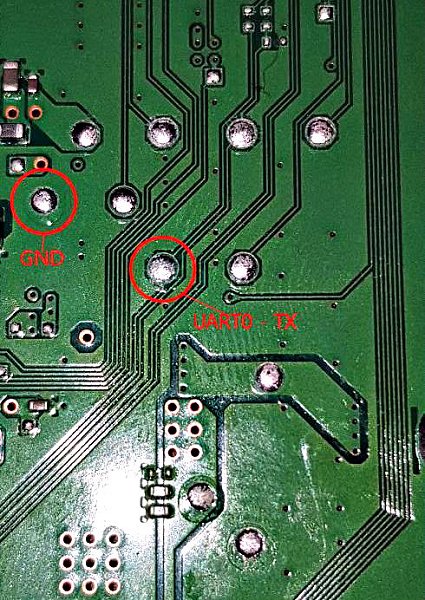
Then solder 1 end to these points
Step 4:
MAKE SURE THE WIRES ARE STICKING OUT of the console
(Optional) Hot glue the wires to the motherboard so they dont come un-done when you put the PS4 back together
Step 5:
Put the console back together WITH THE WIRES HANGING OUT
Step 6:
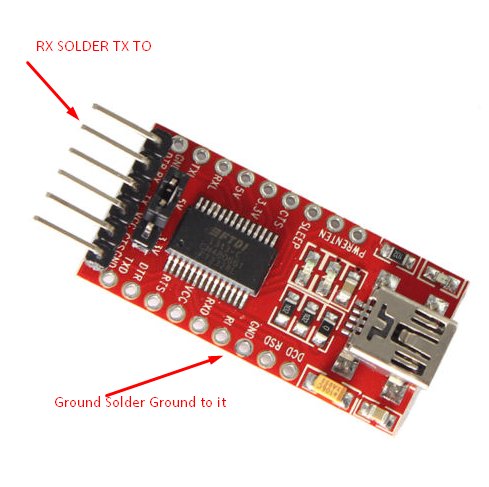
Solder the ground wire to Ground on the device and the TX Wire from the PS4 to the RX Pad on the FTDI Device (Pic of the one i bought0
Step 7:
Hook it up to your PC with the micro-USB Cabel
Step 8:
Download: arduino-1.8.5-windows.exe
INSTALL IT DONT USE PS WATSON.. PS WATSON DOESNT WORK!!
Step 9:
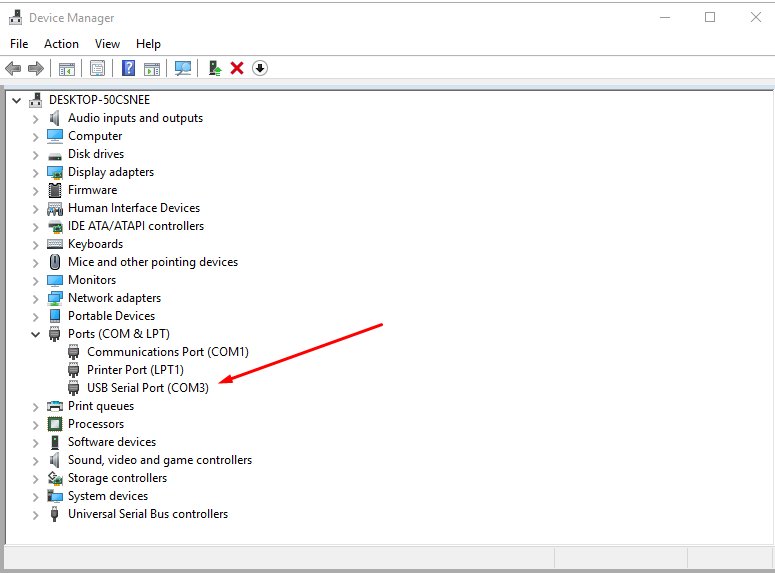
MAKE SURE ITS YOU COM PORT
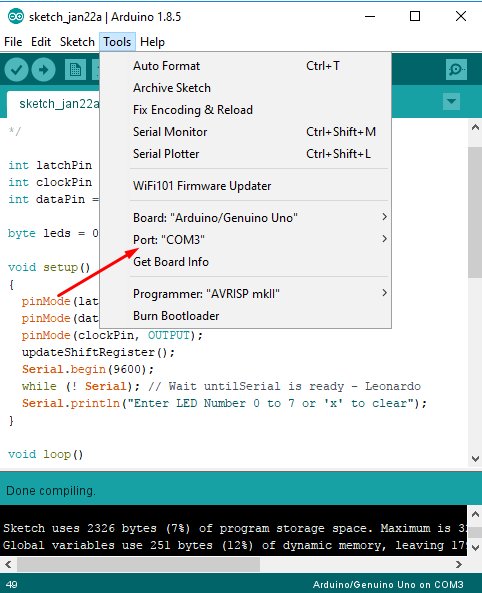
LAST STEP:...
Tools you would need:
- A set of screw Drivers to open up the PS4
- Soldering station $30-$150 (depends what you get)
- Solder 0.7mm - $7
- Flux - $5 - $15
- Kynair Wire- $7
- Wire cutters - $12
- (Optional) Hot Glue and Glue gun - $15
- Tip cleaner - $10
- ANY Cheap FTDI USB to TTL Serial Adapter
- Micro-USB Cable
- etc
After you have your tools buy any cheap FTDI USB to TTL Serial Adapter I bought this one.
Step 2:
Open up your PS4
Video:
Step 3:
Got some wire and strip some of both ends
Then solder 1 end to these points
Step 4:
MAKE SURE THE WIRES ARE STICKING OUT of the console
(Optional) Hot glue the wires to the motherboard so they dont come un-done when you put the PS4 back together
Step 5:
Put the console back together WITH THE WIRES HANGING OUT
Step 6:
Solder the ground wire to Ground on the device and the TX Wire from the PS4 to the RX Pad on the FTDI Device (Pic of the one i bought0
Step 7:
Hook it up to your PC with the micro-USB Cabel
Step 8:
Download: arduino-1.8.5-windows.exe
INSTALL IT DONT USE PS WATSON.. PS WATSON DOESNT WORK!!
Step 9:
MAKE SURE ITS YOU COM PORT
LAST STEP:...
Call of Duty Sale: Savings Up to 67% Off COD PSN Titles
Right now there is a Call Of Duty Sale underway on PlayStation Store which includes savings up to 67% off the original price on select #CallofDuty titles! 
For a complete listing of the Call of Duty Sale see HERE on the PS Store offering 30 various matches, but keep in mind the sale ends on Monday, October 2nd, 2017.
For a complete listing of the Call of Duty Sale see HERE on the PS Store offering 30 various matches, but keep in mind the sale ends on Monday, October 2nd, 2017.
PS4 System Software Update 4.50 Features, Sasuke Beta Firmware
Previously we reported on Sony opening PS4 4.50 Beta Firmware Sign-Ups, and today the Sasuke Beta 2 PUP (Mirror by Senaxx / Mirror #2 by SilicaAndPina / Mirror #3 by monastry) has surfaced from a tester complete with feature details and pictures below!
Also from OhMyGod comes a screenshot of 'boost mode' for PS4 Pro which provides a higher frame rate for older PlayStation 4 games that don't have a Pro patch yet with a list of changed games available on ThisGenGaming.com.
Here's the official announcement from Sony VP John Koller, to quote: PS4 System Software Update 4.50 Features Detailed
Starting today, those of you selected for our beta program will get an early peek at some of the new features coming to PS4 with our next major system software update, version 4.50 (codenamed Sasuke). If you signed up for the beta and were chosen, you’ll receive an email with instructions on how to download and get started.
Even if you’re not participating in the beta, we still wanted to give you a quick glance of the key features that will be rolling out with this update. We’re refining the user interface of PS4 even further, and adding highly requested features like external HDD support and custom wallpapers.
External HDD Support...
Also from OhMyGod comes a screenshot of 'boost mode' for PS4 Pro which provides a higher frame rate for older PlayStation 4 games that don't have a Pro patch yet with a list of changed games available on ThisGenGaming.com.
Here's the official announcement from Sony VP John Koller, to quote: PS4 System Software Update 4.50 Features Detailed
Starting today, those of you selected for our beta program will get an early peek at some of the new features coming to PS4 with our next major system software update, version 4.50 (codenamed Sasuke). If you signed up for the beta and were chosen, you’ll receive an email with instructions on how to download and get started.
Even if you’re not participating in the beta, we still wanted to give you a quick glance of the key features that will be rolling out with this update. We’re refining the user interface of PS4 even further, and adding highly requested features like external HDD support and custom wallpapers.
External HDD Support...
PS4Ninja PlayStation 4 File Browser Source Code by M0rph3us1987
Following his previous releases, today PlayStation 4 developer m0rph3us1987 let us know on Twitter that he's abandoning the PS4Ninja project so he's decided to share the PS4Ninja file browser homebrew application's source code with PS4 community developers! 
Download: ps4ninja-master.zip / GIT / ps4ninja_672.7z (18 KB)
From the Readme.txt, to quote: How to build
1) Go into ps4ninja_win\Browser\PS4NINJA and type
This will build minlib, ps4ninja (PS4 part) and create payload_176.bin.
2) To build the windows application, open the VS Solution and build it.
3) You can manually build any of the components by entering into the directory and type "make".
From Ybin.me (PS4-EAP-KEY-DUMPER-672.bin):
Download: ps4ninja-master.zip / GIT / ps4ninja_672.7z (18 KB)
From the Readme.txt, to quote: How to build
1) Go into ps4ninja_win\Browser\PS4NINJA and type
Code:
make2) To build the windows application, open the VS Solution and build it.
3) You can manually build any of the components by entering into the directory and type "make".
From Ybin.me (PS4-EAP-KEY-DUMPER-672.bin):
Code:
// Decrypted EAP partition key and print it into klog
// key for /eap_user, /User, /Update
void getEAPPartitionKey(){
   void(*bzero)(void *buf, size_t len) = (void *)0xFFFFFFFF82613B00;
   void(*icc_nvs_read)(size_t id, size_t no, size_t offset, size_t len, unsigned char *buff) = (void *)0xFFFFFFFF82639CD0;
   void(*sceSblGetEAPInternalPartitionKey)(unsigned char *encBuffer, unsigned char *decBzffer) = (void*)0xFFFFFFFF827B1B00;

   // Allocate needed space
   struct malloc_type *mt = ps4KernelDlSym("M_TEMP");
   unsigned char *encNVSKeyBuffer = (unsigned char*)malloc(0x70, mt, M_ZERO | M_WAITOK);
   unsigned char *decryptedKey = malloc(0x20, mt, M_ZERO | M_WAITOK);
   bzero(encNVSKeyBuffer, 0x70);
   bzero(decryptedKey, 0x20);

   // Read encrypted...
Netcheck_bypass.suprx: PlayStation Vita Netcheck Bypass by Yifan Lu
Following the PS Vita PFS, RSA Modulus and Exponent Keys and recent F00d hack, today PlayStation Vita hacker Yifan Lu has released Vita Netcheck Bypass which allows users to bypass applications that require a PSN login with details below.
Download: netcheck_bypass.suprx / Latest Version / GIT
To quote from the README.md: Vita Netcheck Bypass
Add this to your ux0:tai/config.txt for any application that requires PSN login to bypass it.
Note this only bypasses login and the application might fail elsewhere if it requires PSN functions. It's useful for apps that require PSN but does not use it.
Note: After I made this I realized it still won't let you link your PS4 to a new Vita for remote play because that actually needs PSN. I haven't tested anything else.
License
The code is public domain and can be used in any way you want.
Download: netcheck_bypass.suprx / Latest Version / GIT
To quote from the README.md: Vita Netcheck Bypass
Add this to your ux0:tai/config.txt for any application that requires PSN login to bypass it.
Note this only bypasses login and the application might fail elsewhere if it requires PSN functions. It's useful for apps that require PSN but does not use it.
Note: After I made this I realized it still won't let you link your PS4 to a new Vita for remote play because that actually needs PSN. I haven't tested anything else.
License
The code is public domain and can be used in any way you want.
- PS4 Fake PKG (FPKG) Sharing Guide
- 6.XX Webkit / 6.72 PS4 Jailbreak
- 7.00-7.02 Webkit Exploit
- 7.02 Webkit / 7.02 Kernel / PS4JB
- 7.50 Kernel Exploit / PS4JB 7.55
- 7.55 / 8.00 Payloads / PS4JB2 7.55
- 9.00 PS4 Webkit Exploit
- 9.00 PS4 Payloads / GoldHEN (Latest)
- 9.00 PS4 Jailbreak Kernel Exploit
- 11.00 PS4 Jailbreak Kernel Exploit
- 13.00 PS4 Kernel Exploit / 13.02 BD-J Bug
- 4.03 PS5 Webkit Exploit
- PS5 Kernel Exploit (ExFAT Bug)
- PS5 Root Keys Obtained
- 4.03 PS5 Kernel Build String
- 4.03 PS5 Webkit Execution
- 4.03 PS5 Kernel Vulnerability
- 4.03 PS5 Filesystem Dumps
- 4.51 PS5 BD-JB Sandbox Escape
- PS5 BD-JB Exploit Hack Source Code
- Mast1c0re PS5 Userland Exploit
- PS5 Kernel Access via PS4 Exploit
- PS5 exFAT Vulnerability Disclosed
- 4.03 PS5 Kernel Exploit Webkit ROP
- 4.50 PS5 Kernel Exploit Webkit ROP
- 4.51 PS5 Kernel Exploit Webkit ROP
- 4.xx PS5 Kernel Exploit v1.01
- 4.xx PS5 Kernel Exploit v1.02 / v1.03
- PS5 1.00-6.50 Firmware Webkit
- Native PS5 ROP Chain Execution
- Mast1c0re PS5 Compiler Attack
- PS5 FreeBSD Kernel Bug & WebKit
- PS5 UMTX 2 Exploit & PS5 Jailbreak
- Byepervisor PS5 Hypervisor Exploit
- Lua Lapse PS5 Kxploit & Laps3c0re / Y2JB
- 12.00 / 12.70 PS5 Kernel Exploit