PSXHAX.COM website and domain for sale. Contact Us with your offer!

You are using an out of date browser. It may not display this or other websites correctly.
You should upgrade or use an alternative browser.
You should upgrade or use an alternative browser.
Fallout 4 PC Mods on PS4 Tutorial Video by Modded Warfare
Following the Fallout 4 PS4 EBOOT.BIN ELF Patcher, today PlayStation 4 developer @MODDEDWARFARE made available via Twitter a Fallout 4 PC Mods on PS4 Tutorial video on his YouTube Channel for all the game modders out there! 
From the video's description, to quote: Fallout 4 PC Mods on PS4 Tutorial
Converting Fallout 4 PC mods to run on the PS4 version.
Download Links:
From the video's description, to quote: Fallout 4 PC Mods on PS4 Tutorial
Converting Fallout 4 PC mods to run on the PS4 version.
Download Links:
- PC Mods
- Fake Pkg Tools
- Gen GP4 (gengp4.zip)
- Fallout 4 Conversion Tools (Fallout 4 Conversion Tools.zip)
- [plain]HxD[/plain] Hex Editor
Extract TROPHY.TRP Files from Modded PS4 to PC via Filezilla Guide
We've seen some TRP File Tools followed by How to Resign PS4 Trophies, and today NagatoRevenge shared on his YouTube Channel a tutorial covering how to extract TROPHY.TRP files from modded PS4 consoles using a PC and Filezilla. 
Check out the video below, and here's the guide details from the video's description: How to extract TROPHY.TRP files from your modded PS4 to your PC using Filezilla!
Hello everyone! Today I'll be showing you a quick method on how to extract TROPHY.TRP files from your modded PS4 to your PC using Filezilla!
Prerequisites:
Cheers to @DEFAULTDNB for the heads-up on this PS4 TROPHY.TRP file extraction guide!
Check out the video below, and here's the guide details from the video's description: How to extract TROPHY.TRP files from your modded PS4 to your PC using Filezilla!
Hello everyone! Today I'll be showing you a quick method on how to extract TROPHY.TRP files from your modded PS4 to your PC using Filezilla!
Prerequisites:
- Modded PS4 on FW such as 1.76, 4.05, 4.55, 4.74. 5.05
- A method to FTP using webkit either via PC, or URL.
- HEN Exploit
- File Manager for PS4 *easier to FTP*
- TROPHY.TRP Extractor (149.88 KB)
- File Manager for PS4 (71.31 MB)
- FileZilla (8.6 MB)
Cheers to @DEFAULTDNB for the heads-up on this PS4 TROPHY.TRP file extraction guide!
BwE PS4 NOR Repair Guide by BetterWayElectronics
A few months ago I posted a BwE Complete PS4 NOR Removal Guide followed by my BwE PS4 NOR Comparator, and today's Tutorial covers a lesson in corruption repair on PS4 NOR Repairs by Better Way Electronics.
Here in my favourite example we have a dump that does not boot, is ultimately displaying signs of a BLOD but when the dump is validated it shows the following results:
Well large blocks of 00 is obviously not good, but what about the UNK Dynamic Section 23? Well I give this area (and the areas below it) WARNING's as it generally has blank spaces sporatically throughout its section. So no big deal! I just can't explain why there are blank spaces!
The real issue is the UNK Static Section 1 and UNK Dynamic Section 20-22. Hence the DANGER output!
If you were to open this dump in a hex editor (I prefer HxD) you would see from 0x1CE000 to 0x1CE1FF (A length of 200) you would see this:
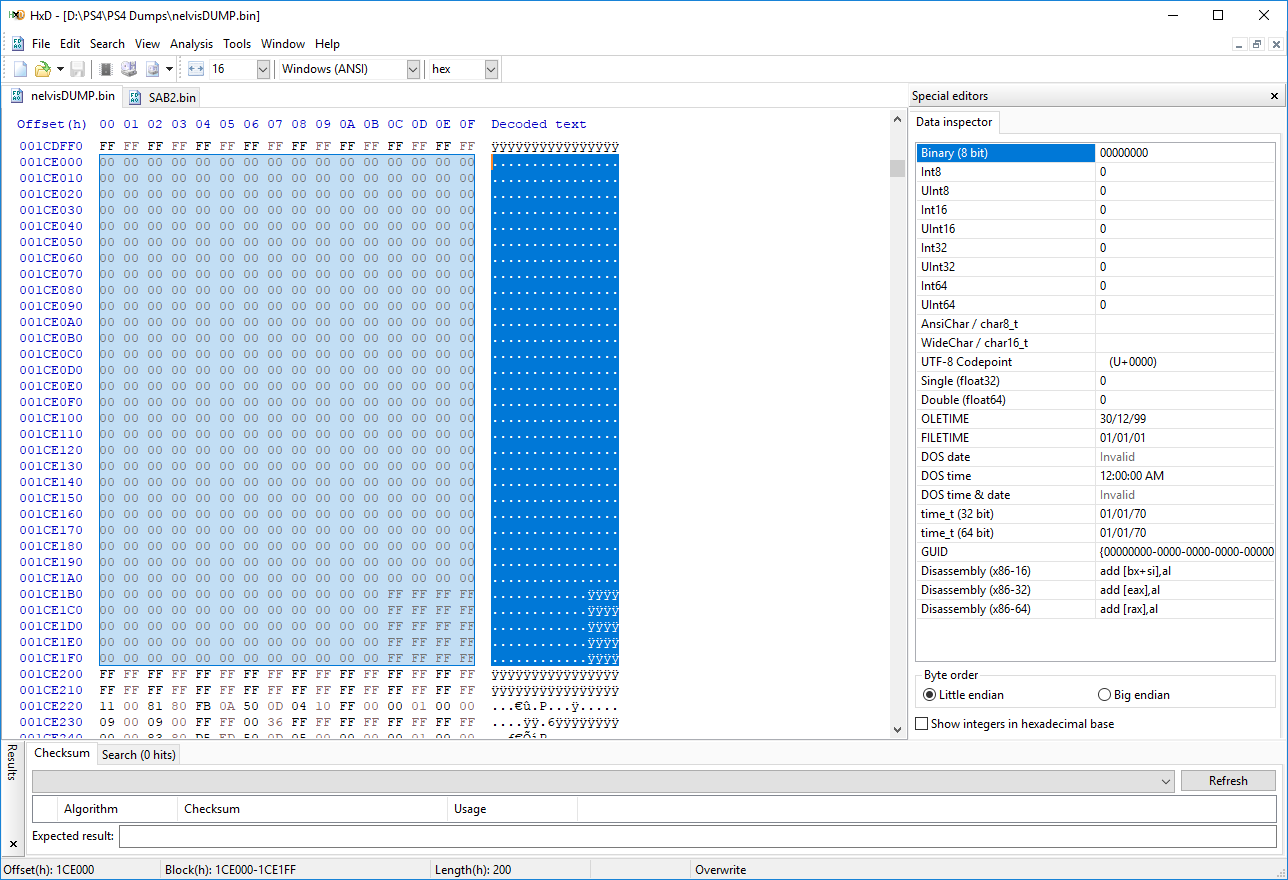
Now this corrupt dump is a CUH-1001A on version 6.20 - If I were to look at a similar dump, with similar specs I would see:
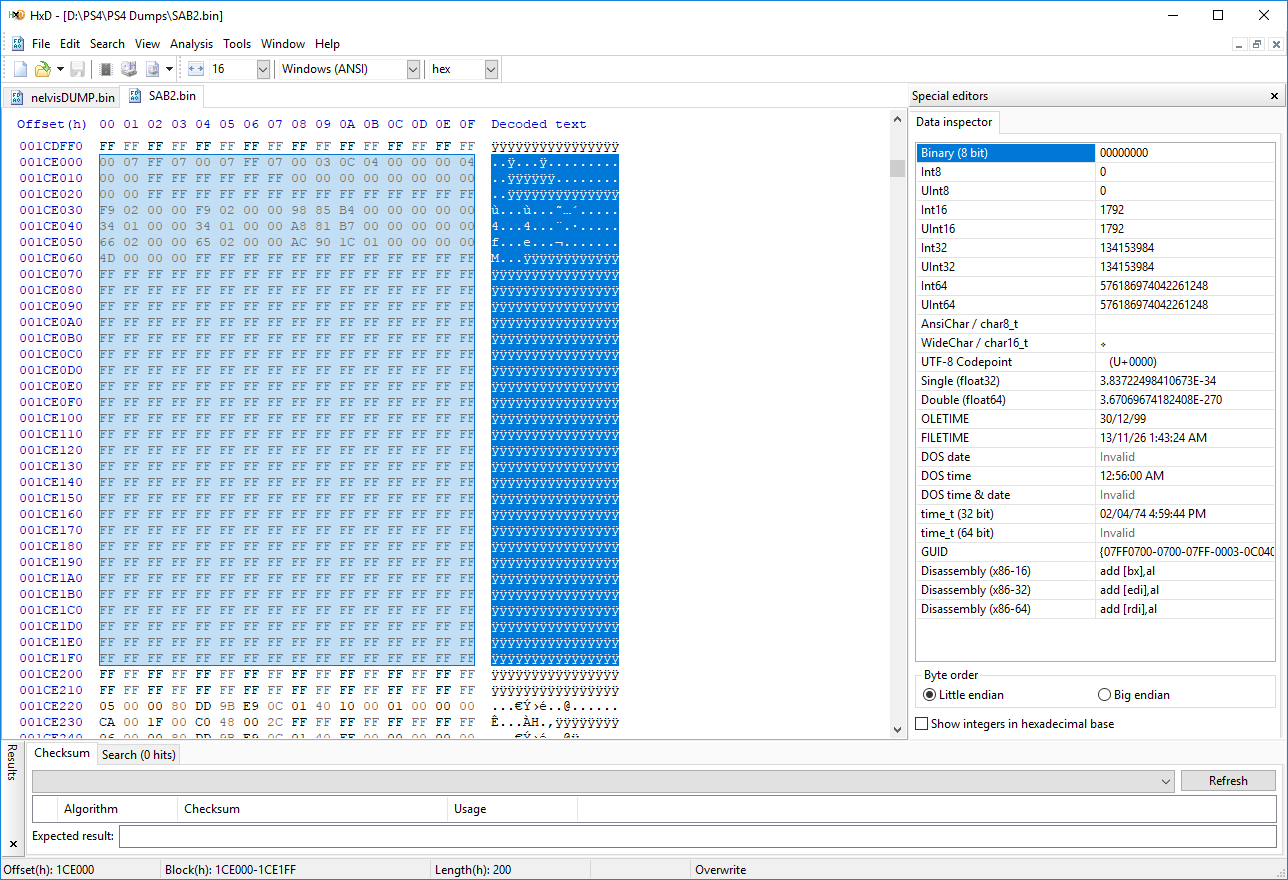
Its quite clear what the solution is! Copy this data from the working dump into the corrupt dump! But Should I?
Well luckily the above static section and dynamic sections that were corrupt are GENERIC. This means they are not tied down to a specific console or even version.
To explain a bit better, here is a quick run down of the possible results for the corrupt area:
The possible outputs for the UNK Static Section 1 are only going to be 0007FF (Unless you are stuck in IDU mode, it will be 0107FF - which I consider a 'DANGER' output). So its quite obvious that there is no other replacement for this corruption!
The next area is the UNK Dynamic Section 20, it is a bit...
Here in my favourite example we have a dump that does not boot, is ultimately displaying signs of a BLOD but when the dump is validated it shows the following results:
Code:
UNK Dynamic PerConsole Section Filler 2: ✔
UNK Static Section 1: 000000 [DANGER]
UNK Dynamic Section 20 (SKU Byte): 00 [DANGER]
UNK Dynamic Section 21: 0000000000000000000000000000 [DANGER]
UNK Filler 4: ✔
UNK Dynamic Section 22:
00000000000000000000000000000000000000000000000000000000000000000000000000000000000000000000000000000000 ✔
UNK Filler 5: ✔
UNK Dynamic Section 23:
FFFFFFFFFFFFFFFFFFFFFFFFFFFFFFFFFFFFFFFFFFFFFFFF [WARNING]
Well large blocks of 00 is obviously not good, but what about the UNK Dynamic Section 23? Well I give this area (and the areas below it) WARNING's as it generally has blank spaces sporatically throughout its section. So no big deal! I just can't explain why there are blank spaces!
The real issue is the UNK Static Section 1 and UNK Dynamic Section 20-22. Hence the DANGER output!
If you were to open this dump in a hex editor (I prefer HxD) you would see from 0x1CE000 to 0x1CE1FF (A length of 200) you would see this:
Now this corrupt dump is a CUH-1001A on version 6.20 - If I were to look at a similar dump, with similar specs I would see:
Its quite clear what the solution is! Copy this data from the working dump into the corrupt dump! But Should I?
Well luckily the above static section and dynamic sections that were corrupt are GENERIC. This means they are not tied down to a specific console or even version.
To explain a bit better, here is a quick run down of the possible results for the corrupt area:
The possible outputs for the UNK Static Section 1 are only going to be 0007FF (Unless you are stuck in IDU mode, it will be 0107FF - which I consider a 'DANGER' output). So its quite obvious that there is no other replacement for this corruption!
The next area is the UNK Dynamic Section 20, it is a bit...
Neo-Geo CD Emu PS2 on PS4 Tutorial by 7he D4RK H4CK
Following the recent CreeperDiver / Spelunky Classic HD / Deltarune / Chip and Dale: Remastered PS4 PKG homebrew releases and his GBA Emulator Port for PS4, scene developer @7he D4RK H4CK shared on Twitter a Neo-Geo CD Emu on PS4 tutorial today alongside a video guide from @MasterTurkey based on it via his YouTube Channel for SNK emulation fans! 
Download: tutorial neo geo.rar (7.8 MB) / NeoCD Images Guide
To quote from his blog at PSMegaHax.BlogSpot.com, roughly translated: Neo-Geo CD Emu on PS4 Tutorial
And from the video's description: This tutorial was created by 7he D4RK H4CK for NeoGeo CD emulation on the PS4. I just followed their instructions and made this video. Essentially like contract work or something. So this is not my work or tutorial, just me following instructions and recording it.
NeoGeo CD emulation is done via the PS2 for PS4 emulator. Audio/Sound does not work currently.
Cheers to @MasterTurkey for the heads-up on Twitter of this Neo-Geo CD Emu on PS4 news!
Download: tutorial neo geo.rar (7.8 MB) / NeoCD Images Guide
To quote from his blog at PSMegaHax.BlogSpot.com, roughly translated: Neo-Geo CD Emu on PS4 Tutorial
And from the video's description: This tutorial was created by 7he D4RK H4CK for NeoGeo CD emulation on the PS4. I just followed their instructions and made this video. Essentially like contract work or something. So this is not my work or tutorial, just me following instructions and recording it.
NeoGeo CD emulation is done via the PS2 for PS4 emulator. Audio/Sound does not work currently.
- 7he D4RK H4CK Twitter and YouTube Channel
Cheers to @MasterTurkey for the heads-up on Twitter of this Neo-Geo CD Emu on PS4 news!
Mortal Kombat XL (Half & Full Mesh Swap) PS4 Tutorial by GrimDoe
Hello to all and a Happy New Year to Ya'll ! 
This would have come a lot sooner following my Mortal Kombat XL Half-Swap Horror Mod Pack, but better now then never.
Within MK XL and I'm assuming MK X you have two major files that will once swap will change your player's around. So after you dump your Fake Game, Game update that's already been updated.
You are going to be looking for The .MKO File & also the CHAR____.XXX File located in: Asset Folder for the (CHAR____.XXX File) and MKScript Folder for the .MKO Files.
Once you have these files and (Back up) your good to go. So with the HALF & FULL Swapping Technique:
Good Luck & Happy New Years!
PS4 / 5.05 / MK XL / 1.04 / PS4 Cheater (Kombat Baller'$ Card)
This would have come a lot sooner following my Mortal Kombat XL Half-Swap Horror Mod Pack, but better now then never.
Within MK XL and I'm assuming MK X you have two major files that will once swap will change your player's around. So after you dump your Fake Game, Game update that's already been updated.
You are going to be looking for The .MKO File & also the CHAR____.XXX File located in: Asset Folder for the (CHAR____.XXX File) and MKScript Folder for the .MKO Files.
Once you have these files and (Back up) your good to go. So with the HALF & FULL Swapping Technique:
- Your going to change Two Players Names around once done
- Your going to the root of that Patch folder and look for the (PS4TOC) Text file
- Open it up in (Notepad ++)
- Then look for your player you are switching around
- If its just the .MKO File you only need to change the file size
- Now for the CHAR___.XXX File you still need to change the File size
- But also the individual number that is AFTER the two 0's with in the PS4TOC File.
- You will get the file size from the .MKO or CHAR___.XXX File by right clicking on the file then going down to Properties
- Look for the Size (Not the size on disk) and start changing it in the PS4TOC File always keep the OG for a back up
Good Luck & Happy New Years!
PS4 / 5.05 / MK XL / 1.04 / PS4 Cheater (Kombat Baller'$ Card)
- PS4 Fake PKG (FPKG) Sharing Guide
- 6.XX Webkit / 6.72 PS4 Jailbreak
- 7.00-7.02 Webkit Exploit
- 7.02 Webkit / 7.02 Kernel / PS4JB
- 7.50 Kernel Exploit / PS4JB 7.55
- 7.55 / 8.00 Payloads / PS4JB2 7.55
- 9.00 PS4 Webkit Exploit
- 9.00 PS4 Payloads / GoldHEN (Latest)
- 9.00 PS4 Jailbreak Kernel Exploit
- 11.00 PS4 Jailbreak Kernel Exploit
- 13.00 PS4 Kernel Exploit / 13.02 BD-J Bug
- 4.03 PS5 Webkit Exploit
- PS5 Kernel Exploit (ExFAT Bug)
- PS5 Root Keys Obtained
- 4.03 PS5 Kernel Build String
- 4.03 PS5 Webkit Execution
- 4.03 PS5 Kernel Vulnerability
- 4.03 PS5 Filesystem Dumps
- 4.51 PS5 BD-JB Sandbox Escape
- PS5 BD-JB Exploit Hack Source Code
- Mast1c0re PS5 Userland Exploit
- PS5 Kernel Access via PS4 Exploit
- PS5 exFAT Vulnerability Disclosed
- 4.03 PS5 Kernel Exploit Webkit ROP
- 4.50 PS5 Kernel Exploit Webkit ROP
- 4.51 PS5 Kernel Exploit Webkit ROP
- 4.xx PS5 Kernel Exploit v1.01
- 4.xx PS5 Kernel Exploit v1.02 / v1.03
- PS5 1.00-6.50 Firmware Webkit
- Native PS5 ROP Chain Execution
- Mast1c0re PS5 Compiler Attack
- PS5 FreeBSD Kernel Bug & WebKit
- PS5 UMTX 2 Exploit & PS5 Jailbreak
- Byepervisor PS5 Hypervisor Exploit
- Lua Lapse PS5 Kxploit & Laps3c0re / Y2JB
- 12.00 / 12.70 PS5 Kernel Exploit