PSXHAX.COM website and domain for sale. Contact Us with your offer!

You are using an out of date browser. It may not display this or other websites correctly.
You should upgrade or use an alternative browser.
You should upgrade or use an alternative browser.
Rock Band 4 (RB4) Custom PS4 DLC Building Tools & Guide by Maxton
On this Christmas Day following his PS4 PFS Extractor Tool, GameArchives updates, MakePFS Utility for building PlayStation File System images and recent LibOrbisPKG Library for generating PS4 DLC packages developer maxton shared on Twitter a guide on creating Rock Band 4 (RB4) customs alongside some demo videos on his YouTube Channel! 
Check it out below, to quote from Maxton: [How-To] Playing Customs on PS4 (BETA)
A word of warning: the tools used to build DLC for Rock Band 4 are still unfinished, so keep in mind that errors and bugs may abound. Until this changes consider this a BETA/PRERELEASE. Please report all the issues you run into either in this thread or on GitHub!
1. Prerequisites
The first thing that you must do is set up HEN on your PS4. There are many guides online on how to do this, but the general idea is that you visit a webpage, either in the web browser or by redirecting the user manual, and the webpage automatically jailbreaks your system and sets up a Homebrew ENabler (HEN). This is what allows you to install custom PKGs that the PS4 will accept as DLC.
HEN Guides
Spoiler
Check it out below, to quote from Maxton: [How-To] Playing Customs on PS4 (BETA)
A word of warning: the tools used to build DLC for Rock Band 4 are still unfinished, so keep in mind that errors and bugs may abound. Until this changes consider this a BETA/PRERELEASE. Please report all the issues you run into either in this thread or on GitHub!
1. Prerequisites
- A PS4 with firmware 5.07 or lower (personally, I am on 5.05)
- Rock Band 4, either already installed digitally on the PS4 or as a Blu-Ray copy (it is not possible to install RB4 digitally on 5.07 or lower anymore due to no PSN access)
- A Windows PC or Mac/Linux with Mono installed
The first thing that you must do is set up HEN on your PS4. There are many guides online on how to do this, but the general idea is that you visit a webpage, either in the web browser or by redirecting the user manual, and the webpage automatically jailbreaks your system and sets up a Homebrew ENabler (HEN). This is what allows you to install custom PKGs that the PS4 will accept as DLC.
HEN Guides
Spoiler
BwE Complete PS4 NOR Removal Guide by BetterWayElectronics
Hey! Following my PS4 NOR Statistics and PS4 NOR Validator, this is a brief visual guide on removing and flashing your PS4's NOR from Better Way Electronics.
This can be for repairing, backing up or just destroying your PS4, it's entirely up to you - no pressure.
Step 1: Heat your iron, which has a chisel tip, to around 400 degrees.
Step 2: Put Kapton tape around your NOR. Now put solder paste (flux) on both sides of your NOR.
Step 3: Insert a massive blob of LEAD solder on each side of the NOR.
Step 4: Using your chisel tip and while holding the NOR with tweezers, heat both sides (quickly) then lift!
Step 5: Move the excess solder onto your tape, just push it!
Step 6: Lower the temp to around 380 degrees and grab your solder wick.
Step 7: Clean the pads on the PS4 and then the arms of the NOR (if its not cleanable by simply wisking it away with the iron).

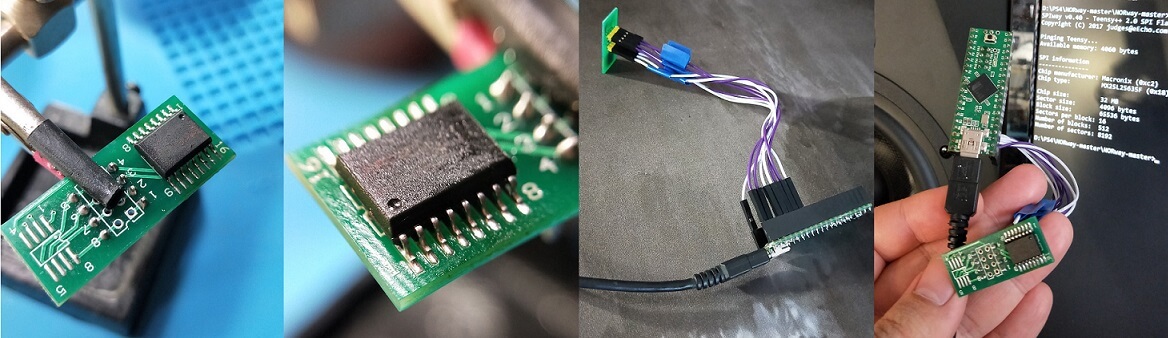
Step 8: Put your NOR on a break out board like mine (they cost about $1)
Step 9: Either solder each arm individually, or heat the NOR with a heat gun (400-500 degrees, high air flow).
Step 10: Plug it all into your Teensy.
Step 11: Use SPI Way!
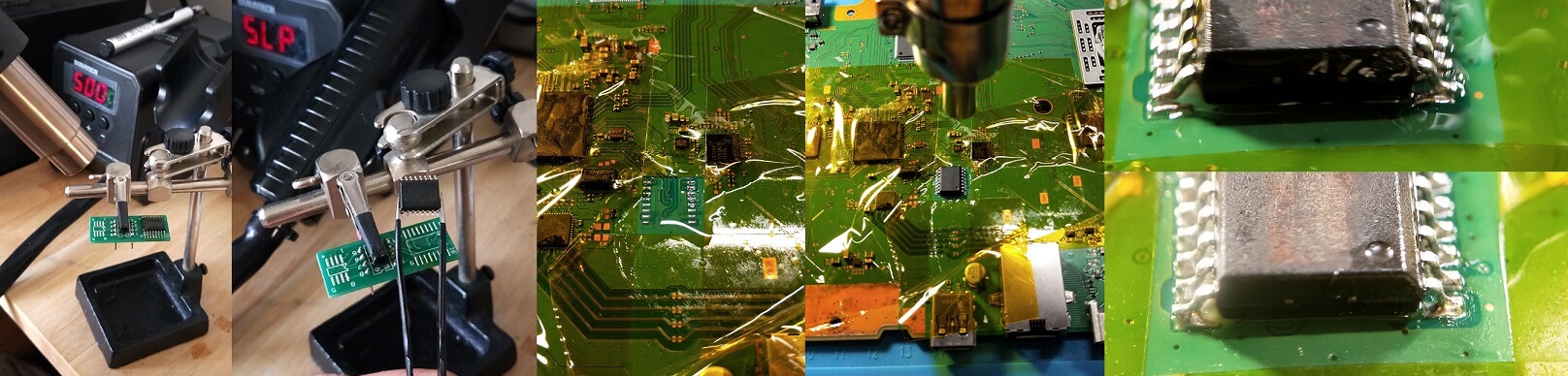
Step 12: To remove the NOR from the break out board, add solder paste (flux) and heat it (just like before)
Step 13: Grab it with tweezers when you see it getting shiny.
Step 14: Put some solder onto your PS4's nice and clean pads
Step 15: Place your NOR and align it with the pads and then HEAT! (Same temp and time as before).
Step 16: Watch the chip drop down ever so slightly, youll see the solder run up the arms of the NOR.
Mission complete!
Note: This guide can also apply to 1200 series and above NOR chips. Just be a bit more careful with those.
If you like what I do, or just like me for me, buy me a coffeeeee!
This can be for repairing, backing up or just destroying your PS4, it's entirely up to you - no pressure.
Step 1: Heat your iron, which has a chisel tip, to around 400 degrees.
Step 2: Put Kapton tape around your NOR. Now put solder paste (flux) on both sides of your NOR.
Step 3: Insert a massive blob of LEAD solder on each side of the NOR.
Step 4: Using your chisel tip and while holding the NOR with tweezers, heat both sides (quickly) then lift!
Step 5: Move the excess solder onto your tape, just push it!
Step 6: Lower the temp to around 380 degrees and grab your solder wick.
Step 7: Clean the pads on the PS4 and then the arms of the NOR (if its not cleanable by simply wisking it away with the iron).
Step 8: Put your NOR on a break out board like mine (they cost about $1)
Step 9: Either solder each arm individually, or heat the NOR with a heat gun (400-500 degrees, high air flow).
Step 10: Plug it all into your Teensy.
Step 11: Use SPI Way!
Step 12: To remove the NOR from the break out board, add solder paste (flux) and heat it (just like before)
Step 13: Grab it with tweezers when you see it getting shiny.
Step 14: Put some solder onto your PS4's nice and clean pads
Step 15: Place your NOR and align it with the pads and then HEAT! (Same temp and time as before).
Step 16: Watch the chip drop down ever so slightly, youll see the solder run up the arms of the NOR.
Mission complete!
Note: This guide can also apply to 1200 series and above NOR chips. Just be a bit more careful with those.
If you like what I do, or just like me for me, buy me a coffeeeee!
PS4 Remote Play Without PSN Access PS4REN Guide by ModdedWarfare
Following his PS4 Save Mounter Guide, PlayStation 4 developer @MODDEDWARFARE shared on Twitter a link to his latest YouTube Channel video update featuring a PS4 Remote Play without PSN access tutorial using the recently released PS4REN (Remote Play Enabler) homebrew application payload on 5.05 jailbroken consoles. 
Check it out below, and from the video's caption to quote: How to access remote play on a Jailbroken PS4 without PSN access.
Download Links:
Check it out below, and from the video's caption to quote: How to access remote play on a Jailbroken PS4 without PSN access.
Download Links:
- NetCat GUI.zip (2.2 MB) / NetCat GUI v1.1.zip (3.7 MB)
- ps4ren_5.05.zip (37.4 KB)
- Remote Play App for PC / Mac
PS4 Save Mounter Tutorial to Swap Saves Between Consoles & Games
Earlier this month we saw the release of PlayStation 4 Save Mounter v1.1 followed by a PS4 GameSave Tutorial complete with Video Demonstration, and today proceeding his PS4 Remote PKG Installer Speed Guide developer @MODDEDWARFARE announced on Twitter that he's updated his YouTube Channel with a PS4 Save Mounter Tutorial to swap saves between consoles and games. 
Check it out below, and from the video's description to quote: The PS4 save mounter allows you to share your game saves between different consoles and swap save games between different game versions.
PS4 Save Mounter Tutorial (Swap Saves Between Consoles & Games)
Installing PS4 Saves From Other PS4's Without Save Wizard | PS4 Save Mounter Tutorial
How to install PS4 Save Game files from the internet or other PS4's without the need to resign them in PS4 Save Wizard. This method requires a Jailbreakable PS4.
Download Links:
Check it out below, and from the video's description to quote: The PS4 save mounter allows you to share your game saves between different consoles and swap save games between different game versions.
PS4 Save Mounter Tutorial (Swap Saves Between Consoles & Games)
Installing PS4 Saves From Other PS4's Without Save Wizard | PS4 Save Mounter Tutorial
How to install PS4 Save Game files from the internet or other PS4's without the need to resign them in PS4 Save Wizard. This method requires a Jailbreakable PS4.
Download Links:
- PS4 Save Mounter v1.8 (7.55)
- PS4 Save Mounter v1.7...
PS4 Save Mounter GameSave Tutorial by Hejran7
Following the PS4 Save Mounter Homebrew Utility v1.1 update, this is a tutorial I have posted in the PS4 Source Discord channel community so I'll add it here plus some editing so it may help others... and please checkout @Sc0rpion's Video Guide (added below) in the PS4 Game Saves Repository thread too.
 Update: Work-around if no save can be found in the dirs box can be found HERE.
Some notes:
a- This will not work with PS4 Save Wizard saves that you download from the net because they are encrypted unless you have access to those saves to load on your PS4 to decrypt, encrypt, edit or swap region.
b- You need a jailbroken PS4 for this to work.
c- Swap region works on every game I have tried not sure about all games yet need more testing.
d- You don't need any other tool to decrypt or encrypt the save the tool will do it for you.
e- Very important please always make a backup of your save.
f- I used Al-Azif Offline PS4 Exploit Host v0.4.6 Alpha1.
g- Use ChendoChap PlayStation 4 Save Mounter v1.1.
h- Make sure that you have a working save, in my case I have good save Bloodborne CUSA00900 v01.09 and its on my PS4 slim that I want to decrypt, on the other hand I have a dummy save for Bloodborne CUSA00207 v01.00 on my PS4, you don't need 2nd PS4.
i- Make a note of your PS4 IP address.
Tutorial:
Update: Work-around if no save can be found in the dirs box can be found HERE.Some notes:
a- This will not work with PS4 Save Wizard saves that you download from the net because they are encrypted unless you have access to those saves to load on your PS4 to decrypt, encrypt, edit or swap region.
b- You need a jailbroken PS4 for this to work.
c- Swap region works on every game I have tried not sure about all games yet need more testing.
d- You don't need any other tool to decrypt or encrypt the save the tool will do it for you.
e- Very important please always make a backup of your save.
f- I used Al-Azif Offline PS4 Exploit Host v0.4.6 Alpha1.
g- Use ChendoChap PlayStation 4 Save Mounter v1.1.
h- Make sure that you have a working save, in my case I have good save Bloodborne CUSA00900 v01.09 and its on my PS4 slim that I want to decrypt, on the other hand I have a dummy save for Bloodborne CUSA00207 v01.00 on my PS4, you don't need 2nd PS4.
i- Make a note of your PS4 IP address.
Tutorial:
- Move ps4debug.bin from ChendoChap PlayStation 4 Save Mounter v1.1 that come inside the zip file to ps4-exploit-host-win-v0.4.6a1\payloads.
- Load HEN if you have fpkg.
- Load Original from Al-Azif offline PS4 Exploit Host v0.4.6 Alpha1.
- Use Al-Azif.exe to inject ps4debug.bin, in my case I have only ps4debug.bin so press 2 and hit enter.
- Start your game.
- Press PS button on PS4 controller to go...
- PS4 Fake PKG (FPKG) Sharing Guide
- 6.XX Webkit / 6.72 PS4 Jailbreak
- 7.00-7.02 Webkit Exploit
- 7.02 Webkit / 7.02 Kernel / PS4JB
- 7.50 Kernel Exploit / PS4JB 7.55
- 7.55 / 8.00 Payloads / PS4JB2 7.55
- 9.00 PS4 Webkit Exploit
- 9.00 PS4 Payloads / GoldHEN (Latest)
- 9.00 PS4 Jailbreak Kernel Exploit
- 11.00 PS4 Jailbreak Kernel Exploit
- 13.00 PS4 Kernel Exploit / 13.02 BD-J Bug
- 4.03 PS5 Webkit Exploit
- PS5 Kernel Exploit (ExFAT Bug)
- PS5 Root Keys Obtained
- 4.03 PS5 Kernel Build String
- 4.03 PS5 Webkit Execution
- 4.03 PS5 Kernel Vulnerability
- 4.03 PS5 Filesystem Dumps
- 4.51 PS5 BD-JB Sandbox Escape
- PS5 BD-JB Exploit Hack Source Code
- Mast1c0re PS5 Userland Exploit
- PS5 Kernel Access via PS4 Exploit
- PS5 exFAT Vulnerability Disclosed
- 4.03 PS5 Kernel Exploit Webkit ROP
- 4.50 PS5 Kernel Exploit Webkit ROP
- 4.51 PS5 Kernel Exploit Webkit ROP
- 4.xx PS5 Kernel Exploit v1.01
- 4.xx PS5 Kernel Exploit v1.02 / v1.03
- PS5 1.00-6.50 Firmware Webkit
- Native PS5 ROP Chain Execution
- Mast1c0re PS5 Compiler Attack
- PS5 FreeBSD Kernel Bug & WebKit
- PS5 UMTX 2 Exploit & PS5 Jailbreak
- Byepervisor PS5 Hypervisor Exploit
- Lua Lapse PS5 Kxploit & Laps3c0re / Y2JB
- 12.00 / 12.70 PS5 Kernel Exploit