PSXHAX.COM website and domain for sale. Contact Us with your offer!

You are using an out of date browser. It may not display this or other websites correctly.
You should upgrade or use an alternative browser.
You should upgrade or use an alternative browser.
PSXHAX - PSXHACKS: PSX HAX - PSX HACKS - PLAYSTATION HAX - PLAYSTATION HACKS
Adding PS4 Game Updates in Packages (PKGs) Tutorial by Lush78
Here is a quick guide I made for bundling PS4 game updates into PKGs. PKG Kitchen 1.3 is used and all thanks to the toolmakers...
Game Update PKG
Needed: PKG Kitchen 1.3, Offline Update PKG ≤4.05
1: Insert game disc and install
2: Exploit idc, xvortex ftp payload
3: Dump 4 files from system_data/priv/appmeta/CUSAxxxxx/* to dump\appmeta\ (Must get these files before update)
4: Exit title/ftp, reboot, exploit xvortex, install sony game update pkg (This will be the hardest step, obtaining offline 4.05 updates)
5: Check for update to game on information screen
6: Reboot, exploit idc, xvortex ftp payload, minimize, load game, connect ftp
7: Dump /user/app/CUSAxxxxx/app.pkg -> dump\pkg
/mnt/sandbox/pfsmnt/CUSAxxxxx-app0-nest/pfs_image.dat -> dump\pfs\
/mnt/sandbox/pfsmnt/CUSAxxxxx-app0/sce_module/* -> dump\app\sce_module\
/mnt/sandbox/pfsmnt/CUSAxxxxx-patch0-nest/pfs_image.dat, RENAME pfs_image2.dat -> dump\pfs\
/mnt/sandbox/pfsmnt/CUSAxxxxx-patch0/eboot.bin -> dump\app\
/mnt/sandbox/pfsmnt/CUSAxxxxx-patch0/sce_module/* -> dump\app\sce_module\ (Overwrite if prompted, update may not contain this folder and/or all files)
8: Reboot, remove disc, and delete game and all game data
9: Run _extract_pkg.bat and wait for success
10: Open /tools ArchiveExplorer.exe and open dump\pfs\pfs_image.dat and extract all to \app\
11: Open dump\pfs\pfs_image2.dat and extract all and overwrite to \app\
12: Copy and overwrite dump\app\* to \app\
13: Copy and overwrite dump\appmeta\* to \app\sce_sys\
14: Run _gen_gp4.bat and wait for success
15: Open CUSAxxxxx.gp4 with /tools/orbis-pub-gen.exe and go to Command, Build Image, select save location and build.
16: Turn on PS4, load xvortex exploit, install new PKG with bundled update.
How to Install Older PS4 Game Updates on Any PS4 7.02/7.50
Installing PS4 Games, DLC & Updates (PS4 6.72 Jailbreak)
Installing Retail Updates on a Jailbroken PS4 (6.72 or Lower!)
...
Game Update PKG
Needed: PKG Kitchen 1.3, Offline Update PKG ≤4.05
1: Insert game disc and install
2: Exploit idc, xvortex ftp payload
3: Dump 4 files from system_data/priv/appmeta/CUSAxxxxx/* to dump\appmeta\ (Must get these files before update)
4: Exit title/ftp, reboot, exploit xvortex, install sony game update pkg (This will be the hardest step, obtaining offline 4.05 updates)
5: Check for update to game on information screen
6: Reboot, exploit idc, xvortex ftp payload, minimize, load game, connect ftp
7: Dump /user/app/CUSAxxxxx/app.pkg -> dump\pkg
/mnt/sandbox/pfsmnt/CUSAxxxxx-app0-nest/pfs_image.dat -> dump\pfs\
/mnt/sandbox/pfsmnt/CUSAxxxxx-app0/sce_module/* -> dump\app\sce_module\
/mnt/sandbox/pfsmnt/CUSAxxxxx-patch0-nest/pfs_image.dat, RENAME pfs_image2.dat -> dump\pfs\
/mnt/sandbox/pfsmnt/CUSAxxxxx-patch0/eboot.bin -> dump\app\
/mnt/sandbox/pfsmnt/CUSAxxxxx-patch0/sce_module/* -> dump\app\sce_module\ (Overwrite if prompted, update may not contain this folder and/or all files)
8: Reboot, remove disc, and delete game and all game data
9: Run _extract_pkg.bat and wait for success
10: Open /tools ArchiveExplorer.exe and open dump\pfs\pfs_image.dat and extract all to \app\
11: Open dump\pfs\pfs_image2.dat and extract all and overwrite to \app\
12: Copy and overwrite dump\app\* to \app\
13: Copy and overwrite dump\appmeta\* to \app\sce_sys\
14: Run _gen_gp4.bat and wait for success
15: Open CUSAxxxxx.gp4 with /tools/orbis-pub-gen.exe and go to Command, Build Image, select save location and build.
16: Turn on PS4, load xvortex exploit, install new PKG with bundled update.
How to Install Older PS4 Game Updates on Any PS4 7.02/7.50
Installing PS4 Games, DLC & Updates (PS4 6.72 Jailbreak)
Installing Retail Updates on a Jailbroken PS4 (6.72 or Lower!)
...
SNESStation SNES Emulator Port for PS4 4.05 by Nominus!
Many may recall emulators like PGEN and SNES Station to emulate Super Nintendo and Sega Genesis platforms on both PS2 and PS3, well today following his announcement the SNESStation emulator has been ported by Nominus for exploited PS4 4.05 consoles allowing sceners to relive their SNES video game memories once again! 
Download: SnesStation.zip (28.6 MB) / SnesStation.zip (Mirror) / SnesStation.zip (Mirror #2) / SNES_STATION.pkg (42.62 MB - 10 ROMs included by @0x199) / SnesStationIcon.zip (2.71 MB - SNESStation for PS4 icon set) by Cloud0835 / SNESEMU.pkg (SNES EMU with FULL Rom Set 4.06 GB) via @eustachy7777 / UP1004-SLUS20090_00-SCUS974900000001-A0100-V0100.pkg (Mirror) / Snes Station SLUS20090.rtf (Mirror #2) / SNES Station Compilations via @jwooh
From the included ReadMe file, to quote: SNESStation Emulator for PS4 4.05
1. Open disc01 place ROM files in folder
2. Open cdgenPS2.exe, drag all files located INSIDE disc01 folder into cdgenPS2
3. Click IMG on left side, save as disc01.iso [make sure it's an iso file]
4. This is your disc01 for you PS4 FPKG building.
5. Continue to...
Download: SnesStation.zip (28.6 MB) / SnesStation.zip (Mirror) / SnesStation.zip (Mirror #2) / SNES_STATION.pkg (42.62 MB - 10 ROMs included by @0x199) / SnesStationIcon.zip (2.71 MB - SNESStation for PS4 icon set) by Cloud0835 / SNESEMU.pkg (SNES EMU with FULL Rom Set 4.06 GB) via @eustachy7777 / UP1004-SLUS20090_00-SCUS974900000001-A0100-V0100.pkg (Mirror) / Snes Station SLUS20090.rtf (Mirror #2) / SNES Station Compilations via @jwooh
From the included ReadMe file, to quote: SNESStation Emulator for PS4 4.05
1. Open disc01 place ROM files in folder
2. Open cdgenPS2.exe, drag all files located INSIDE disc01 folder into cdgenPS2
3. Click IMG on left side, save as disc01.iso [make sure it's an iso file]
4. This is your disc01 for you PS4 FPKG building.
5. Continue to...
GTA V PS4 4.05 Menu Test 1 Demonstration Video by AlFaMoDz
Since his recent GameDecrypt405 payload release and following @mb2010's PS4 GTA V Native Caller 4.05 Byroms Edit, PlayStation 4 developer @AlFaMoDz shared a GTA V PS4 4.05 Menu Test 1 demonstration video showing he finally got it working, the design is more or less finished except for adding options and confirmed on Twitter that a release will be soon so other developers can use it as a base for their menus. 
Below is the demo video alongside the related Tweets, with some others making their rounds on Twitter of interest also including an AutomatedHomebrewBuildPKGScript_CrazyVoid_V1.zip (5.88 KB) by @CrazyVoid via zecoxao:
First Grand Theft Auto 5 (GTA5) Mod Menu For 4.05 (PS4 Jailbreak & Mods)
Thanks to @hyndrid and @TheOneAngel for the news tips in the PSXHAX Shoutbox earlier today!
Below is the demo video alongside the related Tweets, with some others making their rounds on Twitter of interest also including an AutomatedHomebrewBuildPKGScript_CrazyVoid_V1.zip (5.88 KB) by @CrazyVoid via zecoxao:
First Grand Theft Auto 5 (GTA5) Mod Menu For 4.05 (PS4 Jailbreak & Mods)
Thanks to @hyndrid and @TheOneAngel for the news tips in the PSXHAX Shoutbox earlier today!
PS3Xploit Tools v2.0 to Install PS3 CFW on 4.82 OFW Consoles
Following their PS3Xploit 4.82 CFW on OFW, NOR / NAND Flash Writer & NOR Dumper update, the PS3Xploit Team of @bguerville, @esc0rtd3w, @smhabib and W released PS3Xploit Tools v2.0 which features improved NOR / NAND flash writers and dumpers to make things simpler to install PlayStation 3 CFW on 4.82 OFW consoles!
Download: NOR_NAND_IDPS_dumper_release_2.0_PS3Xploit.zip / NOR_NAND_writer_release_2.0_PS3Xploit.zip / flash_482.hex (included in the Flash Writer 2.0 archive) MD5: d05be52f8d21700052fbd1fc0174acae) / minvercheck.zip / Self's PS3 Xploit Guide for 4.82 OFW
To quote from the changelog on their official site at PS3Xploit.com: Changelog v2.0
Download: NOR_NAND_IDPS_dumper_release_2.0_PS3Xploit.zip / NOR_NAND_writer_release_2.0_PS3Xploit.zip / flash_482.hex (included in the Flash Writer 2.0 archive) MD5: d05be52f8d21700052fbd1fc0174acae) / minvercheck.zip / Self's PS3 Xploit Guide for 4.82 OFW
To quote from the changelog on their official site at PS3Xploit.com: Changelog v2.0
- Freeze issues - Fixed
- Occasional bad dumps - Fixed
- No beeps & shutdown. Replaced by a graceful ROP chain exit & return to browser. This gives the opportunity to the user to dump after patching & validate the dump with littlebalup's py checker. As long as the user does not shutdown/restart, it's still possible to recover from bad patching.
- Support for usb port 0,1,6 + sd/cf/ms cards.
- Multi firmware support on all dumpers (4.10+) & DEX support on 4.81.
- HDD editions for all dumpers & flash writer where a picture file placeholder is used for read/write operations.
- Javascript refactoring for performance & efficiency.
- ps3xploit.com will host the 2.0 update, no need for 3rd party sites.
How to Create Emulated PS2 PS4 Packages (PKGs) Guide by G991!
This is a user-friendly tutorial on how to play your favorite PlayStation 2 games on your jailbroken PlayStation 4 as can be seen HERE. I am not going to go into specifics here; but if you need help or have a question, feel free to reply and I will answer.

1. Download the ps2emu.rar and Fake PKG Tools_1v1.rar (look above)
2. Extract both archives (as you would...)
3. Put your favorite PlayStation 2 game ISO in the ps2emu\image\ folder
4. Rename the iso to 'disc01.iso' (the emulator can take multiple discs, but this is more advanced and you have to specify things in lua or the command line arguments)
5. Go to sce_sys and edit 'param.sfo' with 'orbis-pub-sfo.exe'
a. Change content ID to (UP9000-CUSAXXXXX_00-SCUS974900000001) where XXXXX is any string of numbers
b. The content ID can be somewhat random, but has to be in the enforced format. Who really cares what you do, but the original emulated game (Rogue Galaxy) was like this and I just decided to change the title ID portion.
c. Go to Title Text tab and change the text to the title of your game (ex. Ratchet & Clank, Crash Bandicoot)
6. Save the param.sfo
7. In Fake PKG Tools, rename 'orbis-pub-cmd-ps2.exe' to 'orbis-pub-cmd.exe' (delete or rename original 'orbis-pub-cmd.exe')
8. Open 'orbis-pub-gen.exe'
9. Double click on 'Image0' (we are going to add the files from ps2emu, including disc01.iso/disc0X.iso)
10. Drag and drop all the files from ps2emu into the Image0 Root (right side is files, left is directory view)
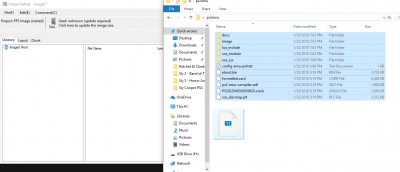 [ATTACH...
- ps2emu (2.36 MB)
- Fake PKG Tools (Someone please make a better Fake PKG Tools! This is aids to work with...)
- Custom configuration files for PS2 emulator used in PS4
1. Download the ps2emu.rar and Fake PKG Tools_1v1.rar (look above)
2. Extract both archives (as you would...)
3. Put your favorite PlayStation 2 game ISO in the ps2emu\image\ folder
4. Rename the iso to 'disc01.iso' (the emulator can take multiple discs, but this is more advanced and you have to specify things in lua or the command line arguments)
5. Go to sce_sys and edit 'param.sfo' with 'orbis-pub-sfo.exe'
a. Change content ID to (UP9000-CUSAXXXXX_00-SCUS974900000001) where XXXXX is any string of numbers
b. The content ID can be somewhat random, but has to be in the enforced format. Who really cares what you do, but the original emulated game (Rogue Galaxy) was like this and I just decided to change the title ID portion.
c. Go to Title Text tab and change the text to the title of your game (ex. Ratchet & Clank, Crash Bandicoot)
6. Save the param.sfo
7. In Fake PKG Tools, rename 'orbis-pub-cmd-ps2.exe' to 'orbis-pub-cmd.exe' (delete or rename original 'orbis-pub-cmd.exe')
8. Open 'orbis-pub-gen.exe'
9. Double click on 'Image0' (we are going to add the files from ps2emu, including disc01.iso/disc0X.iso)
10. Drag and drop all the files from ps2emu into the Image0 Root (right side is files, left is directory view)
[ATTACH...- PS4 Fake PKG (FPKG) Sharing Guide
- 6.XX Webkit / 6.72 PS4 Jailbreak
- 7.00-7.02 Webkit Exploit
- 7.02 Webkit / 7.02 Kernel / PS4JB
- 7.50 Kernel Exploit / PS4JB 7.55
- 7.55 / 8.00 Payloads / PS4JB2 7.55
- 9.00 PS4 Webkit Exploit
- 9.00 PS4 Payloads / GoldHEN (Latest)
- 9.00 PS4 Jailbreak Kernel Exploit
- 11.00 PS4 Jailbreak Kernel Exploit
- 13.00 PS4 Kernel Exploit / 13.02 BD-J Bug
- 4.03 PS5 Webkit Exploit
- PS5 Kernel Exploit (ExFAT Bug)
- PS5 Root Keys Obtained
- 4.03 PS5 Kernel Build String
- 4.03 PS5 Webkit Execution
- 4.03 PS5 Kernel Vulnerability
- 4.03 PS5 Filesystem Dumps
- 4.51 PS5 BD-JB Sandbox Escape
- PS5 BD-JB Exploit Hack Source Code
- Mast1c0re PS5 Userland Exploit
- PS5 Kernel Access via PS4 Exploit
- PS5 exFAT Vulnerability Disclosed
- 4.03 PS5 Kernel Exploit Webkit ROP
- 4.50 PS5 Kernel Exploit Webkit ROP
- 4.51 PS5 Kernel Exploit Webkit ROP
- 4.xx PS5 Kernel Exploit v1.01
- 4.xx PS5 Kernel Exploit v1.02 / v1.03
- PS5 1.00-6.50 Firmware Webkit
- Native PS5 ROP Chain Execution
- Mast1c0re PS5 Compiler Attack
- PS5 FreeBSD Kernel Bug & WebKit
- PS5 UMTX 2 Exploit & PS5 Jailbreak
- Byepervisor PS5 Hypervisor Exploit
- Lua Lapse PS5 Kxploit & Laps3c0re / Y2JB
- 12.00 / 12.70 PS5 Kernel Exploit