PSXHAX.COM website and domain for sale. Contact Us with your offer!

You are using an out of date browser. It may not display this or other websites correctly.
You should upgrade or use an alternative browser.
You should upgrade or use an alternative browser.
PSXHAX - PSXHACKS: PSX HAX - PSX HACKS - PLAYSTATION HAX - PLAYSTATION HACKS
PKG KitchenAID for PS4 Packages by NORATIO
Following the release of PKG Kitchen by @XVortex, here is a ALL-IN-ONE script/tools I call PKG KitchenAID to dump/rip your own games and backup them into a PKG.
Download: PKG_KitchenAID-NORATIO-V1.0.zip (3.9 MB) / PKG_KitchenAID-NORATIO-V1.1.zip (3.9 MB) / PKG_KitchenAID-NORATIO-V1.2.zip (4.8 MB) / PKG KitchenAID_V1_3-NORATIO.zip (13.0 MB) via NORATIO
PKG KitchenAID is super easy, you have one batch file to run and just follow the onscreen instructions. You can't go wrong. No need of a FTP client or to download separated tools. All you need is in the package and easy to use (will help some newbies).
1) On your PS4, delete any files/traces of the game you want to rip on your PS4 to ensure a proper rip
2) On your computer, execute file "DUMP.bat" at the root of your installation to begin the process and follow onscreen instructions
Download the package and just extract the files where you want on your computer.
Download: PKG_KitchenAID-NORATIO-V1.0.zip (3.9 MB) / PKG_KitchenAID-NORATIO-V1.1.zip (3.9 MB) / PKG_KitchenAID-NORATIO-V1.2.zip (4.8 MB) / PKG KitchenAID_V1_3-NORATIO.zip (13.0 MB) via NORATIO
PKG KitchenAID is super easy, you have one batch file to run and just follow the onscreen instructions. You can't go wrong. No need of a FTP client or to download separated tools. All you need is in the package and easy to use (will help some newbies).
- All the improvements/automated process in based on @XVortex FTP Payload and its own scripts and other freewares included.
- Anyone is free to use this code and improve it as well (I might update it here and there based on changes, but so far, all the dumps tested are 100% working)
- An SSD is suggested to facilitate/speed up the process
1) On your PS4, delete any files/traces of the game you want to rip on your PS4 to ensure a proper rip
2) On your computer, execute file "DUMP.bat" at the root of your installation to begin the process and follow onscreen instructions
Download the package and just extract the files where you want on your computer.
How to Host PS4HEN for 4.05 PS4 OFW on Android Phone Guide
Here's a guide on how to host PS4HEN using exploited 4.05 PS4 OFW on an Android Phone for those interested!
How to host PS4HEN on Android Phone
Requirements:
~HomeDope
How to host PS4HEN on Android Phone
Requirements:
- kWS (or any other web server application)
- PS4-HEN-VTX
- Install kWS in to your Android phone.
- Extract .zip file to your Android phone (Ex. sdcard\)
- Adjust kWS settings so "Home Directory" will point to your extracted PS4-HEN-VTS folder. (Ex. sdcard\PS4-HEN-VTX)
- [OPTIONAL] Change port number (Default: 8080)
- [OPTIONAL] Make your android phone have static IP. (Via Android settings or by assigning IP Address to MAC Address via router)
- Start kWS server
- Open PS4 browser and browse to your kWS server (Ex. http://192.168.0.100:8080)
- [OPTIONAL] Save it as bookmark for fast access.
~HomeDope
PlayStation 4 (SAC-001) PS4 UART For Dummies Tutorial, E4 Flasher Development
Let me start by saying I'm writing this because a lot of people don't know how to setup UART (Universal Asynchronous Receiver / Transmitter) for their PS4, this tutorial is only for those who have a SAC-001 Motherboard following the previous SAA-001 board details.
Tools you would need:
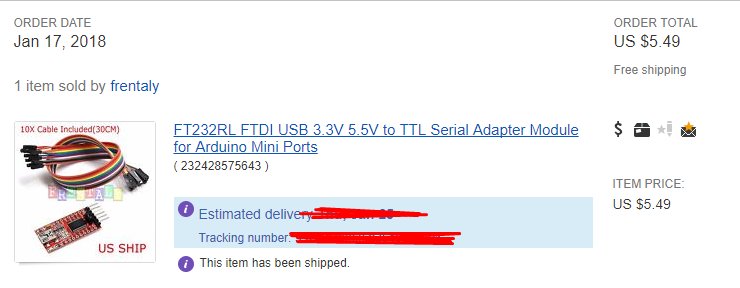
After you have your tools buy any cheap FTDI USB to TTL Serial Adapter I bought this one.
Step 2:
Open up your PS4
Video:
Step 3:
Got some wire and strip some of both ends
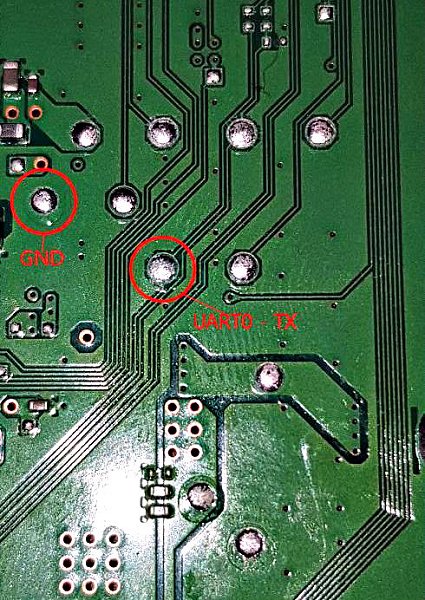
Then solder 1 end to these points
Step 4:
MAKE SURE THE WIRES ARE STICKING OUT of the console
(Optional) Hot glue the wires to the motherboard so they dont come un-done when you put the PS4 back together
Step 5:
Put the console back together WITH THE WIRES HANGING OUT
Step 6:
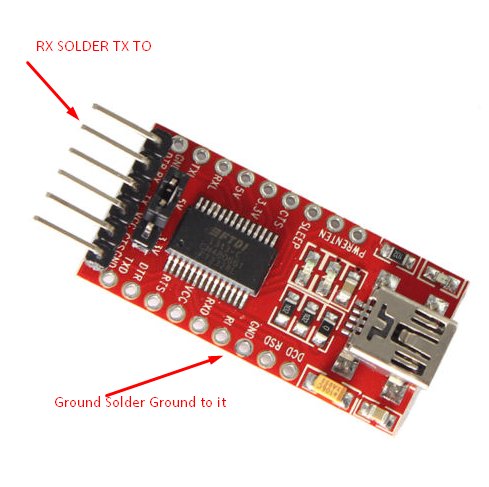
Solder the ground wire to Ground on the device and the TX Wire from the PS4 to the RX Pad on the FTDI Device (Pic of the one i bought0
Step 7:
Hook it up to your PC with the micro-USB Cabel
Step 8:
Download: arduino-1.8.5-windows.exe
INSTALL IT DONT USE PS WATSON.. PS WATSON DOESNT WORK!!
Step 9:
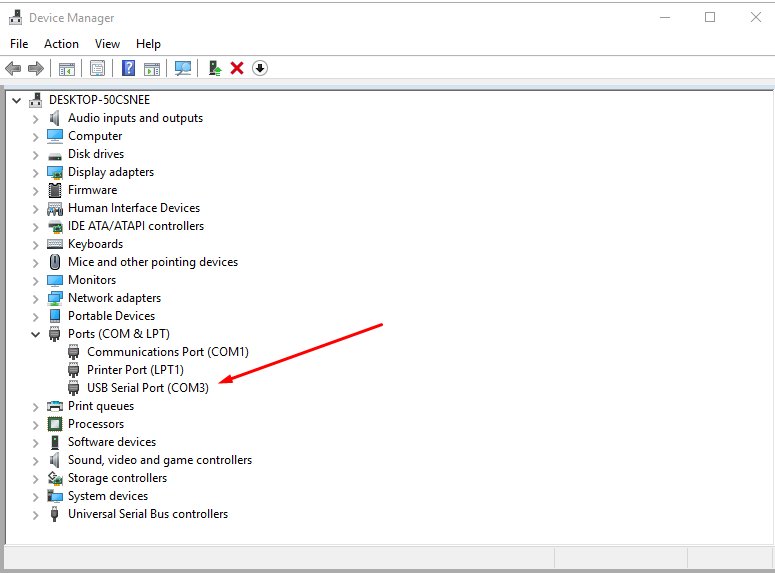
MAKE SURE ITS YOU COM PORT
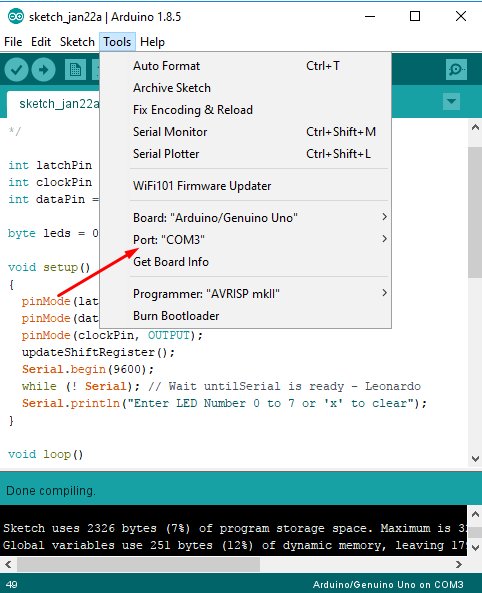
LAST STEP:...
Tools you would need:
- A set of screw Drivers to open up the PS4
- Soldering station $30-$150 (depends what you get)
- Solder 0.7mm - $7
- Flux - $5 - $15
- Kynair Wire- $7
- Wire cutters - $12
- (Optional) Hot Glue and Glue gun - $15
- Tip cleaner - $10
- ANY Cheap FTDI USB to TTL Serial Adapter
- Micro-USB Cable
- etc
After you have your tools buy any cheap FTDI USB to TTL Serial Adapter I bought this one.
Step 2:
Open up your PS4
Video:
Step 3:
Got some wire and strip some of both ends
Then solder 1 end to these points
Step 4:
MAKE SURE THE WIRES ARE STICKING OUT of the console
(Optional) Hot glue the wires to the motherboard so they dont come un-done when you put the PS4 back together
Step 5:
Put the console back together WITH THE WIRES HANGING OUT
Step 6:
Solder the ground wire to Ground on the device and the TX Wire from the PS4 to the RX Pad on the FTDI Device (Pic of the one i bought0
Step 7:
Hook it up to your PC with the micro-USB Cabel
Step 8:
Download: arduino-1.8.5-windows.exe
INSTALL IT DONT USE PS WATSON.. PS WATSON DOESNT WORK!!
Step 9:
MAKE SURE ITS YOU COM PORT
LAST STEP:...
PS4 PFSPKG Dump: Dump PFS_Image and App.pkg to USB0 by Dbaaz
Since the release of MakePFS and his PS4 FTP IP Set, PlayStation 4 developer @dbaaz put together his first PS4-PFSPKG-DUMP.bin payload called PS4 PFSPKG Dump that dumps pfs_image and app.pkg to usb0 which can be handy for PS4 4.05 game rippers to dump large files to their external hard drive 
Download: PS4-PFSPKG-DUMP.bin / GIT
To quote from the README.md: PS4-PFSPKG-DUMP - Dump pfs_image and app.pkg to usb0
How to:
 In other PlayStation 4 hacking news making rounds on Twitter today, developer @CelesteBlue announced that he's working on a PS4 system update blocker without DNS that will be included in PS4-HEN-VTX coming soon for 1.76, 4.05 or any firmware that has a kernel exploit.
This means blocking PS4 updates via Sony URLs to prevent them from downloading so you don't have...
Download: PS4-PFSPKG-DUMP.bin / GIT
To quote from the README.md: PS4-PFSPKG-DUMP - Dump pfs_image and app.pkg to usb0
How to:
- Open the .bin file using a hexeditor and change CUSAXXXXX to the game id of your game.
- Open web browser, go to a exploit host page, and minimise the browser using the PS4 home button.
- Start the game you wish to dump. Wait until you reach the menus.
- Connect your external HDD to your USB0 port (leftmost usb port). Make sure you have at least 100GB free space.
- Wait until your PS4 recognizes your HDD. Then, send the payload
- Increased buffer size
- Use hexedit to change game id
In other PlayStation 4 hacking news making rounds on Twitter today, developer @CelesteBlue announced that he's working on a PS4 system update blocker without DNS that will be included in PS4-HEN-VTX coming soon for 1.76, 4.05 or any firmware that has a kernel exploit. This means blocking PS4 updates via Sony URLs to prevent them from downloading so you don't have...
Free PS2 Pub Gen / Fake PKG Tools: PS2 Fake PKG Generator for PS4
Following the PS2 Backups on PS4HEN progress this past weekend, Fake PKG Generator for PS4 and his recent Make_FSELF_GUI v1.2 update, today PlayStation 4 developer @cfwprophet shared on Twitter a Free PS2 Pub Gen (Fake PKG Tools) that are used as a PS2 Fake PKG Generator for PS4 while PS3120 made available the required orbis-pub-cmd-ps2.exe file and orbis-pub-gen.exe. 
Download: free-ps2-pub-gen.rar / Fake PKG Tools_v1.1.1.rar (5.5 MB) / Fake PKG Tools_v1.1.1.rar (Mirror) / Fake PKG Tools_v1.1.2.rar (4.7 MB) / Fake_PKG_Tools_v1.2.rar (588.62 MB - Full) / Fake PKG Tools_v1.1.3.rar (5.5 MB) / fake-pkg-tools_v1.1.3.rar (Mirror) / Fake_PKG_GeneratorPS2.zip (2.97 MB - Mirror) / GIT / orbis-pub-cmd-ps2.exe (2.61 MB) / Klonoa2passcode.pkg (2.76 GB - Passcode: oJhgpRpSASYXdjbh90Sikqu_oLM6Esri via DarkElement who states: "To create another PS2 iso from, extract it, change disc01.iso with your own, and repackage using files from that dump I will provide a more detailed tutorial together with video tut together.) / Fake_PKG_Tools_v1.3.rar /...
Download: free-ps2-pub-gen.rar / Fake PKG Tools_v1.1.1.rar (5.5 MB) / Fake PKG Tools_v1.1.1.rar (Mirror) / Fake PKG Tools_v1.1.2.rar (4.7 MB) / Fake_PKG_Tools_v1.2.rar (588.62 MB - Full) / Fake PKG Tools_v1.1.3.rar (5.5 MB) / fake-pkg-tools_v1.1.3.rar (Mirror) / Fake_PKG_GeneratorPS2.zip (2.97 MB - Mirror) / GIT / orbis-pub-cmd-ps2.exe (2.61 MB) / Klonoa2passcode.pkg (2.76 GB - Passcode: oJhgpRpSASYXdjbh90Sikqu_oLM6Esri via DarkElement who states: "To create another PS2 iso from, extract it, change disc01.iso with your own, and repackage using files from that dump I will provide a more detailed tutorial together with video tut together.) / Fake_PKG_Tools_v1.3.rar /...
- PS4 Fake PKG (FPKG) Sharing Guide
- 6.XX Webkit / 6.72 PS4 Jailbreak
- 7.00-7.02 Webkit Exploit
- 7.02 Webkit / 7.02 Kernel / PS4JB
- 7.50 Kernel Exploit / PS4JB 7.55
- 7.55 / 8.00 Payloads / PS4JB2 7.55
- 9.00 PS4 Webkit Exploit
- 9.00 PS4 Payloads / GoldHEN (Latest)
- 9.00 PS4 Jailbreak Kernel Exploit
- 11.00 PS4 Jailbreak Kernel Exploit
- 13.00 PS4 Kernel Exploit / 13.02 BD-J Bug
- 4.03 PS5 Webkit Exploit
- PS5 Kernel Exploit (ExFAT Bug)
- PS5 Root Keys Obtained
- 4.03 PS5 Kernel Build String
- 4.03 PS5 Webkit Execution
- 4.03 PS5 Kernel Vulnerability
- 4.03 PS5 Filesystem Dumps
- 4.51 PS5 BD-JB Sandbox Escape
- PS5 BD-JB Exploit Hack Source Code
- Mast1c0re PS5 Userland Exploit
- PS5 Kernel Access via PS4 Exploit
- PS5 exFAT Vulnerability Disclosed
- 4.03 PS5 Kernel Exploit Webkit ROP
- 4.50 PS5 Kernel Exploit Webkit ROP
- 4.51 PS5 Kernel Exploit Webkit ROP
- 4.xx PS5 Kernel Exploit v1.01
- 4.xx PS5 Kernel Exploit v1.02 / v1.03
- PS5 1.00-6.50 Firmware Webkit
- Native PS5 ROP Chain Execution
- Mast1c0re PS5 Compiler Attack
- PS5 FreeBSD Kernel Bug & WebKit
- PS5 UMTX 2 Exploit & PS5 Jailbreak
- Byepervisor PS5 Hypervisor Exploit
- Lua Lapse PS5 Kxploit & Laps3c0re / Y2JB
- 12.00 / 12.70 PS5 Kernel Exploit