PSXHAX.COM website and domain for sale. Contact Us with your offer!

You are using an out of date browser. It may not display this or other websites correctly.
You should upgrade or use an alternative browser.
You should upgrade or use an alternative browser.
PSXHAX - PSXHACKS: PSX HAX - PSX HACKS - PLAYSTATION HAX - PLAYSTATION HACKS
Playerkp420 Dual Boot OFW 4.80 for PSN on PlayStation 3
Today PlayStation 3 developer playerkp420 made available his Dual Boot OFW 4.80 for accessing PSN a bit safer on modified PlayStation 3 consoles.
Download: Playerkp420_DB_4.80_PS3UPDAT.PUP (196.59 MB)
MD5 Hash: BA5F6B0BEE23BBDB9F472AFEFF867339
Here's what he had to say about the release, to quote: I am happy to share my Dual Boot OFW 4.80.
I have been working hard with real life, and on my Cobra CFW in the little spare time I have. I seen someone looking for a dual boot OFW, and thought I would help out. Since nobody else made one yet, here it is.
 Then you can play as you are on OFW. Then when you wish to go back to CFW, insert CFW HDD, and install your favorite CFW. It is important to keep your DB OFW HDD free of any homebrew apps. To prevent Sony from seeing them. Keep all your CFW stuff on your CFW HDD.
I personally tested this on my CECH-2501A, and my CECHA01. On both I went from Playerkp420 4.80 Cobra 7.3 to Playerkp420 DB OFW 4.80. Then back to Playerkp420 4.80 Cobra 7.3. On the NAND model it did say no applicable update from XMB, and made me install from the recovery menu.
But I was able to go back to CFW from the XMB. Not sure if that applies to all NAND models, but it is recommended anyway to boot to recovery menu after switching HDDs and installing either DB OFW or CFW with Option 6.
Download: Playerkp420_DB_4.80_PS3UPDAT.PUP (196.59 MB)
MD5 Hash: BA5F6B0BEE23BBDB9F472AFEFF867339
Here's what he had to say about the release, to quote: I am happy to share my Dual Boot OFW 4.80.
I have been working hard with real life, and on my Cobra CFW in the little spare time I have. I seen someone looking for a dual boot OFW, and thought I would help out. Since nobody else made one yet, here it is.
- Made from OFW 4.80.
- ECDSA check patch applied to isoldr in lv0.
- ECDSA check patch applied to spu_pkg_rvk_verifier.
- Same metadata applied to keep the exact same size as OFW. (see pic below) Even all the encrypted files inside CoreOS are the same size.
- Can be installed over OFW 3.55 and any CFW with a lower or same version.
- While on this DB OFW 4.80, you can install any CFW with the same or higher Syscon version.
- Can only play disc based games and games downloaded from PSN.
Then you can play as you are on OFW. Then when you wish to go back to CFW, insert CFW HDD, and install your favorite CFW. It is important to keep your DB OFW HDD free of any homebrew apps. To prevent Sony from seeing them. Keep all your CFW stuff on your CFW HDD.I personally tested this on my CECH-2501A, and my CECHA01. On both I went from Playerkp420 4.80 Cobra 7.3 to Playerkp420 DB OFW 4.80. Then back to Playerkp420 4.80 Cobra 7.3. On the NAND model it did say no applicable update from XMB, and made me install from the recovery menu.
But I was able to go back to CFW from the XMB. Not sure if that applies to all NAND models, but it is recommended anyway to boot to recovery menu after switching HDDs and installing either DB OFW or CFW with Option 6.
Holoflex: Holographic Flexible Smartphone Demonstration Video
A demonstration video recently hit the Interwebs showcasing holographic flexible smartphone technology dubbed Holoflex.
According to Human Media Lab, the device is capable of rendering 3D images with motion parallax and stereoscopy to multiple simultaneous users without head tracking or glasses.
To quote: “HoloFlex offers a completely new way of interacting with your smartphone. It allows for glasses-free interactions with 3D video and images in a way that does not encumber the user.” says Dr. Vertegaal.
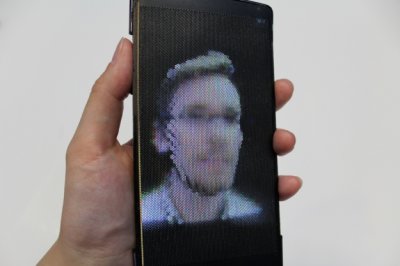 HoloFlex features a 1920x1080 full high-definition Flexible Organic Light Emitting Diode (FOLED) touchscreen display. Images are rendered into 12-pixel wide circular blocks rendering the full view of the 3D object from a particular viewpoint.
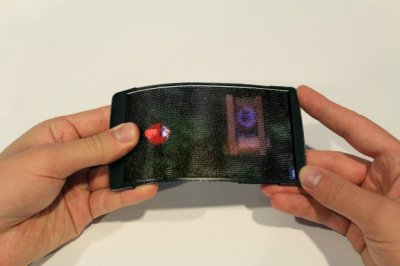 These pixel blocks project through a 3D printed flexible microlens array consisting of over 16,000 fisheye lenses. The resulting 160 x 104 resolution image allows users to inspect a 3D object from any angle simply by rotating the phone.
According to Human Media Lab, the device is capable of rendering 3D images with motion parallax and stereoscopy to multiple simultaneous users without head tracking or glasses.
To quote: “HoloFlex offers a completely new way of interacting with your smartphone. It allows for glasses-free interactions with 3D video and images in a way that does not encumber the user.” says Dr. Vertegaal.
HoloFlex features a 1920x1080 full high-definition Flexible Organic Light Emitting Diode (FOLED) touchscreen display. Images are rendered into 12-pixel wide circular blocks rendering the full view of the 3D object from a particular viewpoint. These pixel blocks project through a 3D printed flexible microlens array consisting of over 16,000 fisheye lenses. The resulting 160 x 104 resolution image allows users to inspect a 3D object from any angle simply by rotating the phone.
Ferrox PS3 CFW 4.80 COBRA 7.3 NoBD Edition by Alexander
Proceeding his recent Ferrox PS3 Custom Firmware 4.80 COBRA 7.3 release, today PlayStation 3 developer Alexander made available Ferrox PS3 CFW 4.80 COBRA 7.3 NoBD Edition for those who own consoles with damaged or missing Blu-ray drives.
Download: FERROX 4.80 COBRA 7.3 NOBD.rar (195.1 MB) / FERROX 4.80 COBRA 7.3 NOBD.rar (Mirror) / CFW FERROX 4.80.1 NoBT NoBD.rar (195.06 MB)
4.80 MD5 Hash: 3a678b4ae3021c6de03cf091cc0c3a4d
4.80.1 MD5 Hash: ba84641461869829226e7665ee584a92
To quote, roughly translated: Custom Firmware 4.80 FERROX COBRA 7.3 NoBD Edition
Still good news !! Here on Cybermodding mica you sleep! In fact, we give you a new gem, all for you!
Our dear friend and developer Alexander knows no respite, and there he is to release a new version of its CFW FERROX.
After the recent release of Standard Versions CEX, and after the new COBRA, here comes one of the traditional versions of FERROX, that Alexander has pursued for a long time. We speak of the Custom Firmware FERROX in NoBD version!
BUT...!!!! More news! In NoBD version of CFW FERROX, even the Patch COBRA were integrated. The first version of COBRA - NoBD together for FERROX!
Thanks to this special version of the CFW, users who own a PS3 with Logica route, will return to start games and Homebrew !! Logic route is in fact a beautiful pain in the butt.. For this CFW NoBD exists, that goes to completely disable your Player. Therefore a very important version, and vital for many users. Let's meet the specifications:
FEATURES:
Download: FERROX 4.80 COBRA 7.3 NOBD.rar (195.1 MB) / FERROX 4.80 COBRA 7.3 NOBD.rar (Mirror) / CFW FERROX 4.80.1 NoBT NoBD.rar (195.06 MB)
4.80 MD5 Hash: 3a678b4ae3021c6de03cf091cc0c3a4d
4.80.1 MD5 Hash: ba84641461869829226e7665ee584a92
To quote, roughly translated: Custom Firmware 4.80 FERROX COBRA 7.3 NoBD Edition
Still good news !! Here on Cybermodding mica you sleep! In fact, we give you a new gem, all for you!
Our dear friend and developer Alexander knows no respite, and there he is to release a new version of its CFW FERROX.
After the recent release of Standard Versions CEX, and after the new COBRA, here comes one of the traditional versions of FERROX, that Alexander has pursued for a long time. We speak of the Custom Firmware FERROX in NoBD version!
BUT...!!!! More news! In NoBD version of CFW FERROX, even the Patch COBRA were integrated. The first version of COBRA - NoBD together for FERROX!
Thanks to this special version of the CFW, users who own a PS3 with Logica route, will return to start games and Homebrew !! Logic route is in fact a beautiful pain in the butt.. For this CFW NoBD exists, that goes to completely disable your Player. Therefore a very important version, and vital for many users. Let's meet the specifications:
FEATURES:
- Built on the basis of OFW 4.80 SONY.
- PSN / SEN Enabled.
- Update from any possibility of CFW (CEX).
- Ability to Upgrade from OFW 3.55.
- Ability to Downgrade from any CFW with QA active Flags.
- QA Flags active if previously enabled.
- NEW FEATURE - Added COBRA PATCH 7.30!
- NEW FEATURE - New look of the XMB (See below).
- NEW FEATURE - Introduced CyberModding HomebrewStore the web column.
- NEW FEATURE - Brand new Coldboot FERROX COBRA designated by MiZiO90...
Control Fan Utility for PS3 CFW 4.78 / 4.80 Updated by Baxalo
Following the previous release, PlayStation 3 developer baxalo recently updated the Control Fan Utility for PS3 CFW 4.78 / 4.80 followed by a 4.82 PS3 Fan Temperature Control, a v4.83 update by Evilnat, a 4.84 PKG below and Control Fan Utility v1.8 for CFW 4.87 CEX by theheroGAC.
Download: Control_Fan_Utility_ 1.9.4(4.78).pkg (221.48 KB) / Control_Fan_Utility_ 1.9.4(4.80).pkg (221.48 KB) / Control Fan Utility [v4.83 Unofficial].rar (214 KB) / GIT / Control.Fan.Utility.4.84.pkg (for CFW 4.84 DEX AND CEX) / control_fan_utility.pkg (4.86) / control_fan_utility.v1.8.pkg / GIT
To quote, roughly translated: We upgraded the fan management program for the PS3 to be compatible with the 4.78 and 4.80 CFW. Above we provide separately for each CFW the corresponding version of the Fan Control Utility. First uninstall the previous version and then put the new.
Some additional details are also available on it from GameSonic.it, as follows:
Color of LED:
Download: Control_Fan_Utility_ 1.9.4(4.78).pkg (221.48 KB) / Control_Fan_Utility_ 1.9.4(4.80).pkg (221.48 KB) / Control Fan Utility [v4.83 Unofficial].rar (214 KB) / GIT / Control.Fan.Utility.4.84.pkg (for CFW 4.84 DEX AND CEX) / control_fan_utility.pkg (4.86) / control_fan_utility.v1.8.pkg / GIT
To quote, roughly translated: We upgraded the fan management program for the PS3 to be compatible with the 4.78 and 4.80 CFW. Above we provide separately for each CFW the corresponding version of the Fan Control Utility. First uninstall the previous version and then put the new.
Some additional details are also available on it from GameSonic.it, as follows:
Color of LED:
- Up to 70° will flash yellow and green
- If the temperature is above 70° it will...
XMBLock v2.03 for PS3 4.80 Custom Firmware to Lock XMB
If you're on PS3 4.80 CFW and would like to be able to lock and secure your console's XrossMediaBar (XMB), PlayStation 3 developers ErMaK86 and Echo6vi have a solution in their latest update of XMBLock v2.03 for PS3 4.80 Custom Firmware.
Download: XMBLOCK_v2.03.pkg (52.73 MB)
Below is a rough translation from their blog, to quote: Our Ermak86 did it again the miracle and upgraded XMBLock of which is now compatible with 4.80 custom firmware.
To remind that with this PKG now you can lock the system update the system settings and network settings for security reasons, so can not change a setting that should not be even if one presses it from the system settings.
To install it can be done by Install Package Files.
Download: XMBLOCK_v2.03.pkg (52.73 MB)
Below is a rough translation from their blog, to quote: Our Ermak86 did it again the miracle and upgraded XMBLock of which is now compatible with 4.80 custom firmware.
To remind that with this PKG now you can lock the system update the system settings and network settings for security reasons, so can not change a setting that should not be even if one presses it from the system settings.
To install it can be done by Install Package Files.
- PS4 Fake PKG (FPKG) Sharing Guide
- 6.XX Webkit / 6.72 PS4 Jailbreak
- 7.00-7.02 Webkit Exploit
- 7.02 Webkit / 7.02 Kernel / PS4JB
- 7.50 Kernel Exploit / PS4JB 7.55
- 7.55 / 8.00 Payloads / PS4JB2 7.55
- 9.00 PS4 Webkit Exploit
- 9.00 PS4 Payloads / GoldHEN (Latest)
- 9.00 PS4 Jailbreak Kernel Exploit
- 11.00 PS4 Jailbreak Kernel Exploit
- 13.00 PS4 Kernel Exploit / 13.02 BD-J Bug
- 4.03 PS5 Webkit Exploit
- PS5 Kernel Exploit (ExFAT Bug)
- PS5 Root Keys Obtained
- 4.03 PS5 Kernel Build String
- 4.03 PS5 Webkit Execution
- 4.03 PS5 Kernel Vulnerability
- 4.03 PS5 Filesystem Dumps
- 4.51 PS5 BD-JB Sandbox Escape
- PS5 BD-JB Exploit Hack Source Code
- Mast1c0re PS5 Userland Exploit
- PS5 Kernel Access via PS4 Exploit
- PS5 exFAT Vulnerability Disclosed
- 4.03 PS5 Kernel Exploit Webkit ROP
- 4.50 PS5 Kernel Exploit Webkit ROP
- 4.51 PS5 Kernel Exploit Webkit ROP
- 4.xx PS5 Kernel Exploit v1.01
- 4.xx PS5 Kernel Exploit v1.02 / v1.03
- PS5 1.00-6.50 Firmware Webkit
- Native PS5 ROP Chain Execution
- Mast1c0re PS5 Compiler Attack
- PS5 FreeBSD Kernel Bug & WebKit
- PS5 UMTX 2 Exploit & PS5 Jailbreak
- Byepervisor PS5 Hypervisor Exploit
- Lua Lapse PS5 Kxploit & Laps3c0re / Y2JB
- 12.00 / 12.70 PS5 Kernel Exploit