
You are using an out of date browser. It may not display this or other websites correctly.
You should upgrade or use an alternative browser.
You should upgrade or use an alternative browser.
Live in Your World, HAX in Ours!

Live in Your World, HAX in Ours!
Hello World! I've been reporting on Sony PlayStation hacking news since 2000 and started PSXHAX in 2014 to cover PlayStation (PSX), PlayStation 2 (PS2), PlayStation 3 (PS3), PlayStation 4 (PS4), PlayStation Portable (PSP), PlayStation Vita (PS Vita), PlayStation TV (PS TV) and next-gen PlayStation 5 (PS5) platforms along with anything else of interest.
Click on my UserName author link above and you'll be able to view a curated list of all the articles I've contributed thus far to PSXHAX.COM!
Click on my UserName author link above and you'll be able to view a curated list of all the articles I've contributed thus far to PSXHAX.COM!
PS4 NMount Payload with How to Mount Crypt Partitions Tutorial
This weekend PlayStation 4 developer zecoxao shared a tutorial with help from VVildCard777, Zer0xFF and psxdev detailing how to mount crypt partitions for PlayStation 4 developers including a PS4 NMount payload below. 
Download: nmount.7z (22.53 KB)
To quote: [Tutorial] How to mount crypt partitions
First, as always, the credits (included in README):
In order to compile for nmount you need to add 2 flags to /ps4sdk/make/ps4sdk.mk
Replace this line:
With this line:
Enjoy!
Now, for the tutorial!
Requirements:
Download: nmount.7z (22.53 KB)
To quote: [Tutorial] How to mount crypt partitions
First, as always, the credits (included in README):
- nmount ps4 payload
- developed by wildcard
In order to compile for nmount you need to add 2 flags to /ps4sdk/make/ps4sdk.mk
Replace this line:
Code:
LinkerFlags = -O3 -Wall -m64 $(LibraryPath) $(Debug)
Code:
LinkerFlags = -O3 -Wall -m64 $(LibraryPath) $(Debug) -lPs4SystemCall_stub -lPs4SystemCallAdaptive_stubNow, for the tutorial!
Requirements:
- PS4 in 1.76
- Hitodama's PS4SDK
- nmount payload
- elf loader or extreme-modding's elf loader
- the table (included in payload):
Code:
    Partition    |   Directory    |  fstype   |  mount flag

    md0              /               msdosfs?    MNT_UPDATE
    da0x0.crypt      /preinst        msdosfs     MNT_UPDATE
    da0x1.crypt      /preinst2       msdosfs     MNT_UPDATE
    da0x2.crypt      ????????
    da0x3.crypt      /eap_vsh        msdosfs     MNT_FORCE
    da0x4.crypt      /system         msdosfs     MNT_UPDATE
    da0x4b.crypt     ???????
    da0x5.crypt      /system_ex      msdosfs     MNT_UPDATE
    da0x5b.crypt     some exfat?     exfat?
    da0x6.crypt      ??????
    da0x6x0.crypt    ??????
    da0x6x1.crypt    SCE EVENT...
Demon's Souls Demo, Almost Playable on RPCS3 PC PS3 Emulator
It's been awhile since we last reported on the RPCS3 PS3 Emulator, and today the official RPCS3 Blog announced that Demon's Souls is nearly playable on the latest Build v0.0.2 of their PlayStation 3 PC Emulator known as RPCS3! 
Download: Latest Build / WIP Build / rpcs3-master.zip / GIT
Check out the latest RPCS3 video demonstration below, and to quote from their blog:
At the moment, there are still several known problems with Demon’s Souls:

Download: Latest Build / WIP Build / rpcs3-master.zip / GIT
Check out the latest RPCS3 video demonstration below, and to quote from their blog:
At the moment, there are still several known problems with Demon’s Souls:
- Performance. The game is very demanding of resources, and while Ryzen @ 4 ghz or 6 cores of Haswell-E can run some areas of the game at 30 fps, it can also drop down to as little as 10 fps in big open areas such as in front of The Boletarian Castle. One really wants a stable 30 fps (native frame rate, maybe someone will mod it to 60 fps), and preferably also on “normal” CPU’s. But there are both short and long term plans to improve performance, for example by making the LLVM recompiler not crash in this game.
- The player character shadow is missing, and there are other minor graphical bugs here and there.
- The sound is a bit unstable. It can work fine for a while, but after some 5-10 minutes it can suddenly stop. There are also problems where sound effects are repeated before they are finished or they sound very loud and strange.
- The game can randomly get stuck on loading screens. Not critical as it auto-saves continuously.
PS Vita ePSP Bubble Installer v3.0 by CelesteBlue is Updated
Last month we reported on the PlayStation Vita ePSP Bubble Installer, and today PS Vita developer @CelesteBlue has updated it to ePSP Bubble Installer v3.0 with the changes outlined below.
Download: ePSP_Bubble_Installer_v3.0.vpk (5.24 MB) / Readme_v2.0.txt (1.14 KB)
To quote from the GekiHEN Contest page: EPSP BUBBLE INSTALLER 3.0
This is a tool that quickly installs a mini ePSP bubble for use with Adrenaline or ARK. No need to be on IDU or to have a PS3. Moreover, the bubble will only cost you 3.5MB !
Since v2.0, you can even activate your PSVita directly through the app ! Since v3.0, you can clone ePSP bubbles and delete them if needed. Open the app and follow what is written on screen. Enjoy, finally, ARK and Adrenaline.
Thanks to @B7U3 C50SS for the news tip in the PSXHAX Shoutbox!
Download: ePSP_Bubble_Installer_v3.0.vpk (5.24 MB) / Readme_v2.0.txt (1.14 KB)
To quote from the GekiHEN Contest page: EPSP BUBBLE INSTALLER 3.0
This is a tool that quickly installs a mini ePSP bubble for use with Adrenaline or ARK. No need to be on IDU or to have a PS3. Moreover, the bubble will only cost you 3.5MB !
Since v2.0, you can even activate your PSVita directly through the app ! Since v3.0, you can clone ePSP bubbles and delete them if needed. Open the app and follow what is written on screen. Enjoy, finally, ARK and Adrenaline.
Thanks to @B7U3 C50SS for the news tip in the PSXHAX Shoutbox!
Editing PS4 Game Saves with Cyber Save Editor Tutorial by Soad08
Following the release of Cyber's PS4 Save Editor and the leaked source code, today soad08 shared a guide on how to edit PS4 game saves with the Cyber Save Editor without knowing Japanese for those who didn't update to PS4 v4.50 OFW which currently blocks it although there is a Bypass Tutorial. 
To quote: Cyber Save Editor Tutorial
It seems that only Japanese saves are supported at the moment, so don't get it if you use US or EU saves!!!!
ALWAYS BACKUP YOUR SAVE BEFORE DOING ANY OF THE FOLLOWING STEPS!!!!
For a list with all compatible games click HERE.
Step 1: Copy the savegame you want to mod from your PS4 to flash drive and put the flash drive in your computer.
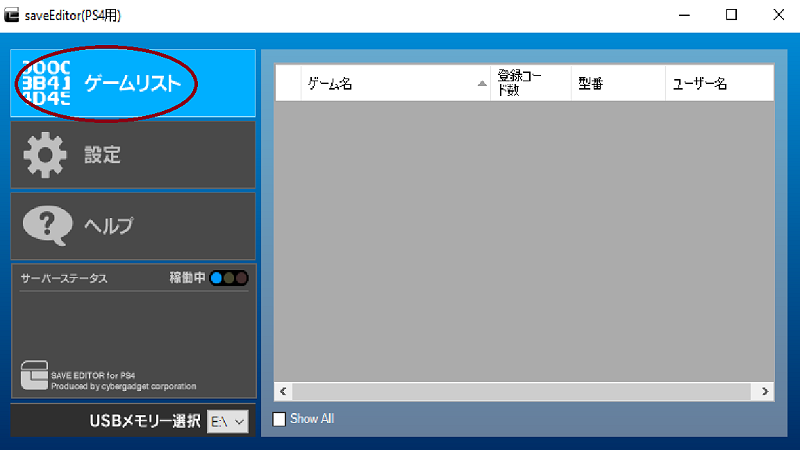
Step 2: Click in the top left side to show which saves are available.
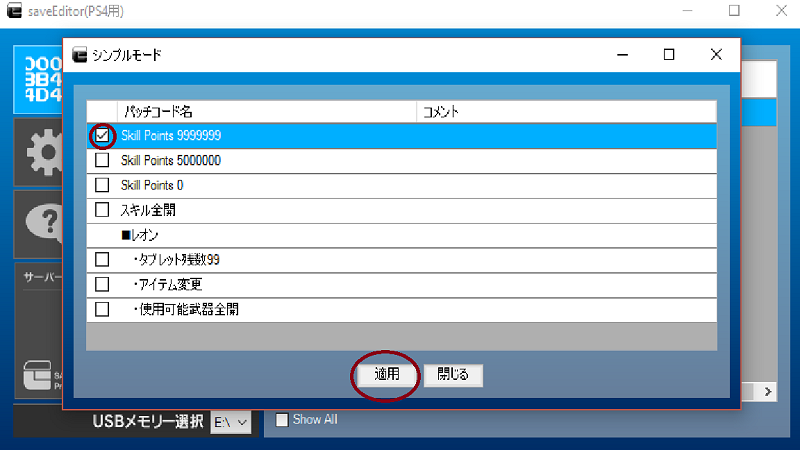
Step 3: Double click your save and choose which mod you want (Upper red circle) , then click on apply (red circle below)
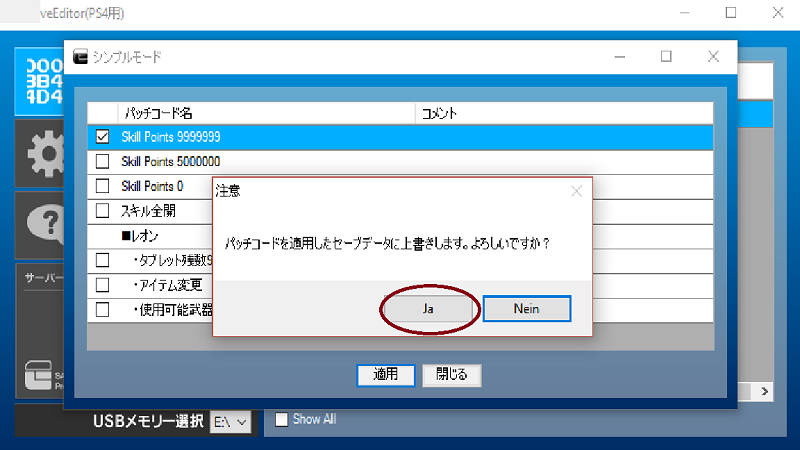
Step 4: The editor asks you if you are sure to apply this mods, click yes (red circle, here it says "ja" because my windows is in German)
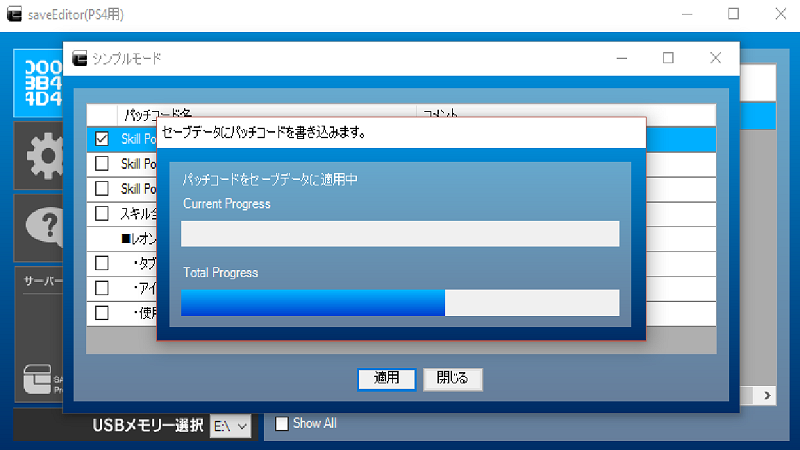
Step 5: Wait until the editor applied your chosen mods.
Step 6: Put your flash drive back into your PS4 and copy your save onto your PS4.
Step 7: Launch game and enjoy!
FAQ:
How can I get Japanese games?
You can create a Japanese account and download games there or visit Play-Asia.com (here you get also PSN cards for Japanese store).
If I mod a savegame I always get some message on Japanese, what does it mean?
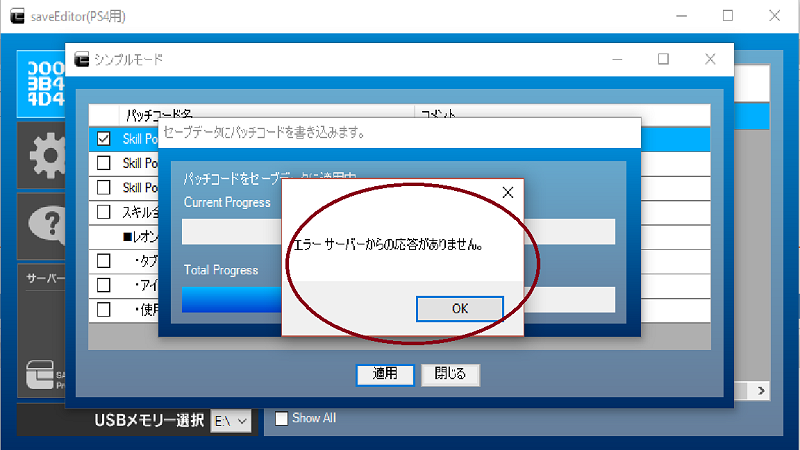
This message means that the server is not responding, i got it all day today, i dont know any...
To quote: Cyber Save Editor Tutorial
It seems that only Japanese saves are supported at the moment, so don't get it if you use US or EU saves!!!!
ALWAYS BACKUP YOUR SAVE BEFORE DOING ANY OF THE FOLLOWING STEPS!!!!
For a list with all compatible games click HERE.
Step 1: Copy the savegame you want to mod from your PS4 to flash drive and put the flash drive in your computer.
Step 2: Click in the top left side to show which saves are available.
Step 3: Double click your save and choose which mod you want (Upper red circle) , then click on apply (red circle below)
Step 4: The editor asks you if you are sure to apply this mods, click yes (red circle, here it says "ja" because my windows is in German)
Step 5: Wait until the editor applied your chosen mods.
Step 6: Put your flash drive back into your PS4 and copy your save onto your PS4.
Step 7: Launch game and enjoy!
FAQ:
How can I get Japanese games?
You can create a Japanese account and download games there or visit Play-Asia.com (here you get also PSN cards for Japanese store).
If I mod a savegame I always get some message on Japanese, what does it mean?
This message means that the server is not responding, i got it all day today, i dont know any...
Fifa 15 for PS4 is Dumped and Decrypted with Precompiled Payload
Previously we reported on Decrypted PS4 Games and PKG Files, PS4 Package Updates and PS4 Tunables and now PlayStation 4 developer @zecoxao (Twitter) tweeted that Fifa 15 has been dumped and decrypted with a precompiled payload for developers available below!
Download: DumpFile (CUSA00722) (319.69 KB) / DumpFile (CUSA00564) (319.69 KB) / DumpFile (CUSA01110) (319.69 KB) / Fifa15_DumpFile_Payload.rar (149 KB - Mirror by Fosi of e✘treme-Modding)
According to notzecoxao, the files will the files will be output to /mnt/usb0 (rightmost port), and below are the related Tweets:
Thanks to @Figure03 for the news in the PSXHAX Shoutbox!
Download: DumpFile (CUSA00722) (319.69 KB) / DumpFile (CUSA00564) (319.69 KB) / DumpFile (CUSA01110) (319.69 KB) / Fifa15_DumpFile_Payload.rar (149 KB - Mirror by Fosi of e✘treme-Modding)
According to notzecoxao, the files will the files will be output to /mnt/usb0 (rightmost port), and below are the related Tweets:
Thanks to @Figure03 for the news in the PSXHAX Shoutbox!
- PS4 Fake PKG (FPKG) Sharing Guide
- 6.XX Webkit / 6.72 PS4 Jailbreak
- 7.00-7.02 Webkit Exploit
- 7.02 Webkit / 7.02 Kernel / PS4JB
- 7.50 Kernel Exploit / PS4JB 7.55
- 7.55 / 8.00 Payloads / PS4JB2 7.55
- 9.00 PS4 Webkit Exploit
- 9.00 PS4 Payloads / GoldHEN (Latest)
- 9.00 PS4 Jailbreak Kernel Exploit
- 11.00 PS4 Jailbreak Kernel Exploit
- 13.00 PS4 Kernel Exploit / 13.02 BD-J Bug
- 4.03 PS5 Webkit Exploit
- PS5 Kernel Exploit (ExFAT Bug)
- PS5 Root Keys Obtained
- 4.03 PS5 Kernel Build String
- 4.03 PS5 Webkit Execution
- 4.03 PS5 Kernel Vulnerability
- 4.03 PS5 Filesystem Dumps
- 4.51 PS5 BD-JB Sandbox Escape
- PS5 BD-JB Exploit Hack Source Code
- Mast1c0re PS5 Userland Exploit
- PS5 Kernel Access via PS4 Exploit
- PS5 exFAT Vulnerability Disclosed
- 4.03 PS5 Kernel Exploit Webkit ROP
- 4.50 PS5 Kernel Exploit Webkit ROP
- 4.51 PS5 Kernel Exploit Webkit ROP
- 4.xx PS5 Kernel Exploit v1.01
- 4.xx PS5 Kernel Exploit v1.02 / v1.03
- PS5 1.00-6.50 Firmware Webkit
- Native PS5 ROP Chain Execution
- Mast1c0re PS5 Compiler Attack
- PS5 FreeBSD Kernel Bug & WebKit
- PS5 UMTX 2 Exploit & PS5 Jailbreak
- Byepervisor PS5 Hypervisor Exploit
- Lua Lapse PS5 Kxploit & Laps3c0re / Y2JB
- 12.00 / 12.70 PS5 Kernel Exploit