
You are using an out of date browser. It may not display this or other websites correctly.
You should upgrade or use an alternative browser.
You should upgrade or use an alternative browser.
PS4 Hacking News Reporter


PS4 Hacking News Reporter
Hello, my name is Hydrogen aka Hydro. I'm a individual that likes to inform others what is going on in the PS4 Hacking Scene at the moment, and understanding the fundamentals of basic Reverse Engineering on the Playstation 4 Console. Hope everyday these articles can impact someone's life by learning something new every single day. I also enjoy breakdancing in my free time which I always do everyday! If you have any questions or concerns, please feel free to PM me whenever you need to! If it is very important, and need to contact me fast. Best chances are to Tweet at me on Twitter.
Twitter: HydrogenNGU
NextGenUpdate Profile: Hydrogen
NGU PS4 Mods and Cheats: PS4 Mods and Cheats Section
Twitter: HydrogenNGU
NextGenUpdate Profile: Hydrogen
NGU PS4 Mods and Cheats: PS4 Mods and Cheats Section
PS4 4.07 Unlimited PSN Gamesharing Hardware Method by Xmax Katsu!
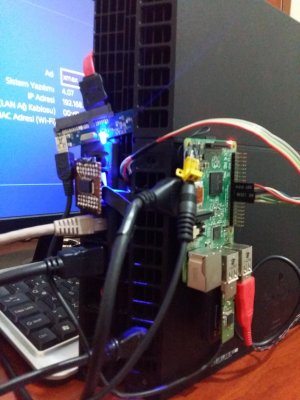
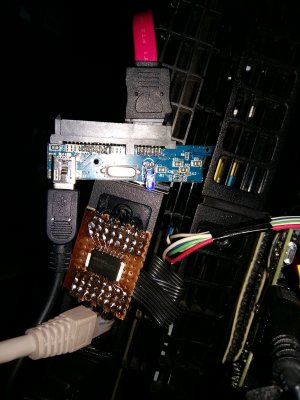
Previously we've seen the Russian / Brazilian, Egyption and standard PS4 GameSharing methods, but today PlayStation 4 hacker xmaxkatsu shared a glimpse at a hardware method he's using to get unlimited PSN games on primary accounts via Sony's latest PlayStation 4 Firmware 4.07! 
This isn't the first time hardware mods have been suggested for the PlayStation 4, and his Tweet (below) states the following, to quote:
 "4.07
"4.07  flash+HDD S/N bypass unlimit PSN primary acc share possible "
Just imagine how many times you could gameshare Destiny, Call of Duty, Final Fantasy VX, or any other game you'd like. Especially for the money-grabbers who hack a console to make revenue from it, I could see it go big in a way.
 We'll see if I can speak with Xmax Katsu this week, and maybe we can find out a bit more over this topic. Hopefully he can post a tutorial over this, and what is needed in order to execute this to work!
Cheers to @mcmrc1 and @UmarDaBest559 for the news tip also in the PSXHAX Shoutbox!
This isn't the first time hardware mods have been suggested for the PlayStation 4, and his Tweet (below) states the following, to quote:
"4.07 flash+HDD S/N bypass unlimit PSN primary acc share possible "Just imagine how many times you could gameshare Destiny, Call of Duty, Final Fantasy VX, or any other game you'd like. Especially for the money-grabbers who hack a console to make revenue from it, I could see it go big in a way.
We'll see if I can speak with Xmax Katsu this week, and maybe we can find out a bit more over this topic. Hopefully he can post a tutorial over this, and what is needed in order to execute this to work!Cheers to @mcmrc1 and @UmarDaBest559 for the news tip also in the PSXHAX Shoutbox!
Reading and Writing to PS4 Process Memory Using Proc_rwmem Guide
Hello PSXHAX Members, today PS4 Developer Zecoxao shared a new PlayStation 4 tutorial proceeding his PS4 Version Spoof covering reading and writing to the PS4 process memory using proc_rwmem for those on a 1.76 Firmware console.
Previously, Peek and Poke support was added to PS4Link by PS4 Developer psxdev (Big Boss). This nice addition helps out to Read and Write to the PlayStation 4 process memory using the function "proc_rwmem".
The original credits goes to Wskeu and Wildcard, these individuals did the reading part and writing part of this tutorial you are about to read.
To roughly quote Zecoxao's tutorial: How to read and write to process memory using proc_rwmem
Credits (these go first):
Original authors: wskeu (for the reading part), and wildcard (for the writing part)
Requirements:
1. Compile the payload. Specifically to what you want to patch, the size, etc. So, this:
Previously, Peek and Poke support was added to PS4Link by PS4 Developer psxdev (Big Boss). This nice addition helps out to Read and Write to the PlayStation 4 process memory using the function "proc_rwmem".
The original credits goes to Wskeu and Wildcard, these individuals did the reading part and writing part of this tutorial you are about to read.
To roughly quote Zecoxao's tutorial: How to read and write to process memory using proc_rwmem
Credits (these go first):
Original authors: wskeu (for the reading part), and wildcard (for the writing part)
Requirements:
- 1.76 console
- elf loader precompiled or extreme-modding's elf loader
- ps4–***
- the payload source
- a brain
1. Compile the payload. Specifically to what you want to patch, the size, etc. So, this:
Code:
/* set...
DualShock 4 (DS4) PS4 Firmware Dump & Reversing Tools by DS4User
Hello @PSXHAX, today PlayStation 4 Developer Zecoxao shared a new GitHub from DS4User containing a DualShock 4 (DS4) PS4 Firmware dump and reverse-engineering tools for other devs to examine! 
Previously, we have seen PS4 Developer J0lama release his DS4 Linux Library to control DualShock 4 Controllers which you can view here if you haven't seen it yet: J0lama's DS4.lib
Github Link for the DS4 Code: DS4 GitHub
Clone/Download: DS4User.git / ds4-master.zip / ds4-master.zip (Mirror) / ds4-master.zip (Mirror #2)
Raw File for Code Below: Raw Code
 From the README.md file: DS4
Tools for working with DualShock 4
With fw of controller, it is possible to do interesting things like:
Previously, we have seen PS4 Developer J0lama release his DS4 Linux Library to control DualShock 4 Controllers which you can view here if you haven't seen it yet: J0lama's DS4.lib
Github Link for the DS4 Code: DS4 GitHub
Clone/Download: DS4User.git / ds4-master.zip / ds4-master.zip (Mirror) / ds4-master.zip (Mirror #2)
Raw File for Code Below: Raw Code
From the README.md file: DS4Tools for working with DualShock 4
With fw of controller, it is possible to do interesting things like:
- flash custom fw to controller
- learn how all aspects of controller works
- implement native pairing on other host devices
- present custom hardware as "official" DS4 to PS4
Code:
'''
fw file:
With fw of controller, it is possible to do interesting things like:
* flash custom fw to controller
* learn how all aspects of controller works
* implement native pairing on other host devices
* present custom hardware as "official" DS4 to PS4
The following code shows how to do the first stage of auth - authenticating
over USB in order to have console send the bluetooth link key and host address.
(C) HAXX
'''
import struct...
Decrypting and Dumping PS4 Games (EBOOT & SPRX) Guide by Zecoxao
Hello PSXHAX, today PlayStation 4 Developer Zecoxao has conveyed a new tutorial on how to decrypt and dump PS4 games (EBOOT, PRX, SPRX).
Previously, he made a tutorial on How to Dump and Decrypt Usermodules, which is a continuation on this topic he brings today.
There was a mistake on the tutorial, but @zecoxao had got it fixed, so everything should be okay now. Lets jump straight into this tutorial.
To roughly quote Zecoxao's Tutorial: [Tutorial] How to Decrypt and Dump Games (EBOOT, PRX and SPRX)
Requirements:
1. Compile the payload with the correct commands. Specifically for The Playroom (CUSA00001):
2. Start the game.
3. Minimize the game (PS Button)
4. Access elf loader
5. Let it load all the way until stage 5 and stabilize
6. Plug the usb stick or hdd on the rightmost port, near PS4 logo
7. Load the payload:
8. when it finishes loading (user...
Previously, he made a tutorial on How to Dump and Decrypt Usermodules, which is a continuation on this topic he brings today.
There was a mistake on the tutorial, but @zecoxao had got it fixed, so everything should be okay now. Lets jump straight into this tutorial.
To roughly quote Zecoxao's Tutorial: [Tutorial] How to Decrypt and Dump Games (EBOOT, PRX and SPRX)
Requirements:
- ps4sdk precompiled
- elf loader precompiled or extreme-modding's elf loader.
- the payload source
- 1.76 console
- usb pendrive or external hdd (fat32 or exfat, exfat recommended)
- A preactivated online game or a purchased disc game
- The TITLE ID of the disc
1. Compile the payload with the correct commands. Specifically for The Playroom (CUSA00001):
Code:
decrypt_and_dump_self("/mnt/sandbox/pfsmnt/CUSA00001-app0/eboot.bin", "/mnt/usb0/eboot.bin");
decrypt_and_dump_self("/mnt/sandbox/pfsmnt/CUSA00001-app0/sce_module/libc.prx", "/mnt/usb0/libc.prx");
decrypt_and_dump_self("/mnt/sandbox/pfsmnt/CUSA00001-app0/sce_module/libSceFios2.prx", "/mnt/usb0/libSceFios2.prx");
decrypt_and_dump_self("/mnt/sandbox/pfsmnt/CUSA00001-app0/sce_sys/about/right.sprx", "/mnt/usb0/right.sprx");3. Minimize the game (PS Button)
4. Access elf loader
5. Let it load all the way until stage 5 and stabilize
6. Plug the usb stick or hdd on the rightmost port, near PS4 logo
7. Load the payload:
Code:
#listener
socat - TCP:my.ps4.ip:5052
#sender
socat -u FILE:path/to/DumpFile TCP:my.ps4.ip:5053- PS4 Fake PKG (FPKG) Sharing Guide
- 6.XX Webkit / 6.72 PS4 Jailbreak
- 7.00-7.02 Webkit Exploit
- 7.02 Webkit / 7.02 Kernel / PS4JB
- 7.50 Kernel Exploit / PS4JB 7.55
- 7.55 / 8.00 Payloads / PS4JB2 7.55
- 9.00 PS4 Webkit Exploit
- 9.00 PS4 Payloads / GoldHEN (Latest)
- 9.00 PS4 Jailbreak Kernel Exploit
- 11.00 PS4 Jailbreak Kernel Exploit
- 13.00 PS4 Kernel Exploit / 13.02 BD-J Bug
- 4.03 PS5 Webkit Exploit
- PS5 Kernel Exploit (ExFAT Bug)
- PS5 Root Keys Obtained
- 4.03 PS5 Kernel Build String
- 4.03 PS5 Webkit Execution
- 4.03 PS5 Kernel Vulnerability
- 4.03 PS5 Filesystem Dumps
- 4.51 PS5 BD-JB Sandbox Escape
- PS5 BD-JB Exploit Hack Source Code
- Mast1c0re PS5 Userland Exploit
- PS5 Kernel Access via PS4 Exploit
- PS5 exFAT Vulnerability Disclosed
- 4.03 PS5 Kernel Exploit Webkit ROP
- 4.50 PS5 Kernel Exploit Webkit ROP
- 4.51 PS5 Kernel Exploit Webkit ROP
- 4.xx PS5 Kernel Exploit v1.01
- 4.xx PS5 Kernel Exploit v1.02 / v1.03
- PS5 1.00-6.50 Firmware Webkit
- Native PS5 ROP Chain Execution
- Mast1c0re PS5 Compiler Attack
- PS5 FreeBSD Kernel Bug & WebKit
- PS5 UMTX 2 Exploit & PS5 Jailbreak
- Byepervisor PS5 Hypervisor Exploit
- Lua Lapse PS5 Kxploit & Laps3c0re / Y2JB
- 12.00 / 12.70 PS5 Kernel Exploit