PSXHAX.COM website and domain for sale. Contact Us with your offer!

You are using an out of date browser. It may not display this or other websites correctly.
You should upgrade or use an alternative browser.
You should upgrade or use an alternative browser.
PS4 PKG Information on PlayStation 4 Packages and Keys via Maxton
Proceeding Flat_z's Write-up, the PS4 Backporting Method Outline and his recent PKGEditor EKPFS / XTS Key Support updates, PlayStation 4 developer maxton shared on Github some handy Package information including details on PS4 PKG encryption developer-controlled keys, PFS key generation, the ENTRY_KEYS entry, the IMAGE_KEY entry, how to decrypt PKGs and PKG authentication. 
This also comes following the PFS Protection Bypass method, PFS Explorer Support for GameArchives (Latest Version) archive explorer, PS Vita PlayStation File System Keys, MakePFS, PS4 Sealedkey / pfsSKKey details for savegame and trophy data decryption, a PSFSKKey savegame decryption tool (lacking SAMU PFS keys) and the PFS Structure.
From the LibOrbisPkg Wiki via maxton on Github, to quote: PKG Information
The PS4 Dev Wiki has some information on PKGs...
This also comes following the PFS Protection Bypass method, PFS Explorer Support for GameArchives (Latest Version) archive explorer, PS Vita PlayStation File System Keys, MakePFS, PS4 Sealedkey / pfsSKKey details for savegame and trophy data decryption, a PSFSKKey savegame decryption tool (lacking SAMU PFS keys) and the PFS Structure.
From the LibOrbisPkg Wiki via maxton on Github, to quote: PKG Information
The PS4 Dev Wiki has some information on PKGs...
Blu-Play DOOM I Port by Sleirsgoevy, Homebrew Games with C / C++
Following the second PS4 Blu-Play homebrew release The UFO Game! from LuBlu Entertainment, developer sleirsgoevy demonstrates that you can create Blu-ray Disc Java homebrew with C or C++ using Cybil MIPS transpiler. Simply convert your C / C++ code into BD-J. 
Sounds too good to be true? I thought so too, but then he dishes up a working Blu-Play port of Doom, after just a couple of days.
Download: power-of-bdj-master.zip / Power of BD-J GIT / bdj-cibyl-master.zip / BD-J Cibyl GIT / bdj-doom-master.zip / doom.zip (Compiled) / BD-J DOOM GIT / Doom-BluPlay.iso via Blu-Play.com
I tested it on PS3, and found the framerate surprisingly good. It's currently still just an early preview of course, but it's definitely a good proof of concept.
Would be interesting if any homebrew devs could try porting some of their native homebrew to PS4 BD-J using this approach. Here are some related topics on PlayStationHaX for those interested:
Sounds too good to be true? I thought so too, but then he dishes up a working Blu-Play port of Doom, after just a couple of days.
Download: power-of-bdj-master.zip / Power of BD-J GIT / bdj-cibyl-master.zip / BD-J Cibyl GIT / bdj-doom-master.zip / doom.zip (Compiled) / BD-J DOOM GIT / Doom-BluPlay.iso via Blu-Play.com
I tested it on PS3, and found the framerate surprisingly good. It's currently still just an early preview of course, but it's definitely a good proof of concept.
Would be interesting if any homebrew devs could try porting some of their native homebrew to PS4 BD-J using this approach. Here are some related topics on PlayStationHaX for those interested:
LibOrbisPkg PKGTool: PKGEditor for PS4 Updated by Maxton with EKPFS / XTS Key Support
Since yesterday's PS4 PKG Backporting updates PlayStation 4 scene developer maxton of Maxton.xyz announced on Twitter that he updated the LibOrbisPkg PKGTool (LibOrbisPkg PkgEditor) adding support for EKPFS / XTS keys to access an encrypted PKG's file system alongside a keydb.json file to store the keys eliminating the need to paste them in every time a Package is opened. 
Download: PKGEditor (Latest Builds) / GIT / PkgEditor-0.1.214.rar (102 KB) / pkgtool-linux-x64.7z (128 KB) via @KIWIDOGGIE aka kd_tech_ on X
He notes keys are now saved to a JSON file located at %AppData%/LibOrbisPkg/keydb.json
To quote from the README.md: LibOrbisPkg
I am developing an open source library for reading and writing PS4 PKG files. This project's goal is to eliminate the need to use proprietary *** tools. Without a proper open PKG tool, the PS4 homebrew scene cannot flourish.
All code in this repository is licensed under the GNU LGPL version 3, which can be found in LICENSE.txt.
Download
The latest builds are available to download at AppVeyor.
Usage
PkgEditor
PkgEditor is a GUI tool with which you can edit GP4 projects, create and edit SFO files, and build PKG and PFS archives. The tool also supports opening PKGs directly. You can see the header, entries, and if the package is a fake PKG or you enter a passcode, you can browse files as well.
PkgTool
PkgTool is a command line tool for common PKG/PFS/SFO tasks. Integrate it into your build scripts!
Download: PKGEditor (Latest Builds) / GIT / PkgEditor-0.1.214.rar (102 KB) / pkgtool-linux-x64.7z (128 KB) via @KIWIDOGGIE aka kd_tech_ on X
He notes keys are now saved to a JSON file located at %AppData%/LibOrbisPkg/keydb.json
To quote from the README.md: LibOrbisPkg
I am developing an open source library for reading and writing PS4 PKG files. This project's goal is to eliminate the need to use proprietary *** tools. Without a proper open PKG tool, the PS4 homebrew scene cannot flourish.
All code in this repository is licensed under the GNU LGPL version 3, which can be found in LICENSE.txt.
Download
The latest builds are available to download at AppVeyor.
Usage
PkgEditor
PkgEditor is a GUI tool with which you can edit GP4 projects, create and edit SFO files, and build PKG and PFS archives. The tool also supports opening PKGs directly. You can see the header, entries, and if the package is a fake PKG or you enter a passcode, you can browse files as well.
PkgTool
PkgTool is a command line tool for common PKG/PFS/SFO tasks. Integrate it into your build scripts!
Code:
Usage: PkgTool.exe <verb> [options ...]

Verbs:
  pfs_buildinner <input_project.gp4> <output_pfs.dat>
    Builds an inner PFS image from the given GP4 project.

  pfs_buildouter [--encrypt] <input_project.gp4>...
PS4 BCP Method Backporting PlayStation 4 PKGs Outline & PKGEditor Updates
Lately there's been a surge of PS4 Game PKG's normally requiring higher Firmware that PlayStation 4 scene developers have been able to 'backport' to work on lower Firmware including Jailbroken PS4 5.05-5.07 Consoles following the PS4 Backporting Instructions to Play 6.72 Games on 5.05 Firmware. 
Spoiler: Examples
In recent weeks a PKGTool bug fix was discovered by 3226_2143 and developer m4xton committed a Fix integer overflow in PKGTool parallel extraction (PS4 PKG Tool GUI) on the LibOrbisPkg GIT to extract game files properly.
Spoiler: PKGTool Bug Fix Tweets
As a result, announcements were made pushing the PlayStation 4 games official releases back further:
Spoiler: Updated Global Release Dates
Since then, one of the biggest questions PlayStation 4 sceners have been wondering is: What's involved in the process of backporting...
Spoiler: Examples
In recent weeks a PKGTool bug fix was discovered by 3226_2143 and developer m4xton committed a Fix integer overflow in PKGTool parallel extraction (PS4 PKG Tool GUI) on the LibOrbisPkg GIT to extract game files properly.
Spoiler: PKGTool Bug Fix Tweets
As a result, announcements were made pushing the PlayStation 4 games official releases back further:
Spoiler: Updated Global Release Dates
Since then, one of the biggest questions PlayStation 4 sceners have been wondering is: What's involved in the process of backporting...
The Elder Scrolls Online PS4 Ability Timer Project by Sourander
Currently The Elder Scrolls Online bundle by Bethesda Softworks is 60% off on PSN through January 17th at 11:00 am, and this weekend sourander made available on Github a small project for ESO fans that mimics the PC ability timer addons for the PS4 version of the online multiplayer RPG. ⏲
Download: eso-ability-timer-master.zip / GIT
From the README.md, to quote: ESO Ability Timer
A small project that works on PS4 version of ESO. It mimics similar ability timer addons available on PC. It keeps track of when you have activated an ability and creates an animated bar based on the time data.
Important The software works only on two skills per character profile.
Requirements
This project requires that you have ffmpeg installed with Blackmagic ***. The code has been tested with FFmpeg 2.1.0 and Blackmagic Desktop 11.4 (and same version for ***). My setup during dev phase was:
The software's core functionality is to grab a frame from gameplay, crop the ability icons, and check whether the icon is activated or not. This comparison is performed using structural similarity function from Sklearn.
For this comparison to work, you must manually grab a frame when the icons activates. I have provided the icons I am using, but if your build uses completely different skills, you must grab these yourself.
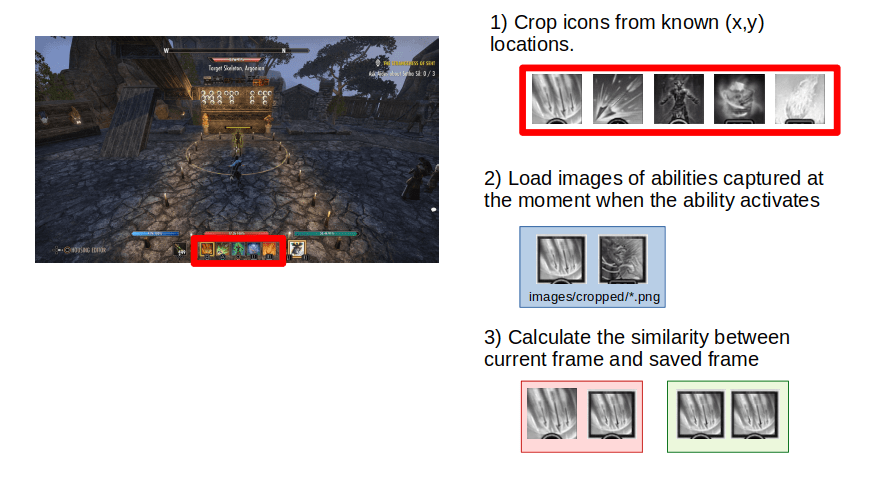
Assumed that you have a screenshot of the game taken at the moment when the ability icon is in its activated state, you can save the icon by modifying and running a helper script: ./tools/generate_crop_from_still.py
Installation
Check the requirements section for other software.
Usage
Before using the script, you must...
Download: eso-ability-timer-master.zip / GIT
From the README.md, to quote: ESO Ability Timer
A small project that works on PS4 version of ESO. It mimics similar ability timer addons available on PC. It keeps track of when you have activated an ability and creates an animated bar based on the time data.
Important The software works only on two skills per character profile.
Requirements
This project requires that you have ffmpeg installed with Blackmagic ***. The code has been tested with FFmpeg 2.1.0 and Blackmagic Desktop 11.4 (and same version for ***). My setup during dev phase was:
- PC with Ubuntu 18.04 Desktop
- Blackmagic Intensity Pro 4K capture card
- PS4 Pro with Elder Scrolls Online
- Python 3 with pip
The software's core functionality is to grab a frame from gameplay, crop the ability icons, and check whether the icon is activated or not. This comparison is performed using structural similarity function from Sklearn.
For this comparison to work, you must manually grab a frame when the icons activates. I have provided the icons I am using, but if your build uses completely different skills, you must grab these yourself.
Assumed that you have a screenshot of the game taken at the moment when the ability icon is in its activated state, you can save the icon by modifying and running a helper script: ./tools/generate_crop_from_still.py
Installation
Check the requirements section for other software.
Code:
git clone https://github.com/sourander/eso-ability-timer.git
pip install -r requirements.txtBefore using the script, you must...
- PS4 Fake PKG (FPKG) Sharing Guide
- 6.XX Webkit / 6.72 PS4 Jailbreak
- 7.00-7.02 Webkit Exploit
- 7.02 Webkit / 7.02 Kernel / PS4JB
- 7.50 Kernel Exploit / PS4JB 7.55
- 7.55 / 8.00 Payloads / PS4JB2 7.55
- 9.00 PS4 Webkit Exploit
- 9.00 PS4 Payloads / GoldHEN (Latest)
- 9.00 PS4 Jailbreak Kernel Exploit
- 11.00 PS4 Jailbreak Kernel Exploit
- 13.00 PS4 Kernel Exploit / 13.02 BD-J Bug
- 4.03 PS5 Webkit Exploit
- PS5 Kernel Exploit (ExFAT Bug)
- PS5 Root Keys Obtained
- 4.03 PS5 Kernel Build String
- 4.03 PS5 Webkit Execution
- 4.03 PS5 Kernel Vulnerability
- 4.03 PS5 Filesystem Dumps
- 4.51 PS5 BD-JB Sandbox Escape
- PS5 BD-JB Exploit Hack Source Code
- Mast1c0re PS5 Userland Exploit
- PS5 Kernel Access via PS4 Exploit
- PS5 exFAT Vulnerability Disclosed
- 4.03 PS5 Kernel Exploit Webkit ROP
- 4.50 PS5 Kernel Exploit Webkit ROP
- 4.51 PS5 Kernel Exploit Webkit ROP
- 4.xx PS5 Kernel Exploit v1.01
- 4.xx PS5 Kernel Exploit v1.02 / v1.03
- PS5 1.00-6.50 Firmware Webkit
- Native PS5 ROP Chain Execution
- Mast1c0re PS5 Compiler Attack
- PS5 FreeBSD Kernel Bug & WebKit
- PS5 UMTX 2 Exploit & PS5 Jailbreak
- Byepervisor PS5 Hypervisor Exploit
- Lua Lapse PS5 Kxploit & Laps3c0re / Y2JB
- 12.00 / 12.70 PS5 Kernel Exploit