PSXHAX.COM website and domain for sale. Contact Us with your offer!

You are using an out of date browser. It may not display this or other websites correctly.
You should upgrade or use an alternative browser.
You should upgrade or use an alternative browser.
PS4 Web Trainer for PlayStation 4 Game Cheats by TylerMods
As you know, about 8 months ago I (@TylerMods) released a desktop application, PS4 Trainer by TylerMods (Guide) to easily cheat in games on a kexploited PS4. Over time, the trainer grew in games, cheats and users.
Since this period of time the trainer's file size also began to grow to a ridiculous amount due to the pictures. We have been working on a new project called the Web Trainer.
The Web Trainer
We were finally able to finish this project and release it, but it's not done yet. This trainer is much smaller in size, much bigger in cheats. You are able to use this trainer on your Windows, MAC, mobile devices, and more just by visiting the trainer website. The speeds are greater along with overall user experience.
It is so exciting to share this with all of you. The future of this trainer is greater than even we can see due to everything being dynamic. Unlike my previous trainer, everything was hard-coded and a simple cheat fix would require a full download of the application.
With this trainer I am able to fix a cheat without you even realizing (although I do keep our Twitter updated) it. I plan to add more features while also not trying to over-do it and over-load it. There is plenty of work left to be done.
In order for this trainer to work, please... don't forget the payload, "WebRTE". You can enable this payload/exploit through Al Azif's DNS server or inject it manually.
How to use this trainer (Step by step)
1) Enable HEN and/or Mira if necessary.
2) Enable/Inject the WebRTE payload/exploit.
3) Visit ps4trainer.com/Trainer and enter your PS4 IP.
4) Launch your game on the PS4.
5) Click your game (with the matching CUSA/version) in the trainer.
6) If the trainer message says "Trainer Attached." you can start cheating.
Links
Since this period of time the trainer's file size also began to grow to a ridiculous amount due to the pictures. We have been working on a new project called the Web Trainer.
The Web Trainer
We were finally able to finish this project and release it, but it's not done yet. This trainer is much smaller in size, much bigger in cheats. You are able to use this trainer on your Windows, MAC, mobile devices, and more just by visiting the trainer website. The speeds are greater along with overall user experience.
It is so exciting to share this with all of you. The future of this trainer is greater than even we can see due to everything being dynamic. Unlike my previous trainer, everything was hard-coded and a simple cheat fix would require a full download of the application.
With this trainer I am able to fix a cheat without you even realizing (although I do keep our Twitter updated) it. I plan to add more features while also not trying to over-do it and over-load it. There is plenty of work left to be done.
In order for this trainer to work, please... don't forget the payload, "WebRTE". You can enable this payload/exploit through Al Azif's DNS server or inject it manually.
How to use this trainer (Step by step)
1) Enable HEN and/or Mira if necessary.
2) Enable/Inject the WebRTE payload/exploit.
3) Visit ps4trainer.com/Trainer and enter your PS4 IP.
4) Launch your game on the PS4.
5) Click your game (with the matching CUSA/version) in the trainer.
6) If the trainer message says "Trainer Attached." you can start cheating.
Links
- PS4 Trainer - PS4Trainer.com / GIT
- PS4 Trainer Discord
- Twitter (Updates + more) -...
PS4 EBOOT.BIN ELF Patcher for Skyrim Special Edition & Fallout 4
Proceeding the PS4 EBOOT / ELF FW Patcher method and previous updates, this weekend developer @Backporter (aka Kernel Panic on Twitter) made available a PS4 EBOOT.BIN ELF Patcher for Skyrim Special Edition and Fallout 4 game modders. 
Download: Eboot.bin.Patcher.exe / Eboot.bin.Patcher.7z / EBOOT.BIN-ELF-Patcher.rar / GIT / Discord Official PS4 Server
To quote from the README.md: EBOOT.BIN-ELF-Patcher
This only works with SSE version 1.09 and 1.22 for Fallout 4.
This is for the PS4, This allows you to patch Skyrim Special Edition and Fallout 4 to look for "mods.txt", it could also be used to add your own custom patches as long as you have offsets and are willing to do so.
Side notes, ESM must be first ESP 2nd and ESL 3rd. For a example i'll show you what it should look like this:
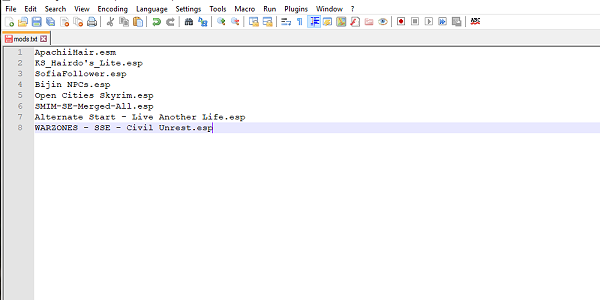
Cheers to @Wultra for sharing the news tip on Twitter earlier today!
How To Generate FNIS Behavior For PS4 For Skyrim
been reverse engineering the PS4 version of skyrim, found a serious issue lol, their own implementation of one of the papyrus functions is completely broken, calling it fetlocks the game and causes a ASYNC failure, take a guess at what the function is...
PlayBink, yes, the video player does not work when called via papyrus, I've "fixed" it but even than the implementation of...
Download: Eboot.bin.Patcher.exe / Eboot.bin.Patcher.7z / EBOOT.BIN-ELF-Patcher.rar / GIT / Discord Official PS4 Server
To quote from the README.md: EBOOT.BIN-ELF-Patcher
This is for the PS4, This allows you to patch Skyrim Special Edition and Fallout 4 to look for "mods.txt", it could also be used to add your own custom patches as long as you have offsets and are willing to do so.
Side notes, ESM must be first ESP 2nd and ESL 3rd. For a example i'll show you what it should look like this:
Cheers to @Wultra for sharing the news tip on Twitter earlier today!
How To Generate FNIS Behavior For PS4 For Skyrim
been reverse engineering the PS4 version of skyrim, found a serious issue lol, their own implementation of one of the papyrus functions is completely broken, calling it fetlocks the game and causes a ASYNC failure, take a guess at what the function is...
PlayBink, yes, the video player does not work when called via papyrus, I've "fixed" it but even than the implementation of...
PGEN Sega Genesis / MegaDrive PS2 on PS4 Emulator Port by Markus95
Following his recent RetroArch PS2 on PS4 homebrew package, PlayStation 4 developer @Markus95 has now released a PGEN PS2 emulator port PKG file for PS4 which emulates Sega Genesis / MegaDrive games for retrogamer fans! 
Download: Megadrive-Genesis_(PS2).pkg (25.69 MB) / UP9000-CUSB00002_00-SCUS974900000001-A0100-V0100.pkg (684.03 MB - Sega Megadrive / Genesis EMU & ROM Pack via @astronman) / MegaDrive (7.5 GB ROMs via @prezax)
This comes after the PS4NES / PS4GearSystem Nintendo Entertainment System Emulator (NES) and Sega Master System / Game Gear emulator ports, and to quote from his blog post on Logic-Sunrise.com roughly translated: PS4-MAJ Megadrive / Genesis Emulator (PS2) on PS4
After adapting and publishing the 2 PS2 cores (2048 and QuickNES) on PS4, here is another PS2 emulator adapted for our dear PS4: PGEN.
PGEN is a Megadrive / Genesis emulator, so you can launch your megadrive ROMs on your PS4.
This emulator uses the PS2 part of our PS4, although it is not native, it works very well.
This may cause waiting until the publication of RetroArch version PS4.
You will have to add your own ROMs in the ROMS folder, for that you will also have to decompile the FPKG (password: 00000000000000000000000000000000) with Fake_PKG_Generator, open the file disc01.iso with CDgenPS2, copy your ROMs in the ROMS folder, recreate the iso with CDgenPS2 and finally recompile the FPKG always with...
Download: Megadrive-Genesis_(PS2).pkg (25.69 MB) / UP9000-CUSB00002_00-SCUS974900000001-A0100-V0100.pkg (684.03 MB - Sega Megadrive / Genesis EMU & ROM Pack via @astronman) / MegaDrive (7.5 GB ROMs via @prezax)
This comes after the PS4NES / PS4GearSystem Nintendo Entertainment System Emulator (NES) and Sega Master System / Game Gear emulator ports, and to quote from his blog post on Logic-Sunrise.com roughly translated: PS4-MAJ Megadrive / Genesis Emulator (PS2) on PS4
After adapting and publishing the 2 PS2 cores (2048 and QuickNES) on PS4, here is another PS2 emulator adapted for our dear PS4: PGEN.
PGEN is a Megadrive / Genesis emulator, so you can launch your megadrive ROMs on your PS4.
This emulator uses the PS2 part of our PS4, although it is not native, it works very well.
This may cause waiting until the publication of RetroArch version PS4.
You will have to add your own ROMs in the ROMS folder, for that you will also have to decompile the FPKG (password: 00000000000000000000000000000000) with Fake_PKG_Generator, open the file disc01.iso with CDgenPS2, copy your ROMs in the ROMS folder, recreate the iso with CDgenPS2 and finally recompile the FPKG always with...
RetroArch PS2 on PS4 (2048 and QuickNES Cores) PKGs via Markus95
Proceeding his Half-Life Blue Shift PS4 PKG Mod and the RetroArch PS4 (Orbis) Support announcement, PlayStation 4 developer @Markus95 made available via Twitter some PS4 RetroArch PS2 PKGs utilizing the 2048 and QuickNES cores on PS4 today. 
Download: RetroArchPS2_(PS4).rar (195.69 MB) / Latest Builds
While there are no video game ROMs included for legal reasons, inside the archive above are PlayStation 4 homebrew packages for RetroArch_2048_(PS2).pkg, RetroArch_NES.pkg and Rom_NES_Installer.pkg with additional details below.
To quote from his blog post on Logic-Sunrise.com, roughly translated: PS4 RetroArch PS2 (2048 and QuickNES) on PS4
There is little Libretro Team published 2 cores (2048 and quickNES) for PS2, they allow to enjoy 2048, a video game type puzzle designed in March 2014 by the Italian independent developer Gabriele Cirulli and quickNES, a NES emulator.
After this publication I had fun testing these 2 cores on PS4 and it turned out that they are both functional thanks to the PS2 emulator PS4.
We all know that the team Libretro is working right now on RetroArch for PS4, that's why I did not want to publish these 2 cores PS2 adapted for PS4, but after several requests on Twitter and by PM, I decided to finally make public.
I still specify that these 2 cores will be very quickly obsolete (not to say that they are already) between 2048 which has no interest for me and quickNES which is only a PS2 version while an emulator Native NES for PS4 already exists, so I did not see the need to publish these versions PS2, finally if it can please...
You will find in the attached archive 3 PKGs:
Download: RetroArchPS2_(PS4).rar (195.69 MB) / Latest Builds
While there are no video game ROMs included for legal reasons, inside the archive above are PlayStation 4 homebrew packages for RetroArch_2048_(PS2).pkg, RetroArch_NES.pkg and Rom_NES_Installer.pkg with additional details below.
To quote from his blog post on Logic-Sunrise.com, roughly translated: PS4 RetroArch PS2 (2048 and QuickNES) on PS4
There is little Libretro Team published 2 cores (2048 and quickNES) for PS2, they allow to enjoy 2048, a video game type puzzle designed in March 2014 by the Italian independent developer Gabriele Cirulli and quickNES, a NES emulator.
After this publication I had fun testing these 2 cores on PS4 and it turned out that they are both functional thanks to the PS2 emulator PS4.
We all know that the team Libretro is working right now on RetroArch for PS4, that's why I did not want to publish these 2 cores PS2 adapted for PS4, but after several requests on Twitter and by PM, I decided to finally make public.
I still specify that these 2 cores will be very quickly obsolete (not to say that they are already) between 2048 which has no interest for me and quickNES which is only a PS2 version while an emulator Native NES for PS4 already exists, so I did not see the need to publish these versions PS2, finally if it can please...
You will find in the attached archive 3 PKGs:
- RetroArch_2048_(PS2)
- RetroArch_NES
- Roms_NES_Installer
BwE PS4 NOR Comparator & PS3 NAND Validator Source Code
Heeey! No annoying loader or chiptune this time. 
Following my BwE Complete PS4 NOR Removal Guide and BwE PS4 NOR Validator v1.3.1 update, this program is super basic and is pretty much only for developers and repairers. I use it all the time at Better Way Electronics! Why not release it! And now with a paradigm shift - im releasing the source!
Download: BwE_PS4_NOR_Comparator.rar (2.7 MB - Archive Password: BwE) / GIT
Spoiler: Depreciated
I also thought I'd release the severely outdated PS3 NAND validator source. It's messy and unprofessional, but hey it worked and it was made in 2012/2013. Feel free to update it.
Don't trust my PS4 NOR Validator? Have a whole bunch of dumps from the various consoles you have been repairing/collecting? Well now is your chance to shine!
I present to you the BwE PS4 NOR Comparator! Now you can gather vital information from all of your dumps at once and compare them all by yourself!
Be sure to use Notepad++ as the outputs can be large enough to crash your normal text editor. Oh and a multi-cored PC would help.
I think at this point I am finding excuses to release stuff...
Version History:
Following my BwE Complete PS4 NOR Removal Guide and BwE PS4 NOR Validator v1.3.1 update, this program is super basic and is pretty much only for developers and repairers. I use it all the time at Better Way Electronics! Why not release it! And now with a paradigm shift - im releasing the source!
Download: BwE_PS4_NOR_Comparator.rar (2.7 MB - Archive Password: BwE) / GIT
Spoiler: Depreciated
I also thought I'd release the severely outdated PS3 NAND validator source. It's messy and unprofessional, but hey it worked and it was made in 2012/2013. Feel free to update it.
Don't trust my PS4 NOR Validator? Have a whole bunch of dumps from the various consoles you have been repairing/collecting? Well now is your chance to shine!
I present to you the BwE PS4 NOR Comparator! Now you can gather vital information from all of your dumps at once and compare them all by yourself!
Be sure to use Notepad++ as the outputs can be large enough to crash your normal text editor. Oh and a multi-cored PC would help.
I think at this point I am finding excuses to release stuff...
Version History:
- 1.00 (19/01/19) - First Release!
- 1.01 (20/01/19) - Whoops! Fixed Bug. Added Additional Comparison.
- 1.02 (02/03/19) - Added FW/BIOS Versioning & Made Outputs (Slightly) Prettier.
- 1.04 (21/03/20) - Added Dynamic MD5 Comparison & Fine Tuning!
- 1.05 (13/01/21) - Added Output Options, Added Statistics, Minor Code Change
- 1.06 (23/06/21) - Added ASCII Output, Fixed $file Outputs On Screen.
- 1.07 (05/06/22) - Improved File Handling, Fixed MD5 Calculation Mistake (Option 3)
- 1.08 (07/11/22) - Added Filter (By SKU, By Version, All Dumps), Mild Fix To Menu
- 1.09 (13/11/22) - Added Filter (Version & SKU), Added Colourization To Found Dumps...
- PS4 Fake PKG (FPKG) Sharing Guide
- 6.XX Webkit / 6.72 PS4 Jailbreak
- 7.00-7.02 Webkit Exploit
- 7.02 Webkit / 7.02 Kernel / PS4JB
- 7.50 Kernel Exploit / PS4JB 7.55
- 7.55 / 8.00 Payloads / PS4JB2 7.55
- 9.00 PS4 Webkit Exploit
- 9.00 PS4 Payloads / GoldHEN (Latest)
- 9.00 PS4 Jailbreak Kernel Exploit
- 11.00 PS4 Jailbreak Kernel Exploit
- 13.00 PS4 Kernel Exploit / 13.02 BD-J Bug
- 4.03 PS5 Webkit Exploit
- PS5 Kernel Exploit (ExFAT Bug)
- PS5 Root Keys Obtained
- 4.03 PS5 Kernel Build String
- 4.03 PS5 Webkit Execution
- 4.03 PS5 Kernel Vulnerability
- 4.03 PS5 Filesystem Dumps
- 4.51 PS5 BD-JB Sandbox Escape
- PS5 BD-JB Exploit Hack Source Code
- Mast1c0re PS5 Userland Exploit
- PS5 Kernel Access via PS4 Exploit
- PS5 exFAT Vulnerability Disclosed
- 4.03 PS5 Kernel Exploit Webkit ROP
- 4.50 PS5 Kernel Exploit Webkit ROP
- 4.51 PS5 Kernel Exploit Webkit ROP
- 4.xx PS5 Kernel Exploit v1.01
- 4.xx PS5 Kernel Exploit v1.02 / v1.03
- PS5 1.00-6.50 Firmware Webkit
- Native PS5 ROP Chain Execution
- Mast1c0re PS5 Compiler Attack
- PS5 FreeBSD Kernel Bug & WebKit
- PS5 UMTX 2 Exploit & PS5 Jailbreak
- Byepervisor PS5 Hypervisor Exploit
- Lua Lapse PS5 Kxploit & Laps3c0re / Y2JB
- 12.00 / 12.70 PS5 Kernel Exploit