PSXHAX.COM website and domain for sale. Contact Us with your offer!

You are using an out of date browser. It may not display this or other websites correctly.
You should upgrade or use an alternative browser.
You should upgrade or use an alternative browser.
Dragon Ball FighterZ PC Mods Now on PS4 by Markus95
Following his previous work, PlayStation 4 developer @Markus95 (Twitter) released a pack of Dragon Ball FighterZ PC mods now for PS4 as a homebrew PKG file alongside details and a demo video below with more mods to come he states! 
Download: DragobBall_Fighter_Z_Mod_V1.00.rar (253.26 MB) / Restore_Db_FighterZ_Delete_Mods.pkg (8.81 MB)
To quote from his blog article on Logic-Sunrise.com, roughly translated: Dragon Ball Fighter Z PC mods now on PS4
Here is as announced on the forum of LS, the first publication of Pc Dragon Ball Fighter Z compatible PS4 mods.
Indeed a large community of modders have fun on the latest DBZ game date Dragon Ball Fighter Z, many mods (available here) are executable very easily on PC and offer a lot of new features (different transformations, new skins, new characters, original music or new courses), but unfortunately this is exclusive PC.
After a few weeks of testing, here is a first version of different PS4 compatible PC Mods, I have integrated a dozen different mods in this first PKG, new skins and costumes, 2 new courses and a new intro at the beginning of the game.
This mod pack installs on the CUSA08992 version of Dragon Ball Fighter Z, a simple PKG to install like any other PKG by the Debug menu of the console.
Mods Dragon Ball Fighter Z PS4
Some of these mods (basic for PC) work normally, on the other hand as the 2 stages have problems of textures.
The concern is that it is about the PC version, the textures of these are not compatible PS4.
It would use the Unreal Engine PS4 to redo the right colors, which I do not have (only the PC version) but that would solve the problem of textures and allow compatibility to 100% of all PC mods on PS4.
Another pack of Mods is being tested and will be released soon.
Changelog V1:
Download: DragobBall_Fighter_Z_Mod_V1.00.rar (253.26 MB) / Restore_Db_FighterZ_Delete_Mods.pkg (8.81 MB)
To quote from his blog article on Logic-Sunrise.com, roughly translated: Dragon Ball Fighter Z PC mods now on PS4
Here is as announced on the forum of LS, the first publication of Pc Dragon Ball Fighter Z compatible PS4 mods.
Indeed a large community of modders have fun on the latest DBZ game date Dragon Ball Fighter Z, many mods (available here) are executable very easily on PC and offer a lot of new features (different transformations, new skins, new characters, original music or new courses), but unfortunately this is exclusive PC.
After a few weeks of testing, here is a first version of different PS4 compatible PC Mods, I have integrated a dozen different mods in this first PKG, new skins and costumes, 2 new courses and a new intro at the beginning of the game.
This mod pack installs on the CUSA08992 version of Dragon Ball Fighter Z, a simple PKG to install like any other PKG by the Debug menu of the console.
Mods Dragon Ball Fighter Z PS4
Some of these mods (basic for PC) work normally, on the other hand as the 2 stages have problems of textures.
The concern is that it is about the PC version, the textures of these are not compatible PS4.
It would use the Unreal Engine PS4 to redo the right colors, which I do not have (only the PC version) but that would solve the problem of textures and allow compatibility to 100% of all PC mods on PS4.
Another pack of Mods is being tested and will be released soon.
Changelog V1:
- Goku normal form (you need goku ssj blue)
- Goku SSJ3
- Vegeta normal...
ArabicGuy v1.1 GTA V Mod Menu for PS4 5.05 Firmware by RF0oDxM0Dz
Hello Everyone, following my ArabicGuy 4.55 V1 GTA V Mod Menu and Source Code here is ArabicGuy v1.1 GTA V Mod Menu for PS4 5.05 jailbroken consoles with some demo videos from my YouTube Channel below.
Note: This ModMenu only works for GTAV 1.00 Version.
How to open menu?
L1 + R1
Enjoy
Download: ArabicGuy(5.05).zip / GTA ArabicGuy Menu.zip (201 KB - includes ArabicGuy100.bin, ArabicGuy127.bin and ArabicGuy132.bin)
Videos:
Credits:
 Also making rounds on Twitter over the weekend:
Download: SDL2_ORBIS-master.zip / GIT
And from the README.md, to quote: SDL2 for liborbis
What does this do?
This is an unofficial port of SDL2.0 for PlayStation 4 using liborbis. It is ugly and some functionalities are not tested. I have no idea about SDL and the base port have been done in less than 24 hours porting from VITA code so sure you could improve it and make it much better than me or port it for other libraries. No intention from me to maintain it.
You can get a little sample in liborbis repository with video and pad using SDL. Audio is using directly liborbis although i have implemented audio part on SDL i have not tested it, but i left some init method for externals libraries on liborbisAudio to avoid callbacl function and control buffer population with your own hands...
Note: This ModMenu only works for GTAV 1.00 Version.
How to open menu?
L1 + R1
Enjoy
Download: ArabicGuy(5.05).zip / GTA ArabicGuy Menu.zip (201 KB - includes ArabicGuy100.bin, ArabicGuy127.bin and ArabicGuy132.bin)
Videos:
Credits:
- RF0oDxM0Dz
- D70M
Also making rounds on Twitter over the weekend:Download: SDL2_ORBIS-master.zip / GIT
And from the README.md, to quote: SDL2 for liborbis
What does this do?
This is an unofficial port of SDL2.0 for PlayStation 4 using liborbis. It is ugly and some functionalities are not tested. I have no idea about SDL and the base port have been done in less than 24 hours porting from VITA code so sure you could improve it and make it much better than me or port it for other libraries. No intention from me to maintain it.
You can get a little sample in liborbis repository with video and pad using SDL. Audio is using directly liborbis although i have implemented audio part on SDL i have not tested it, but i left some init method for externals libraries on liborbisAudio to avoid callbacl function and control buffer population with your own hands...
PS4 Source Community Trainer by DeathRGH
Following some PS4 Game-Modding Offsets, my PS4 Toolbox updates, PS4 TUCE and the PS4 Trainer Tool Payload recently @Weysincha saw one of @Shiningami's old projects of a dynamic trainer for PS4. It was still in a really early state of development and not quite functional yet.
@Weysincha asked me to create a new project like that and here we are now. We put together a community trainer to which people can submit cheats for any game and they are tested in a small team. If there are no issues with the cheats, they are added to the trainer, giving credit to the original cheat creator.
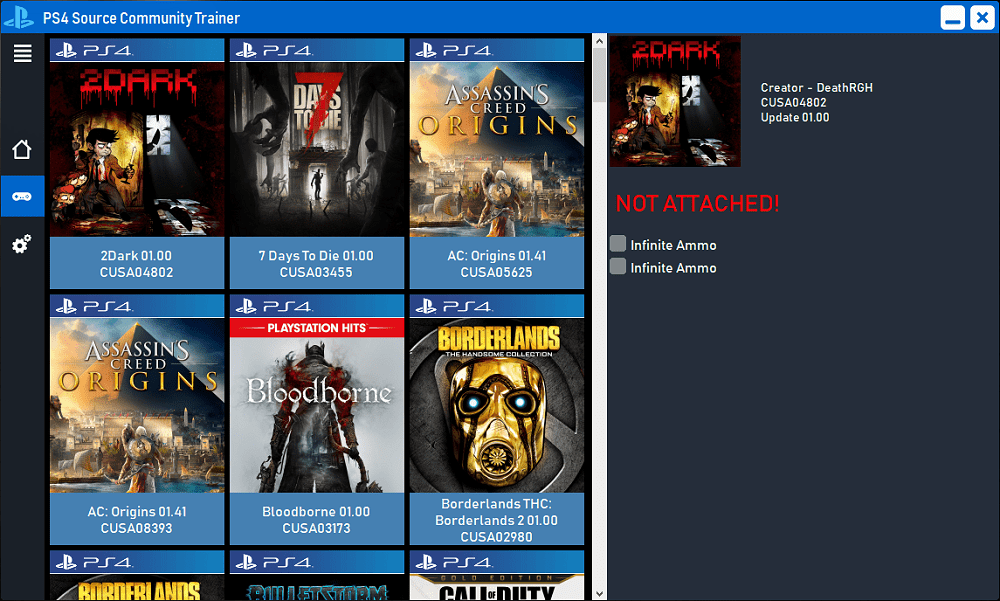
Whats so special about that community trainer ?
All of the cheat information is stored on a server and can be updated in real time.
That means we can add cheats for a game and every user can instantly see that game and start cheating on it, without downloading any updates!
Getting Started
1. Change the ip address in the settings tab to your ps4 ip address.

2. Load up a .bin loader on your ps4 console and inject the payload in the sidebar menu.
3. Load hen (homebrew enabler) if you plan to use this with fake packages.
4. Click on the trainer tab in the sidebar and the trainer information will be downloaded.
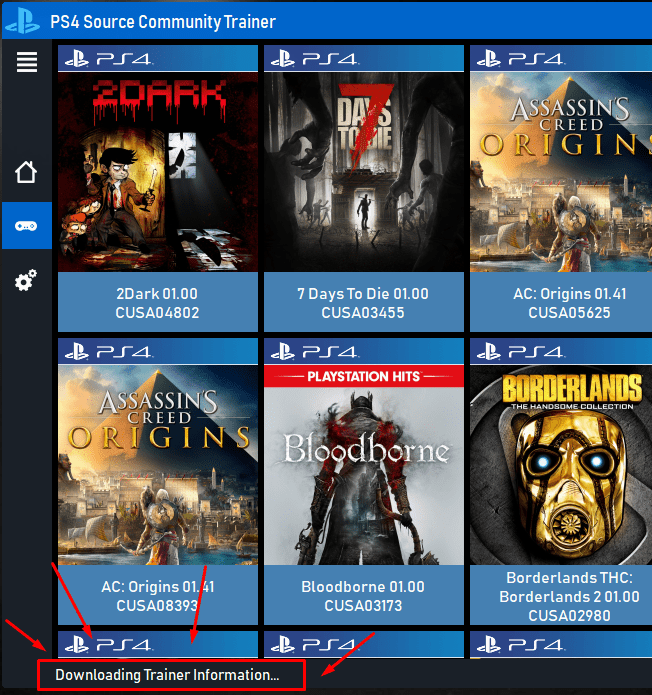
This step can take a bit longer if you do this for the first time. The images are saved locally and the next time you load the trainer list, it will be a lot faster.
5. Select the game you want to cheat on and have some fun!
Make sure to join our Discord server so you don't miss any updates!
You will also get support in the discord server if you need any help with the trainer.
Download
@Weysincha asked me to create a new project like that and here we are now. We put together a community trainer to which people can submit cheats for any game and they are tested in a small team. If there are no issues with the cheats, they are added to the trainer, giving credit to the original cheat creator.
Whats so special about that community trainer ?
All of the cheat information is stored on a server and can be updated in real time.
That means we can add cheats for a game and every user can instantly see that game and start cheating on it, without downloading any updates!
Getting Started
1. Change the ip address in the settings tab to your ps4 ip address.
2. Load up a .bin loader on your ps4 console and inject the payload in the sidebar menu.
3. Load hen (homebrew enabler) if you plan to use this with fake packages.
4. Click on the trainer tab in the sidebar and the trainer information will be downloaded.
This step can take a bit longer if you do this for the first time. The images are saved locally and the next time you load the trainer list, it will be a lot faster.
5. Select the game you want to cheat on and have some fun!
Make sure to join our Discord server so you don't miss any updates!
You will also get support in the discord server if you need any help with the trainer.
Download
- PS4 Source CT - 1.0.3.0.zip (1.2 MB)
Netflix and Plex Application NoPSN PKGs for PS4 Now Available
Proceeding the VR Patched PS4 Media Player and YouTube NoPSN PKGs, today some Netflix and Plex NoPSN PKGs are making rounds on the Interwebs with help from biorn and samsepi01 for those interested in using the PlayStation 4 video applications followed by a write-up and dumper_sandbox_psfmnt_auth_info.bin (27.5 KB) payload by Zer0xFF for PS4 dumping auth_info. 
Update (11/13/2021): [CUSA06120] Littlstar Cinema / Rad . tv - v1.00 & v2.04 [5.05] (need activated account) via @opoisso893
Update (3/31/2021): Netflix Update 1.46 (CUSA00127) Fully Backported and Plex Update 2.01 (CUSA01850) Fully Backported and PSN Patched via @CyB1K
Download:EP4350-CUSA00127_00-NETFLIXPOLLUX001-A0100-V0107.pkg (34.5 MB) / Mirror via biorn / Plex_NoPSN_MainScreen.pkg (60.19 MB) / Mirrors via jwooh / No-PSN CrunchyRoll App /...
Update (11/13/2021): [CUSA06120] Littlstar Cinema / Rad . tv - v1.00 & v2.04 [5.05] (need activated account) via @opoisso893 Update (3/31/2021): Netflix Update 1.46 (CUSA00127) Fully Backported and Plex Update 2.01 (CUSA01850) Fully Backported and PSN Patched via @CyB1KDownload:
PS4 Homebrew Platform 2D Demo Video with LibOrbis by PSXITA
Following the PS3ITA Team PS4 Linux updates, PSXITArch Linux Guide and LibOrbisPKG library for PS4 PKGs today the PSXITA Team (@PS3ITATeam) shared via Twitter a PS4 homebrew Platform 2D demonstration video using the LibOrbis open-source libraries for PlayStation 4. 
Among the PS4 developers they send thanks to are both BigBoss and masterzorag for their recent contributions including those detailed HERE, HERE and HERE.
Check out the Platform 2D PS4 Homebrew Demo video and related Tweets below!
[Prototype] Platform 2D on PS4
Among the PS4 developers they send thanks to are both BigBoss and masterzorag for their recent contributions including those detailed HERE, HERE and HERE.
Check out the Platform 2D PS4 Homebrew Demo video and related Tweets below!
[Prototype] Platform 2D on PS4
- PS4 Fake PKG (FPKG) Sharing Guide
- 6.XX Webkit / 6.72 PS4 Jailbreak
- 7.00-7.02 Webkit Exploit
- 7.02 Webkit / 7.02 Kernel / PS4JB
- 7.50 Kernel Exploit / PS4JB 7.55
- 7.55 / 8.00 Payloads / PS4JB2 7.55
- 9.00 PS4 Webkit Exploit
- 9.00 PS4 Payloads / GoldHEN (Latest)
- 9.00 PS4 Jailbreak Kernel Exploit
- 11.00 PS4 Jailbreak Kernel Exploit
- 13.00 PS4 Kernel Exploit / 13.02 BD-J Bug
- 4.03 PS5 Webkit Exploit
- PS5 Kernel Exploit (ExFAT Bug)
- PS5 Root Keys Obtained
- 4.03 PS5 Kernel Build String
- 4.03 PS5 Webkit Execution
- 4.03 PS5 Kernel Vulnerability
- 4.03 PS5 Filesystem Dumps
- 4.51 PS5 BD-JB Sandbox Escape
- PS5 BD-JB Exploit Hack Source Code
- Mast1c0re PS5 Userland Exploit
- PS5 Kernel Access via PS4 Exploit
- PS5 exFAT Vulnerability Disclosed
- 4.03 PS5 Kernel Exploit Webkit ROP
- 4.50 PS5 Kernel Exploit Webkit ROP
- 4.51 PS5 Kernel Exploit Webkit ROP
- 4.xx PS5 Kernel Exploit v1.01
- 4.xx PS5 Kernel Exploit v1.02 / v1.03
- PS5 1.00-6.50 Firmware Webkit
- Native PS5 ROP Chain Execution
- Mast1c0re PS5 Compiler Attack
- PS5 FreeBSD Kernel Bug & WebKit
- PS5 UMTX 2 Exploit & PS5 Jailbreak
- Byepervisor PS5 Hypervisor Exploit
- Lua Lapse PS5 Kxploit & Laps3c0re / Y2JB
- 12.00 / 12.70 PS5 Kernel Exploit