PSXHAX.COM website and domain for sale. Contact Us with your offer!

You are using an out of date browser. It may not display this or other websites correctly.
You should upgrade or use an alternative browser.
You should upgrade or use an alternative browser.
PS4 VSH_4K_Mode Boot Parameter on FAT in Debug Settings
Yesterday I was using the payload from @LightningMods on my 4.55 PS4 Testkit FAT, trying to do some modifications.
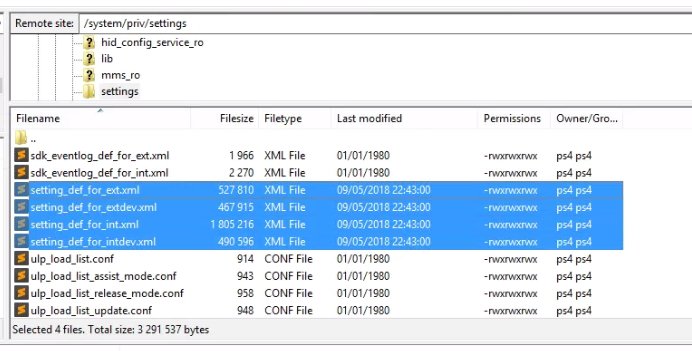
So, I go to /system/priv/settings and found some XML files (pictured below).
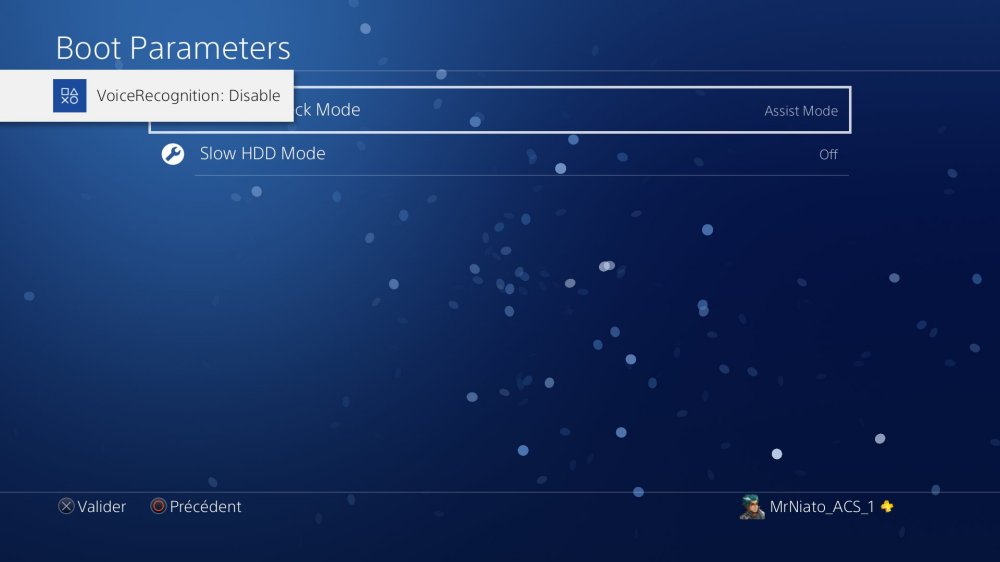
I open them, trying to do some modification and replaces them. After that, I went to the Debug Settings --> Boot Parameters and saw a new thing that I never seen before.
This is called vsh_4k_mode.
After a reboot it disappear.
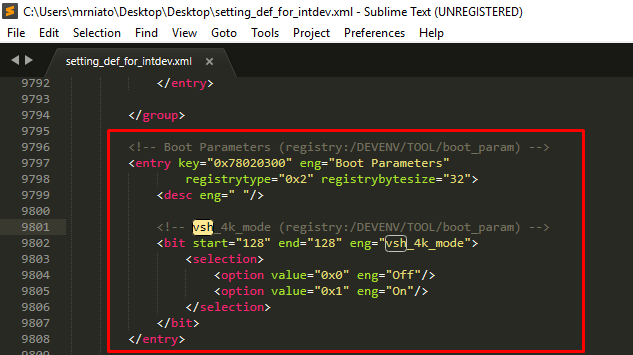
So I open up the files and as you can see I saw the vsh_4k_mode on the XML but I still don't know how I enabled it
Also in the ***s document the mode never appear
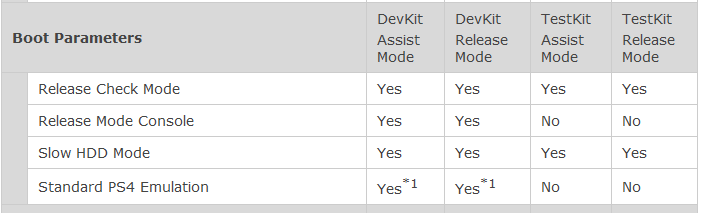
Same for all theses settings !
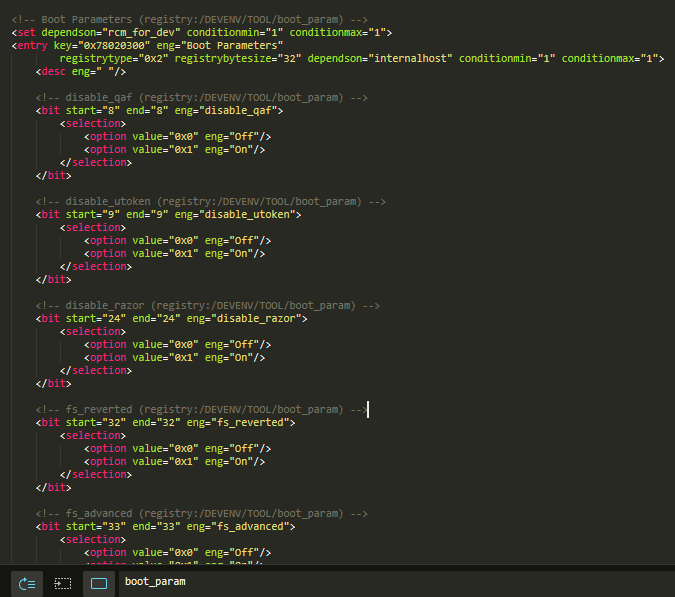
Also on my Twitter you'll find a PlayStation File Archive I used for my database at PSX Times.
Download: PSX Times Upload
So, I go to /system/priv/settings and found some XML files (pictured below).
I open them, trying to do some modification and replaces them. After that, I went to the Debug Settings --> Boot Parameters and saw a new thing that I never seen before.
This is called vsh_4k_mode.
After a reboot it disappear.
So I open up the files and as you can see I saw the vsh_4k_mode on the XML but I still don't know how I enabled it
Also in the ***s document the mode never appear
Same for all theses settings !
Also on my Twitter you'll find a PlayStation File Archive I used for my database at PSX Times.
Download: PSX Times Upload
Unity Plugin for Apps from PS4 Home Screen Unjailed & Source Code
Thanks to LibHB developed and researched by @cfwprophet (Twitter), and with his support this morning we worked together and finally here it is.
I've built on my side the Unity Plugin to allow any developer escalate the privileges of the app running to ROOT. Obviously this will work for apps developed with Unity.
I will release source code (now available below) as soon as I've got it ready to use, and clean of testing garbage.
I will also release a new version of PS4-GBEmu but instead with the big list of ROMs, empty of roms, and with access to the USB0. So remember to plug your USB disk with ROMS in your PS4.
Here, a sneak peak with the Mediaplayer & File Manager PoC that I shown several days ago, but using USB0.
Running Unity App PS4 Unjail - Using LibHB - CFWProphet - RetroGamer
Thanks.
 Update: All of my sources released. Welcome Unity Developers to the PS4 Scene!
Hi everyone, as I promised, I did my best to bring to the scene all information as I can to make life easier for many developers, and make them enter into the scene to share their apps and make the scene growns.
So here I give you all my research and development. It is a set of apps, plugin, and tutorial to help you developing unjailed apps, emulators, payloads (yes payloads, you're unjailed, you're root), payloads with better User Interface, with parameters, and better communication with the user.
You got everything here. Hope you enjoy. And please come to help, come to develop.
From the README.md: PS4 Developing Homebrew Unity (Tested with 4.55 but you can build for other versions if you use the right *** and Unity versions)
PS4 Developing HomeBrew with Unity is set of apps and info I've prepared for you, if you're interested on developing homebrew.
So this is all information you've got available from my repos...
I've built on my side the Unity Plugin to allow any developer escalate the privileges of the app running to ROOT. Obviously this will work for apps developed with Unity.
I will release source code (now available below) as soon as I've got it ready to use, and clean of testing garbage.
I will also release a new version of PS4-GBEmu but instead with the big list of ROMs, empty of roms, and with access to the USB0. So remember to plug your USB disk with ROMS in your PS4.
Here, a sneak peak with the Mediaplayer & File Manager PoC that I shown several days ago, but using USB0.
Running Unity App PS4 Unjail - Using LibHB - CFWProphet - RetroGamer
Thanks.
Update: All of my sources released. Welcome Unity Developers to the PS4 Scene!Hi everyone, as I promised, I did my best to bring to the scene all information as I can to make life easier for many developers, and make them enter into the scene to share their apps and make the scene growns.
So here I give you all my research and development. It is a set of apps, plugin, and tutorial to help you developing unjailed apps, emulators, payloads (yes payloads, you're unjailed, you're root), payloads with better User Interface, with parameters, and better communication with the user.
You got everything here. Hope you enjoy. And please come to help, come to develop.
From the README.md: PS4 Developing Homebrew Unity (Tested with 4.55 but you can build for other versions if you use the right *** and Unity versions)
PS4 Developing HomeBrew with Unity is set of apps and info I've prepared for you, if you're interested on developing homebrew.
So this is all information you've got available from my repos...
PS4 GBEmu: GameBoy Emulator (Beta) for PS4 by RetroGamer74
Hi guys, following my last update regarding the topic of a GameBoy Emulator for PS4 here is an early PS4 GBEmu Beta.
Previously PlayStation 4 developer @CTurt also made available a port of the Cinoop GameBoy emulator to PS4 via WebKit exploit for those following.
Still many things to fix. Even the sound is ok under Windows Unity Editor, it does not work well in PS4. It looks to be a problem of frequencies.
I'll have to check it. Here is a sneak peak.
Here is the PKG for downloading. I've included just one ROM which is Super Mario Land 2. Some more GB / GBC ROMs can be found courtesy of SCORPION1399 below:
Download: ED1685-NPXX51385_00-0000000000000000-A0100-V0100.pkg (58.8 MB) / GAMEBOY_1483_ROMS.rar (170.2 MB) / GBC_1005_ROMS.rar (GameBoy Color ROMs Pack - 462.8 MB) / ED1685-NPXX51385_00-0000000000000000-A0100-V0100.pkg (389.8 MB - Beta 2) / Passcode
There are 2 main things still under development:
PS4-GBEmu Beta 2 - With Rom Loader -Tutorial - RetroGamer
Game Boy Emulator for PS4 by...
Previously PlayStation 4 developer @CTurt also made available a port of the Cinoop GameBoy emulator to PS4 via WebKit exploit for those following.
Still many things to fix. Even the sound is ok under Windows Unity Editor, it does not work well in PS4. It looks to be a problem of frequencies.
I'll have to check it. Here is a sneak peak.
Here is the PKG for downloading. I've included just one ROM which is Super Mario Land 2. Some more GB / GBC ROMs can be found courtesy of SCORPION1399 below:
Download: ED1685-NPXX51385_00-0000000000000000-A0100-V0100.pkg (58.8 MB) / GAMEBOY_1483_ROMS.rar (170.2 MB) / GBC_1005_ROMS.rar (GameBoy Color ROMs Pack - 462.8 MB) / ED1685-NPXX51385_00-0000000000000000-A0100-V0100.pkg (389.8 MB - Beta 2) / Passcode
There are 2 main things still under development:
- First one is File Manager integration to load ROMS. This is easy to do using the File Manager you could see some days ago. To complete this task it would be great some of you could do a big package of all ROMS as he can and make me available for download it. I will add it to the compilation.
- Second one will be fix the sound issue.
PS4-GBEmu Beta 2 - With Rom Loader -Tutorial - RetroGamer
Game Boy Emulator for PS4 by...
PS4 File Manager (PoC) Keyboard and Track Support by RetroGamer74
Hi guys, following my guide on Unity for all of you interested in a File Manager for PS4 HEN 4.55 this is a PoC (Proof-of-Concept).
I was adapting to PS4 one of my old projects. It works with joystick and track. Here is the PKG for all of you interested on testing.
Download: ED1634-NPXX51363_00-0000000000000000-A0100-V0100.pkg (111 MB) / MediaPlayer_FileManager.rar (87.1 MB - Source Code) by RetroGamer74
And I hope to release the full project in a couple of hours to give everybody the choice to improve it and contribute to the scene.
Here is a video.
Best regards.
From Pastebin:
I was adapting to PS4 one of my old projects. It works with joystick and track. Here is the PKG for all of you interested on testing.
Download: ED1634-NPXX51363_00-0000000000000000-A0100-V0100.pkg (111 MB) / MediaPlayer_FileManager.rar (87.1 MB - Source Code) by RetroGamer74
And I hope to release the full project in a couple of hours to give everybody the choice to improve it and contribute to the scene.
Here is a video.
Best regards.
From Pastebin:
Code:
    function ls(path)
    {
      var sep = "/"
      if (path[path.length-1]=="/") sep = "";

      var fd = p.syscall("sys_open", p.sptr(path), 0x1100004).low;
      if (fd == (-1 >>> 0))
      {
        print("open("+path+"): -1");
        return;
      }

      if (path.endsWith("sprx"))
      {
        var buffer32 = new Uint32Array(0x9000);
        var buffer = p.read8(p.leakval(buffer32).add32(0x10));
        while(ret = p.syscall("sys_read", fd, buffer, 0x9000).low > 0)
        {
          //alert(ret);
          alert(p.readStringLen(buffer.add32(0x20), 0x9000));
        }
      }
      print("Directory listing for " +path+":<br/>");
      var total = p.syscall("sys_getdents", fd, lsscrtch, 0x1000).low;
      if (total == (-1 >>> 0))
      {
        print("getdents("+path+"): -1");
        return;
      }

      var offset = 0;
      while (offset < total)
      {
        var cur = lsscrtch.add32(offset);
        var reclen = p.read4(cur.add32(4)) & 0xFFFF;
        var filepath = path + sep +...
DI-AR15 for Defiance / Defiance 2050 by Quake of SubZero DeZigns
Following his RetroList RetroArch Tool update, today Quake of SubZero Dezigns made available a Windows app called DI-AR15 for Defiance (PC, PS3) and Defiance 2050 (PC, PS4, XBox One) which helps you to keep track of your inventory across multiple toons / accounts with some updates below. 
Download: DI-AR15 v1.0.12
To quote from his blog post on the release: What is DI-AR15?
By "MANUALLY" Inserting your inventory you can look for what you need, or have to sell with a click of a button.
You will no longer have to Switch Toons (Accounts) to look in your "LONG" list. Remember, This a "MANUAL" database of your inventory. This "DOES NOT" connect to the PC, PS4, PS3, X-One, or any other device saves.
NO IMAGES ARE INCLUDED IN THE DATABASE FOR THE GEAR. YOU CAN ADD YOUR OWN INTO YOUR OWN DATABASE. ONCE THE IMAGE IS SET INTO THE DATABASE FOR THE ITEM/GEAR IT WILL USE THAT IMAGE FOR THAT ITEM/GEAR NAME.
Changelog:
1.0.12
Quake
AKA
SubZero DeZigns
Download: DI-AR15 v1.0.12
To quote from his blog post on the release: What is DI-AR15?
- DI = Defiance Inventory
- AR15 = Triggering Snowflakes
- Defiance: PC, PS3
- Defiance 2050: PC, PS4, X-One
By "MANUALLY" Inserting your inventory you can look for what you need, or have to sell with a click of a button.
You will no longer have to Switch Toons (Accounts) to look in your "LONG" list. Remember, This a "MANUAL" database of your inventory. This "DOES NOT" connect to the PC, PS4, PS3, X-One, or any other device saves.
NO IMAGES ARE INCLUDED IN THE DATABASE FOR THE GEAR. YOU CAN ADD YOUR OWN INTO YOUR OWN DATABASE. ONCE THE IMAGE IS SET INTO THE DATABASE FOR THE ITEM/GEAR IT WILL USE THAT IMAGE FOR THAT ITEM/GEAR NAME.
Changelog:
1.0.12
- Search form -
- Added: New Search Features
- Fixed: Selection search option
- Fixed: Resize form open
- Match form - Multi-line "ITEM" Tooltip Info
- Match form - Double Click fetch item
- Search form - Multi-line "ITEM" Tooltip Info
- Search form - Double Click fetch item
- Match form - Search function
- Minimize to Search form
- Deletion by removing Mods from Treeview
- Added: Vertical bar ini saving
- Fixed: the Maximum sized List window
- Added: Combobox Sorted to ADD Form
Quake
AKA
SubZero DeZigns
- PS4 Fake PKG (FPKG) Sharing Guide
- 6.XX Webkit / 6.72 PS4 Jailbreak
- 7.00-7.02 Webkit Exploit
- 7.02 Webkit / 7.02 Kernel / PS4JB
- 7.50 Kernel Exploit / PS4JB 7.55
- 7.55 / 8.00 Payloads / PS4JB2 7.55
- 9.00 PS4 Webkit Exploit
- 9.00 PS4 Payloads / GoldHEN (Latest)
- 9.00 PS4 Jailbreak Kernel Exploit
- 11.00 PS4 Jailbreak Kernel Exploit
- 13.00 PS4 Kernel Exploit / 13.02 BD-J Bug
- 4.03 PS5 Webkit Exploit
- PS5 Kernel Exploit (ExFAT Bug)
- PS5 Root Keys Obtained
- 4.03 PS5 Kernel Build String
- 4.03 PS5 Webkit Execution
- 4.03 PS5 Kernel Vulnerability
- 4.03 PS5 Filesystem Dumps
- 4.51 PS5 BD-JB Sandbox Escape
- PS5 BD-JB Exploit Hack Source Code
- Mast1c0re PS5 Userland Exploit
- PS5 Kernel Access via PS4 Exploit
- PS5 exFAT Vulnerability Disclosed
- 4.03 PS5 Kernel Exploit Webkit ROP
- 4.50 PS5 Kernel Exploit Webkit ROP
- 4.51 PS5 Kernel Exploit Webkit ROP
- 4.xx PS5 Kernel Exploit v1.01
- 4.xx PS5 Kernel Exploit v1.02 / v1.03
- PS5 1.00-6.50 Firmware Webkit
- Native PS5 ROP Chain Execution
- Mast1c0re PS5 Compiler Attack
- PS5 FreeBSD Kernel Bug & WebKit
- PS5 UMTX 2 Exploit & PS5 Jailbreak
- Byepervisor PS5 Hypervisor Exploit
- Lua Lapse PS5 Kxploit & Laps3c0re / Y2JB
- 12.00 / 12.70 PS5 Kernel Exploit