PSXHAX.COM website and domain for sale. Contact Us with your offer!

You are using an out of date browser. It may not display this or other websites correctly.
You should upgrade or use an alternative browser.
You should upgrade or use an alternative browser.
DS4Windows Updated by Boganhobo, Supports Sony Bluetooth Adapter
Those seeking to use their PS4 DualShock 4 Controller for PC gaming may already be aware of DS4Windows from Jays2Kings (GIT), but recently boganhobo (GIT) forked and updated the DS4 application with the help of Chamilsaan to support Sony's official Bluetooth adapter... meaning you can now use Dualshock 4's headphone jack and touchpad with DS4Windows! 
Download: DS4Windows.exe (3.06 MB) / PS4MouseToController.zip (676 KB for those seeking PS4MouseToController to use with FPS games)
To quote from PCGamer.com on this latest update: "DS4Windows tricks your PC into seeing the DualShock as an Xbox controller, which allows it to work in pretty much any game with controller support.
Now you can have the best of both worlds: the same old DS4Windows support, but with the added benefits of the Sony adapter’s strong Bluetooth range and full use of the headphone jack and touchpad.
Because DS4Windows is an open source project, boganhobo created a project fork to support Sony’s adapter."
Below is a DS4Windows demonstration video, and thanks to KeenGamer.com for the news.
this set of files should produce the necessary keys for the GP2040-CE PS4 Mode. You can quickly find it via google search but i've decided to put it here for you to use. This will make the device be able to skip 8 minute timeout
Download: DS4Windows.exe (3.06 MB) / PS4MouseToController.zip (676 KB for those seeking PS4MouseToController to use with FPS games)
To quote from PCGamer.com on this latest update: "DS4Windows tricks your PC into seeing the DualShock as an Xbox controller, which allows it to work in pretty much any game with controller support.
Now you can have the best of both worlds: the same old DS4Windows support, but with the added benefits of the Sony adapter’s strong Bluetooth range and full use of the headphone jack and touchpad.
Because DS4Windows is an open source project, boganhobo created a project fork to support Sony’s adapter."
Below is a DS4Windows demonstration video, and thanks to KeenGamer.com for the news.
this set of files should produce the necessary keys for the GP2040-CE PS4 Mode. You can quickly find it via google search but i've decided to put it here for you to use. This will make the device be able to skip 8 minute timeout
- ds4-master-custom-lJArAqXq.zip (789.79 KB - includes ds4sig.bin, jedi_crypto.py, jedi_crypto-mod.py, jedi_flash-Aug_3_2013.bin, jedi_flash, Aug_3_2013.idc, jedi_tool.py and...
PS4 PKG Unpacker via Red-EyeX32, Payload Porting WIP by Specter
A few Twitter updates today from PlayStation 4 developer RedEyeX32 who shared a teaser image of what appears to be a PS4 PKG Unpacker while Specter confirmed the payload is tested, working and he's beginning to port it to PS4 now!
Previously @RedEyeX32 released a PS4 Update Bypasser and PSProxy Update while there have been several PlayStation 4 Package Unpackers on the Interweb including the original GIT (Archived) from Hykem (HykemTheDemon) and flat_z with Sony PS4 PKG Tools leaks, clones from RetroA (Hisham Baig aka Hishamage), mirrors from Keyaku and the UnPKG tool source code on the Wiki (also below) with an update by XVortex available here: UnPKG.zip (5 KB)
Previously @RedEyeX32 released a PS4 Update Bypasser and PSProxy Update while there have been several PlayStation 4 Package Unpackers on the Interweb including the original GIT (Archived) from Hykem (HykemTheDemon) and flat_z with Sony PS4 PKG Tools leaks, clones from RetroA (Hisham Baig aka Hishamage), mirrors from Keyaku and the UnPKG tool source code on the Wiki (also below) with an update by XVortex available here: UnPKG.zip (5 KB)
Code:
# UnPKG rev 0x00000008 (public edition), (c) flatz

import sys, os, hashlib, hmac, struct, math, traceback
from cStringIO import StringIO

# parse arguments

if len(sys.argv) < 3:
    script_file_name = os.path.split(sys.argv[0])[1]
    print 'usage: {0} <pkg file> <output dir>'.format(script_file_name)
    sys.exit()

pkg_file_path = sys.argv[1]
if not os.path.isfile(pkg_file_path):
    print 'error: invalid file specified'
    sys.exit()

output_dir...
PS4 EEPROM Dumper to Dump PlayStation 4 Non-Volatile Storage
Many moons ago the PS3 Controller EEPROM (Electrically Erasable Programmable Read-Only Memory) was dumped, and moving to the PlayStation 4 generation following zecoxao's recent PS4 SFlash Guide comes a PS4 EEPROM Dumper to (you guessed it  ) dump the console's EEPROM Non-Volatile Storage data.
Download: eeprom.7z (5.39 KB) / eeprom.7z (Mirror)
Below are some related replies from totallynotzecoxao as Twitter tends to blow balls at times with partial embeds:
) dump the console's EEPROM Non-Volatile Storage data.Download: eeprom.7z (5.39 KB) / eeprom.7z (Mirror)
Below are some related replies from totallynotzecoxao as Twitter tends to blow balls at times with partial embeds:
- it dumps this -> Non_Volatile_Storage
- dumps your tokens and flags
- zero point, unless you are interested in documenting things
- if you ever had a ps3, it's the equivalent of SYSCON's EEPROM readable data through lv1
Code:
#include <stdlib.h>
#include <stdio.h>
#include <string.h>
#include <stdint.h>
#include <inttypes.h>

#include <machine/_types.h>
#include <unistd.h>
#include <errno.h>
#include <assert.h>
#include "kmain.h"

#include <arpa/inet.h>
#include <netinet/in.h>

#include <signal.h>

#include <machine/cpufunc.h>

#include <sys/_stdint.h>
#include <sys/sysent.h>
#include <sys/_types.h>
#include <sys/syscall.h>
#include <sys/socket.h>
#include <sys/mman.h>
#include <sys/sysctl.h>
#include <sys/ptrace.h>
#include <sys/errno.h>
#include <sys/proc.h>
#include <sys/param.h>
#include <sys/types.h>
#include <sys/user.h>
#include <sys/mutex.h>
#include <sys/lock.h>
#include <sys/sysproto.h>
#include <sys/uio.h>
#include <sys/wait.h>
#include <machine/reg.h>

#include <ps4/standard_io.h>
#include <ps4/kernel.h>
#include <ps4/register.h>
#include <ps4/socket.h>
#include <ps4/stream.h>
#include <ps4/type.h>

#include <sce/kernel.h>

#define IP(a, b, c, d) (((a) << 0) + ((b) << 8) + ((c) << 16) + ((d) << 24))
#define TCP_NODELAY 1

int main(int argc, char **argv)
{
    void *sceSblACMgrIsVideoplayerProcess;
    //char...
Fifa_14_READ_NFO_PS4-EPEEN: FIFA 14 PS4 by EPEEN Fully Decrypted!
Following the first PS4 scene release and first decrypted audio packet, today PlayStation 4 scene release group EPEEN made available Fifa_14_READ_NFO_PS4-EPEEN which according to the PS4 NFO file below labels FIFA 14 PS4 as the world's first fully decrypted PS4 game! 
Spoiler
 Notes: Passkey is all zeroes, so you can UnPKG the PKG without problems. You have to uninstall FIFA first (if already installed), then FTP to the PS4 and push the FIFA FIX.rar (1.1 MB) files onto the PS4 first (directly in the root and keep the folder hierarchy) then after you pushed the files onto the PS4 you have to install the PKG.
This news comes a few years after the first PS4 game backups surfaced on the Internet followed by even more PlayStation 4 scene PS4 game iSO dumps.
Check out the Fifa 14 READ NFO PS4 EPEEN NFO file below:
Spoiler
Notes: Passkey is all zeroes, so you can UnPKG the PKG without problems. You have to uninstall FIFA first (if already installed), then FTP to the PS4 and push the FIFA FIX.rar (1.1 MB) files onto the PS4 first (directly in the root and keep the folder hierarchy) then after you pushed the files onto the PS4 you have to install the PKG.This news comes a few years after the first PS4 game backups surfaced on the Internet followed by even more PlayStation 4 scene PS4 game iSO dumps.
Check out the Fifa 14 READ NFO PS4 EPEEN NFO file below:
Code:
°°°°°°°°°°°°°°°°°°°°°°°°°°°°°°°°°°°°°°°°°°°°°°°°°°°°°°°°°°°°°°°°°°°°°°°°°°°°°°
°°°°°°°°°°°°°°°°°°°°°°°°°°°°°°°°°°°°°°°°°°°°°°°°°°°°°°°°°°°°°°°°°°°°°°°°°°°°°°
°°°°°°°°°°°°°°°°°°°°°°°°°°°°°°°°°°°°°°°°°°°°°°°°°°°°°°°°°°°°°°°°°°°°°°°°°°°°°°
°°°°°°²°°°°°°°°°°°°°°°°°°°°°°°°°°°°°°²²°°°°°°°°°°°°²°°°°°°°°°°°°°°°°°°°°°°°°°°
°°°°°°ÛÛÛÛÛÛÛÛÛÛÛ±°°°°°°°±ÛÛ°ÛÛÛÛÛ²°°±ÛÛÛÛÛÛÛÛÛÛÛ°°ÛÛÛÛÛÛÛÛÛÛÛ²°°ÛÛÛ°°°°²ÛÛ°°°
°°°°°°°ÛÛÛÛ±ÛÛÛÛÛ°°°°°°°ÛÛÛÛÛÛÛÛÛÛÛ°°°°ÛÛÛ±±ÛÛÛÛ°°°°ÛÛÛÛ±ÛÛÛÛÛ°²ÛÛÛÛÛ²°²ÛÛÛ°°°
°°°°°°²ÛÛ°°°°ÛÛÛ°°°°°°°ÛÛÛÛÛ°°°ÛÛÛÛ²°°ÛÛ°°°°²ÛÛ°°°°²ÛÛ°°°°ÛÛÛ°°ÛÛÛÛÛÛÛ²°°ÛÛ°°°
°°°°°°ÛÛÛ°°²°Û²°°°°°°°°°ÛÛÛÛ°°°ÛÛÛÛ°°ÛÛÛ±°²°±Û°°°°°ÛÛÛ°°²°Û²°°°°°ÛÛÛÛÛÛ²°ÛÛ°°°
°°°°°ÛÛÛÛÛÛÛ°°°°°°²ÛÛÛ°°ÛÛÛÛ°°²ÛÛÛ°°²ÛÛÛÛÛÛ°°°°°°°ÛÛÛÛÛÛÛ°°°°°°°°Û±ÛÛÛÛÛ°ÛÛ°°°
°°°°²ÛÛÛ±Û±°°°°°°°ÛÛÛÛ°°ÛÛÛÛ°ÛÛÛÛ°°°ÛÛÛÛ±Û°°°°°°°°ÛÛÛ±Û±°°°°°°°°°Û²°ÛÛÛÛÛÛ±°°°
°°°°±ÛÛÛÛ°°°°°°°°°ÛÛÛÛ°°ÛÛÛÛ°Û±°°°°°ÛÛÛÛ°°°°°°°°°±ÛÛÛÛ°°°°°°°°°°°Û±°°ÛÛÛÛÛÛ°°°...
PS4 Custom Home Menu UI Modding Database Information by eXtreme
Following his PS4 1.76 Permanent Internet Browser Mod, PlayStation 4 modder e✘treme returns with PS4 Custom Home Menu UI modding database information for those looking to modify the menu appearance of their console like ninjas! 
Also be sure to check out their downloads section and PS4 PKG Database which offers Sony PlayStation 4 Games, Apps and Themes in Package (PKG) File format.
From Extreme-Modding.de, to quote: Custom Home Menu – UI Modding – Database Infos
It’s just the beginning of a Custom Home Menu on the PS4. The Home Menu is a part of the User Interface and since the console is hacked, we are able to modify the Menu. Senaxx was the first Scener who showed a Custom Icon.
We can edit the Database with the DB Browser Tool to change Icons or the Title of installed Apps and a bit more atm.
If you have connected your PC via ftp to your 1.76 PS4, you will find the app.db in /system_data/priv/mms
The edit in the Database is limited but we can change a few things in the Menu like the title name, data path, visibility or category.
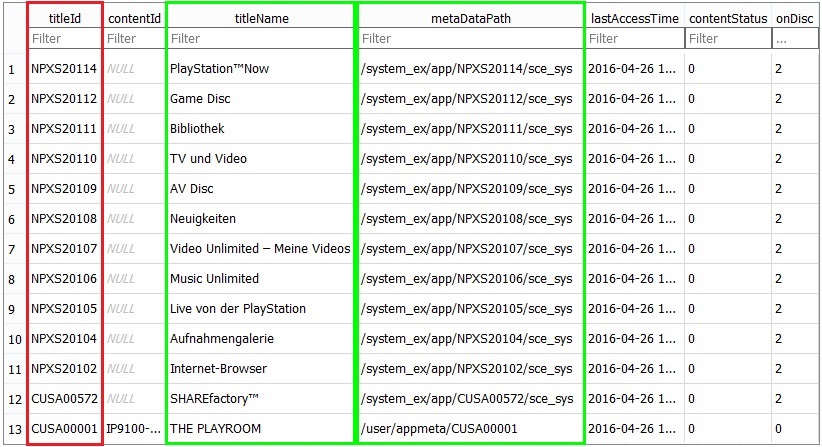
You can change the data path of the preinstalled Apps by uploading a folder (for example CUSA22222) with Custom Icons in /user/appmeta/ and edit /system_ex/app/NPXS20110/sce_sys with the path.
If you want to remove Icons of installed Apps, you have to edit visible with 0. To show a App for example in TV and Video, you can edit category with gde.
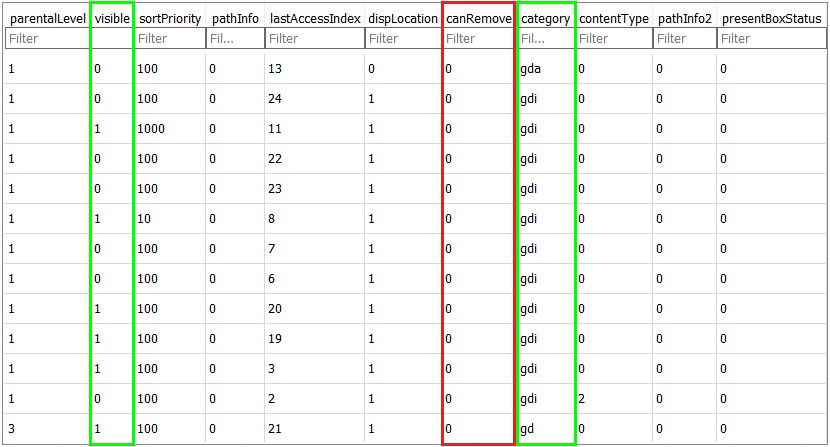
The edit of the title Id, remove Apps and change the category for Games does not work. Also you can’t add a new line to the Database.
Thanks to @VultraAID for sharing the news in the PSXHAX.COM Shoutbox yesterday!
Also be sure to check out their downloads section and PS4 PKG Database which offers Sony PlayStation 4 Games, Apps and Themes in Package (PKG) File format.
From Extreme-Modding.de, to quote: Custom Home Menu – UI Modding – Database Infos
It’s just the beginning of a Custom Home Menu on the PS4. The Home Menu is a part of the User Interface and since the console is hacked, we are able to modify the Menu. Senaxx was the first Scener who showed a Custom Icon.
We can edit the Database with the DB Browser Tool to change Icons or the Title of installed Apps and a bit more atm.
If you have connected your PC via ftp to your 1.76 PS4, you will find the app.db in /system_data/priv/mms
The edit in the Database is limited but we can change a few things in the Menu like the title name, data path, visibility or category.
You can change the data path of the preinstalled Apps by uploading a folder (for example CUSA22222) with Custom Icons in /user/appmeta/ and edit /system_ex/app/NPXS20110/sce_sys with the path.
If you want to remove Icons of installed Apps, you have to edit visible with 0. To show a App for example in TV and Video, you can edit category with gde.
The edit of the title Id, remove Apps and change the category for Games does not work. Also you can’t add a new line to the Database.
Thanks to @VultraAID for sharing the news in the PSXHAX.COM Shoutbox yesterday!
- PS4 Fake PKG (FPKG) Sharing Guide
- 6.XX Webkit / 6.72 PS4 Jailbreak
- 7.00-7.02 Webkit Exploit
- 7.02 Webkit / 7.02 Kernel / PS4JB
- 7.50 Kernel Exploit / PS4JB 7.55
- 7.55 / 8.00 Payloads / PS4JB2 7.55
- 9.00 PS4 Webkit Exploit
- 9.00 PS4 Payloads / GoldHEN (Latest)
- 9.00 PS4 Jailbreak Kernel Exploit
- 11.00 PS4 Jailbreak Kernel Exploit
- 13.00 PS4 Kernel Exploit / 13.02 BD-J Bug
- 4.03 PS5 Webkit Exploit
- PS5 Kernel Exploit (ExFAT Bug)
- PS5 Root Keys Obtained
- 4.03 PS5 Kernel Build String
- 4.03 PS5 Webkit Execution
- 4.03 PS5 Kernel Vulnerability
- 4.03 PS5 Filesystem Dumps
- 4.51 PS5 BD-JB Sandbox Escape
- PS5 BD-JB Exploit Hack Source Code
- Mast1c0re PS5 Userland Exploit
- PS5 Kernel Access via PS4 Exploit
- PS5 exFAT Vulnerability Disclosed
- 4.03 PS5 Kernel Exploit Webkit ROP
- 4.50 PS5 Kernel Exploit Webkit ROP
- 4.51 PS5 Kernel Exploit Webkit ROP
- 4.xx PS5 Kernel Exploit v1.01
- 4.xx PS5 Kernel Exploit v1.02 / v1.03
- PS5 1.00-6.50 Firmware Webkit
- Native PS5 ROP Chain Execution
- Mast1c0re PS5 Compiler Attack
- PS5 FreeBSD Kernel Bug & WebKit
- PS5 UMTX 2 Exploit & PS5 Jailbreak
- Byepervisor PS5 Hypervisor Exploit
- Lua Lapse PS5 Kxploit & Laps3c0re / Y2JB
- 12.00 / 12.70 PS5 Kernel Exploit