PSXHAX.COM website and domain for sale. Contact Us with your offer!

You are using an out of date browser. It may not display this or other websites correctly.
You should upgrade or use an alternative browser.
You should upgrade or use an alternative browser.
PSXHAX - PSXHACKS: PSX HAX - PSX HACKS - PLAYSTATION HAX - PLAYSTATION HACKS
PS4 Dev: Linux Kernel CVE-2017-6074 DCCP Double-Free Vulnerability
While most are still digesting the impact of #CloudBleed, @aimaim dropped by the PSXHAX Shoutbox this morning and shared news of this CVE-2017-6074 Linux Kernel DCCP double-free local root vulnerability (Proof-of-Concept by xairy) with us today! 
As was done with CVE-2016-1885, here's to hoping some more PlayStation 4 developers take a peek at it and see what possibilities (if any) it may present.
Until then, some quick observations in the PSXHAX Shoutbox from @xxmcvapourxx:
Hi, This is an announcement about CVE-2017-6074 [1] which is a double-free vulnerability I found in the Linux kernel. It can be exploited to gain kernel code execution from an unprivileged processes.
Fixed on Feb 17, 2017:
https://git.kernel.org/cgit/linux/kernel/git/torvalds/linux.git/commit/?id=5edabca9d4cff7f1f2b68f0bac55ef99d9798ba4
The oldest version that was checked is 2.6.18 (Sep 2006), which is vulnerable. However, the bug was introduced before that, probably in the first release with DCCP support (2.6.14, Oct 2005).
The kernel needs to be built with CONFIG_IP_DCCP for the vulnerability to be present. A lot of modern...
As was done with CVE-2016-1885, here's to hoping some more PlayStation 4 developers take a peek at it and see what possibilities (if any) it may present.
Until then, some quick observations in the PSXHAX Shoutbox from @xxmcvapourxx:
- kmalloc() <-- dcloser again wow
- but that can cause a lot of issues: https://github.com/fail0verflow/ps4-linux
- config ip dccp ohhhhhhhh wireshark uses it
- can be used on linux

- that DLClose is for IPV6_RECVPKTINFO
- nothing to do with a kernel, if i say
- no its kmalloc
- you just need web crash find that memory
- then find the offsets for vtable and gadgets
Hi, This is an announcement about CVE-2017-6074 [1] which is a double-free vulnerability I found in the Linux kernel. It can be exploited to gain kernel code execution from an unprivileged processes.
Fixed on Feb 17, 2017:
https://git.kernel.org/cgit/linux/kernel/git/torvalds/linux.git/commit/?id=5edabca9d4cff7f1f2b68f0bac55ef99d9798ba4
The oldest version that was checked is 2.6.18 (Sep 2006), which is vulnerable. However, the bug was introduced before that, probably in the first release with DCCP support (2.6.14, Oct 2005).
The kernel needs to be built with CONFIG_IP_DCCP for the vulnerability to be present. A lot of modern...
Sasuke PS4 Firmware 4.50 Beta 4 Update Live, More Invites Going Out!
Since the initial sign-ups, PS4 4.50 Firmware Beta 2, PS4 4.50 Firmware Beta 3 and Sasuke 4.50 video walkthrough many have reported that the PS4 Firmware 4.50 Beta 4 Update is live (339.9 MB) for official testers, while others including Blastoise confirmed that Sony is sending out another round of invites to those who signed up after the Beta started... so definitely re-check your mail folks! 
Download: PS4UPDATE FW 4.50 Beta 4.rar (324 MB) via Senaxx
To quote from PlayFront.de on Beta 4 changes and a possible public release window, roughly translated:
"Unfortunately Sony does not have to provide an official changelog again, so you have to assume that only minor errors have been fixed since the start.
The most important features are therefore the new Quick Menu, the Boost Mode, Custom Wallpapers, as well as 3D Movies Support in conjunction with VR.
It should also be assumed that it will be the last BETA release before the final release, which is expected to take place in the next 1 to 2 weeks."
Cheers to @Sametto Chan for the heads-up on the PS4 Firmware 4.50 Beta 4 Update and to @Skye1337 for providing burner accounts for members here to give Sasuke a test run before it is officially released!
Download: PS4UPDATE FW 4.50 Beta 4.rar (324 MB) via Senaxx
To quote from PlayFront.de on Beta 4 changes and a possible public release window, roughly translated:
"Unfortunately Sony does not have to provide an official changelog again, so you have to assume that only minor errors have been fixed since the start.
The most important features are therefore the new Quick Menu, the Boost Mode, Custom Wallpapers, as well as 3D Movies Support in conjunction with VR.
It should also be assumed that it will be the last BETA release before the final release, which is expected to take place in the next 1 to 2 weeks."
Cheers to @Sametto Chan for the heads-up on the PS4 Firmware 4.50 Beta 4 Update and to @Skye1337 for providing burner accounts for members here to give Sasuke a test run before it is officially released!
PS4 1.76 Changing System App Icons Custom UI by ThisIsMrNameless
Following his previous demos and the PS4 UI Modding Database, today PlayStation 4 Modder @Thisismrnameles shared a PS4 Custom UI video demonstration HERE showcasing changes in the system app icons for PS4 Firmware 1.76 consoles. 
Below is a brief guide from the demo video by Hydrogen, as follows: How to Mod Your Own UI Application with FTP 1.76 PS4
Pre-Requisites
1.) Turn on your PS4 Console.
2.) Connect your PS4 to a FTP Server (FileZilla).
3.) On FileZilla, go through your directories from the following and find the game/app you want to change: User > appmeta
4.) Drag the game folder or application folder into a brand new folder. Open it there, and you should see all the meta data for it. From here, "icon0" is the image of the application.
Quick Note: The images have to be 512x512 size, or this will not work. Also, 1st icon0 is a .png, and the 2nd icon0 is a .dds. Pic1/pic2/pic3/etc are always 1920x1080.
5.) Now get your image you want, and make sure you re-edit them to a .png file, and a .dds file. Afterwards, drag and drop them in.
6.) Drop the folder you were editing back into your game applications from FileZilla on your PS4.
7.) Restart your PS4, congratulations you have now created a UI Mod on your applications.
Thanks to @raedoob in the PSXHAX Shoutbox for the tip and @HydrogenNGU on Twitter!
Below is a brief guide from the demo video by Hydrogen, as follows: How to Mod Your Own UI Application with FTP 1.76 PS4
Pre-Requisites
- 1.76 Firmware PlayStation 4 Console
- Eyes
- FileZilla
1.) Turn on your PS4 Console.
2.) Connect your PS4 to a FTP Server (FileZilla).
3.) On FileZilla, go through your directories from the following and find the game/app you want to change: User > appmeta
4.) Drag the game folder or application folder into a brand new folder. Open it there, and you should see all the meta data for it. From here, "icon0" is the image of the application.
Quick Note: The images have to be 512x512 size, or this will not work. Also, 1st icon0 is a .png, and the 2nd icon0 is a .dds. Pic1/pic2/pic3/etc are always 1920x1080.
5.) Now get your image you want, and make sure you re-edit them to a .png file, and a .dds file. Afterwards, drag and drop them in.
6.) Drop the folder you were editing back into your game applications from FileZilla on your PS4.
7.) Restart your PS4, congratulations you have now created a UI Mod on your applications.
Thanks to @raedoob in the PSXHAX Shoutbox for the tip and @HydrogenNGU on Twitter!
PlayStation 4 Remote Play Updates by Twist3d89, PS4 Input Profiles
Following his previous updates, today Twisted shared an update via Twitter on his PlayStation 4 Remote Play application for Android which now features PS4 input profiles with details below. 
To quote: A lot of you are asking how the next update is progressing so I decided to create a thread everyone can follow and see what has been completed and whats left to do.
Whats completed:
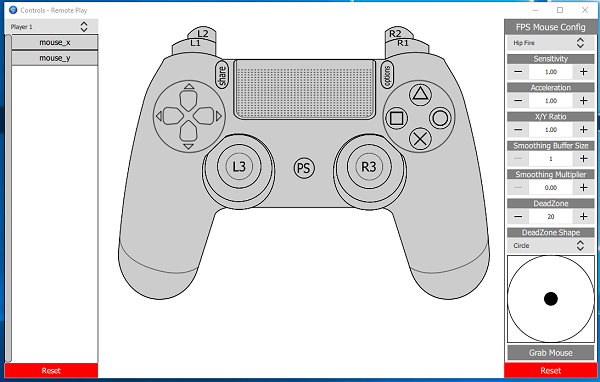
To quote: A lot of you are asking how the next update is progressing so I decided to create a thread everyone can follow and see what has been completed and whats left to do.
Whats completed:
- Implemented hardware decoding (still a few bugs to fix here but it works)
- Multiple PS4 account support
- Importing/exporting of PS4 accounts
- Multiple PS4 management (for when there are multiple PS4's on the same network)
- Log in system - No more serial Keys, you can log into the app using your forum details to unlock premium features
- Input system - I'm looking to improve mouse support which has required a total rewrite from scratch of the input system. Previously Lilypad (a 3rd party plugin) was used which besides having a massive code base introduced a lot of annoying limitations when trying to modify it to work with Remote Play. Starting from scratch is taking longer that initially expected but will help with Remote Play specific customisation ie. Touchpad input emulation. Below is an early look as the system, it's not complete and is subject to change but is massive upgrade over Lilypad with a user friendly interface for customising Remote Play specific controls.
- Multiple players - related to the new input system, I'm looking to add multiple player support. I'll attempt to implement this once the input system is fully functioning.
- Input profiles - This is to support multiple input profiles and allow easy switching between them whilst running remote play. Depending on time this may not make it into the next update as it's not critical and will be added shortly after.
- Routed connection requests - currently port UDP 986 is required when connecting remotely, this is to allow the PS4 search request to receive a response. A lot of environments don't allow port forwarding such as work so I'll be adding a routing system to proxy PS4 connection requests and remove...
Sony PlayStation Game Developer's Conference (GDC) 2017 Details
Today Sony released details on the 2017 PlayStation Game Developer's Conference (GDC) including game kiosks, sessions, dates, times and locations all which takes place from February 27 through March 3, 2017 at the Moscone Convention Center in sunny San Francisco, California. 
Below is the event's full itinerary courtesy of Sony Interactive Entertainment's Darren Fong, as follows:
Tech Kiosks
Game Kiosks
The Ask Developer Relations table will be here throughout GDC to answer any development related questions around working with PlayStation you may have. Members of our Third Party Developer Relations team will be here to answer them and have discussions with you throughout GDC. Click here for more information about times and availability.
Sponsored Sessions
Subdiv for the PlayStation 4 (Presented by Sony Interactive Entertainment America) (More Info)
Date: Thursday, March 2nd
Time: 11:30am – 12:30pm
Location: Room 3007, West Hall
Speakers: John Doolittle (Senior Software Engineer, SIE), Anthony Rivero (Senior Character Artist, SIE)
Competitive Gaming with PlayStation (Presented by Sony Interactive Entertainment America) (More Info)
Date: Wednesday, March 1st
Time: 11:00am...
Below is the event's full itinerary courtesy of Sony Interactive Entertainment's Darren Fong, as follows:
Tech Kiosks
- PlayStation VR Aim Controller & 3D Audio
- PlayStation VR Game Engine
- PlayStation Developer Tools – SN Systems
- PlayStation 4 Subdiv
- PlayStation VR Trace Tool
- PlayStation Magic Lab VR Tech Demo
Game Kiosks
| PS4 Titles | PS4 Pro Titles | PSVR Titles |
| Pyre Full Throttle Remastered Everything Nex Machina Gang Beasts Cosmic Star Heroine Crash Bandicoot N. Sane Trilogy Nidhogg 2 Sundered Rain World EITR GNOG | GT Sport Horizon Zero Dawn RiME | Farpoint Dino Frontier Psychonauts in the Rhombus of Ruin |
The Ask Developer Relations table will be here throughout GDC to answer any development related questions around working with PlayStation you may have. Members of our Third Party Developer Relations team will be here to answer them and have discussions with you throughout GDC. Click here for more information about times and availability.
Sponsored Sessions
Subdiv for the PlayStation 4 (Presented by Sony Interactive Entertainment America) (More Info)
Date: Thursday, March 2nd
Time: 11:30am – 12:30pm
Location: Room 3007, West Hall
Speakers: John Doolittle (Senior Software Engineer, SIE), Anthony Rivero (Senior Character Artist, SIE)
Competitive Gaming with PlayStation (Presented by Sony Interactive Entertainment America) (More Info)
Date: Wednesday, March 1st
Time: 11:00am...
- PS4 Fake PKG (FPKG) Sharing Guide
- 6.XX Webkit / 6.72 PS4 Jailbreak
- 7.00-7.02 Webkit Exploit
- 7.02 Webkit / 7.02 Kernel / PS4JB
- 7.50 Kernel Exploit / PS4JB 7.55
- 7.55 / 8.00 Payloads / PS4JB2 7.55
- 9.00 PS4 Webkit Exploit
- 9.00 PS4 Payloads / GoldHEN (Latest)
- 9.00 PS4 Jailbreak Kernel Exploit
- 11.00 PS4 Jailbreak Kernel Exploit
- 13.00 PS4 Kernel Exploit / 13.02 BD-J Bug
- 4.03 PS5 Webkit Exploit
- PS5 Kernel Exploit (ExFAT Bug)
- PS5 Root Keys Obtained
- 4.03 PS5 Kernel Build String
- 4.03 PS5 Webkit Execution
- 4.03 PS5 Kernel Vulnerability
- 4.03 PS5 Filesystem Dumps
- 4.51 PS5 BD-JB Sandbox Escape
- PS5 BD-JB Exploit Hack Source Code
- Mast1c0re PS5 Userland Exploit
- PS5 Kernel Access via PS4 Exploit
- PS5 exFAT Vulnerability Disclosed
- 4.03 PS5 Kernel Exploit Webkit ROP
- 4.50 PS5 Kernel Exploit Webkit ROP
- 4.51 PS5 Kernel Exploit Webkit ROP
- 4.xx PS5 Kernel Exploit v1.01
- 4.xx PS5 Kernel Exploit v1.02 / v1.03
- PS5 1.00-6.50 Firmware Webkit
- Native PS5 ROP Chain Execution
- Mast1c0re PS5 Compiler Attack
- PS5 FreeBSD Kernel Bug & WebKit
- PS5 UMTX 2 Exploit & PS5 Jailbreak
- Byepervisor PS5 Hypervisor Exploit
- Lua Lapse PS5 Kxploit & Laps3c0re / Y2JB
- 12.00 / 12.70 PS5 Kernel Exploit