PSXHAX.COM website and domain for sale. Contact Us with your offer!

You are using an out of date browser. It may not display this or other websites correctly.
You should upgrade or use an alternative browser.
You should upgrade or use an alternative browser.
MultiMAN PS4 in Development by DeanK, Open Source Code on Github?
Many may recall PS3 developer @deank of DeanBG.com's multiAVCHD homebrew application that, with help from Open Manager 1.0 source code, was modified and transformed into the popular PS3 backup game manager known as MultiMAN today. 
"In the spirit of open source (when using other peoples code)" as modrobert put it, in 2011 @deank released the long overdue MultiMAN Source Code (source-archive.zip - 79.94 MB) with some unofficial repositories available on Github from other PS3 scene developers including Twinaphex.
Since then Joonie86 of Team Rebug also made available Cobra code updates for 4.81 and 4.82, although current MultiMAN PS3 source code remains elusive... so if anyone runs across a repository for it feel free to share!
That said, with the official announcement that MultiMAN PS4 is now in development comes the big question many PlayStation 4 developers and homebrew enthusiasts are left wondering... will PS4 MultiMAN be open source and freely shared with the scene on a public repository such as Github?
 Here's what @deank had to say thus far via STLcardsWS:
"After reading here and there I figured that Gold and Silver editions should come with 4.55 firmware. Luckily there is a pc store in my building and yesterday I got myself a Silver Edition...
"In the spirit of open source (when using other peoples code)" as modrobert put it, in 2011 @deank released the long overdue MultiMAN Source Code (source-archive.zip - 79.94 MB) with some unofficial repositories available on Github from other PS3 scene developers including Twinaphex.
Since then Joonie86 of Team Rebug also made available Cobra code updates for 4.81 and 4.82, although current MultiMAN PS3 source code remains elusive... so if anyone runs across a repository for it feel free to share!
That said, with the official announcement that MultiMAN PS4 is now in development comes the big question many PlayStation 4 developers and homebrew enthusiasts are left wondering... will PS4 MultiMAN be open source and freely shared with the scene on a public repository such as Github?
Here's what @deank had to say thus far via STLcardsWS:"After reading here and there I figured that Gold and Silver editions should come with 4.55 firmware. Luckily there is a pc store in my building and yesterday I got myself a Silver Edition...
PS4 Cheat List: Listing of PS4 Cheat Codes / Offsets on Github
Following JKPatch / MemView, the NetCheat API and PS4 Cheater homebrew application we've seen a resulting PS4 Game-Modding Offsets Drop thread... but today JDsnyke kicked things up a notch initiating a free PS4 Cheat List on Github for PlayStation 4 game modders to share their findings with the community! 
Download: PS4-Cheat-List-master.zip / GIT / PSXCheatList.tk
Hopefully others will join in and fork it pushing current changes, and to quote from the README.md in part: PS4 Cheat Code / Offset List
List of PS4 cheat codes / offsets found for either PS4Cheater or NetCheatPS4
Disclaimer
All codes belong to their respective owners. I am merely gathering them here for ease of use.
I do not and cannot guarantee the accuracy nor the reliability of either these programs / software nor of these codes / offsets.
I nor the original publishers of these codes are to be blamed for any issues that arise with their use.
In other words, USE AT YOUR OWN RISK!
Information
Original threads found here, here and here on the psxhax forum...
Download: PS4-Cheat-List-master.zip / GIT / PSXCheatList.tk
Hopefully others will join in and fork it pushing current changes, and to quote from the README.md in part: PS4 Cheat Code / Offset List
List of PS4 cheat codes / offsets found for either PS4Cheater or NetCheatPS4
Disclaimer
All codes belong to their respective owners. I am merely gathering them here for ease of use.
I do not and cannot guarantee the accuracy nor the reliability of either these programs / software nor of these codes / offsets.
I nor the original publishers of these codes are to be blamed for any issues that arise with their use.
In other words, USE AT YOUR OWN RISK!
Information
Original threads found here, here and here on the psxhax forum...
PS4API Server Payload Port for PS4 4.55 Firmware by BISOON
Following the initial release, his NetCheat API and the recent PS4 Debugger and PS4Notify projects that make use of the PS4API today PlayStation 4 developer @BISOON made available a PS4API Server Payload Port for 4.55 Firmware. 
Download: ps4-api-server_4.55.bin (1.0 MB) / GIT
This comes proceeding both the 4.55 PS4 Holy Grail and 4.55 PS4HEN updates for exploited console owners.
From the README.md here are the usage commands and more, as follows: PS4API Server
This project allows you to control PS4 game memory for reading/writing calls. with this project you can make RTE/RTM tools
Installation
use CTurt's PS4 *** from xvortex's repository. then follow the instructions on how to add the *** path to your environment.
Usage
commands:
args:
Contributing
Download: ps4-api-server_4.55.bin (1.0 MB) / GIT
This comes proceeding both the 4.55 PS4 Holy Grail and 4.55 PS4HEN updates for exploited console owners.
From the README.md here are the usage commands and more, as follows: PS4API Server
This project allows you to control PS4 game memory for reading/writing calls. with this project you can make RTE/RTM tools
Installation
use CTurt's PS4 *** from xvortex's repository. then follow the instructions on how to add the *** path to your environment.
Usage
Code:
char sendCommand(char command, void* args);
Code:
* 'a' attach to game process ( eboot.bin ) and the process will continued.
* 'c' continue the process.
* 'd' detach the process.
* 's' suspend the process.
* 'u' resume the process.
* 'k' kill the process (seems not works)
* 'n' send notification with text.
* 'r' read memory.
* 'w' write memory.
Code:
* 'a'(void);
* 'c'(void);
* 'd'(void);
* 's'(void);
* 'u'(void);
* 'k'(void);
* 'n'(char text[]);
* 'r'(unsigned int length, unsigned long int address);
* 'w'(unsigned int length, unsigned long int address, char data[]);- Fork it!
- Create your feature branch: git checkout -b my-new-feature
- Commit your changes: git commit -am 'Add some...
Roll A Ball / Roll The Ball PS4 Homebrew Game Port PKG, DS4 Support
Last month we saw a Controller Homebrew package from him, and today he's back with a Roll A Ball / Roll The Ball PS4 homebrew game port PKG (Rollaball.pkg - 138 MB) featuring DualShock 4 (DS4) support by PlayStation 4 developer @LightningMods via Twitter. 
Some PlayStation 4 screenshots and the related Tweets are also posted below for PS4 homebrew fans to enjoy!
Thanks to @LightningMods for the news in the PSXHAX Shoutbox tonight also!
Spoiler
Download: Flappy Bird PS4.rar (74.0 MB)
Flappy Bird PS4 (5.05) by TER152
Download: Pokemon PS4.rar (308.7 MB)
Pokemon PS4 (5.05) by TER152
Pokemon Homebrew On The PS4 Jailbreak
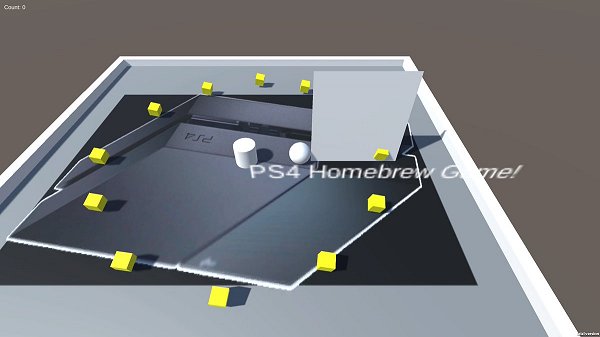
Some PlayStation 4 screenshots and the related Tweets are also posted below for PS4 homebrew fans to enjoy!
Thanks to @LightningMods for the news in the PSXHAX Shoutbox tonight also!
Spoiler
Download: Flappy Bird PS4.rar (74.0 MB)
Flappy Bird PS4 (5.05) by TER152
Download: Pokemon PS4.rar (308.7 MB)
Pokemon PS4 (5.05) by TER152
Pokemon Homebrew On The PS4 Jailbreak
App2USB / AppToUSB by Stooged: A Modification of PKG2USB for PS4
I will post this as a separate thread from the PS4 PKG2USB as the 2 payloads vary and it saves confusion.
Original Post: I was playing around with the ext0 mount and recreating the file structure that would be there if the pkg was installed to external storage.
There is a trick I found where if you copy the CUSAXXXXX folder from /user/app to /mnt/ext0/user/app and then unplug the hdd and plug it back in it causes the ps4 to do a repair and then the game is recognized as installed on external storage and from there there are other issues.
BUT with the great work SiSTRo has done in PKG2USB with the symlinks its a lot easier to manage with exfat and just normal USB.
So building on his PKG2USB and symlinks I modified what I was working on for the ext0 mount to work with the usb0 or usb1 and symlinks.
Downloads:
 Changlog via dbsuarez
This payload searches the entire /user/app folder and copies all installed fpkg games to usb from the system drive and creates the symlinks like SiSTRo has kindly shown us the ability to do.
If you want to target a single game not the whole folder use PKG2USB.
If you install more games just run the payload again and it will copy any new games to the USB and so on.
With symlinks you are making a link to a directory so you want to pick which USB port to...
Original Post: I was playing around with the ext0 mount and recreating the file structure that would be there if the pkg was installed to external storage.
There is a trick I found where if you copy the CUSAXXXXX folder from /user/app to /mnt/ext0/user/app and then unplug the hdd and plug it back in it causes the ps4 to do a repair and then the game is recognized as installed on external storage and from there there are other issues.
BUT with the great work SiSTRo has done in PKG2USB with the symlinks its a lot easier to manage with exfat and just normal USB.
So building on his PKG2USB and symlinks I modified what I was working on for the ext0 mount to work with the usb0 or usb1 and symlinks.
Downloads:
- 455 Source GIT
- 405 Source GIT
- AppToUsb 5.05 (Latest Release)
- AppToUsb 4.55 (Latest Release)
- AppToUsb 4.05 (Latest Release)
- PS4 App2USB (Scene Collective)
Changlog via dbsuarezThis payload searches the entire /user/app folder and copies all installed fpkg games to usb from the system drive and creates the symlinks like SiSTRo has kindly shown us the ability to do.
If you want to target a single game not the whole folder use PKG2USB.
If you install more games just run the payload again and it will copy any new games to the USB and so on.
With symlinks you are making a link to a directory so you want to pick which USB port to...
- PS4 Fake PKG (FPKG) Sharing Guide
- 6.XX Webkit / 6.72 PS4 Jailbreak
- 7.00-7.02 Webkit Exploit
- 7.02 Webkit / 7.02 Kernel / PS4JB
- 7.50 Kernel Exploit / PS4JB 7.55
- 7.55 / 8.00 Payloads / PS4JB2 7.55
- 9.00 PS4 Webkit Exploit
- 9.00 PS4 Payloads / GoldHEN (Latest)
- 9.00 PS4 Jailbreak Kernel Exploit
- 11.00 PS4 Jailbreak Kernel Exploit
- 13.00 PS4 Kernel Exploit / 13.02 BD-J Bug
- 4.03 PS5 Webkit Exploit
- PS5 Kernel Exploit (ExFAT Bug)
- PS5 Root Keys Obtained
- 4.03 PS5 Kernel Build String
- 4.03 PS5 Webkit Execution
- 4.03 PS5 Kernel Vulnerability
- 4.03 PS5 Filesystem Dumps
- 4.51 PS5 BD-JB Sandbox Escape
- PS5 BD-JB Exploit Hack Source Code
- Mast1c0re PS5 Userland Exploit
- PS5 Kernel Access via PS4 Exploit
- PS5 exFAT Vulnerability Disclosed
- 4.03 PS5 Kernel Exploit Webkit ROP
- 4.50 PS5 Kernel Exploit Webkit ROP
- 4.51 PS5 Kernel Exploit Webkit ROP
- 4.xx PS5 Kernel Exploit v1.01
- 4.xx PS5 Kernel Exploit v1.02 / v1.03
- PS5 1.00-6.50 Firmware Webkit
- Native PS5 ROP Chain Execution
- Mast1c0re PS5 Compiler Attack
- PS5 FreeBSD Kernel Bug & WebKit
- PS5 UMTX 2 Exploit & PS5 Jailbreak
- Byepervisor PS5 Hypervisor Exploit
- Lua Lapse PS5 Kxploit & Laps3c0re / Y2JB
- 12.00 / 12.70 PS5 Kernel Exploit