PSXHAX.COM website and domain for sale. Contact Us with your offer!

You are using an out of date browser. It may not display this or other websites correctly.
You should upgrade or use an alternative browser.
You should upgrade or use an alternative browser.
PS4 4.05 GTA V Mod Menu V1 Payload by AlFaMoDz is Released!
Following his GTA V PS4 4.05 Menu Test 1 and the recent PS4 4.05 GTA 5 Mod Guide, today PlayStation 4 developer @AlFaMoDz shared on Twitter his PS4 4.05 GTA V Mod Menu v1 payload for offline Grand Theft Auto 5 game modders with details below! 
Download: AlFaMoDz-GTAV-4.05.bin (1.01 MB) / AlFaMoDz-GTAV-4.05.bin (Mirror) / GTA ArabicGuy Menu.zip (201 KB - includes ArabicGuy100.bin, ArabicGuy127.bin and ArabicGuy132.bin)
From the video's description, roughly translated: Open with Square + Left Arrow, the menu opens with Square + Right Arrow
So to open, R2+[] or ←+[]
Also below is another GTA 5 ArabicGuy BETA PS4 4.05 demo video via RFOoD x MoDz on YouTube with a 4.05 PS4 payload, as follows:
Download: ArabicGuy.bin (534.49 KB) / ArabicGuy.bin (1.01 MB - Fixed via RF0oDxM0Dz) / Simple Guide by @Pretinaverse
Open menu: L1 + R1
Thanks to 2much4u for PS4 Native Caller
Zombie Mission PS4 4 05
Mod Dog Attacker PS4 4.05
ArabicGuy BETA PS4 4 05 + Download -Fixed
Video with...
Download: AlFaMoDz-GTAV-4.05.bin (1.01 MB) / AlFaMoDz-GTAV-4.05.bin (Mirror) / GTA ArabicGuy Menu.zip (201 KB - includes ArabicGuy100.bin, ArabicGuy127.bin and ArabicGuy132.bin)
From the video's description, roughly translated: Open with Square + Left Arrow, the menu opens with Square + Right Arrow
So to open, R2+[] or ←+[]
Also below is another GTA 5 ArabicGuy BETA PS4 4.05 demo video via RFOoD x MoDz on YouTube with a 4.05 PS4 payload, as follows:
Download: ArabicGuy.bin (534.49 KB) / ArabicGuy.bin (1.01 MB - Fixed via RF0oDxM0Dz) / Simple Guide by @Pretinaverse
Open menu: L1 + R1
Thanks to 2much4u for PS4 Native Caller
Zombie Mission PS4 4 05
Mod Dog Attacker PS4 4.05
ArabicGuy BETA PS4 4 05 + Download -Fixed
Video with...
PS4 HEN Update Blocker Payload with Debug Settings by CelesteBlue
Since the release of PS4 HEN (which can be used with Android and iOS) the 4.05 PlayStation 4 scene has been on fire while PS4 developer @CelesteBlue worked on a PS4 System Update Blocker with testing and hosting done by @LightningMods followed by V2 and V3, V3.1, V3.2, PS4 4.55 Update Blocker HEN and PS4 4.55 Update Blocker HEN V3! 
To recap briefly, we've seen guides on how to block PS4 updates, covered some reasons why you may want to block them, reported on Sony blocking some PS4 Playground sites in PS4 Web browsers, and most recently added a tutorial on how to remove the downloaded PS4 Update PUP from your system...
To recap briefly, we've seen guides on how to block PS4 updates, covered some reasons why you may want to block them, reported on Sony blocking some PS4 Playground sites in PS4 Web browsers, and most recently added a tutorial on how to remove the downloaded PS4 Update PUP from your system...
PS4 4.05 GTA 5 Mod Tutorial by Reazer, PS4 Exploit Host for OpenWRT
Yesterday we saw the release of PS4 AIO v1.4.0 for PS4 4.05 Firmware, and today following @irefuse's OpenWRT fork of @Al Azif's PS4 Exploit Host comes a video guide on how to install GTA 5 Mods on PS4 4.05 by @Reazer on his YouTube Channel for PlayStation 4 game modders to check out below. 
Download: ps4-exploit-host-openwrt-master.zip / GIT
To quote from the README.md: PS4 Exploit Host for OpenWRT
OpenWRT fork of https://github.com/Al-Azif/ps4-exploit-host
Requirements
opkg update
opkg install wget openssl-util
wget https://raw.githubusercontent.com/iref-use/ps4-exploit-host-openwrt/master/install.sh
sh install.sh
This is an easy way for anyone to host their own exploit for the PS4 on your OpenWRT router. features include:
How to run as payload mode
Stop service and start payload mode
After payload has been loaded...
Download: ps4-exploit-host-openwrt-master.zip / GIT
To quote from the README.md: PS4 Exploit Host for OpenWRT
OpenWRT fork of https://github.com/Al-Azif/ps4-exploit-host
Requirements
- OpenWRT Chaos Calmer on your router
- Mounted USB storage as overlay (https://wiki.openwrt.org/doc/howto/extroot)
- SSH access to your router
opkg update
opkg install wget openssl-util
wget https://raw.githubusercontent.com/iref-use/ps4-exploit-host-openwrt/master/install.sh
sh install.sh
- Script install python3, git, openssh-sftp-server.
- Make changes in dnsmasq config and hosts file.
- Create service of ps4-exploit-host server.
This is an easy way for anyone to host their own exploit for the PS4 on your OpenWRT router. features include:
- Hosts your choice of exploit (Specter, IDC, and XVortex included)
- Sends your choice of payload after a successful exploit
- Blocks PSN domains from resolving (Stops accidental updates)
- Serves the 4.05 update to your PS4
How to run as payload mode
Stop service and start payload mode
Code:
/etc/init.d/ps4-exploit-host stop
/etc/init.d/ps4-exploit-host payload
PS4 4.05 Database Mod to Run Installed Fake PKGs on USB or BD
Following their PS4 1.76 Database Mod, today the PlayStation 4 modders at e✘treme-Modding.de shared a PS4 4.05 database mod to run installed Fake PKGs on USB or BD with a demonstration video below! 
Here's the details from their blog, to quote: If you want to play your installed Fake PKGs on USB or BD you just have to copy a few files and edit the Database. It's nothing new but now with a detailed tutorial for 4.05 users.
Of course it's not hard if you understand how the Database work, just follow the steps of my Tutorial below.
PS4 4.05 Mod - Run PKGs on USB or BD
Tutorial for USB method:
1. Enable Debug Settings and install all Fake PKGs you want to play
2. Connect your PS4 via FTP to your PC and dump the Database (/system_data/priv/mms/app.db)
3. Copy the app folder (/user/app) to your USB device and rename it to GAMES
Or you can create the GAMES folder on the USB device, add the ID folder (CUSAxxxxx), rename the pkg (you have installed and which is already on the USB device) to app.pkg and move it in this folder (/GAMES/CUSAxxxxx/app.pkg).
Database Mod:
Now you have to edit the app.db to change the path to your app.pkg on /GAMES/CUSAxxxxx
Example (CUSA03842):
1. Change _org_path (/user/app/CUSA03842) to /mnt/usb0/GAMES/CUSA03842

2. Copy your modified app.db back via FTP (/system_data/priv/mms/) and restart the PS4. Now you can run your Games on USB.
If you want to run a PKG on a BD Disc you have to burn the app.pkg to a writeable disc (/GAMES/CUSAxxxxx/app.pkg) (only tested with a bd-rw). The _org_path for the Database is /mnt/disc/GAMES/CUSAxxxxx.
 Update: Also from their blog comes a PS4 4.55 Database Mod to add your homebrew apps in a custom System Folder to quote:
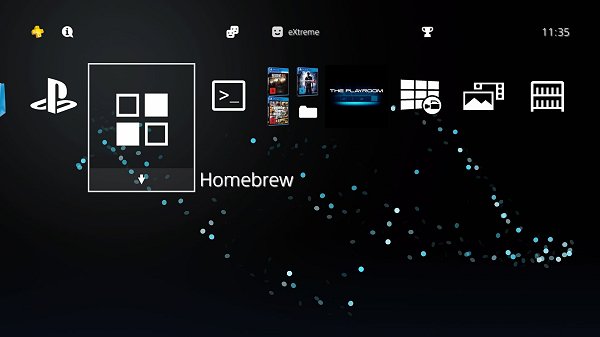
Database Mod: you...
Here's the details from their blog, to quote: If you want to play your installed Fake PKGs on USB or BD you just have to copy a few files and edit the Database. It's nothing new but now with a detailed tutorial for 4.05 users.
Of course it's not hard if you understand how the Database work, just follow the steps of my Tutorial below.
PS4 4.05 Mod - Run PKGs on USB or BD
Tutorial for USB method:
1. Enable Debug Settings and install all Fake PKGs you want to play
2. Connect your PS4 via FTP to your PC and dump the Database (/system_data/priv/mms/app.db)
3. Copy the app folder (/user/app) to your USB device and rename it to GAMES
Or you can create the GAMES folder on the USB device, add the ID folder (CUSAxxxxx), rename the pkg (you have installed and which is already on the USB device) to app.pkg and move it in this folder (/GAMES/CUSAxxxxx/app.pkg).
Database Mod:
Now you have to edit the app.db to change the path to your app.pkg on /GAMES/CUSAxxxxx
Example (CUSA03842):
1. Change _org_path (/user/app/CUSA03842) to /mnt/usb0/GAMES/CUSA03842
2. Copy your modified app.db back via FTP (/system_data/priv/mms/) and restart the PS4. Now you can run your Games on USB.
If you want to run a PKG on a BD Disc you have to burn the app.pkg to a writeable disc (/GAMES/CUSAxxxxx/app.pkg) (only tested with a bd-rw). The _org_path for the Database is /mnt/disc/GAMES/CUSAxxxxx.
Update: Also from their blog comes a PS4 4.55 Database Mod to add your homebrew apps in a custom System Folder to quote:Database Mod: you...
PS2 ELF Loader for PS4 4.05 by Nominus and uLaunchELF PKG Arrives
Following his Super Nintendo Emulator Port for PS4 4.05 users, PlayStation 4 developer Nominus returns with a PS2 ELF Loader for PS4 4.05 alongside a version of uLaunchELF compiled as a PKG by @DarkElementPL via Twitter to launch ELF files in ps2emu for those who recall these popular PS2 homebrew applications. 
To use the PS2 ELF Loader for PS4 4.05 add disc01 to your PS4 FPKG, build and enjoy... but according to Nominus USB support is still needed to take full advantage, so while the Open PS2 Loader (known as OPL) loads without USB support there is no way of booting PSX iSO files yet.
Download: PS4-PS2-ELF Load.zip (23.4 MB) / PS4-PS2-ELF Load.zip (Mirror) / uLaunchELF.zip (102.02 MB) / ps2emu.7z (123.59 MB - Raw dump of Rogue Galaxy PS2 classic for PS4 by VVildCard777)
Cheers to @prreis and @SSShowmik for the news tips in the PSXHAX Shoutbox earlier today!
To use the PS2 ELF Loader for PS4 4.05 add disc01 to your PS4 FPKG, build and enjoy... but according to Nominus USB support is still needed to take full advantage, so while the Open PS2 Loader (known as OPL) loads without USB support there is no way of booting PSX iSO files yet.
Download: PS4-PS2-ELF Load.zip (23.4 MB) / PS4-PS2-ELF Load.zip (Mirror) / uLaunchELF.zip (102.02 MB) / ps2emu.7z (123.59 MB - Raw dump of Rogue Galaxy PS2 classic for PS4 by VVildCard777)
Cheers to @prreis and @SSShowmik for the news tips in the PSXHAX Shoutbox earlier today!
- PS4 Fake PKG (FPKG) Sharing Guide
- 6.XX Webkit / 6.72 PS4 Jailbreak
- 7.00-7.02 Webkit Exploit
- 7.02 Webkit / 7.02 Kernel / PS4JB
- 7.50 Kernel Exploit / PS4JB 7.55
- 7.55 / 8.00 Payloads / PS4JB2 7.55
- 9.00 PS4 Webkit Exploit
- 9.00 PS4 Payloads / GoldHEN (Latest)
- 9.00 PS4 Jailbreak Kernel Exploit
- 11.00 PS4 Jailbreak Kernel Exploit
- 13.00 PS4 Kernel Exploit / 13.02 BD-J Bug
- 4.03 PS5 Webkit Exploit
- PS5 Kernel Exploit (ExFAT Bug)
- PS5 Root Keys Obtained
- 4.03 PS5 Kernel Build String
- 4.03 PS5 Webkit Execution
- 4.03 PS5 Kernel Vulnerability
- 4.03 PS5 Filesystem Dumps
- 4.51 PS5 BD-JB Sandbox Escape
- PS5 BD-JB Exploit Hack Source Code
- Mast1c0re PS5 Userland Exploit
- PS5 Kernel Access via PS4 Exploit
- PS5 exFAT Vulnerability Disclosed
- 4.03 PS5 Kernel Exploit Webkit ROP
- 4.50 PS5 Kernel Exploit Webkit ROP
- 4.51 PS5 Kernel Exploit Webkit ROP
- 4.xx PS5 Kernel Exploit v1.01
- 4.xx PS5 Kernel Exploit v1.02 / v1.03
- PS5 1.00-6.50 Firmware Webkit
- Native PS5 ROP Chain Execution
- Mast1c0re PS5 Compiler Attack
- PS5 FreeBSD Kernel Bug & WebKit
- PS5 UMTX 2 Exploit & PS5 Jailbreak
- Byepervisor PS5 Hypervisor Exploit
- Lua Lapse PS5 Kxploit & Laps3c0re / Y2JB
- 12.00 / 12.70 PS5 Kernel Exploit